Apple consolidates iOS gaming features in new Games app

At its Worldwide Developer Conference today, Apple unveiled a new iOS Games App that Apple Senior Director of Marketplace Platforms and Technologies Ann Thai promoted as “a new destination to help you get more out of your games.”

The most relevant new social feature in the app comes in the “Play Together” tab, which provides a quick look at what your friends are playing on iOS. That tab will also integrate a new Challenges feature, which game developers can use to turn single-player games into score-based competitions between friends. These interpersonal Challenges come on top of the standard game leaderboards already common through iOS’s Game Center, allowing for a new way to compete socially.

Other than that, the new Games app seems to consolidate several features that were previously split between Game Center and the App Store. On the Home tab, the Games app will let you see games with new update, time-sensitive in-game events, and recommendations for new games to try. A Library tab will show every iOS game you’ve ever downloaded in a single place, while the Apple Arcade tab shows subscribers what’s available to download. The Games app will work in both portrait and landscape mode and be navigable via controller.

Read full article

Comments

“Cardio Crusher” and “Heat Check” Summer Challenges Launched

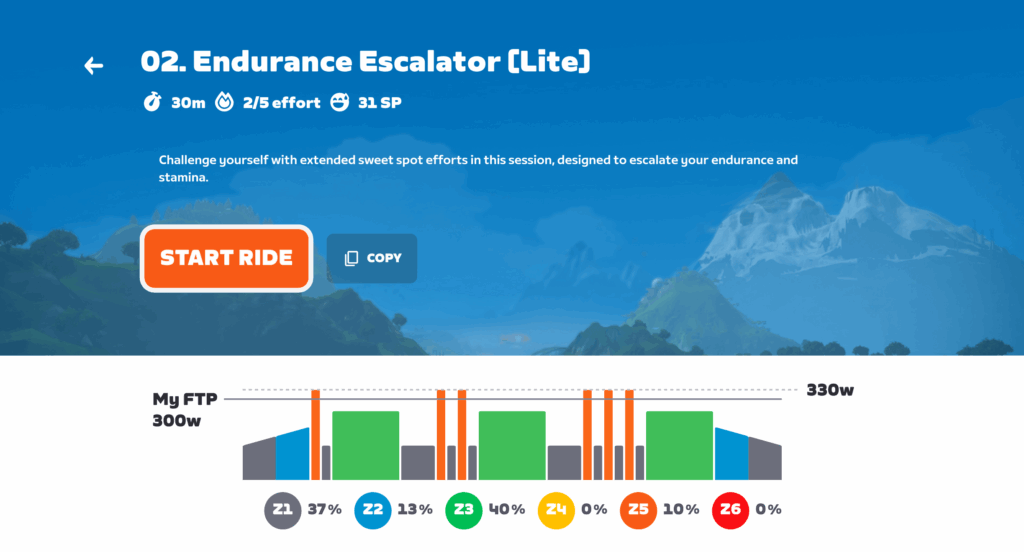
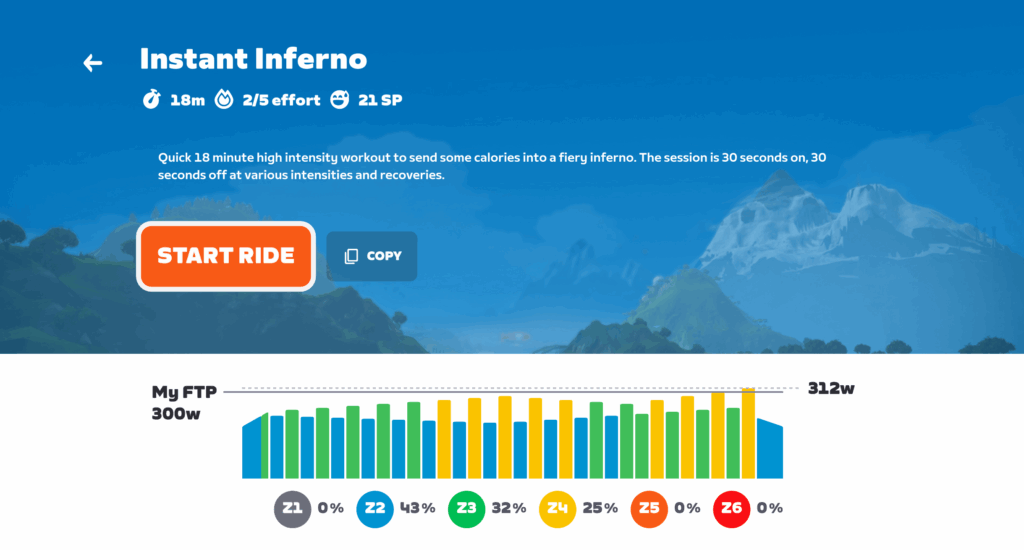
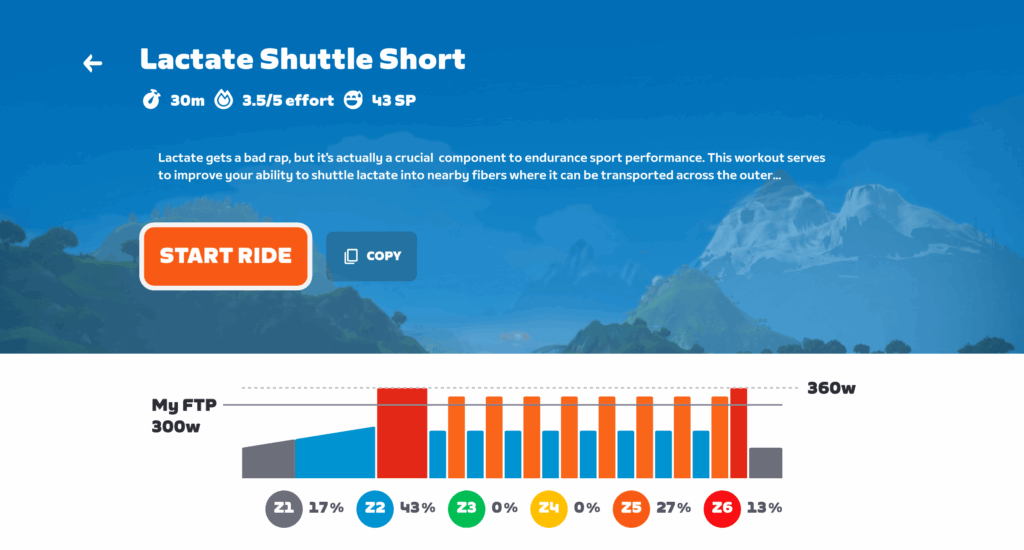
Last week, Zwift launched two summer mini challenges named “Cardio Crusher” and “Heat Check”. Each consists of 5 workouts, and completing them earns you an XP bonus.

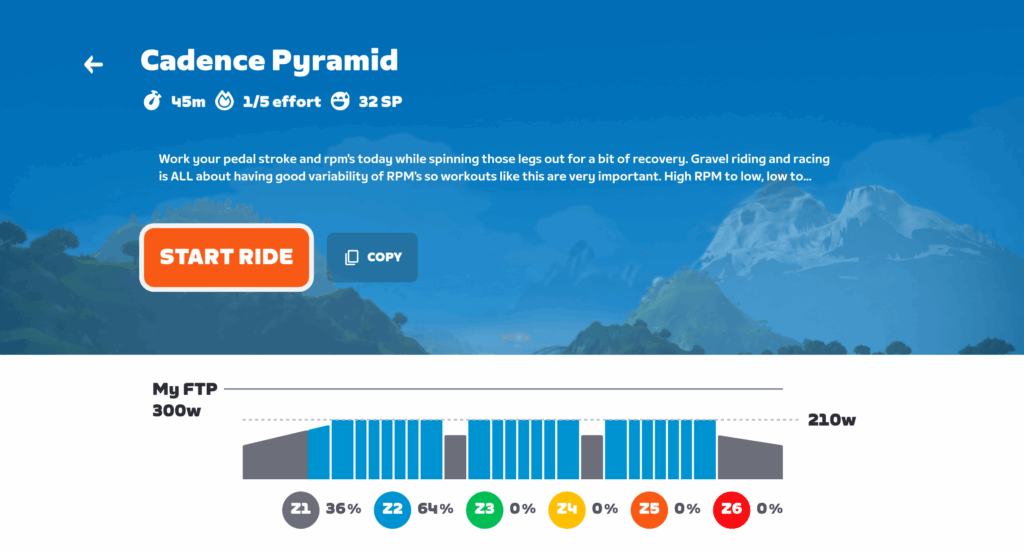
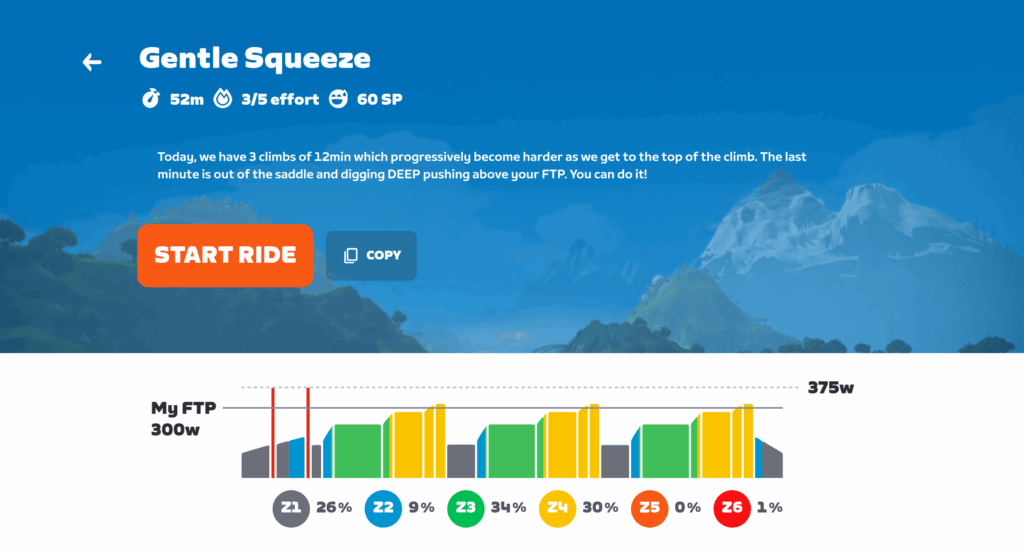
Cardio Crusher Workouts

“Get ready to sweat! Cardio Crusher is your ticket to staying fit, fast, and fired up all season. With five targeted workouts built to boost endurance, power, and speed, this challenge keeps your summer training locked in—so you show up stronger for every ride, indoors or out.”

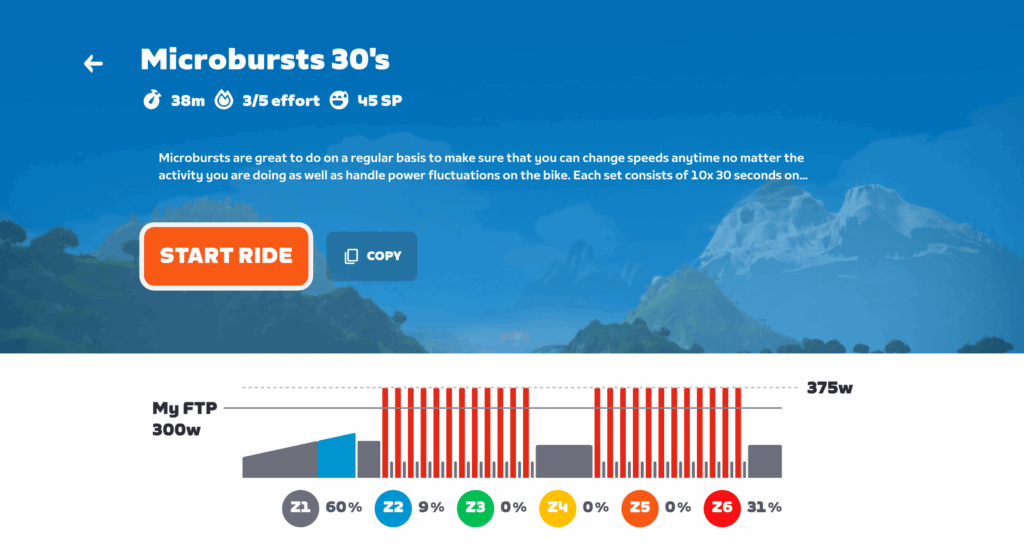
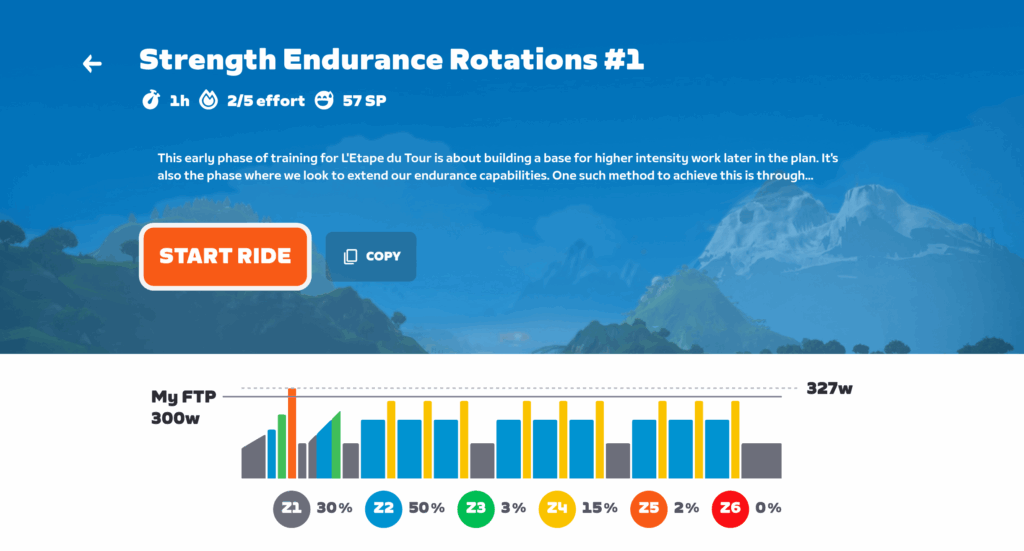
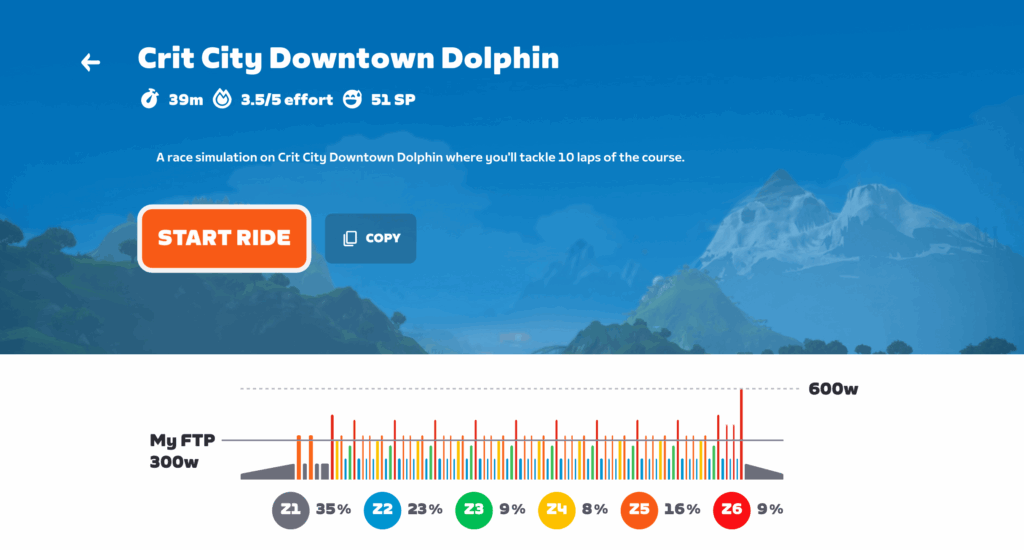
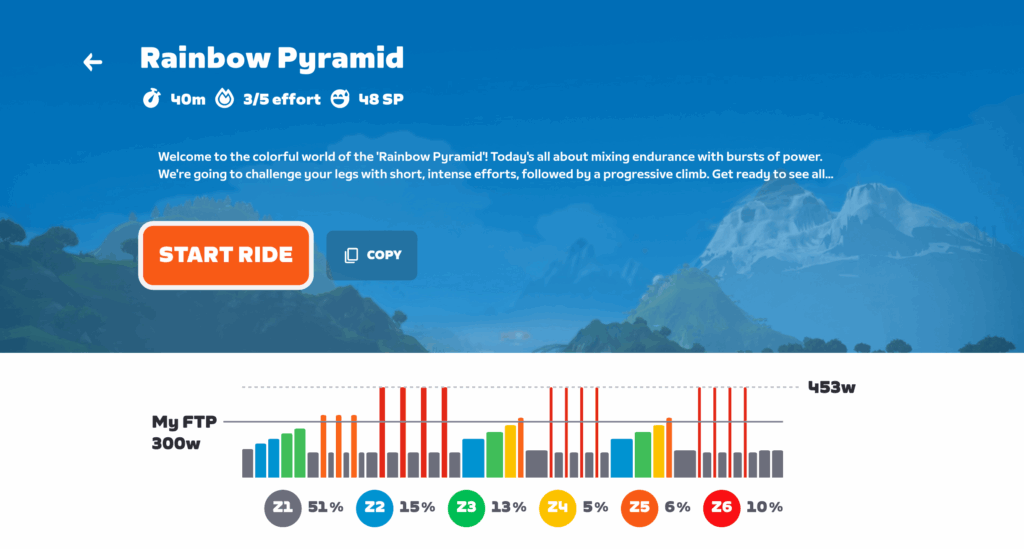
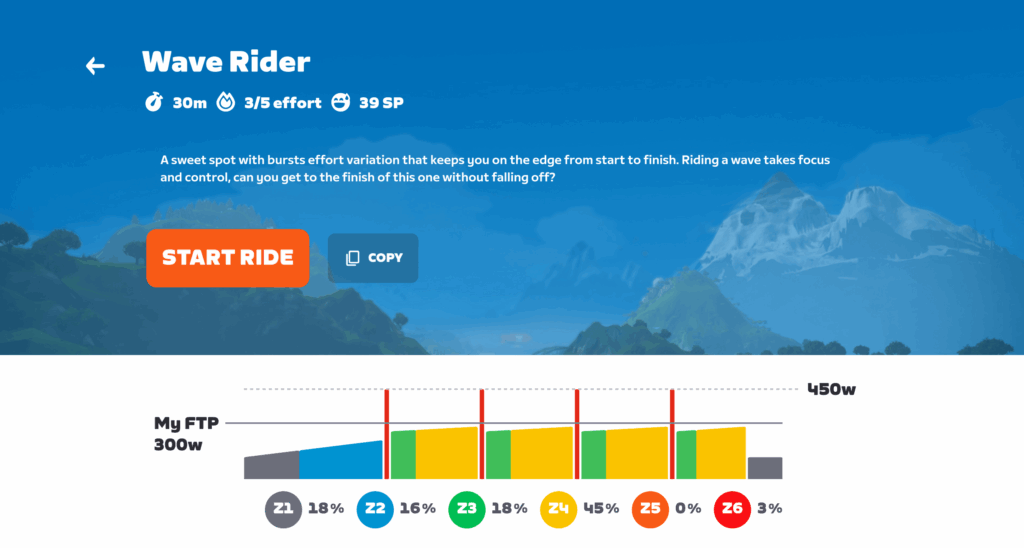
Heat Check Workouts

“Summer’s here—are you ready to bring the heat? Heat Check is all about staying sharp, fast, and race-ready, even when outdoor riding is in full swing. With structured workouts designed to maximize your time and build power, this challenge proves that the smartest riders don’t just ride more—they ride better.”

Joining a Challenge

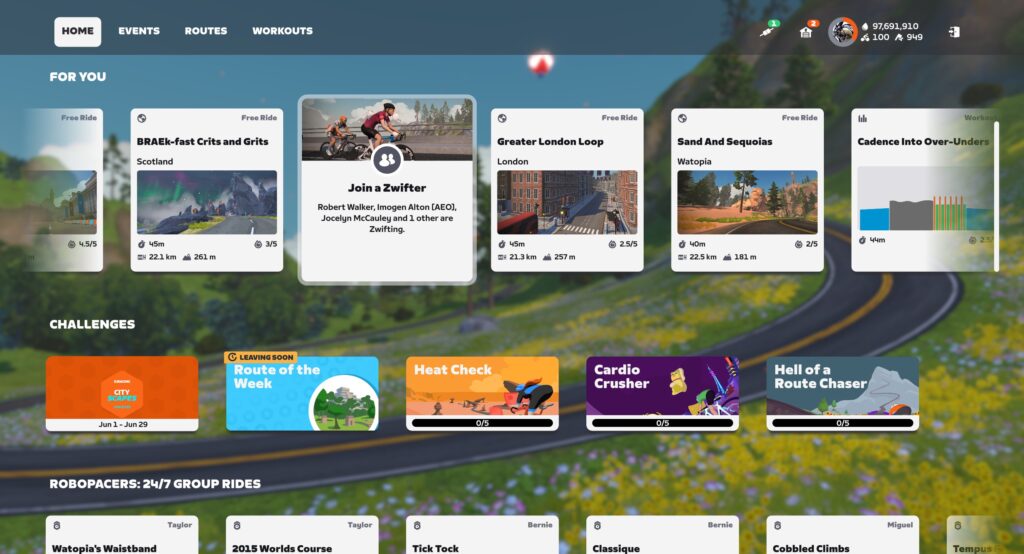
To sign up for one of these Challenges, just click its card on the home screen under “Challenges”, pick a workout, and go!

Mini challenges are typically available for 3 months.

Challenge Rewards

Your reward for completing all five workouts in one of these challenges? Boosted fitness, of course. B

But you’ll also earn a total of 2000XP as you progress through the 5 workouts.

Tip: do one of these workouts each week on the Route of the Week to earn a 500XP bonus!

YouTube will “protect free expression” by pulling back on content moderation

YouTube videos may be getting a bit more pernicious soon. Google’s dominant video platform has spent years removing discriminatory and conspiracy content from its platform in accordance with its usage guidelines, but the site is now reportedly adopting a lighter-touch approach to moderation. A higher bar for content removal will allow more potentially inflammatory content to remain up in the “public interest.”

YouTube has previously attracted the ire of conservatives for its removal of QAnon and anti-vaccine content. According to The New York Times, YouTube’s content moderators have been provided with new guidelines and training on how to handle the deluge of provocative content on the platform. The changes urge reviewers to pull back on removing certain videos, a continuation of a trend not just at YouTube, but on numerous platforms that host user-created content.

Beginning late last year, YouTube began informing moderators they should err on the side of caution when removing videos that are in the public interest. That includes user uploads that discuss issues like elections, race, gender, sexuality, abortion, immigration, and censorship. Previously, YouTube’s policy told moderators to remove videos if one-quarter or more of the content violated policies. Now, the exception cutoff has been increased to half. In addition, staff are now told to bring issues to managers if they are uncertain rather than removing the content themselves.

Read full article

Comments

How to Install macOS 26 Tahoe Right Now

Apple’s annual WWDC event is here, and with it, a new macOS beta, complete with a new name and numbering scheme. There’s a lot that’s new this time around, actually, with Apple adopting a refreshed look across all of its operating systems. But you don’t need to wait to try it out. The latest version of macOS—macOS 26 Tahoe—is actually available now, in the form of a developer beta. Read on to learn how to start poking around with Apple’s latest computer operating system below.

How to install macOS 26 Tahoe

Before you can try out the latest version of macOS, you need to install it. Technically, the full release, and even the public beta, are a ways off yet. But there’s a workaround you can use to get your hands on it today.

Apple usually seeds developers with betas of its latest operating systems after the WWDC keynote, and this year is no different. This didn’t used to mean much for the average user, but now that Apple developer accounts are free, you can get your hands on the developer beta right away.

A word of warning first, though: These betas are early into development, and they could introduce a lot of instability to your computer. Always back up your Mac before installing a beta, especially a developer one, and be prepared for unexpected glitches. To be honest, you’re probably better off waiting for a more stable release, but if you can’t hold yourself back, I understand.

With that in mind, here’s how to install the macOS 26 Tahoe developer beta onto your device right now:

  1. Sign up for Apple’s developer program here. Simply click “Start your enrollment,” log in with your Apple ID (it’ll need two-factor authentication enabled), enter your legal name and address, and wait for approval. You’ll also need to be over 18 (or whatever the legal age of majority is in your region).

  2. Once you’re approved, head to your (backed up!) Mac and navigate to System Settings > General > Software Update. Click the i button next to “Beta updates.”

  3. Choose the developer beta for macOS 26 and click Install. If you don’t see it, ensure you’re logged in with your Apple ID, which you can check toward the top of the left hand column in the System Settings page.

What to expect from macOS 26 Tahoe

Now that you’re on the latest version of macOS, you’re probably asking yourself “now what?” Well, there’s a lot to explore.

First, there’s the new name. Apple usually names new versions of macOS after famous Californian landmarks, and this one is named after Lake Tahoe. Simple enough. 

The bigger news is that new number—macOS 26. If you’re confused, good eye. The macOS version before this was actually macOS 15, so what happened to everything in between? Well, Apple’s taking a Windows 95 approach here, and naming all of its new operating systems after the year now. While a bit disorienting, this move does make sense to a degree—it was hard to keep up with the old macOS version numbers unless you were an Apple diehard, but now, you just need to know the year to check if you’re up to date. Still, there is one confusing note—the full version of macOS 26 will likely come this fall, meaning it’ll technically be released in 2025. Go figure.

Speaking of being up to date, the new features: macOS 26 comes with a new look inspired by visionOS, which is supposed to add some translucency to the UI for a glassy appearance. There’s also a new gaming app that’s replacing Game Center, which is cross platform, and on Mac, is supposed to be able to serve as a launcher even for games you downloaded outside of the App Store.

Notes also now has Markdown support, the Journal app is on Mac now, and Messages will now let you run polls in your group chats and can translate messages automatically (rather than requiring a long press first). Notably, the Phone app is also here, so you can call over wifi. Plus, Apple Intelligence has a number of upgrades on the way, including that smarter Siri Apple keeps teasing, although it’s unclear when everything will finally be ready.

Finally, new accessibility features are here. These include a Mac version of Magnifier, plus new features for taking notes in braille, dealing with motion sickness, and customizing the font and size for various bits of text.

macOS 26 Tahoe compatibility

With that, you’re all set to download the latest macOS beta and start poking around. But know that you might need to upgrade your device first, if it’s a bit old. macOS 26 Tahoe is compatible with the following devices:

  • MacBook Air (M1 and later)

  • MacBook Pro (2019 and later)

  • iMac (2020 and later)

  • Mac Mini (M1 and later)

  • Mac Pro (2019 and later)

  • Mac Studio 

WWDC 2025: Everything Apple announced including iOS 26, Liquid Glass design and more

The WWDC 2025 keynote gave Apple device owners a peek into what they can expect their iPhones, iPads and Macs to look like later this year. The company focused on design and productivity upgrades to all of its major operating systems this time around, and of course, some new AI features as well. When the latest OSes become available to all this fall, interfaces will look noticeably different than they did before, with a refreshed design language, updated widgets, a few overhauled apps and more. Here’s everything Apple announced at WWDC 2025 this year.

Apple Intelligence

Apple kicked off the keynote by talking about Apple Intelligence, reviewing features that iPhone users already have access. The biggest piece of news this time around is that all apps, including those made by third-party developers, will be able to access Apple Intelligence. That means non-native apps will able to tap into Apple Intelligence to use AI to enhance their own features.

Liquid Glass design and new software names

iOS 26 WWDC 2025
Apple

As was expected, Apple revealed a new visual design language coming to all of its operating systems dubbed Liquid Glass. It called this new system its “broadest” design update yet, and it features semi-transparent design features like redesigned widgets, notifications and more. Apple is billing it as more dynamic than the previous design language, and it will bring even more consistency across all operating systems including iOS, iPadOS and macOS.

In addition to the new design language, Apple is revamping the names of all of its operating systems. Instead of iOS 19, for example, we’ll have iOS 26 coming out this fall. iPadOS 26, watchOS 26 and others will follow suit, marking the first time Apple has given its software updates year identifiers instead of arbitrary generation numbers.

iOS 26

Upon naming iOS 26 for the first time during the keynote, Apple focused on the visual changes we can expect coming in the redesign. The changes are subtle, but they give iOS a cleaner look and feel, with lots of overlapping elements, rounded corners and more. Apple said the design is inspired by that of visionOS, the operating system that powers Vision Pro headsets. App icons has slightly different looks, and toolbars and text inputs have see-through appearances. But folks will be happy to know that things look largely the same — you shouldn’t have an issue identifying key apps like the Phone app, FaceTime and more.

Phone app

Speaking of the Phone app, it’s getting the biggest redesign since its launch with the original iPhone all those years ago. It puts scrolling front-and-center, allowing you to scroll through key contacts, recent calls and voicemail messages all on one screen. A translucent bar at the bottom of the screen gives you quick access to additional contacts and other options. Hold Assist, a new feature, will mute hold music but keep you on the call until someone picks up on the other line.

iOS 26 Phone app
Apple

Messages

Messages is getting a few new features as well, including the ability to change the entire message background color for group messages and the ability to take polls among group chat members. New screening features including “unknown senders,” which sequesters those pesky spam messages to a separate space in Messages, so you can keep your most important conversations in the forefront and ignore those that don’t matter.

Elsewhere within Messages are a few sneaky AI features related to Genmoji. In the forthcoming software update, you’ll be able to combine two existing emojis to create an entirely new, custom Genmoji, and you can even use ChatGPT to create Genmoji if you wish. Live translate is coming to Messages as well, automatically translating messages as you type and delivering them to the receiver in their preferred language. Similarly functioning live captions will be available in FaceTime, and Apple Music will get live translation and live pronunciation features to help listeners enjoy music in other languages even more. Call Translation API will be available to other developers to use in their communication apps as well.

Maps and Wallet

Updates coming to Apple Maps include the ability for the app to learn your routine to suggest alternative routes, and “visited places,” which logs cities, landmarks, business and more that you’ve visited, making it easier for you to find places you want to revisit again.

The Wallet app will now support Digital ID, which lets you create a digital ID that’s separate from your driver’s license and passport and can be used to verify your identity in some locations. You’ll also be able to add boarding passes to Wallet when you’re flying.

Games app

iOS 26 will feature a revamped Games app as well. It will feature a Library tab, where you can find all of the games you’ve ever downloaded for iOS, and a dedicated Apple Arcade tab where you can find all of the titles included in that service. Challenges is a new feature will let you play more directly with friends by challenging them to competitions in supported games, and that includes single-player games that can be turned into “competition” games, with built-in developer support.

Visual Intelligence

Visual Intelligence is getting baked into iOS 26’s interface a bit more an a seemingly handy way — by allowing you to visually search for anything that pops up on your iPhone screen. For example, if there’s an image of a jacket you like on your social media feed, you can take a screenshot of your iPhone screen and use the new Visual Intelligence image search feature to search for similar jackets across the web and other apps. You can even highlight certain areas of your screenshot to refine your visual search further.

Developing…

This article originally appeared on Engadget at https://www.engadget.com/big-tech/wwdc-2025-everything-apple-announced-including-ios-26-liquid-glass-design-and-more-171718030.html?src=rss

macOS Tahoe 26 will bring Apple’s new Liquid Glass UI to your desktop

So long macOS Sequoia, hello macOS Tahoe 26. Apple‘s next desktop operating system will feature the company’s Liquid Glass UI, but at this point, it doesn’t look like there will be any truly transformative features like last year’s iPhone mirroring. But hey, at least Apple isn’t trying to make us excited about widgets again. Just like the rest of Apple’s new software, Tahoe’s version number has also been updated to reflect the upcoming year — previously, we expected it to be macOS 16. While that may take some getting used to, it’s easier than trying to remember the different version numbers across Apple’s platforms.

Developing…

This article originally appeared on Engadget at https://www.engadget.com/computing/macos-tahoe-26-will-bring-apples-new-liquid-glass-ui-to-your-desktop-174149070.html?src=rss

Apple’s new ‘liquid glass’ design is its biggest visual update in years

In addition to renaming its core operating systems, today at WWDC Apple announced a major update to visual designs of iOS, iPadOS, macOS and more. Inspired by some of the fancy graphics used in the Vision Pro, this UI overhaul not only features revamped icons and emphasis on translucent elements it also looks to bring a much more unified look to Apple’s flagship software platforms. 

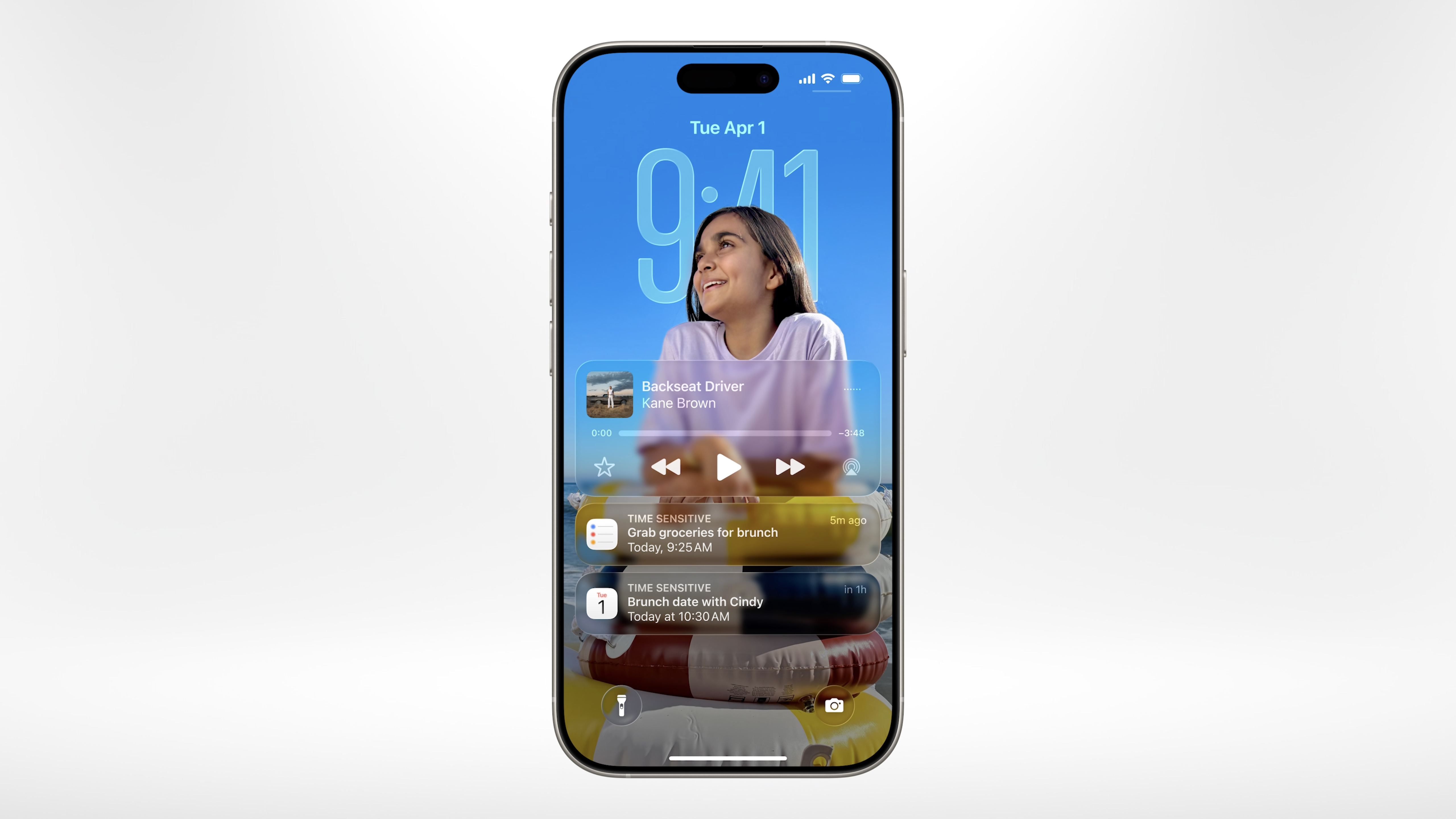
Based on a design theme called liquid glass, Apple’s new visual language will bring increased consistency accross the company’s OSes. In iOS, the home screen has been totally revamped with new app icons, including new all-clear options. Wallpapers and the lock screen have been updated to dynamically scale to better accommodate both the subject of things like photos, album art and on-screen text. Many buttons also have a new floating design that makes them easier to see without becoming distractions. 

A preview of Apple's new liquid glass phone app.
Apple

Some important apps have also gotten individual makeovers such as the Phone app, which now has a floating toolbar alongside fresh features such as Call Screening and Hold Assist similar to what we’ve seen from Google’s Pixel handsets. 

Meanwhile, the Camera app’s interface has been significantly simplified with the ability to quickly swipe between photo and video modes. There’s also a dedicated tab for your library and improved organization for other categories like albums. 

New liquid glass UI in the next version of CarPlay
Apple

Similar UI updates are also heading to CarPlay, which is getting a matching visual refresh featuring an revamped home screen, new widgets for things like Live Activities and translucent design elements. 

This story is still developing…

This article originally appeared on Engadget at https://www.engadget.com/mobile/smartphones/apples-new-liquid-glass-design-is-its-biggest-visual-update-in-years-172158766.html?src=rss

Apple unveils a dedicated Games app at WWDC 2025

Apple is rolling out a new, dedicated gaming app, called Games, that will come pre-installed on Mac, iPhone, iPad and Apple TV devices. It’s basically a spit-shined, updated version of Game Center, a service that Apple has let languish since its rollout roughly 15 years ago. The new app will behave more like a modern gaming hub, a la Xbox or GOG Galaxy. It’ll include a space for leaderboards, matchmaking, recommendations and launching games — plus a direct pipeline to Apple Arcade, of course. You can see what your friends are playing and challenge them to specific feats in certain games. The library tab will include every game you’ve ever downloaded from the App Store, allowing you to booth them up right there.

Apple’s gaming push in recent years includes mobile and Mac support for AAA experiences like Resident Evil Village, the Resident Evil 2 and 4 remakes, Death Stranding and Assassin’s Creed Mirage. At Summer Game Fest 2025 over the weekend, IO Interactive announced that its Hitman trilogy, Hitman World of Assassination, is heading to iPhone, iPad and Mac this summer.

Also on the video game front, Apple is still battling Epic Games in court over claims of anti-competitive behavior, but they’re mainly just closing out appeals now that Fortnite is live on the App Store and third-party payments are enabled on Apple’s storefront. Xbox recently threw its support behind Epic Games, filing an amicus brief accusing Apple of unfairly blocking the Xbox mobile store in late May.

Also also in game land, last month Apple acquired its first video game studio, the two-person team RAC7, which makes Sneaky Sasquatch.

This article originally appeared on Engadget at https://www.engadget.com/apps/apple-unveils-a-dedicated-games-app-at-wwdc-2025-174028901.html?src=rss

Apple aims for “more personal and expressive” iOS 26 with new Liquid Glass design

At WWDC today, Apple unveiled iOS 26, its next iPhone operating system (OS), which is centered on Apple’s new Liquid Glass design for its software platform.

Available across Apple’s other operating systems, like macOS, Liquid Glass aims to make the software look and operate as if it has glass edges. You can see this approach throughout iOS 26 in things like the app icons’ appearance, which includes softer edges and the option to be translucent.


Read full article

Comments

Apple introduces AI-powered live translation tools at WWDC 2025

Apple had a lot to say about iOS 26 at WWDC 2025. Translation will be a hallmark of the new Apple Intelligence features coming to the iPhone operating system next year. During this year’s annual showcase at Cupertino, the team revealed that it is adding live translation of calls and texts, with integration into the Messages, Phone and FaceTime apps.

The translations are spoken aloud and also appear written out in the original language. Leslie Ikemoto noted that live translations will also be available even when communicating with a non-Apple smartphone. 

Apple added some translation features to Siri all the way back in iOS 11, then launched its own dedicated Translate app as part of iOS 14. Those capabilities will now be more thoroughly baked into the iPhones’ operating system as part of the Apple Intelligence suite.

This story is developing, please refresh for updates.

This article originally appeared on Engadget at https://www.engadget.com/big-tech/apple-introduces-ai-powered-live-translation-tools-at-wwdc-2025-173605234.html?src=rss

Sesame Street’s Big Bird Edited Into Alfred Hitchcock’s ‘The Birds’

Because the internet, just like an unruly 3-year old, refuses to sleep when it should, this is a video from the Bell Bros of Sesame Street’s Big Bird (plus Count von Count) edited into Alfred Hitchcock’s 1963 avian horror film The Birds. The whole thing is set to Outkast’s 2000 banger “B.O.B” (which Big Bird appears to sing), so it sort of serves as a music video for the song as well. Of all the things I didn’t expect to see on the internet today, this is one of them. There are a million more, but this was definitely one. I should have known better.

Apple reveals a comprehensive redesign for iOS 26 at WWDC 2025

Every year, iOS is one of the star attractions of Apple‘s Worldwide Developers Conference keynote. It’s our first official look at new features and other changes that are coming to iPhones in the fall. The 2025 WWDC keynote was no exception, and the most immediate change is to the iOS naming system. 

As was recently reported, Apple operating systems will all be named after years to keep everything aligned. So instead of iOS 19, we’re jumping up to iOS 26. The same goes for iPadOS, watchOS, macOS and so on. The versions will be named for the year after major annual OS updates (so iOS 26 for the version that arrives in fall 2025 etc), but it should still help mitigate some confusion as to which is the current version.

There’s a lot more to this version of iOS than a change to the numbering system, so let’s dig right in.

A major redesign

Beyond the naming system, the biggest change this year is a major visual overhaul across Apple’s operating systems. These responsive, translucent user interfaces are inspired by the look of visionOS, the OS that powers Apple Vision Pro. 

It was reported over the weekend that Apple’s new user interface design language would be built around a concept called Liquid Glass, and that turned out to be dead on. There is a larger focus on factors like light and transparency here. 

App icons and buttons have new looks, while toolbars and tab bars will have a see-through appearance. Apple is also making use of pop-out menus that’ll offer quick access to certain options — that reminds me a bit of the “peek and pop” 3D Touch functions Apple introduced to the iPhone a decade ago). Widgets aren’t going anywhere, though they’re getting a new look to match the rest of the design updates.

It’s been over a decade since the last major change to the look of user interfaces on Apple devices (not counting the new UI for the Apple Vision Pro). With iOS 7, which debuted in 2013, Apple jettisoned its skeuomorphic design language for a flatter, more simplified look.

Core app updates

Apple is giving several core apps notable updates in iOS 26. In the Phone app, it’s pulling together your recent calls and voicemails into a single tab, with your favorite contacts above those. You’ll be able to see Apple Intelligence summaries of voicemail transcripts. 

A call screening tool can automatically answer calls from unknown numbers as well. You’ll be able to see on your iPhone screen who is calling and why, so you can decide whether to answer. 

On FaceTime calls, you’ll see that Apple has moved the major controls to the bottom right of the screen for easier access. Safari will have a more transparent address bar in the updated OS. 

As for the Camera app, Apple is looking to simplify that a bit after adding several features like slow-motion video and panoramic photos over the last several years. You’ll switch between still photo and video options with a swipe. Tabs are blessedly coming back to the Photos app too.

In Messages, you’ll have the ability to set a background image and create polls (much as you can in other messaging apps). The backgrounds will be the same for everyone in the chat, as they are in the likes of Messenger. It’ll be possible to send and receive Apple Cash payments in group chats, which will also be getting typing indicators. 

Also, on-device spam detection for Messages is in the pipeline. That’s a very welcome update, though if Apple handles all of that for me, I’ll kinda miss replying to scammers with a carefully crafted insult before immediately blocking and reporting them.

AI features

Apple Intelligence hasn’t exactly been a huge success for the company so far, but there are AI-powered features that seem genuinely useful coming to iOS 26. Apple is integrating translation tools more deeply into the operating system, so you may not have to switch over to Translate (or, perhaps more likely, Google Translate) as often.

The most impactful aspect of that will be live translation for phone calls, FaceTime and Messages, powered by on-device models. That could be a massive deal for many iPhone users. Live translation for lyrics in Apple Music is cool — I might finally be able to sing a proper version of the Babymetal verse in “Ratatata.”

Since WWDC is an event that’s largely for developers, news that they’ll be able to tap into on-device Foundation Models for their apps could be a boon. Among other things, they’ll be able to integrate live translation into their apps. 

There are minor updates elsewhere, such as to Genmoji (you’ll have the option to combine two existing emoji). The upgraded Siri Apple has been talking about for a while is still in the works, and we’ll hear more about that later this year.

This story is developing; refresh for updates…

This article originally appeared on Engadget at https://www.engadget.com/mobile/smartphones/apple-reveals-comprehensive-redesign-for-ios-26-at-wwdc-2025-171650751.html?src=rss

Apple opens its foundational AI models to developers

It’s safe to say Apple Intelligence hasn’t landed in the way Apple likely hoped it would. However, that’s not stopping the company from continuing to iterate on its suite of AI features. During its WWDC 2025 conference on Monday, Apple announced a collection of new features for Apple Intelligence, starting with the decision to bring its foundational models to developers. 

According to Craig Federighi, the company’s senior vice president of software engineering, Apple’s new Foundation Models framework will allow third-party developers to tap into the large language models that power Apple Intelligence. 

Elsewhere, Apple is using AI to bring subtle improvements across iOS and its other platforms. In Messages, for instance, you’ll be able to use Image Playground to generate colorful backgrounds for your group chats. Apple is also upgrading Genmoji, the tool you can use to create your own emoji, to allow users to combine two emoji from the Unicode library to create new characters. For example, you might combine the sloth and light bulb emoji if you want to poke fun at yourself for being slow to understand a joke.    

Genmoji
Apple

Developing…

This article originally appeared on Engadget at https://www.engadget.com/ai/apple-opens-its-foundational-ai-models-to-developers-171133003.html?src=rss

DOGE wins at Supreme Court; conservative majority ends limits on data access

The Supreme Court allowed the Department of Government Efficiency (DOGE) to access Social Security Administration (SSA) records on Friday, overturning lower-court decisions that imposed some limits on DOGE’s data access.

“We conclude that, under the present circumstances, SSA may proceed to afford members of the SSA DOGE Team access to the agency records in question in order for those members to do their work,” the Supreme Court order said. The court also sided with the Trump administration in a different DOGE case, finding that a lower court’s discovery order requiring DOGE to provide information about its government cost-cutting operations was too broad (more on that ruling later in this article).

The data-access ruling was in a case filed by the American Federation of State, County and Municipal Employees; the Alliance for Retired Americans; and American Federation of Teachers. US District Judge Ellen Lipton Hollander previously issued a preliminary injunction, writing that DOGE “is essentially engaged in a fishing expedition at SSA, in search of a fraud epidemic, based on little more than suspicion.” The District of Maryland judge found that plaintiffs are likely to win their case alleging that the government violated the Privacy Act and the Administrative Procedure Act.

Read full article

Comments

Apple’s New Design Language is Liquid Glass

Apple today introduced Liquid Glass, a new design language that brings transparency and glass shine effects across macOS, iPadOS, iOS, and its other software platforms. Alan Dye, Apple’s VP of human interface, described the update as the company’s “broadest design update, ever” and “the first time we’re introducing a universal design across our platforms.”

The design overhaul adds glass-like elements throughout iOS 26, including glass edges that appear when users swipe up on the lock screen and similar transparent effects across system interfaces. The changes represent Apple’s most significant departure from the iOS 7 design philosophy that has shaped the mobile operating system for over a decade since 2013, when Apple moved away from skeuomorphism. App developers will need to adjust their applications to accommodate the new visual language.


Read more of this story at Slashdot.

iOS 26 is official: Apple changes from version numbers to years for its OS names

As part of an overhaul to its operating systems, Apple is making one of the most significant changes ever to its OS branding, the company announced at its WWDC 25 developer’s conference. Starting in 2026, it will shift from the current version numbers (macOS 15, iOS 18, iPadOS 18.5, etc.) to a year-based system across its entire OS lineup. As such, the names will change to iOS 26, iPadOS 26, MacOS 26, WatchOS 26, TVOS 26 and VisionOS 26 and follow that pattern going forward. Future Mac operating systems will still retain their California nature themes like Tahoe (the next version of macOS) and the current Sequoia.

The change is understandable — keeping track of Apple’s latest updates was getting to be a chore for users given the number of unique operating systems. With the addition of the Vision Pro extended reality headset, the company now counts six OS families with four unique numbering schemes. 

Apple’s iPhones will retain the current numbering system, however. Recall that Samsung switched to a year-based Galaxy S phone naming system in 2020 after the Galaxy S10, with the current model being the Galaxy S25. That doesn’t seem to be in the cards (yet) for Apple. 

This article originally appeared on Engadget at https://www.engadget.com/apps/ios-26-is-official-apple-changes-from-version-numbers-to-years-for-its-os-names-172129166.html?src=rss

June’s Spectacular Strawberry Moon Is Coming, Where And When To Catch It

June's Spectacular Strawberry Moon Is Coming, Where And When To Catch It
June’s full moon, affectionately known as the Strawberry Moon, is set to illuminate the night sky this week, reaching its peak illumination on Wednesday, June 11, at 3:44 a.m. EST. While the exact moment of fullness may occur in the pre-dawn hours for those on the East Coast, the moon will appear full and bright for several nights surrounding

Directive 8020’s rewind feature makes play-your-own-survival-horror easier for completionists

Supermassive’s well-regarded interactive survival horror series, the Dark Pictures Anthology, is ready for its second season. Directive 8020 will be its first entry and was available to play in demo form at SGF 2025, even if it was heavily weighted with cutscenes and context-setting preamble.

The demo kicked off with a meeting between Young and Stafford, marking the anniversary of Young’s father’s death, who was also a long-time friend of Stafford’s – the commander of the space mission that Young is also bound for.

The plot then leaps four years forward, placing us aboard the spaceship Cassiopeia. Oh and it’s somehow overrun by some fungal, sentient alien goop. Worse still, but also a horror staple, the goop is coalescing into almost-perfect copies of the human crew. Trust no-one!

When the hydroponics bay is overrun by an alien substance, two crewmates Cernan and Stafford, have to fight their ET doppelgangers. Finally, I got to play (but only for a few minutes), moving stealthily around the lower deck of the hydroponics bay while my alien copy (now fungal and angry) tried to hunt me down. Fortunately, you’re equipped with a scanner to mark where the aliens were last seen, and after triggering a nearby hydroponic pod to distract, I made my way up the ladder.

This was one of three ways to play this section, handily introducing a new mechanic for The Dark Pictures’ second run: Turning Points. Using this feature, you can rewind to these decision trees, allowing you to replay sections and explore different options or alter the outcome. This is an interesting change for the series. In previous games, while you could rewind to replay entire sections in macro, there was no way to change a single micro decision.

I discussed this with my colleague Jessica Conditt, and we’re both the kind of players to continue with our terrible decisions in games like Directive 8020, the Dark Pictures Anthology, Until Dawn and the rest. Fortunately, then, Directive 8020 will include a hard-boiled Survivor Mode – with no rewinds.

The demo shifted back to a more narrative focus and cutscenes, briefly interrupted by the possibility that one crew member (specifically, the CEO funding the whole operation) might be an alien. Did I pull the trigger? Nope. I’ll have to wait til the October launch to know if that was the right decision to make.

Directive 8020 launches on 2nd October, 2025 on PlayStation 5, Xbox Series X|S, and Steam.

This article originally appeared on Engadget at https://www.engadget.com/gaming/directive-8020-turning-points-explained-hands-on-170049793.html?src=rss

Major US Grocery Distributor Warns of Disruption After Cyberattack

United Natural Foods (UNFI), a major distributor of groceries to Whole Foods and other retailers, said on Monday that it was hit by a cyberattack, warning of disruptions to its ability to fulfill and distribute customer orders. From a report: UNFI said in a Monday filing with the U.S. Securities and Exchange Commission that it became aware of unauthorized access to its IT systems last Thursday, and began shutting down portions of its network. The filing added that the company has “implemented workarounds for certain operations in order to continue servicing its customers where possible,” but noted that the intrusion has caused ongoing disruptions to its business operations.

The Providence, Rhode Island-based company is one of the largest grocery distributors in North America, selling fresh produce, goods, and food products to more than 30,000 stores and supermarket locations across the U.S. and Canada. UNFI also serves as the “primary distributor” to Whole Foods, the Amazon-owned grocery chain. Last year, the two companies extended their long-running contract until May 2032.


Read more of this story at Slashdot.

GOG adds a one-click option to install select mods

GOG has made it much easier to install and run game mods, which has long been a sticking point for fans looking to get into fan-made creations. Certain mods will now offer a simple “install” button, so it’ll be ready to play with just a single click. These mods come packed in with the game, so you don’t even have to peck around the internet for hours on end.

The company promises that each mod has been “pre-packed, pre-tested” and will be “ready to go.” There is, however, one major caveat. This feature is only available for a curated selection of mods, so other mods will have to be installed the old-fashioned way.

Luckily, this curated list contains some real gems. These include Heroes of Might and Magic III: Horn of the Abyss and DOOM 3: Phobos. Perhaps the most notable of the bunch is last year’s Fallout: London. This impressive fan-made update of Fallout 4 brings the action to London, giving players access to a brand-new, massive map.

The Elder Scrolls: Skyblivion is missing for now, but GOG says this fan-made remake of The Elder Scrolls IV: Oblivion that uses the Skyrim engine is coming soon. However, an official remaster of Oblivion came out earlier this year.

This article originally appeared on Engadget at https://www.engadget.com/gaming/pc/gog-adds-a-one-click-option-to-install-select-mods-165408239.html?src=rss