
Ubuntu 25.10 “Questing Quokka” removes Xorg-based sessions, fully embracing Wayland as the new default for GNOME.
Category Archives: Unfiltered RSS
The USB-C Apple Pencil is on sale for $60 right now
The USB-C Apple Pencil is on sale via Woot for just $60. This is a discount of 24 percent and a record low price, as it typically costs $79. This serves as the company’s “budget” stylus and was originally released at the tail-end of 2023.
Despite being the most reasonably priced Apple Pencil, there’s still plenty to like here. It’s the only Pencil that’s compatible with nearly every iPad in Apple’s lineup. This includes the iPad Air (M2), iPad Pro (M4), iPad (10th gen) and iPad mini (6th gen). It even works with the older 12.9-inch iPad Pro (3rd-6th gen), 11-inch iPad Pro (1st-4th gen) and iPad Air (4th and 5th gen). Of course, it also integrates nicely with the recently-released iPad mini (7th gen.)
The model offers tilt sensitivity and will attach to the side of iPads with magnetic holders. This is a great option for casual users who just want a stylus for casual writing or for navigating around a device. This is especially true for owners of the iPad (10th gen.) That tablet doesn’t work with either of Apple’s higher-end stylus options.
However, there are some downgrades when compared to the Pencil Pro and the second-gen Pencil. The USB-C Apple Pencil can’t handle pressure sensitivity, which limits options for illustrators. It also won’t charge while magnetically attached. It charges via a USB-C cable. The accessory is slightly-shorter than the higher-end models and that could be an issue for those with large hands. Otherwise, this is a fine stylus for Apple devices.
Check out our coverage of the best Apple deals for more discounts, and follow @EngadgetDeals on X for the latest tech deals and buying advice.
This article originally appeared on Engadget at https://www.engadget.com/deals/the-usb-c-apple-pencil-is-on-sale-for-60-right-now-151630786.html?src=rss
Resident Evil Requiem has a third-person view for fewer cheap jump scares
The biggest surprise of SGF 2025 was the reveal of a new Resident Evil. The “ninth” game of the series broke cover on the first day of the gaming show. After a fake-out tease from Capcom executives halfway through SGF Live, the show closed with a brief trailer for the Resident Evil Requiem.
Resident Evil Requiem will center on a new character, Grace Ashcroft. Ahead of the hands-off gameplay presentation, game director Koshi Nakanishi outlined how Grace isn’t a combat-hardened soldier or survival expert of episodes past. In that way, she’s more exposed and under constant threat, at least judging from the early gameplay demo.
The audience collectively chuckled at Grace equipping herself with an empty medicine bottle. That is not likely to be enough. Apparently, though, her detective skills will come into use in the game, although we didn’t see that during Capcom’s presentation – she was mostly just trying not to die.
The gameplay demo starts with Grace, strapped to a hospital bed. She’s seemingly soaking wet, injured and to add insult to those injuries, she’s also upside down. As she struggles to escape her restraints, a sense of constant tension and stress builds – it feels like the whole place is a threat, and I kept a careful eye on the closed door of the room intently as she finally broke free. The demo then plays out from Grace’s first-person perspective, a la Resident Evil 7 and Village. Things remain tense as she cautiously explores the mystery locale.
The gameplay focused on simple object interaction, like Resident Evil series past. Survival horror staples, like screwdrivers, broken fuses and overly ornate keys are still here as Grace sculked and breathed heavily around what appeared to be a run-down hotel.
Capcom
Much of the demo involves the fear of being attacked rather than actual attacks. Dark hallways, light switches that didn’t work, and barely any hints or objects to give Grace context about where she’s ended up.
Eventually, an infected corpse fell out of a door onto Grace, momentarily relieving the tension. Finally, a threat! But the dead body isn’t really the threat: a giant creepy hand swings across to grab the corpse, and it’s attached to giant ogre woman-beast that bites the head clean off. Grace spent the remainder of the demo fleeing the creature, which managed to bite her shoulder. This creature could even destroy the ceiling to create new paths. The demo concluded with Grace seemingly facing her demise, armed only with the medicine bottle.
The game starts up again, but with a twist. The camera pans out to offer a ‘classic’ third-person perspective to Grace’s nightmare. The audience during my screening went wild. (A quick now that Resident Evil Village‘s expansion added its own third-person mode, so it’s not an entirely new shift.)
A Capcom spokesperson said you’d be able to transition between the views throughout Resident Evil Reqiuem, offering, if not a difficulty setting, more of a jump scare setting. My take is that a third-person view is a little less scary, so I’ll probably be using that.
Resident Evil Requiem is set to launch February 27, 2026.
This article originally appeared on Engadget at https://www.engadget.com/gaming/resident-evil-requiem-gameplay-demo-first–and-third-person-views-sgf-2025-150009510.html?src=rss
Onimusha: Way of the Sword brings Japanese cinematic royalty to the samurai fantasy series
While the surprise of a new Resident Evil might have been Capcom’s biggest story at SGF, it’s got other series – and other sequels – to show off, like Onimusha. Previously a banner PS2 series, Onimusha spanned four mainline games between 2001 and 2006. We’ve since seen remastered editions of the first two episodes.
Still, a true sequel was long overdue, especially after games like Sekiro and Ghost of Tsushima showed a renewed appetite for feudal Japan swordplay. Through a theater presentation during SGF 2025, I got a closer look at Onimusha: Way of the Sword, which features a new hero and a new setting. Also, no more static backgrounds.
Players will control Miyamoto Musashi, a legendary (but historically real) Japanese swordsman, artist and writer. This is interesting, but the more compelling wrinkle is that his face is modeled on the legendary (but historically real) actor Toshiro Mifune, who passed away in 1997. Mifune was a leading actor in several Akira Kurosawa movies in the 1950s and ‘60s, including Rashomon, Seven Samurai and Yojimbo. In short, he was arguably the most famous samurai actor there ever was. I’m not counting Tom Cruise. (Mifune, while alive, portrayed the same character, Musashi, in three separate movies.)
Several gameplay features have carried over to the latest edition of the Onimusha series. Once again, you’re equipped with the Oni gauntlet, now possessing its own sentient voice. The gauntlet is crucial to collecting different types of orbs from enemies. Some will repair health, while others add experience points, skill points and more. We were also shown some mild puzzle-solving, using the power of the Oni gauntlet to see invisible demons and unlock areas that were spiritually blocked. Absorbing sinister dark masses will let Musashi relive harrowing scenes from the past, powered by his cursed gauntlet.
The early gameplay demo focused on swordplay, mainly, with barely any mystical attacks and special moves. Like in previous games, you’ll have to balance attack, movement, guarding and counters. Once again, Issen attacks (both through interrupting sword strikes and well-timed guards) are key to applying major damage to waves of attacking demons. Musashi can also apply Issen attacks multiple times to finish off groups of enemies – if your timing is good enough. He can also parry arrows and send them back to where they came from.
Environmental damage can also prove useful against enemies, like fire. At times, you’ll even be able to wield objects for defense, like a raised tatami mat to block arrow fire. It seems we were only glimpsing the basics of Onimusha battle dynamics and attacks.
The guard system appears relatively forgiving, and I saw Musashi block light sword attacks from behind without even turning around. I’m intrigued to see how the game’s difficulty will scale in an era of Soulslikes.
Capcom
Fans of those games will be more intrigued with boss battles, in particular, ones where you face off against Ganryu, seen above. He appears to be Musashi’s swordsman rival – and one that’s been gifted his very own Oni gauntlet. The confrontation between the two was a valuable opportunity to demonstrate how Break Issen operates. After wearing down the guard gauge of enemies, you can perform a severe attack which can be channeled to specific areas or body parts. Do you go for the head to hit for maximum damage, or the sword arm to reduce damage going forward? I also love having an antagonist to face off against, each time upping the ante. Ganryu, who seems a bit of a dick, is that guy.
Onimusha: Way of the Sword is scheduled for release in 2026 on PS5, Xbox Series S|X, and PC.
This article originally appeared on Engadget at https://www.engadget.com/gaming/onimusha-way-of-the-sword-gameplay-demo-cinematic-royalty-150007292.html?src=rss
Pragmata is a satisfying sci-fi shooter with an intriguing double act
Capcom’s odd-couple sci-fi action game, Pragmata, is almost here. At SGF 2025, I finally got to steer Hugh (the human) lumbering around in a military spacesuit, with the adorable android, Diana piggybacking along.
First announced in 2020 during the PS5 reveal stream, Pragmata is set on a lunar base, where an industrial mishap turns security droids hostile, while lines of communication back to Earth have been severed. The USP here is how you fight your threats: by teaming up with a small synthetic girl who can hack into hostile robots while you shoot away at them with a collection of weapons.
Hugh starts off with a simple pistol with unlimited ammo but soon acquires additional firearms, including a shotgun-like energy gun that inflicts severe damage up close and restraining webbing to slow down multiple enemies, giving Diana more time to hack.
I was intrigued to see how Capcom would balance Pragmata’s gameplay premise of controlling and fighting with both characters. I thought it would involve a lot of tagging between each character, or worse, steering each with a different analog stick. Fortunately, Pragmata’s implementation is an elegant one.
The player primarily controls the human, Hugh. While he runs and guns, Diana’s powers involve locking onto an enemy and making hacking attacks by navigating a two-dimensional grid with the DualSense’s main buttons. Triangle for up, Circle for right .etc. While getting from point A to B inside this grid will ‘break’ a robot’s defenses, you’ll want to pass through other nodes on the way, increasing damage and even adding buffs. The limit here is ensuring Hugh remains out of danger long enough to focus on Diana’s efforts.
Thankfully, Hugh’s equipped with dodges and rocket dashes to keep his distance from enemies. Expect to use walls and structures as cover, too, especially when facing multiple enemies at once. It’s probably possible to take down enemies without hacking, but it will take a lot more time. Hacking also interrupts the robots’ attacks and movement — it’s mandatory in most confrontations in Pragmata.
The rest of the demo involved exploring the area, releasing multiple locks to progress further into the lunar base. Hugh can jump and boost himself for longer gaps or just some controlled hovering. Pick-ups between battles were mostly health boosts and secondary weapons. Most one-on-one encounters could be dealt with using the low-damage pistol, but when there are two, three, or five enemies, swapping between the slow-down weapons or the powerful shotgun was very much necessary. It’s a satisfying battle system, but I’m curious as to how deep this system will go. (Also, I wish I’d got to try some boss battles during the demo.)
Capcom
When Diana hacks and successfully breaks a robot’s defenses, certain parts and systems are highlighted in yellow, suggesting possible weak points. It’s a little similar to Horizon’s scanning mechanic, and while I couldn’t get an answer during my hands-on demo, it’ll be interesting to see whether that offers some more depth to combat. I’d appreciate the ability to focus on neutralizing a heavy-duty weapon or slowing an enemy down by aiming at their legs.
As the company teased in the latest trailer, Pragmata’s been a long time coming. Capcom is now aiming for a 2026 release.
This article originally appeared on Engadget at https://www.engadget.com/gaming/pragmata-hands-on-demo-sgf-2025-150005007.html?src=rss
Ultra Ethernet Consortium Publishes UEC 1.0 Specification
The Ultra Ethernet Consortium today published the UEC Specification 1.0 release. Nearly two years ago the Ultra Ethernet Consortium was started by Intel, AMD, Meta, HPE, and others and hosted by the Linux Foundation for open and high performance networking with an emphasis on AI and HPC…
I Tried the AI Tool That Made Those Viral Videos, and It’s Not As Good As You’d Think
We know that AI tech is progressing at a rapid rate, and Google’s recent unveiling of the Veo 3 video generator highlighted this once again. Veo 3 is a step up in terms of realism, and adds audio for the first time. Much of the time, the outputs from Veo 3 are pretty much indistinguishable from real videos.
It’s not perfect yet, but Veo 3 is taking the internet by storm, with viral clips covering everything from street interviews to incompetent Stormtroopers. Depicting soldiers of the Galactic Empire is at least one way of ensuring consistency between clips, because of course they all look the same.
Google itself has provided a showreel of impressive-looking video clips as well, which include a sailor at sea and a classical violinist. You need to look very, very hard to tell that these videos are AI, and even then it’s not always possible.
But those are the end results. What about the creation process? If you pay Google for an AI subscription, then you can produce Veo 3 videos of your own, and there are a couple of ways to go about it, which I’ll get into here.
All this AI video creation needs to be put into context each time: There are question marks around the technology in terms of energy use, copyright infringement, the threat to the creative industries, and misinformation spreading, all of which we’ve written about extensively before.
Creating videos with Veo 3
If you pay $20 a month for the Google AI Pro plan, then you get three Veo 3 video generations per day in the Gemini app, using the faster, lower-quality Veo 3 Fast model. If you’ve gone big with the $250-per-month Google AI Ultra plan, you get the “highest limits” for full Veo 3 access—Google doesn’t quantify this exactly, so there may be no hard ceiling, and it may well fluctuate based on demand. Each video is fixed at eight seconds long.
If you’re using the Flow and Whisk tools for your video creation, rather than the Gemini chatbot, it’s a bit different: You get 1,000 AI credits on the Pro plan per month, and 12,500 credits on the Ultra plan. A standard Veo 3 video will set you back 100 credits, and a Veo 3 Fast video is going to cost you 20 credits—and in these tools, the resolution can be upscaled to 1080p (it’s 720p if you’re using the Gemini app).

Creating videos in the Gemini app.
Credit: Lifehacker
Credit: Lifehacker
As per Google’s Josh Woodward, Veo 3 Fast is faster (obviously), less demanding in terms of processing, and sticks to the same 720p resolution as normal Veo 3. It’s not clear exactly what trade-offs there are in terms of quality (the Google team wouldn’t elaborate when I asked via email), but anecdotally, it seems some of the textures, lighting, and details aren’t as good. Inside the Flow app, there’s a label saying Veo 3 Fast is a fifth the quality of Veo 3.
To start making videos, if you’re a Google AI Pro subscriber like me, you need to head to the Gemini app on the web (mobile video creation is limited to Google AI Ultra subscribers for now). Click the model picker in the top left corner, then choose 2.5 Pro (preview) or whatever the latest model is by the time you’re reading this: You can then select Video in the text input box and you’re ready to do some prompting.
Previously, I used Veo 2 to try and recreate the old Sony TV ad, where thousands of colored bouncy balls get thrown down the streets of San Francisco. The results weren’t great, so I gave Veo 3 Fast the same challenge. As you can see below, I got a better video back. It could almost pass as something that had been filmed in real life (the sun through the trees is great), but it still ignores most of my prompt instructions, and is nowhere near as good as Sony’s ad.
This brings us back to the nature of generative AI, which is to mimic what it’s seen before. I’m guessing Veo 3 has been trained on lots and lots of street interview vox pops, and not many ads where bouncy balls are cascading down hills. It also highlights that it can take a lot of prompting to get what you want, and throughout my AI video tests, getting tools to follow the prompts is an ongoing challenge.
With only two Veo 3 generations left for the day, I tasked Veo 3 Fast with recreating the classic “welcome to Jurassic Park” scene in Spielberg’s movie. Again, it’s better than the Veo 2 effort, but there are problems with prompt adherence, and there are too many paleontologists. The dinosaurs (and the dinosaur sounds) are well done, though.
Using Flow to create longer movies
Google also offers Whisk for animations and Flow for longer movie projects, using the same AI models as you’ll find in the Gemini app, corresponding to the plan you’re subscribed to. If you don’t want to make videos of your own, or you’re a free Google Gemini user, you can watch what other people have made via Flow TV.
Once you get into Flow in your web browser, click New project to get started. You can then start prompting, using the settings button in the top right of the prompt box to choose the model you want to use—you’ll see how many credits the generation is going to use up as well, before you do any rendering.
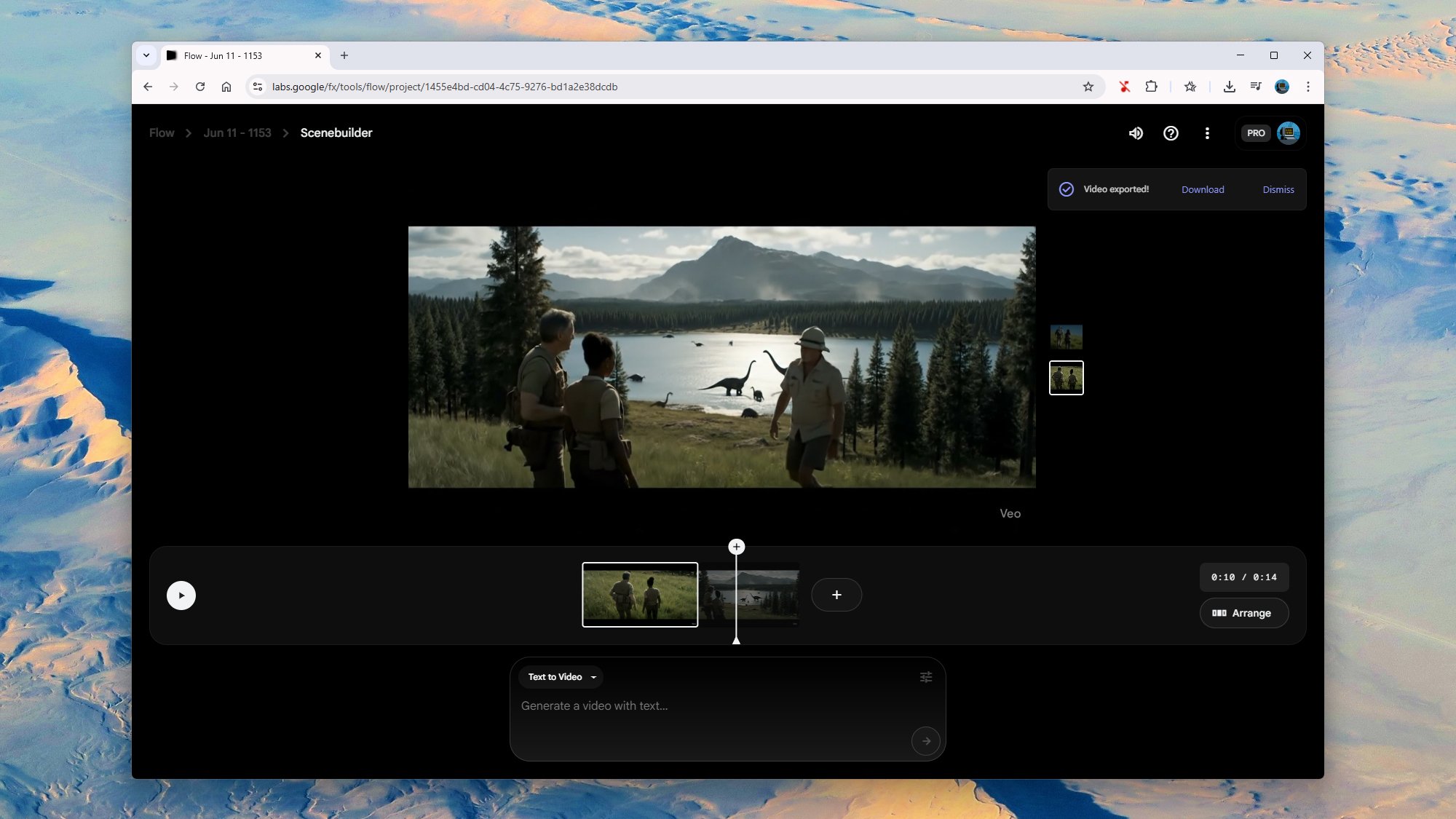
Creating videos in Flow.
Credit: Lifehacker
Credit: Lifehacker
I decided to splash out on 100 credits for a proper, full Veo 3 clip in an attempt to better produce the Jurassic Park scene in full and get my AI movie making career off the ground. I added a little more detail to the prompt, as well as some dialog, and what came out the other end was about on a par with the Veo 2 output. You actually get two generations to choose between, which you can see here and here.
Again, we have the usual problems, in that the AI generator doesn’t really know what it’s supposed to be doing here, or how to construct a scene beyond what it’s seen in other videos. Our intrepid adventurers are looking in the wrong direction when one of them delivers the “wow… would you look at that” line, and everything from the dinosaurs to the trees looks generic.
The difference with Flow and creating extended videos is that you can click Add to scene on any of these generated videos and start building something longer, made up of eight-second chunks. Scenes can then be extended and arranged as needed, with the same characters and environments carried over from one clip to the next.
My attempts to get John Hammond to enter the scene didn’t really work. The original characters stayed in place well enough, but our new character appeared out of nowhere and all sound was suddenly cut out because Flow had somehow switched me back to Veo 2. We also got a freak camera shake half way through. It’s clear that I’m not going to be able to switch from tech journalism to AI film directing anytime soon, especially with just 1,000 credits per month.
Veo 3 is still at an early stage, and Google has put “experimental” labels all over it and the Flow interface. However, at the moment you’re going to have to spend a lot of credits and a lot of time working on prompts to get something that’s consistent and realistic. It’s likely that hours of effort and trial runs went into the polished AI videos you see populating your social media feeds.
NASA Raises Odds Of City-Killer Asteroid Smashing Into The Moon

What was once dubbed a potential “city-killer” asteroid for Earth now has its sights redefined. New observations from NASA’s James Webb Space Telescope (JWST) increase the odds of a collision with the Moon instead in 2032. While the risk to Earth remains negligible, the prospect of a lunar impact by asteroid 2024 YR4 is now a compelling 4.3%,
LEGO Rolling Mill Flattens, Stamps, and Cuts Modeling Clay
Because there’s nothing you can’t build with LEGO besides a comfortable sleeping partner, this is a video of Youtuber Dr. Engine constructing and demonstrating a rolling mill made from LEGO. The mini-factory can flatten, stamp, and cut shapes out of modeling clay. How about that! Full disclosure: when I started writing this article before watching the video I read rolling machine and assumed it rolled joints. This is neat too though.
How to fix the Switch 2 battery indicator
The Nintendo Switch 2 has been in the wild for nearly a week and is selling like hotcakes, but some users have been complaining about an issue with their console’s battery indicator. A number of Switch 2 consoles appear to be displaying less remaining battery life than is accurate.
Battery life definitely is a mark against the Switch 2, with Engadget’s Sam Rutherford noting in his review that the console’s longevity is on the lower end of Nintendo’s estimates when playing more graphically demanding games such as Mario Kart World. But in some cases the issue might appear worse than it actually is. Nintendo has now offered a fix for when the amount of battery being displayed and actual remaining battery don’t match. Thankfully, the solution isn’t anything too dramatic, but it does involve putting the console into Recovery Mode.
According to Nintendo, these are the steps you need to take if you think your Switch 2 is affected. You’ll need the console, the correct AC adapter and internet access.
1. Confirm your console has the latest system update installed.
2. Power off the console.
3. Press and hold down the volume up (+) and volume down (-) buttons, then press the POWER button once, while continuing to hold the volume buttons until the Recovery Mode menu appears. This should reset the battery level meter.
4. Power off the console again by holding the POWER button until it turns off.
5. Power the console back on, and monitor the situation.
Nintendo says following these steps should correct the problem, but if you’re still having the same issues you may need to send your console in to be serviced. You can initiate a repair request by heading to Nintendo’s official Customer Support page.
This article originally appeared on Engadget at https://www.engadget.com/gaming/nintendo/how-to-fix-the-switch-2-battery-indicator-144809855.html?src=rss
WhatsApp Moves To Support Apple Against UK Government’s Data Access Demands
WhatsApp has applied to submit evidence in Apple’s legal battle against the UK Home Office over government demands for access to encrypted user data. The messaging platform’s boss Will Cathcart told the BBC the case “could set a dangerous precedent” by “emboldening other nations” to seek to break encryption protections.
The confrontation began when Apple received a secret Technical Capability Notice from the Home Office earlier this year demanding the right to access data from its global customers for national security purposes. Apple responded by first pulling its Advanced Data Protection system from the UK, then taking the government to court to overturn the request.
Cathcart said WhatsApp “would challenge any law or government request that seeks to weaken the encryption of our services.” US Director of National Intelligence Tulsi Gabbard has called the UK’s demands an “egregious violation” of American citizens’ privacy rights.


Read more of this story at Slashdot.
Razer’s Barebones BlackWidow V4 Pro 75% Keyboard Is A Modder’s Dream

It’s hard to believe that Razer has left a segment of the gaming keyboard market untapped, given how many different models it offers (like the recently-introduced Joro for road warriors). However, up until now, it has never released a barebones plank for typing enthusiasts who crave a higher level of customization. Razer’s new BlackWideo V4
How the Nintendo Switch 2 Looks (and Feels) Next to the Steam Deck and Original Switch
Once upon a time, Nintendo had a near monopoly on the handheld gaming market. Now, with the release of the Nintendo Switch 2, not so much. In the time since the original Nintendo Switch released, there have been several other major handheld releases like the Steam Deck and the Lenovo Legion Go S. The common thread? All of these—including the Switch 2—are on the bigger end, at least compared to prior handhelds like the 3DS or PSP. If you’re like me, and ergonomics and portability matter for your handhelds, that can be a problem.
That’s why I’ve taken the liberty of snapping some photos of the Switch 2 alongside its biggest (both literally and figuratively) competitors, including the original Switch, so you can get a better idea of how it’ll actually feel once it’s in your hands.
Nintendo Switch 2 vs. Nintendo Switch
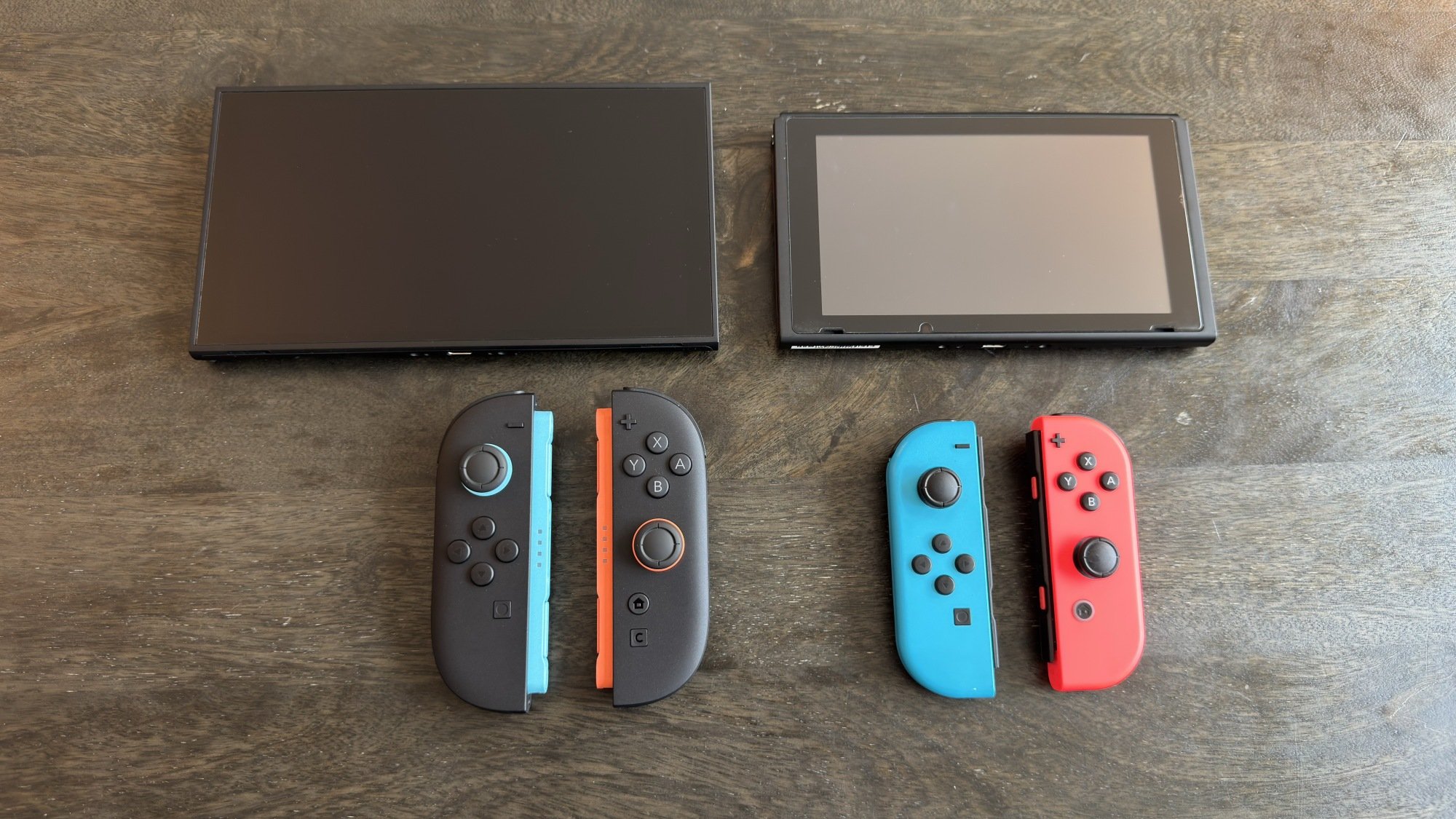
Switch 2 with joy-con 2 (left) next to Switch 1 with joy-con 1 (right)
Credit: Michelle Ehrhardt
Credit: Michelle Ehrhardt
First, to set a baseline, let’s compare the Switch 2 against the original Switch. Unfortunately, I don’t have a Switch OLED on hand, so for this comparison, we’re going to have to go with the launch model.
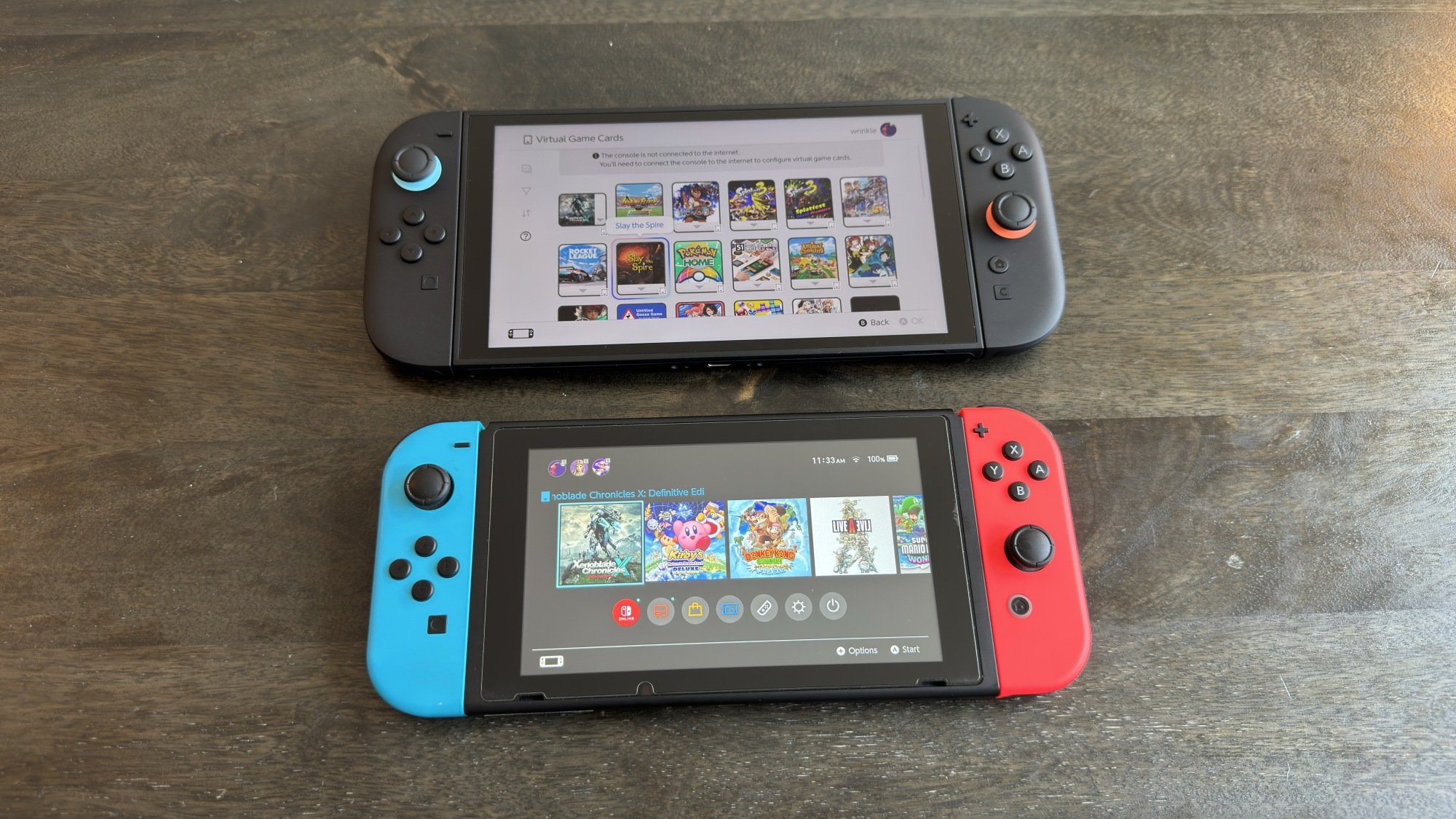
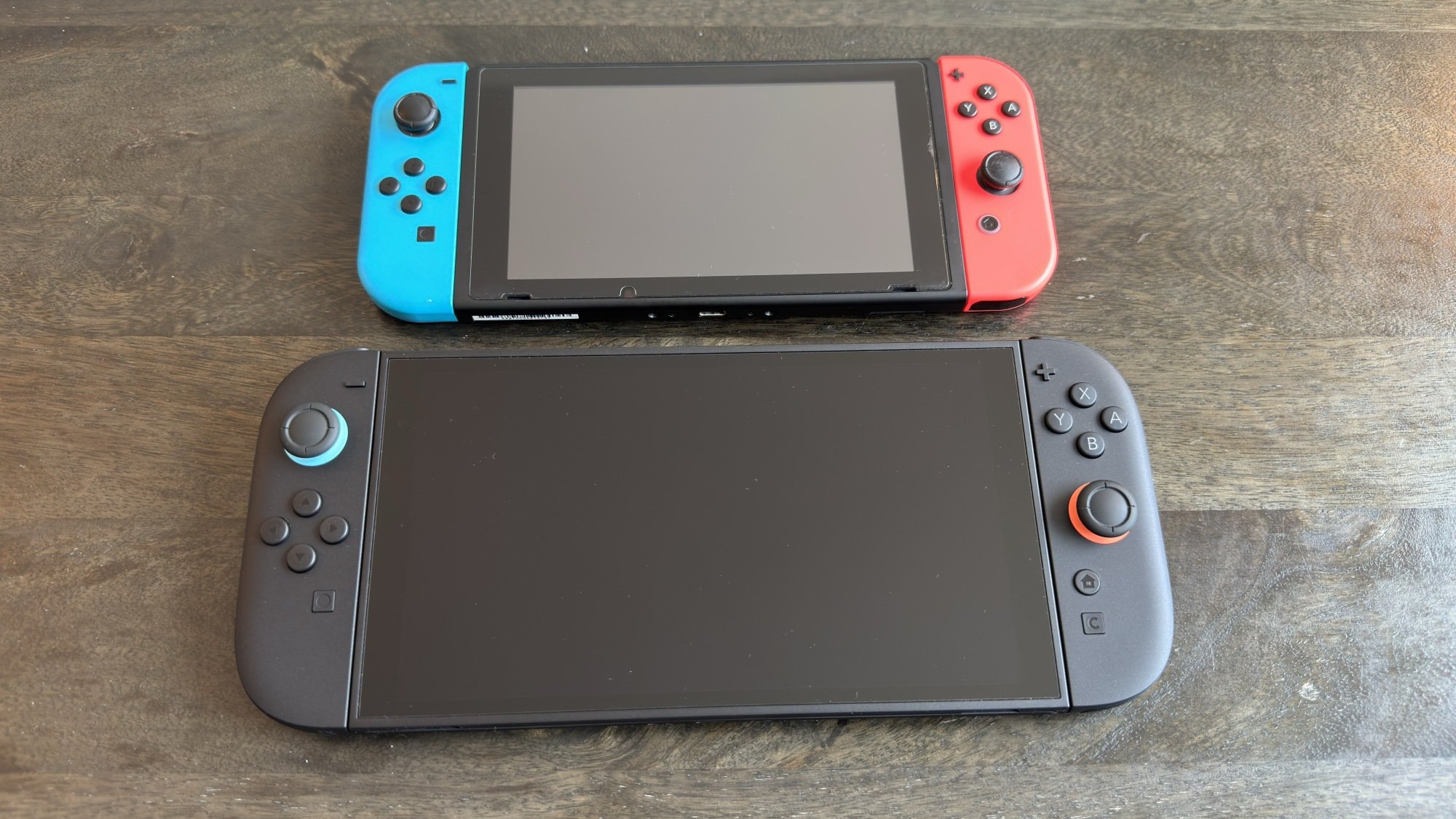
That’s not such a bad thing, though, as it’s where you’ll get the most noticeable differences. First, let’s look at dimensions and weight. The Switch 2 looks like it could eat the original Switch. If you like a big screen, that’s great, but know that it’ll be a little less portable, and maybe a little less friendly to players with tiny hands. Numbers-wise, the original Switch is 4.02 x 9.41 x 0.51 inches and 0.88 pounds (or 0.65 pounds with the controllers detached), while the Switch 2 is 4.5 x 10.7 x 0.55 inches and 1.18 pounds (or 0.88 pounds with the controllers detached). That doesn’t sound like the Switch 2 has beefed up that much on paper, but in person, it feels like night and day. On the plus side, though, it’s still plenty thin, and lightweight and comfortable enough in my adult hands. It might even be more comfortable, which I’ll touch on shortly.
Credit: Michelle Ehrhardt
The Switch 2 presents a noticeable upgrade to the screen on the original Switch, coming in at 7.9 inches over the 6.2 inches of its predecessor. It’s also now 1080p (as opposed to 720p on the original) and can display content in HDR and up to 120 fps (as opposed to no HDR and 60 fps on the original). This screen is definitely a big reason why the new console is bigger, and while I wouldn’t be surprised to see a Switch 2 Lite come out down the line, it does feel worth it once you actually start playing.
Credit: Michelle Ehrhardt
Let’s take a look at the dock and the controllers. The Switch 2 dock is a little taller and wider than the original Switch dock, to accommodate the bigger console and the added fan, but it shouldn’t take up too much more space in your entertainment center. The bigger deal is the new joy-con 2 controllers, which I absolutely love. At 4.57 x 0.56 x 1.2 inches vs. the 4.02 x 0.55 x 1.41 inches on the original joy-cons, they give your hand a little bit more to grab onto. I always felt like the original joy-cons were too cramped, always opting to use either a pro controller or third-party joy-con while playing instead, but the new joy-con are pretty comfortable out of the box, especially with their slightly larger buttons and sticks. You’d probably be fine not bothering to upgrade to a new controller at all now, unless you absolutely want a more traditional D-Pad.
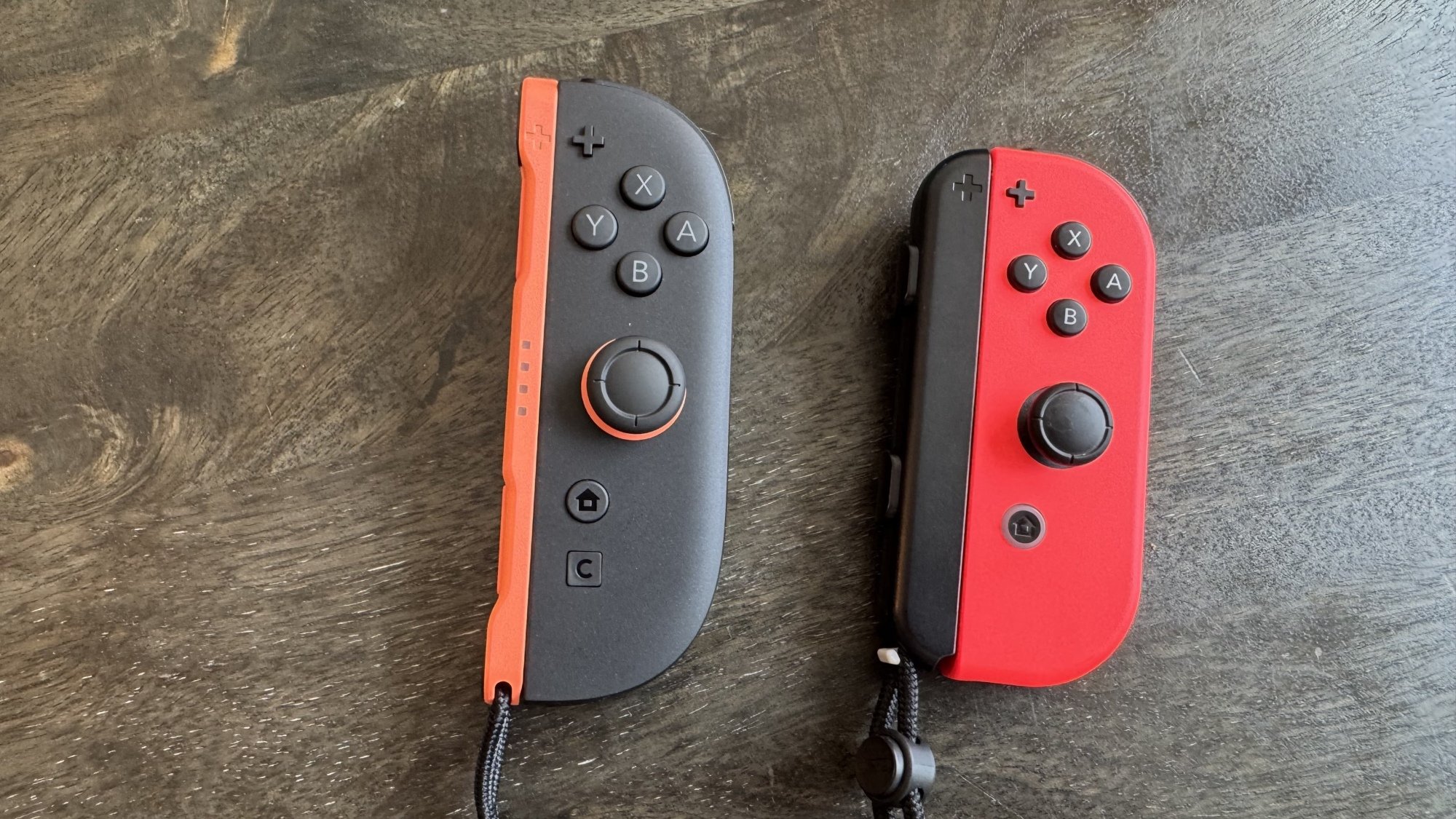
Joy-con 2 (left) next to Joy-con (right).
Credit: Michelle Ehrhardt
Credit: Michelle Ehrhardt
Overall, the Switch 2 feels more adult and a little less toyetic. That’s great news for people like me, although kids might need to take some time to adjust to it.
Nintendo Switch 2 vs. Steam Deck
Credit: Michelle Ehrhardt
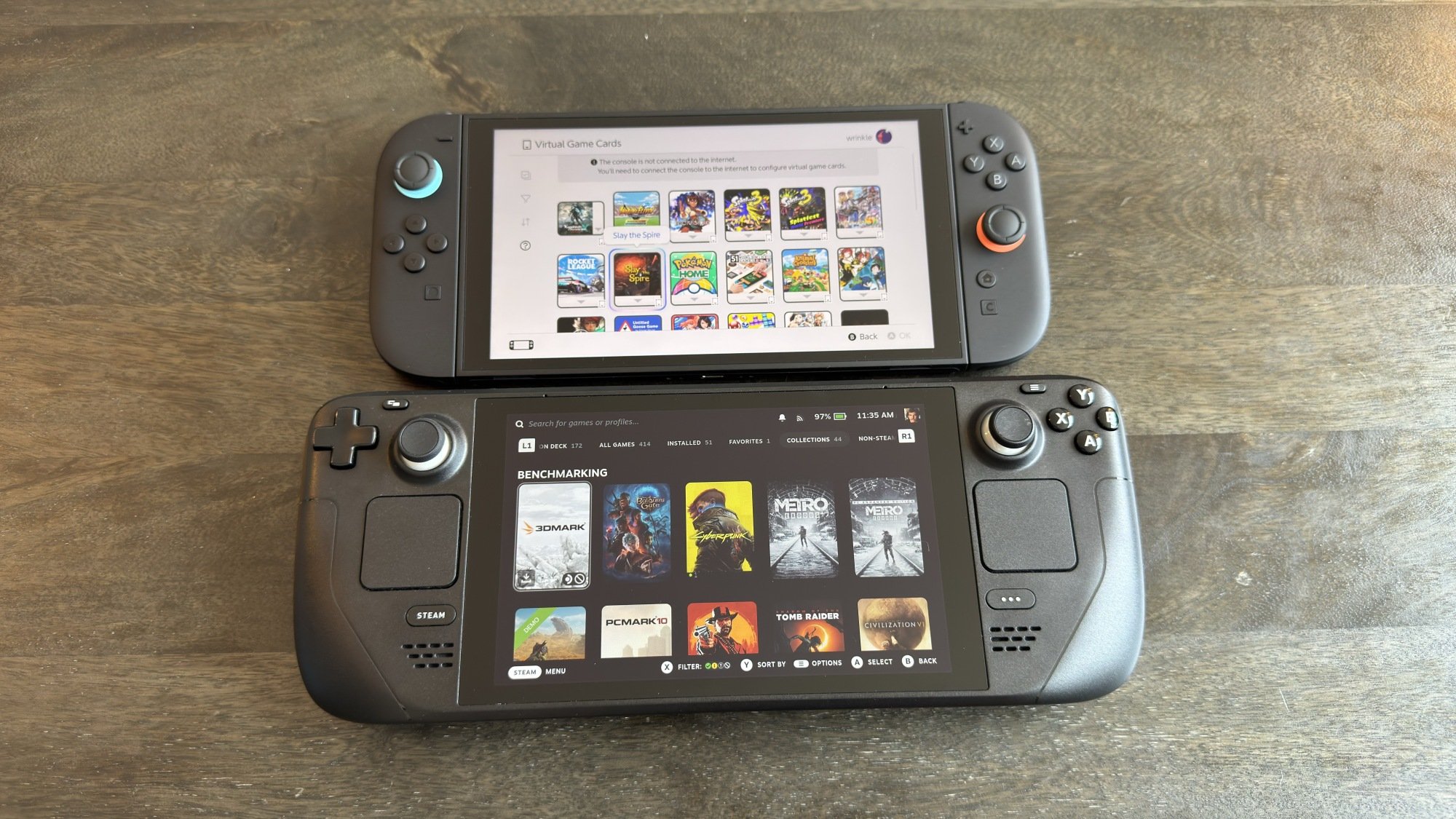
Probably the Nintendo Switch 2’s most prominent competition at the moment, the Steam Deck is a handheld gaming PC from Valve that launched in 2022 and later got an OLED upgrade with the same dimensions and weight, but a slightly larger screen. Again, I have the original model, but both use pretty much the same overall build.
If the Switch 2 looked like it could eat the original Switch, then the Steam Deck looks like it could eat the Switch 2. At 11.73 x 4.60 x 1.93 inches, it is significantly thicker and wider than the Switch 2, if not especially taller. It’s also heavier at 1.41 pounds.
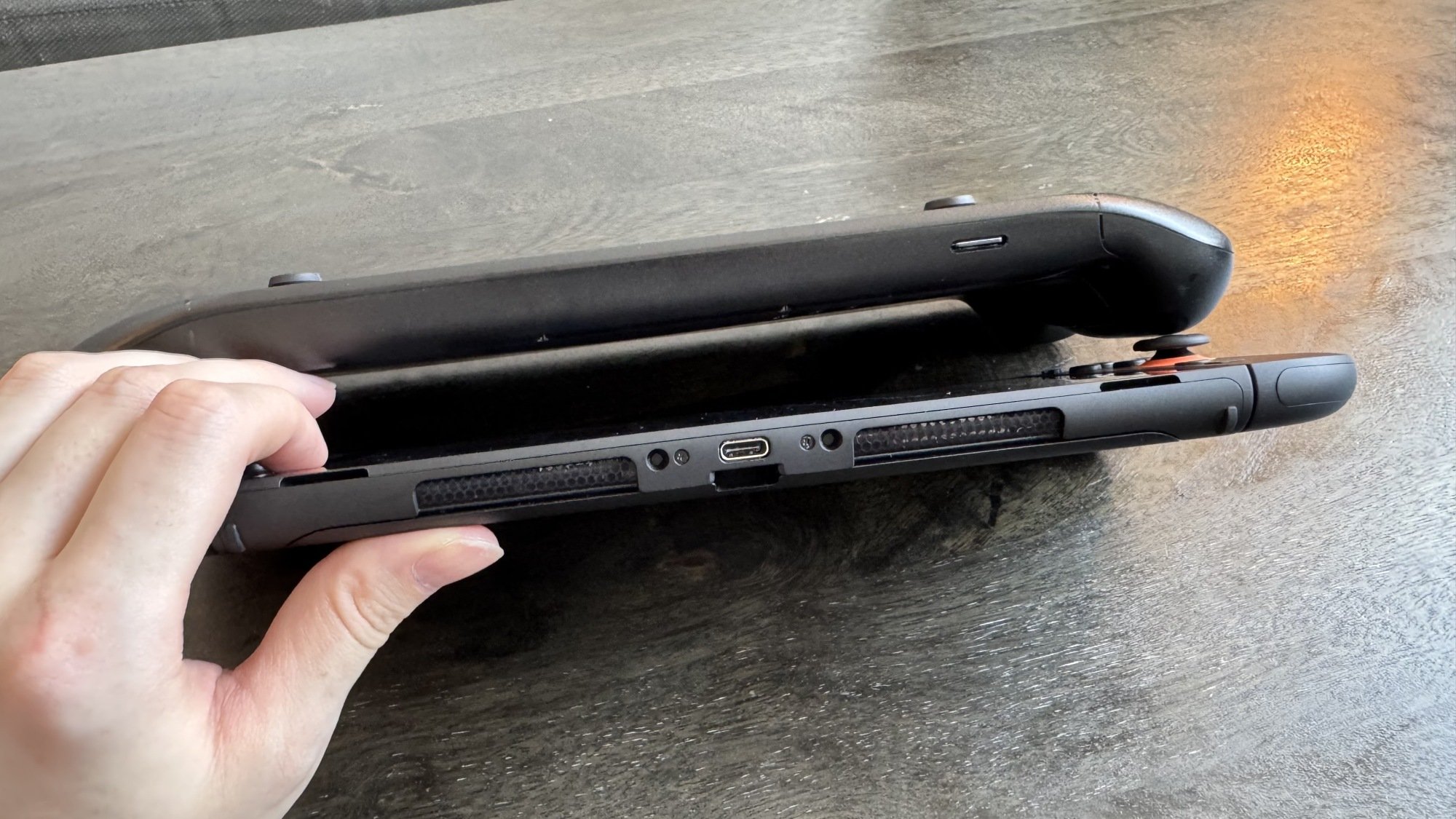
Steam Deck (above) vs. Switch 2 (below) from profile
Credit: Michelle Ehrhardt
Credit: Michelle Ehrhardt
Personally, I think it’s a bit weighty (although my husband doesn’t mind as much), but part of the extra height and depth comes from a purposeful choice to make it more comfortable and usable overall. The Steam Deck comes with built-in grips that make it easier to hold than the Switch 2, at least for me, even taking into account the improved ergonomics on the new joy-con 2 controllers. And with the extra space those grips need, Valve has also taken the liberty of adding in large touchpads on either side of the device, as well as back buttons on the grips themselves. These open up new ways to play that aren’t possible on the Switch 2, and are extra convenient when navigating the Steam Deck’s desktop mode. However, they do make the Steam Deck a bit less portable, as they add some bulkiness to the device around its edges. That’s why the device sounds thicker on paper than it appears in some photos.
As for that desktop mode, it really points to the kicker here: The Steam Deck is, essentially, a shrunken gaming PC, while the Switch 2 is more akin to an overgrown PSP. The devices are kind of aiming for separate goals, and taking that into account, each achieves them pretty well. Sure, the Steam Deck is thicker, but when compared to even the smallest of standard gaming PCs, it’s an impressive form factor for the price.
What’s less impressive next to the Switch 2, unfortunately, is the screen. It’s only 7 inches on the base model and 7.4 inches on the OLED model, both of which are smaller than the Switch 2’s display. It also tops out at 800p and 60 fps, both of which are lower than on the Switch 2.
Nintendo Switch 2 vs. Lenovo Legion Go S
Credit: Michelle Ehrhardt
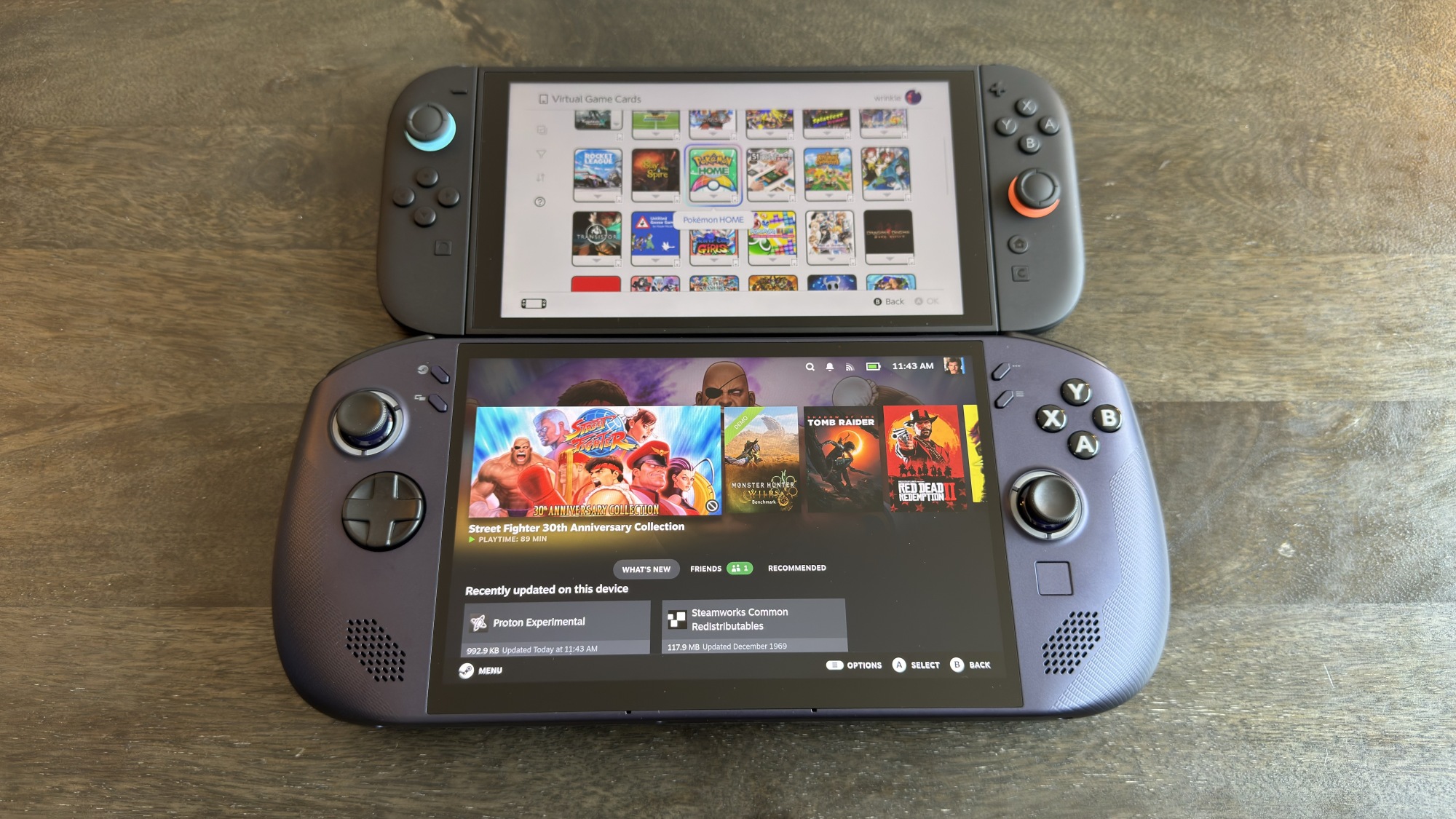
Finally, I want to compare the Switch 2 against another device I’m reviewing right now: the Lenovo Legion Go S. This device from Lenovo is the latest in third-party Steam Deck alternatives, and it’s especially interesting as it’s the first to run Valve’s SteamOS. There are plenty of other competing handheld gaming PCs at the moment, but for my money, this is the one to pay attention to.
At 11.77 x 5.02 x 0.89 inches, it is a little taller and wider than even the Steam Deck, though not by much. And at 1.61 pounds, it’s heavier, although the grips are slightly more bulbous, so I actually think it’s slightly more comfortable to hold.
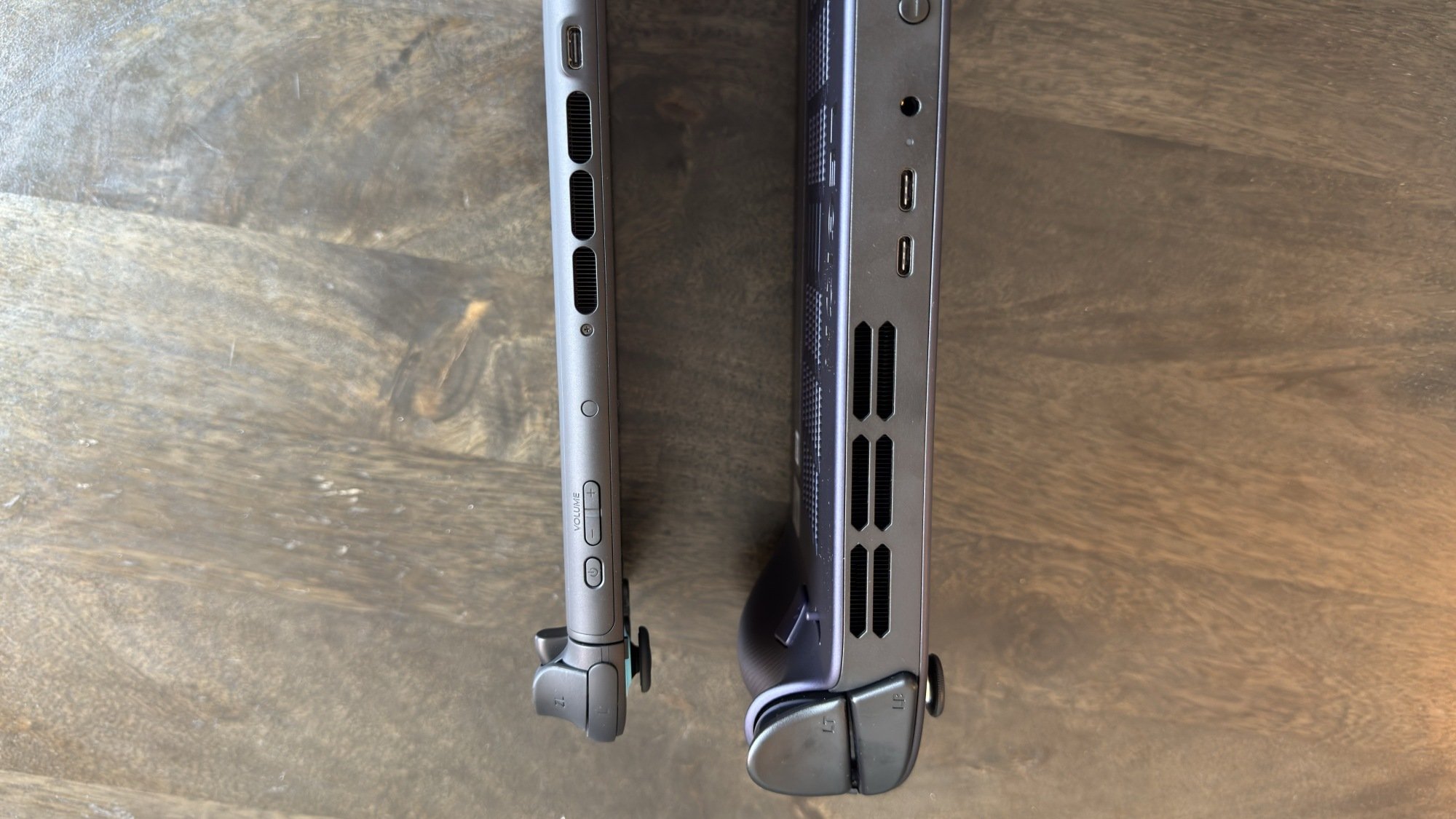
Switch 2 (left) vs. Legion Go S (right) from above.
Credit: Michelle Ehrhardt
Credit: Michelle Ehrhardt
The key improvement here—aside from internals—is the screen, which is eight inches, 1200p, and supports 120 fps. That’s an improvement on even the Switch 2. However, you also do get only one touchpad here (which is much smaller) and only two grip buttons. On the plus side, the triggers have a switch that lets you adjust their travel, so you can turn them into twitchier hair triggers if you’d like.
Overall, this is a pretty different market segment than the Switch 2, so I doubt they’ll hamper each other much. It’s chonkier, but—like the Steam Deck—for good reason. Handheld PCs need to be bigger overall, since their components aren’t always made with such small form factors in mind. But on the plus side, since these devices are already bigger, they usually add in some extra ergonomics and controls to compensate.
I suspect Nintendo will keep following this sleeker, Apple-esque design trend, while handheld gaming PCs will feel a bit more comfortable stretching their legs, at least until a potential Steam Deck 2 and even wider market adoption. There’s room for both, but if you’re wondering which would better fit in your bag, now you know. As for the smaller, more toyetic consoles of the past, well, even if the Switch 2 is smaller than the competition, it’s still bigger than what I played with growing up. For fun, here’s a Switch 2 next to a 3DS XL.
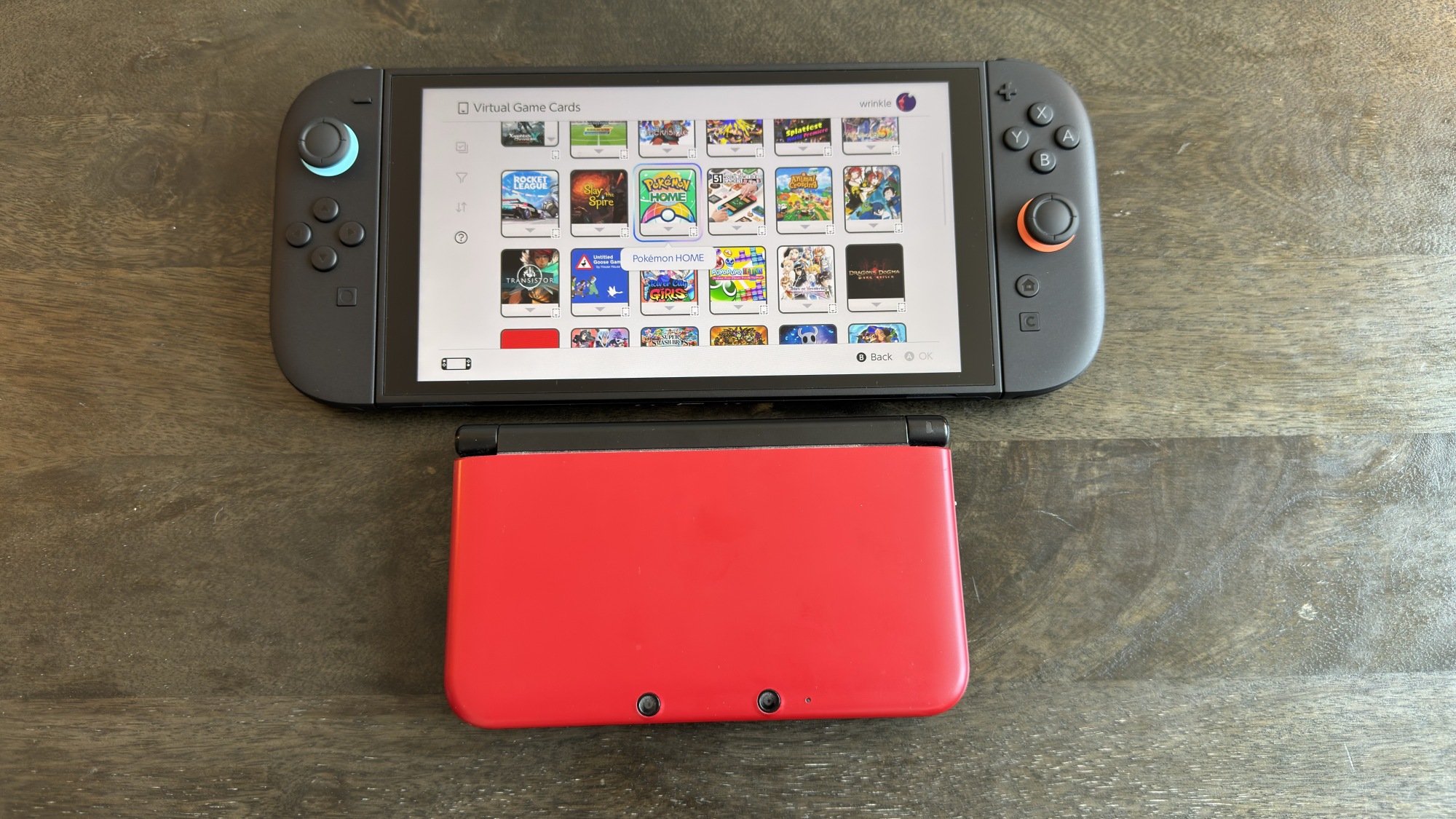
Credit: Michelle Ehrhardt
Glorious Unveils Lightweight And Affordable O Eternal Gaming Mouse With A Caveat

The underbelly of PC gaming rests on its peripherals, even if GPUs often get all the hype. Glorious is a popular brand for all sorts of accessories, including keyboards and gaming mice. It has a new model on the horizon, which it calls the Model O Eternal. It aims to make this lightweight mouse affordable and laden with RGB, based on its Model
Oh Snap! Ray-Ban Meta And Apple Better Watch Out For These Lightweight Specs

Snap Inc. today announced its most ambitious entry into augmented reality yet, revealing plans to launch the “Specs” (so, Spec specs?) in 2026. The announcement, made at the Augmented World Expo (AWE) 2025, points to a more powerful and lightweight pair of glasses that will push machine learning into three-dimensional space.
Unlike previous
Apple Executives Defend AI Strategy
Apple executives defended the company’s AI strategy this week after acknowledging that major Siri features announced at last year’s Worldwide Developers Conference remain undelivered and were quietly pulled from development plans. Craig Federighi, Apple’s senior vice president of software engineering, told the Wall Street Journal that the company is rebuilding Siri from the ground up, admitting that while Apple had working software for the promised features, “it didn’t converge in the way quality-wise that we needed it to.”
The missing capabilities included Siri’s ability to search through apps and respond to on-screen activities, features that were demonstrated a year ago but never shipped to users. In the upcoming iOS 26, Apple has instead incorporated more OpenAI technology, allowing users to interact with ChatGPT through camera and screenshots and generate images using OpenAI’s tools. Federighi defended the strategy by comparing Apple’s position to the early internet era, when the company focused on making other services accessible rather than building competing platforms.


Read more of this story at Slashdot.
Why I Buy Bare Root Plants Instead of Pretty Flowering Plants
Your local garden center can be full of inspiration with its aisles and aisles of abundant, flowering plants in the prime of their lives. It certainly makes sense that when purchasing a plant, you’d gravitate toward one full of blooms and, possibly, fruit. However, bare root plants are actually a better way to go.
What are bare root plants?
Plenty of plants can either be cut back each year and still grow, or die back naturally. The roots, however, are where all the energy for the plant are stored. Bare root plants lack much in the way of branches—instead, they tend to be just the root ball out of soil. In the case of bare root trees, they are usually quite young and are little more than a stick with some roots attached. Rosebushes, for example, are commonly sold in their bare root state in late winter through spring and are little more than the crown, with the roots attached and the rose branches cut down to a few inches height.
Once you’ve planted the rosebushes, they quickly sprout new green branches and leaves and can become big quite quickly. Bare root trees can produce fruit within the first season, and bare root flowers like dahlias can produce flowers in the first year.

this is how bare root plants arrive
Credit: Amanda Blum
Credit: Amanda Blum
Bare root plants are cheaper
So long as you take care to plant them correctly, bare root plants can be a fantastic way to fill out a large space inexpensively. Because bare root plants are lighter and smaller (there’s no soil or moisture to account for), they’re also easier to ship, and are, therefore, less expensive. Bare root trees can be bought in bulk for a small fraction of what you pay per tree in a nursery: Bare root chestnut trees, bought in bulk, can be had for a few dollars, whereas in a nursery, a potted and leafed out chestnut would start at $29, depending on size.
Bare root roses can usually be had for $4 to $10 a piece, while a potted rose would cost three or four times as much. This is true of bare root flowers and shrubs, as well. In fact, most nurseries receive their stock as bare root, and plant them on site—that’s how they make their markup.
It’s easier to plant bare root, and they acclimate better
The common approach when planting almost anything is that you want a hole three times the depth and width of your root ball. When you take a plant out of a pot from a nursery, that “root ball” includes all the soil, so it’s bigger, even though the roots aren’t any larger. Planting bare root, for that reason, usually means a smaller hole, which is less work.
Planting a bare root plant doesn’t require more care, either. It’s wise to saturate the roots before planting, and you should add fertilizer to the water you drench the roots in. However, once it’s time to plant, you simply dig a big enough hole, plant to the appropriate depth, cover to the appropriate level, and walk away.
Bare root plants also acclimate better to their environment, and the roots are therefore stronger. When you transplant, the plant undergoes stress, and every branch, leaf, flower, and fruit is another resource-draining dependent. By planting bare root, you’re allowing the plant to focus on root health and grow out when it has the resources to do so.
Bare root plants are easy to examine when they arrive, so rotten, moldy, or desiccated roots can easily be cut away, and any infestations are easy to catch. It’s a way of ensuring only the healthiest plants go in the ground.
Where to find bare root plants
The first place you should look for bare root trees is your state nursery, and every state has one. Your state nursery likely has saplings or bare root trees native to your state at a low cost. Other good sources include Fedco Seeds and Stark Bro’s, which have deep catalogs to choose from.
A warlord brings chaos in Foundation S3 trailer
Foundation returns for a third season next month on Apple TV+.
Foundation, Apple TV+’s lavish adaptation (or re-mix, if you prefer) of Isaac Asimov’s seminal sci-fi series, returns for its third season next month, and the streaming platform has dropped an official trailer to give us a taste of what’s in store.
As previously reported, the first season ended with a major time jump of 138 years, and S2 focused on the Second Crisis: imminent war between Empire and the Foundation, along with an enemy seeking to destroy Empire from within. The Foundation, meanwhile, adopted the propaganda tactics of religion to recruit new acolytes to the cause. We also met a colony of “Mentalics” with psionic abilities. We’re getting another mega time jump for the Third Crisis.
Per the official premise:
Hackers Are Using AI-Generated Videos on TikTok to Spread Malware
Cybercriminals are now leveraging AI-generated content on TikTok to spread malware and deceive users at scale. According to a recent report by GBHackers, attackers are using highly convincing deepfake-style videos—many of them created with generative AI—to promote fake apps, phishing links, and malicious downloads. The campaign is part of a growing trend where social media is weaponized to deliver advanced threats that traditional security tools often fail to detect.
This strategy is especially dangerous when combined with recent vulnerabilities in core systems. Just days ago, new Linux vulnerabilities capable of leaking password hashes and memory data were disclosed. Meanwhile, a critical zero-day in the Linux SMB module has made servers even more vulnerable to remote exploits. Even though the Linux-libre 6.15 kernel attempts to harden the platform by removing binary blobs, attackers are diversifying their methods. In fact, this isn’t the first time TikTok has been used as an attack vector—check out our earlier coverage of ClickFix-based malware spreading through TikTok videos.
The post Hackers Are Using AI-Generated Videos on TikTok to Spread Malware appeared first on Linux Today.
All-wheel drive EVs at 210 mph? Formula E’s next car gets massive upgrade.
The governing body for world motorsport met in Macau yesterday. Among the jobs for the Fédération Internationale de l’Automobile was to sign off on various calendars for next season, which is why there’s now a clash between the F1 Monaco Grand Prix and the 24 Hours of Le Mans and also between the Indy 500 and F1’s annual visit to Canada. The Formula E calendar was also announced, although with a pair of blank TBCs in the middle, I’ll hold off calling it finalized.
The US round will now take place in late January, and it’s moving venues yet again. No longer will you need to drive an hour south of Miami; instead, the northern outskirts of the city will suffice. The infield at Homestead is no more, and the sport has negotiated a race at the Hard Rock Stadium, albeit on a different layout than the one used by F1. It seems that Formula E’s recent “Evo Sessions” race between influencers, which was held at the stadium, proved convincing.
The really interesting Formula E news from Macau won’t take effect until the 2026–2027 season, and that’s the arrival of the Gen4 car.