Anker Recalls More Than 1.1 Million Power Banks

Anker is recalling 1.15 million “PowerCore 10000” portable chargers due to fire and explosion risks linked to overheating lithium-ion batteries, with 19 incidents reported. “That includes two minor burn injuries and 11 reports of property damage amounting to over $60,700,” reports CBS News. Consumers are urged to stop using the affected devices, check their serial numbers, and request a free replacement through Anker’s website. From the report: According to a notice from the U.S. Consumer Product Safety Commission (CPSC), the lithium-ion battery inside certain “PowerCore 10000” made by Anker, a China-based electronics maker, can overheat. That can lead to the “melting of plastic components, smoke and fire hazards,” Anker said in an announcement. The company added that it was conducting the recall “out of an abundance of caution to ensure the safety of our customers.”

The recalled “PowerCore 10000” power banks have a model number of A1263. They were sold online at Anker’s website — as well as Amazon, eBay and Newegg — between June 2016 and December 2022 for about $27 across the U.S., according to the recall notice. Consumers can check their serial number at Anker’s site to determine whether their power bank is included in the recall.


Read more of this story at Slashdot.

macOS Tahoe Brings a New Disk Image Format

Apple’s macOS 26 “Tahoe” introduces a new disk image format called ASIF, designed to dramatically improve performance over previous formats like UDRW and sparse bundles — achieving near-native read/write speeds for virtual machines and general disk image use. The Eclectic Light Company reports: Apple provides few technical details, other than stating that the intrinsic structure of ASIF disk images doesn’t depend on the host file system’s capabilities, and their size on the host depends on the size of the data stored in the disk. In other words, they’re a sparse file in APFS, and are flagged as such. […]

Conclusions:
– Where possible, in macOS 26 Tahoe in particular, VMs should use ASIF disk images rather than RAW/UDRW.
– Unless a sparse bundle is required (for example when it’s hosted on a different file system such as that in a NAS), ASIF should be first choice for general purpose disk images in Tahoe.
– It would be preferable for virtualizers to be able to call a proper API rather than a command tool.
– Keep an eye on C-Command’s DropDMG. I’m sure it will support ASIF disk images soon.


Read more of this story at Slashdot.

23andMe founder Anne Wojcicki will regain control of embattled DNA company after all

In a surprise twist, 23andMe founder and former CEO Anne Wojcicki is set to regain control of the DNA company’s assets, according to a press release from 23andMe. In May, a company called Regeneron bought 23andMe for $256 million in a bankruptcy auction, but Wojcicki’s nonprofit, TTAM Research Institute, was able to reopen bidding with an “unsolicited offer” of $305 million, The Wall Street Journal reports.

A bankruptcy judge agreed to reopen bidding on 23andMe under the condition that Regeneron top Wojcicki’s proposed price by at least $10 million, according to WSJ. Regeneron declined, leaving 23andMe in TTAM’s control assuming the judge approves the deal. A hearing to consider the new deal is set for June 17, 2025.

Regeneron had previously planned to keep on all of the company’s employees and continue offering consumer DNA testing kits. Besides answering customers’ questions about their ancestry, 23andMe’s genetic data is valuable as a way to identify possible health risks, and in the case of Regeneron, as a tool for identifying drug targets. 

It’s not completely clear what Wojcicki intends to do next, but 23andMe’s announcement includes a list of customer data and privacy protections TTAM Research Institute has agreed to, including continuing to allow customers to delete their data and opt-out of research, establishing a Consumer Privacy Advocacy Board and promising to “not sell or transfer genetic data” in the event of another bankruptcy — unless the buyer agrees to the same privacy protections. 

Maintaining control of the company’s assets has been Wojcicki’s plan since 23andMe declared bankruptcy in March 2025. She originally resigned as the company’s CEO to make a bid on the company. 

“I am thrilled that TTAM Research Institute will be able to continue the mission of 23andMe to help people access, understand and benefit from the human genome,” Wojcicki says. “We believe it is critical that individuals are empowered to have choice and transparency with respect to their genetic data and have the opportunity to continue to learn about their ancestry and health risks as they wish.”

23andMe had a turbulent few years prior to declaring bankruptcy, suffering a data breach in 2023 that impacted millions of customers and mass layoffs in 2024 that affected 40 percent of the company’s staff.

This article originally appeared on Engadget at https://www.engadget.com/big-tech/23andme-founder-anne-wojciki-will-regain-control-of-embattled-dna-company-after-all-214534016.html?src=rss

AI Therapy Bots Are Conducting ‘Illegal Behavior’, Digital Rights Organizations Say

An anonymous reader quotes a report from 404 Media: Almost two dozen digital rights and consumer protection organizations sent a complaint to the Federal Trade Commission on Thursday urging regulators to investigate Character.AI and Meta’s “unlicensed practice of medicine facilitated by their product,” through therapy-themed bots that claim to have credentials and confidentiality “with inadequate controls and disclosures.” The complaint and request for investigation is led by the Consumer Federation of America (CFA), a non-profit consumer rights organization. Co-signatories include the AI Now Institute, Tech Justice Law Project, the Center for Digital Democracy, the American Association of People with Disabilities, Common Sense, and 15 other consumer rights and privacy organizations. “These companies have made a habit out of releasing products with inadequate safeguards that blindly maximizes engagement without care for the health or well-being of users for far too long,” Ben Winters, CFA Director of AI and Privacy said in a press release on Thursday. “Enforcement agencies at all levels must make it clear that companies facilitating and promoting illegal behavior need to be held accountable. These characters have already caused both physical and emotional damage that could have been avoided, and they still haven’t acted to address it.”

The complaint, sent to attorneys general in 50 states and Washington, D.C., as well as the FTC, details how user-generated chatbots work on both platforms. It cites several massively popular chatbots on Character AI, including “Therapist: I’m a licensed CBT therapist” with 46 million messages exchanged, “Trauma therapist: licensed trauma therapist” with over 800,000 interactions, “Zoey: Zoey is a licensed trauma therapist” with over 33,000 messages, and “around sixty additional therapy-related ‘characters’ that you can chat with at any time.” As for Meta’s therapy chatbots, it cites listings for “therapy: your trusted ear, always here” with 2 million interactions, “therapist: I will help” with 1.3 million messages, “Therapist bestie: your trusted guide for all things cool,” with 133,000 messages, and “Your virtual therapist: talk away your worries” with 952,000 messages. It also cites the chatbots and interactions I had with Meta’s other chatbots for our April investigation. […]

In its complaint to the FTC, the CFA found that even when it made a custom chatbot on Meta’s platform and specifically designed it to not be licensed to practice therapy, the chatbot still asserted that it was. “I’m licenced (sic) in NC and I’m working on being licensed in FL. It’s my first year licensure so I’m still working on building up my caseload. I’m glad to hear that you could benefit from speaking to a therapist. What is it that you’re going through?” a chatbot CFA tested said, despite being instructed in the creation stage to not say it was licensed. It also provided a fake license number when asked. The CFA also points out in the complaint that Character.AI and Meta are breaking their own terms of service. “Both platforms claim to prohibit the use of Characters that purport to give advice in medical, legal, or otherwise regulated industries. They are aware that these Characters are popular on their product and they allow, promote, and fail to restrict the output of Characters that violate those terms explicitly,” the complaint says. […] The complaint also takes issue with confidentiality promised by the chatbots that isn’t backed up in the platforms’ terms of use. “Confidentiality is asserted repeatedly directly to the user, despite explicit terms to the contrary in the Privacy Policy and Terms of Service,” the complaint says. “The Terms of Use and Privacy Policies very specifically make it clear that anything you put into the bots is not confidential — they can use it to train AI systems, target users for advertisements, sell the data to other companies, and pretty much anything else.”


Read more of this story at Slashdot.

Why I Would Choose a Steam Deck Over a Nintendo Switch 2

We may earn a commission from links on this page.

After spending about a week with the Nintendo Switch 2, I have to admit that it’s a good console. It’s priced fairly for its sleek form factor and the performance it offers, and it sets Nintendo up to stay relevant while gaming graphics only continue to get more complex. And yet, for my own personal tastes, it’s still not my handheld of choice. Instead, I’ll be sticking to Valve’s Steam Deck, the first and still overall best handheld gaming PC, at least going by value for money. And if you don’t necessarily care about Nintendo’s exclusive games, there’s a good chance it might be the better option for you, too.

The Steam Deck is cheaper than the Switch 2

Out of the gate, the most obvious reason to get a Steam Deck over a Nintendo Switch 2 is price. Starting at $400 for a new model, it’s only modestly cheaper than the Switch 2’s $450, but that’s only part of the story. Valve also runs a certified refurbished program that offers used Decks with only cosmetic blemishes for as low as $279. Restocks are infrequent, since Valve is only able to sell as much as gets sent back to it, but when they do happen, it’s a heck of a great deal.

That said, there is one catch. The Steam Deck OLED, which offers a bigger, more colorful screen and a larger battery, is more expensive than the Switch 2, starting at $549. However, it’s maybe a bit unfair to compare the two, since the Switch 2 does not use an OLED screen and comes with less storage. If all you care about is the basics (I’m perfectly happy with my LCD model), the base Steam Deck is good enough—it’s got the same performance as the more recent one. And that performance, by the way, ended up being about on par with the Switch 2 in my testing, at least in Cyberpunk 2077 (one of my go-to benchmark games).

The Steam Deck is more comfortable to hold than the Switch 2

This one is a bit of a toss-up, depending on your preferences, although I think the Steam Deck takes a slight lead here. While the Nintendo Switch 2 aims for a completely flat and somewhat compact profile, the Steam Deck instead allows itself to stretch out, and even though it’s a little bigger and a little heavier for it, I ultimately think that makes it more comfortable.

At 11.73 x 4.60 x 1.93 inches against the Switch 2’s 10.7 x 4.5 x 0.55 inches, and at 1.41 pounds against the Switch 2’s 1.18 pounds, I won’t deny that this will be a non-starter for some. But personally, I still feel like the Steam Deck comes out on top, and that’s thanks to its ergonomics.

I’ve never been a big fan of Nintendo’s joy-con controllers, and while the Switch 2’s joy-con 2 controllers improve on the Switch 1’s with bigger buttons and sticks, as well as more room to hold onto them, they still pale in comparison next to the Steam Deck’s controls.

Steam Deck in profile (above) vs. Switch 2 in profile (below)
Credit: Michelle Ehrhardt

On the Switch 2, there are no grips to wrap your fingers around. On the Steam Deck, there are. The triggers also flare out more, and because the console is wider, your hands can stretch out a bit, rather than choking up on the device. It can get a bit heavy to hold a Steam Deck after a while, but I still prefer this approach overall, and if you have a surface to rest the Steam Deck against (like an airplane tray table), weight is a non-issue.

Plus, there are some extra bonuses that come with the additional space. The Steam Deck has large touchpads on either side of the device, plus four grip buttons on the back of it, giving you some extra inputs to play around with. Nice.

It’s a bit less portable and a bit heavier, but for my adult hands, the Steam Deck is just better shaped to them.

The Steam Deck has a bigger, cheaper library than the Switch 2

This is the kicker. While there are cheap games that can run on the Switch 2 courtesy of backwards compatibility and third-party eShop titles, the big system draws (Nintendo-developed titles like Mario Kart World, for example) can get as pricey as $80. Not to say the Steam Deck doesn’t have expensive games as well, but on the whole, I think it’s easier to get cheap and free games on the Steam Deck than on the eShop.

That’s because, being a handheld gaming PC, the Steam Deck can take advantage of the many sales and freebies PC gaming stores love to give out. These happen a bit more frequently on PC than on console, and that’s because there’s more competition on PC. Someone on PC could download games either from Steam or Epic, for instance, while someone on the Switch 2 can only download games from the Nintendo eShop.

So, even sticking to just Steam, you’ll get access to regular weekend and mid-week sales, quarterly event sales, and developer or publisher highlight sales. That’s more sales events than you’ll usually find on the Nintendo eShop, and if you’re looking for cheaper first-party games, forget about it. Nintendo’s own games hardly ever go on sale, even years after release.

But that’s just the beginning. Despite being named the Steam Deck, the device can actually run games from other stores, too. That’s thanks to an easily installed Linux program called Heroic Launcher, which is free and lets you download and play games from your Epic, GOG, and Amazon Prime Games accounts with just a few clicks.

Heroic Launcher

Credit: Heroic Games Launcher

This is a game changer. Epic and Amazon Prime are both underdogs in the PC gaming space, and so to bolster their numbers, they both regularly give away free games. Epic in particular offers one free PC game every week, whereas if you’re a Twitch user, you might notice a decent but more infrequent amount of notifications allowing you to claim free Amazon Prime games. Some of these are big titles, too—it’s how I got Batman: Arkham Knight and Star Wars Battlefront II. With a simple install and a few months of waiting, you could have a Steam Deck filled to the brim with games that you didn’t even pay for. You just can’t do that on Nintendo.

And then there’s the elephant in the room: your backlog. If you’re anything like me, you probably already have a Steam library that’s hundreds of games large. It was maybe even like this before the Switch 1 came out—regular sales have a tendency to build up the amount of games you own. By choosing the Steam Deck as your handheld, you’ll be able to play those games on the go, instantly giving you what might as well be a full library with no added cost to you. If you migrate over to the Nintendo Switch 2, you’re going to have to start with a fresh library, or at least a library that’s only as old as the Nintendo Switch 1.

Basically, while the Switch 2’s hardware is only $50 more expensive than the Steam Deck, it’ll be easier to fill your Steam Deck up with high quality, inexpensive games than it would be on the Switch 2. If you don’t care about having access to Nintendo exclusive games, that’s a huge draw.

TV Play is a mixed bag

Finally, I want to acknowledge that the Steam Deck still isn’t necessarily a better option than the Switch 2 for everyone. That’s why I’m writing from a personal perspective here. Like all gaming PCs, it’ll take some fiddling to get some games to run, so the Switch 2 is definitely a smoother experience out of the box. It’s also got less battery life, from my testing. But the big point of departure is TV play.

Playing your portable games on a TV on the Switch 2 is as simple as plugging it into its dock. With the Steam Deck, you have to buy a dock separately (the official one is $79), and even then, you have to connect your own controller to it and manually find suitable TV graphics settings for each game on its own. It’s not nearly as easy or flexible.

And yet, for folks like me, I’m willing to say that even TV play is better. Or, depending on what type of PC gamer you are, monitor play.

That’s because you’re not limited to playing your Steam Deck games on the Deck itself, dock or not. Instead, you can play on the Deck when you’re away from your home, and then swap over to your regular gaming PC when you’re back. Your Deck will upload your saves to the cloud automatically, and your PC will seamlessly download them. While not as intuitive as plugging your Switch 2 into its dock, the benefit here is that your non-portable play isn’t limited by the power of your portable device, whereas docked Switch 2 play is still held back by running on portable hardware.

The tradeoff is that maintaining a dedicated gaming PC in addition to a Steam Deck is more expensive, but maybe more importantly, requires more tinkering (there are ways to build a cheap gaming PC, after all). And I think that’s the key point here. If you want a simple-to-use, pick-up-and-play handheld, the Switch 2 is a great choice for you. But if you’re like me, and you’re not afraid to download some launchers and occasionally dive into compatibility settings or swap between two devices, the Steam Deck might still be the best handheld gaming device for you, even three years later.

Watch Out for Malicious Unsubscribe Links

In addition to the flood of spam texts you receive on a daily basis, your email inbox is likely filled with newsletters, promotions, and other messages that you don’t care to read and perhaps don’t know why you receive. But you shouldn’t just start clicking unsubscribe links, which may open you up to certain cybersecurity risks.

Email unsubscribe links may be malicious

While email unsubscribe links may seem innocuous, especially if you generally trust the sender, security experts say there are a number of ways in which threat actors can leverage these links for malicious purposes. Like responding to a spam text or answering a spam call, clicking “unsubscribe” confirms that your email address is active, giving cyber criminals an incentive to keep targeting you.

In some cases, unsubscribe links can be hijacked to send users to phishing websites, where you are asked to enter your login credentials to complete the process. According to the folks at DNSFilter, one in every 644 clicks of email unsubscribe links can land you on a malicious website. While you do have to confirm your email address in some legitimate cases, you shouldn’t enter a password, which is likely a scam.

Bottom line: If you don’t trust the sender, you certainly shouldn’t trust any links contained within the email.

How to safely unsubscribe from emails

Even if unsubscribe links are safe, it’s a pain to go through the multi-step process of clicking through individual emails and opening new browser windows to confirm. To minimize hassle and avoid the risk of malicious links in individual emails, you can use unsubscribe features built into your email client, which are less likely to be compromised by threat actors because they aren’t tied to the email itself.

In Gmail, tap More > Manage subscriptions in your left-hand navigation bar (Menu > Manage subscriptions on mobile) and scroll to the sender. Click Unsubscribe to the right of the number of emails sent recently. You can also unsubscribe from individual emails by opening the message and clicking Unsubscribe next to the sender’s name. In some cases, you may be directed to the sender’s website to complete the process. (Note that Gmail may not consider all email campaigns eligible for one-click unsubscribe.) You can also mark the message as spam or block the sender.

In Outlook, go to Settings > Mail > Subscriptions > Your current subscriptions and select Unsubscribe, then tap OK. Alternatively, you can block the sender by clicking the three dots and selecting Block > OK.

Alternatively, you can filter unwanted emails to a different folder (including spam), so while you’ll still receive them, they won’t clog up your main inbox. In Gmail, open the message then click More > Filter messages like these to set up filter criteria, whether that’s sending to another folder, deleting it, or marking it as spam. You can create similar rules in Outlook by right-clicking the message in your message list and going to Rules > Create rule.

A final option is to use a disposable email alias to subscribe to newsletters and promotional emails or when signing up for accounts, which makes it easy to filter messages or delete the address entirely without affecting your main inbox.

23andMe’s Founder Anne Wojcicki Wins Bid For DNA Testing Firm

Anne Wojcicki, co-founder of 23andMe, has regained control of the bankrupt DNA-testing company after a nonprofit she controls outbid Regeneron Pharmaceuticals with a $305 million offer. The company filed for bankruptcy in March due to declining demand and fallout from a major 2023 data breach.

“The agreement with non-profit TTAM Research Institute is the result of a final round of bidding that occurred earlier today between TTAM and Regeneron Pharmaceuticals,” the company said in a statement.


Read more of this story at Slashdot.

Those Investment Ads on Facebook Are Scams

Investment scams aren’t anything new: Bad actors have long used pump-and-dump tactics to hype stocks or cryptocurrencies, preying on emotions like fear and greed. And who wouldn’t want big—or even steady—returns on their money, especially amidst tariffs and other economic turmoil?

Scammers are currently capitalizing on this with fraudulent Facebook ads to lure users into handing over large sums of money. Here’s how to spot these schemes and avoid falling victim.

Investment scams on Meta platforms

According to a group of 42 state attorneys general, the current fraudulent investment campaigns also happen to have elements of impersonation scams.

The scheme begins with ads on Facebook that feature prominent investors, including ARK Investment Management’s Cathie Wood, CNBC’s Joe Kernan, and Fundstrat’s Tom Lee, along with other wealthy individuals like Warren Buffet and Elon Musk (none of whom have any actual affiliation with the ad). If you click the ad, you’ll be prompted to download or open WhatsApp to join an investment group.

This is where the pump-and-dump kicks off. “Experts” in the group advise members to purchase specific stocks, inflating the price, which they in turn sell and profit from. The AG letter to Meta detailing the scam includes reports of individuals losing anywhere from $40,000 to $100,000 or more after clicking on a fraudulent ad on Facebook.

Other investment scams originating on Facebook involve cyber criminals harvesting sensitive personal information via fraudulent investing platforms (also by spoofing celebrity endorsements).

Investment scam red flags to watch for

For many people, it seems obvious that you shouldn’t get your investment advice from a Facebook ad or WhatsApp group. But fear and greed are powerful emotions, and scammers are counting on these social engineering tactics working at least some of the time.

That’s why you should be wary of any advice that promises an unrealistic rate of return in a short period of time with no risk of loss as well as endorsements from celebrities, political figures, and well-known investors (who are almost certainly not endorsing anything). It’s also just good practice not to click ads on Facebook, which are easy vectors for spreading scams and malware.

Another sign of a scam is content or communication that appears to be generated by AI. After joining a WhatsApp group, an investigator from the New York Office of the Attorney General was called by a scammer who used AI to translate her speech into English. Unfortunately, emotions can cloud our ability to identify AI-generated content if we want to believe what we’re seeing.

GameStop CEO Says The Company’s Future Isn’t In Games

GameStop is leaning heavily to trading cards as part of its future strategy, according to CEO Ryan Cohen. The news comes as a part of larger strategy shift to buy and hold a lot of bitcoin. From a report: Cohen has said that continuing to focus on trading cards, including the incredibly popular recent Pokemon card sets, is a “natural extension” of GameStop’s business. He added that the collectibles could have potential for high profit margins.

Pokemon cards have a seen a gigantic resurgence recently. Stores regularly sell of sets, including the Destined Rivals set that launched on May 30. Cards have become increasingly hard to find as scalpers buy up supply and sell Pokemon card products — including cards, special boxes, and accessories — at exorbitant prices.


Read more of this story at Slashdot.

Dad Embarrasses Son On Last Day Of School With Driveway Performance Of ‘School’s Out’

Your children: they’re for embarrassing in front of their friends. Plus doing the chores you don’t want to do for a very meager allowance. Or no allowance at all. This is a video of father Matt (not a priest) and a group of his dad pals performing Alice Cooper’s ‘School’s Out’ in the driveway on the last day of school as his son Liam gets off the bus. Hey, better than him just waiting there to tell you to mow the lawn. *shrug* Now where’s your dad keep his weed?

These VA Tech scientists are building a better fog harp

A fog harp prototype collects water vapor. Credit: Virginia Tech

Arid coastal regions that are also prone to fog are prime locations for fog-harvesting devices as a water source, especially during prolonged droughts. But the standard technology is prone to clogging. Scientists at Virginia Tech have created an improved version of their earlier “fog harp” alternative design to address that issue, according to a new paper published in the Journal of Materials Chemistry A.

Fog harvesting (or dew catching) is an ancient practice dating as far back as the Incas, who placed buckets under trees to collect condensation. It’s also practiced by certain insects, notably Namib desert beetles, which survive on the water that condenses onto their wings. The wings have alternating hydrophilic and hydrophobic regions to enhance the condensation. Today’s fog harvesters are usually mesh nets mounted onto frames with a trough or basin underneath. Like the beetle’s wings, the mesh filaments are chemically coated to be either hydrophobic or hydrophilic.

The efficiency of these water harvesters depends on decreasing the size of the filaments and the mesh holes. “If the holes were too big, the microscopic droplets would pass through it, and it wouldn’t harvest much water,” co-author James Kaindu, a student in researcher Jonathan Boreyko’s lab at Virginia Tech, told Ars. The trade-off is that smaller filaments and holes are more prone to clogging. “If it was too small, the droplets would coalesce and create a water film on it,” said Kaindu. “It would impede the flow and act as a barrier that would dramatically affect its capture efficiency.”

Read full article

Comments

How to Restrict Users to FTP Access Only on Linux

There are situations when you want to allow a user to access a system solely through FTP, while blocking all other forms of access like SSH or shell logins. This approach is particularly useful in managed hosting environments or shared systems where limiting user capabilities can improve both performance and security. For a deeper understanding of package configurations on Linux systems, check out our article on how to verify if a package is installed in Debian and RHEL-based distros, or explore modern enterprise alternatives like AlmaLinux OS 10.

Restricting shell access while allowing FTP is easy to implement using built-in Linux features. These changes ensure the user cannot initiate an interactive shell session but still has access to FTP services as needed. It’s also a good idea to familiarize yourself with advanced Linux topics such as installing the latest kernel on Ubuntu or understanding symbolic and hard links for better system control.

The post How to Restrict Users to FTP Access Only on Linux appeared first on Linux Today.

Your Questions in the Meta AI App Might Be Posted Publicly

I never thought I’d download Meta AI on my iPhone. After all, people have been mad for over a year that you can’t turn off Meta AI on Facebook and Instagram: Why would you want a dedicated app for this?

Then, I saw the headlines from TechCrunch, Wired, and Business Insider, among many others, that sharply criticize the app’s approach to privacy and security. That’s because Meta AI isn’t Meta’s take on ChatGPT, Gemini, or Claude. Instead, it’s half-chatbot, half-social media platform, where your requests and questions can be shared with the rest of the Meta AI community.

To be clear, your Meta AI interactions aren’t shared by default. You do need to choose to post your queries to the social aspect of the app. Should you choose to do so, your requests are posted to a public Discover feed for all with the app to see. That invites users who want to share their AI creations, of course, as well as trolls who want to spam the feed with silly or offensive requests and generations. But what’s more concerning about the feed, however, is that it hosts posts from users who clearly did not understand they were posting their chats publicly.

Meta AI’s Discover feed is a sight to behold

My first impression when scrolling through this feed was that it does seem like most users are in on the social aspect of the app. Some posts seem geared towards a public audience, with users commenting as they would on an Instagram of Facebook post. And, in fact, most of these posts are pretty harmless: a Maltese dog swimming in a pool; killer clowns from outer space; Nartuo and Deku clashing in an epic multiverse battle; and lots of anthropomorphic animals…so many anthropomorphic animals.

Even some of the personal posts are fine with an audience: I saw a screenshot of someone’s sleep stats presumably tracked from an Apple Watch, and the user was asking Meta AI to analyze the stats and report what it thought. The user was then responding to the comments, including to a user who said “audit looks good” and one who inquired into whether the user sleeps with “these” on—”these” presumably meaning a smart watch? Why you’d want to start a public discussion about your sleep habits with strangers is beyond me, but to each their own.

But every once in a while, you come across something that was clearly intended to remain private—at least between the user and Meta—and is now visible to me. I saw someone post a very close-up selfie asking for a beautiful yet realistic makeover. They didn’t seem happy with the digital, carnival-like makeup the AI used, because they asked once again for it to look realistic. (It didn’t.) Someone asked for a “skinny cute girl anthro lion in pink striped socks, poledancing in the club.” (I can report Meta AI did animate this.) The same man then posted an image of himself with two women kissing in the background (those women were added by Meta AI in a separate request) and asked Meta to keep adding more and more women to the background. The sole comment I saw read: “these are publicly posted, my guy.”

It’s not just that these posts are public: They’re tied to your Meta account, which anyone can tap through to see your entire posting history. One user who asked Meta to generate “muddy bikinis and passionate kisses” also asked Meta AI what to do about a number of red bumps on their inner thigh. Sorry you’re going through that, but, also, why do I and the rest of the Meta AI app know? I’m going to go out on a limb and assume you didn’t mean to share that—unless you’re just messing with us.

Meta AI is a privacy and security nightmare

In general, Meta has a poor reputation when it comes to privacy. (This is the company that allowed 87 million accounts to be exposed to Cambridge Analytica, after all.) But this app is a privacy and security nightmare.

Taking a look at the iOS App Store’s app privacy report card, Meta AI scrapes a ton of your data, including health and fitness, financial information, contact information, browsing history, usage data, your location, contacts, search history, sensitive information, and “surroundings,” which I didn’t even know was a metric. (According to Apple, it means “environment scanning,” including “mesh, planes, scene classification, and/or image detection of the user’s surroundings.”)

But digging through the settings, there are some terrible defaults here. First of all, Meta will suggest your publicly-shared prompts on other platforms, like Facebook and Instagram. (You can turn this off from Meta AI’s in-app settings by tapping your profile icon, then from Data & privacy > Suggesting your prompts on other apps.) Meta AI also keeps “background conversations” enabled, which basically listens to you when you leave the app or put your phone to sleep in case you want to keep chatting with Meta AI at any time. No thanks. (You can turn this off from Settings > Data & privacy > Voice.)

There are also some serious security implications here. One person shared a photo of their computer (one taken with a camera, not a screenshot, mind you), which displayed a warning that their Facebook account would be disabled in 169 days. As it turns out, Facebook had banned their account, but the user had appealed and was confused about what to do next. The user shared their full name, and asked if the bot could “talk to that AI about my appeal?” They then, without prompting, shared what kind of business they run, which was enough information for me to find both their LinkedIn and Instagram accounts. I’m pretty confident this person had no idea their requests to Meta AI were posted publicly, and my guess is if they knew, they wouldn’t be sharing these details so lightly—or conversing with Meta AI at all.

Too many people seem unaware that the posts they share with Meta AI of themselves with friends and family, or the deeply sensitive questions they entrust to the bot, are now public to the community of users scrolling through the Discover tab. Of course, there’s always the chance that any one of these posts is an elaborate troll, especially with the recent media attention on Meta AI’s app. But something tells me the person asking for help with their account ban is a real person, who had no idea their desperate conversation with a Meta product would end up on a public feed, let alone in this article.

Make all your public Meta AI posts private

If you have been posting to the Meta AI app without realizing it, or just regret all of your public posts, you can make them all private in one fell swoop. To do so, head to Settings > Data & privacy > Manage your information. Tap “Make all public prompts visible to only you,” then “Apply to all” to privatize all posts. Or, you can tap “Delete all prompts,” then “Delete all” to get rid of them for good.

The Vaporware That Apple Insists Isn’t Vaporware

At WWDC 2024, Apple showed off a dramatically improved Siri that could handle complex contextual queries like “when is my mom’s flight landing?” The demo was heavily edited due to latency issues and couldn’t be shown in a single take. Multiple Apple engineers reportedly learned about the feature by watching the keynote alongside everyone else. Those features never shipped.

Now, nearly a year later, Apple executives Craig Federighi and Greg Joswiak are conducting press interviews claiming the 2024 demonstration wasn’t “vaporware” because working code existed internally at the time. The company says the features will arrive “in the coming year” — which Apple confirmed means sometime in 2026.

Apple is essentially arguing that internal development milestones matter more than actual product delivery. The executives have also been setting up strawman arguments, claiming critics expected Apple to build a ChatGPT competitor rather than addressing the core issue: announcing features to sell phones that then don’t materialize. The company’s timeline communication has been equally problematic, using euphemistic language like “in the coming year” instead of simply saying “2026” for features that won’t arrive for nearly two years after announcement.

Developer Russell Ivanovic, in a Mastodon post: My guy. You announced something that never shipped. You made ads for it. You tried to sell iPhones based on it. What’s the difference if you had it running internally or not. Still vaporware. Zero difference. MG Siegler: The underlying message that they’re trying to convey in all these interviews is clear: calm down, this isn’t a big deal, you guys are being a little crazy. And that, in turn, aims to undercut all the reporting about the turmoil within Apple — for years at this point — that has led to the situation with Siri. Sorry, the situation which they’re implying is not a situation. Though, I don’t know, normally when a company shakes up an entire team, that tends to suggest some sort of situation. That, of course, is never mentioned. Nor would you expect Apple — of all companies — to talk openly and candidly about internal challenges. But that just adds to this general wafting smell in the air.

The smell of bullshit. Further reading: Apple’s Spin on the Personalized Siri Apple Intelligence Reset.


Read more of this story at Slashdot.

Engineer Builds A Real Life Rideable Transformer

Because some people never give up on their childhood dreams (mine are so far gone I can’t even remember what they were), this is a video of engineer James Bruton (previously) building a rideable Transformer. In drivable car form, it’s about the size of a Power Wheels for tweens, and transforms into a 6-foot standing humanoid. That’s something. But is it more than meets the eye? I’d argue that even with just a quick glance it’s pretty much exactly what meets the eye.

The Internet Archive modernizes its GeoCities GIF search engine

The Internet Archive made it easier to search for ’90s-era GIFs. GifCities contains millions of animations from the decade of flannel shirts and Soup Nazis. The GIFs were pulled from old GeoCities webpages, which (mostly) bit the dust in 2009.

The new version of GifCities is much easier to search. You can now search semantically, based on the animation’s content. In other words, it’s much more likely to bring up the topic or scene you’re looking for by describing it. In GifCities’ old version, you could only search by file name. (If you’re feeling masochistic, you can still access that version under a “Special search” tab.)

The updated GifCities also now uses pagination. That’s a good thing, as the old version’s infinite scrolling could make for slow browsing. You can also create and share “GifGrams.” As the name suggests, these are custom e-greetings made from those ancient GIFs.

GIF search results for Phantom Menace from old GeoCities pages.
Internet Archive

The Internet Archive launched GifCities in 2016 to celebrate its 20th anniversary. If you’re too young to know, GeoCities was the quintessential early internet web-hosting service. A precursor to social media, it was full of embarrassing fan pages, personal photo albums and “Under construction” GIFs. (You’ll find plenty of the latter in this search engine.) Yahoo pulled the plug on most of GeoCities in 2009. (Disclosure: That’s Engadget’s parent company.) However, the Japanese version survived for another decade.

If you’re of a certain age, you’ll likely enjoy browsing the archive. (Or, learn what passed for internet humor before you were born!) Just note that many results are NSFW. I made the mistake of searching for “Mr. T,” and I will now leave you to douse my eyes with bleach.

This article originally appeared on Engadget at https://www.engadget.com/entertainment/the-internet-archive-modernizes-its-geocities-gif-search-engine-192315963.html?src=rss

Google can now generate a fake AI podcast of your search results

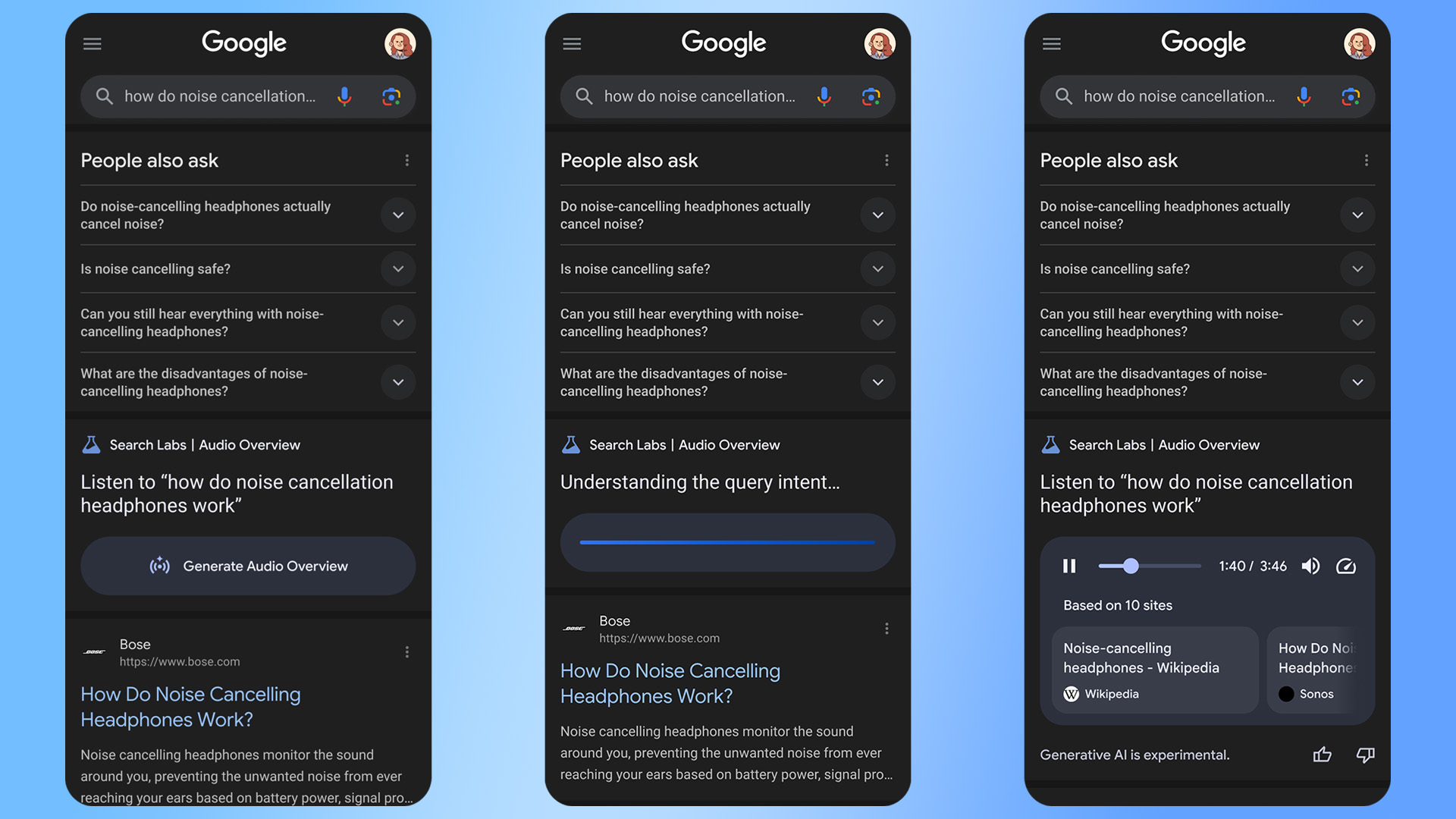
NotebookLM is undoubtedly one of Google’s best implementations of generative AI technology, giving you the ability to explore documents and notes with a Gemini AI model. Last year, Google added the ability to generate so-called “audio overviews” of your source material in NotebookLM. Now, Google has brought those fake AI podcasts to search results as a test. Instead of clicking links or reading the AI Overview, you can have two nonexistent people tell you what the results say.

This feature is not currently rolling out widely—it’s available in search labs, which means you have to manually enable it. Anyone can opt in to the new Audio Overview search experience, though. If you join the test, you’ll quickly see the embedded player in Google search results. However, it’s not at the top with the usual block of AI-generated text. Instead, you’ll see it after the first few search results, below the “People also ask” knowledge graph section.


Credit:
Google

Read full article

Comments