iOS 26 Can Stop Your Kid From Texting New Numbers Without Your Approval

Apple’s upcoming iOS 26 update is packed with new features and changes—but not all of them are just for fun. As part of its series of announcements during last week’s WWDC, Apple revealed a series of features and changes aimed at helping parents keep their kids and teens safe when using an iPhone.

Here are eight of the changes you can expect when your update your family’s devices in the fall.

Permission to text new numbers

Once your family updates your iPhones to iOS 26, your kids will only be able to text numbers within their saved contacts. If they want to send a text to a new number, they’ll need your permission first.

The process works similarly to requests for additional Screen Time or to make a purchase: You’ll receive the permission request in Messages, and Apple says it can be granted or rejected with one tap. This framework is also open to developers to implement in their apps, which will let kids send requests to chat, follow, or friend accounts in other apps.

Sharing age ranges with apps
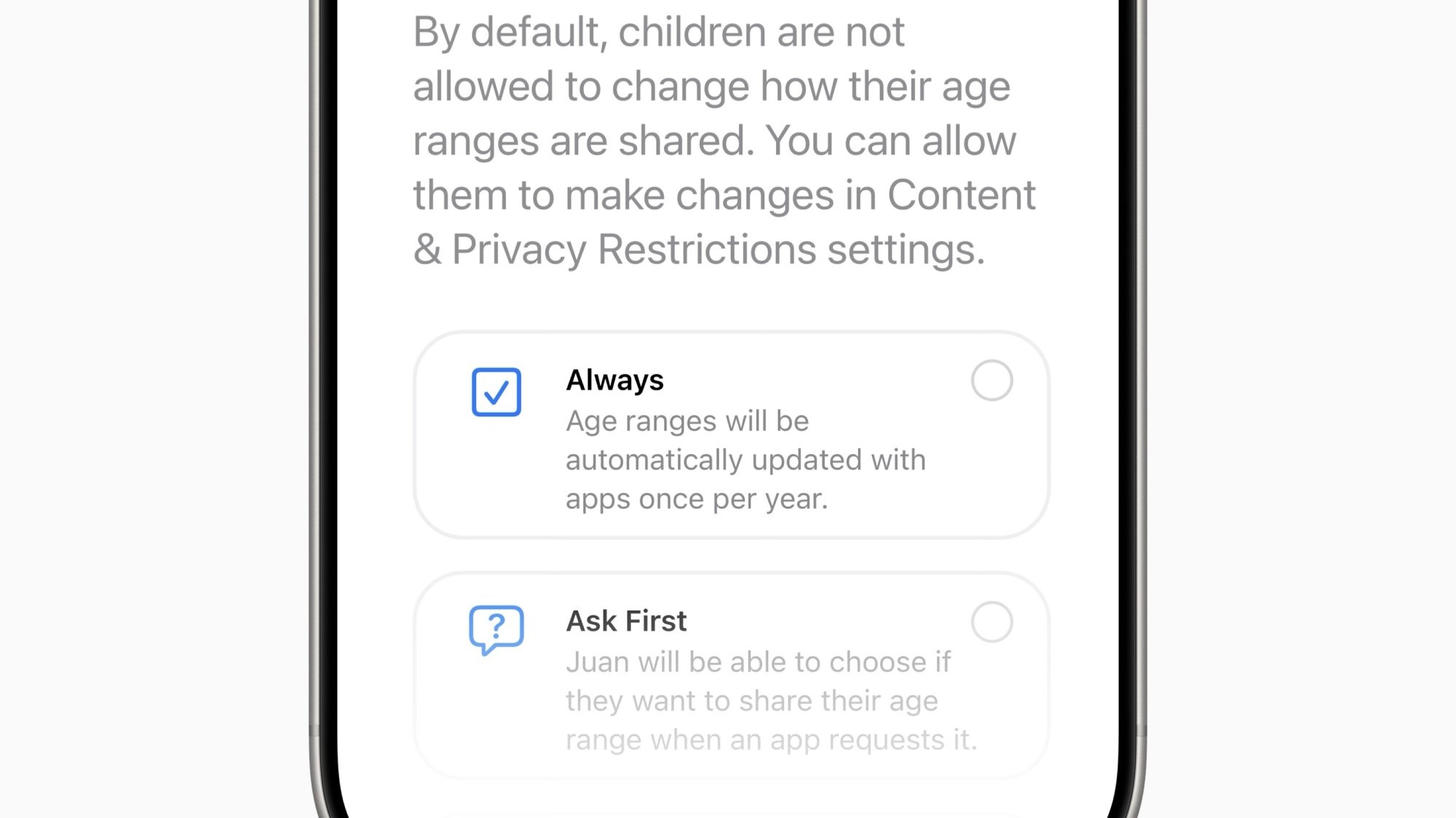
age range settings

Credit: Apple

If an app offers different types of content and experience depending on the age of their users, it may send you an age range request for your child. The idea is you won’t have to share your kid’s exact birth date; rather, you’d send a range your child’s age is in. That way, the app can curate its content that range without giving away too much of your child’s privacy.

In addition, you can configure these requests like other permissions across apps—you can choose whether to share this age range with all apps that want it, or if apps will need to ask for permission each time. You can also choose to never share age ranges going forward.

This change might be in response to new laws popping up throughout the U.S., that will require app stores like Apple’s to verify the ages of its users.

Teen accounts now have new limits

Child Accounts are required for users under 13, but optional for kids who are ages 13 through 17. That means that while some teens have protections baked into their accounts, those who made an Apple Account after they turned 13 might not have all the limitations you want.

Going forward, Apple will apply new limits to accounts for teens by default. That includes web content filters as well as Communication Safety, a feature that warns when content containing nudity is sent or shared.

New categories for age ratings

Currently, there are four age ratings for apps on Apple’s App Store: 4+, 9+, 12+, and 17+. Apple now says they’re expanding this list to five, and adding the following three ratings for adolescents: 13+, 16+, and 18+. While the company doesn’t specify, presumably, 4+ and 9+ will remain.

I can understand the logic here: 12+ and 17+ introduces a five year gap in between app ratings, which could pose an issue for developers with questionable content: Maybe the app isn’t quite right for users 12 and under, but is fine for 16 year olds. But in the current ranking, they’d need to place it under 17+, which locks out those users would could benefit from the app. Plus, developers can now tailor their apps to more specific demographics.

App Store content warnings

With the new updates, you’ll see new warnings on app store pages for apps that contain potentially problematic content, such as user-generated content, messaging, or ads. You’ll also see whether the app ships with in-app content controls, so you can fine-tune the experience for your kids.

Inappropriate apps will not be shown to kids

Apple says when you set app content restrictions for your kids, the App Store will hide apps with age ratings that exceed those restrictions. That means your kids can browse through App Store pages like Today, Games, and the Apps tab without needing to see apps that are inappropriate.

An expanded Ask to Buy

On the flip side, there is now a way for kids to request to buy something outside of their age range, through Ask to Buy. Ask to Buy is the feature that allows your kids to send you a request to buy something on the App Store. Going forward, you’ll be able to grant an exception to the age range, to allow your kid to buy the app anyway. You’ll also be able to rescind permission at any time, which will block your kid from using the app.

New Communication Safety triggers

Apple says Communication Safety will now look out for nudity in FaceTime calls too, and will “intervene” when it detects it. In addition, the feature will blur nudity in Shared Albums in Photos.

Trump fires commissioner of preeminent nuclear safety institution

Critics warn that the United States may soon be taking on more nuclear safety risks after Donald Trump fired one of five members of an independent commission that monitors the country’s nuclear reactors.

In a statement Monday, Christopher Hanson confirmed that Trump fired him from the US Nuclear Regulatory Commission (NRC) on Friday. He alleged that the firing was “without cause” and “contrary to existing law and longstanding precedent regarding removal of independent agency appointees.” According to NPR, he received an email that simply said his firing was “effective immediately.”

Hanson had enjoyed bipartisan support for his work for years. Trump initially appointed Hanson to the NRC in 2020, then he was renominated by Joe Biden in 2024. In his statement, he said it was an “honor” to serve, citing accomplishments over his long stint as chair, which ended in January 2025.

Read full article

Comments

That ‘Unsubscribe’ Button Could Be a Trap, Researchers Warn

Researchers are cautioning users against clicking unsubscribe links embedded in email bodies, citing new data showing such actions can expose recipients to malicious websites and confirm active email addresses to attackers. DNSFilter found that one in every 644 clicks on unsubscribe links leads users to potentially malicious websites.

“You’ve left the safe, structured environment of your email client and entered the open web,” TK Keanini, DNSFilter’s chief technology officer, told WSJ. The risks range from confirming to bad actors that an email address belongs to an active user to redirecting victims to fake websites designed to steal login credentials or install malware. Clicking such links “can make you a bigger target in the future,” said Michael Bargury, CTO of security company Zenity.


Read more of this story at Slashdot.

Intel Core 5 120F CPU Breaks Cover For Budget Gaming PCs With These Specs

Intel Core 5 120F CPU Breaks Cover For Budget Gaming PCs With These Specs
For high-end gaming PCs, many users will immediately flock to AMD’s CPUs with 3D V-Cache, but for an entry-level machine, you can often do better for the money with prior-gen Intel hardware. A good example is the ten-core Core i5-12600K at $149, which gives you very similar performance to a Ryzen 5 7600X in games, yet runs you $50 less before

Why You Should Never Click Old Discord Invite Links

If you’ve received an invite link to Discord but never used it to join that specific server, don’t click through it weeks or months later. As Bleeping Computer reports, hackers have repurposed Discord invite links that have expired or been deleted to deliver malware, including infostealers and keyloggers.

How Discord links are spreading malware

The malware campaign, identified by Check Point Research, capitalizes on a flaw in how Discord handles invite links, which can be temporary or permanent or, for paid servers with Level 3 Boost status, customized.

URLs to join regular Discord servers are randomly generated and unlikely to ever repeat, but vanity links—as well as expired temporary invite links and deleted permanent invite links—can be claimed and reused. Discord also allows invite codes with uppercase letters to be recycled in vanity links with lowercase letters while the original is still active.

This means that hackers can redirect users to malicious servers via links originating from legitimate Discord communities. These links are being shared on social media and official community websites.

When a user clicks the stolen link, they land on a Discord server that looks authentic and prompts them to verify their identity to unlock access. The verification link launches a ClickFix web page, which indicates that a (fake) CAPTCHA has failed to load and directs the user to “verify” by manually running a Windows command. This executes a PowerShell script, which downloads and installs the malware.

The payload itself may include malicious programs—like AsynchRAT, Skuld Stealer, and ChromeKatz—that allow keylogging, webcam or microphone access, and infostealing to harvest browser credentials, cookies, passwords, Discord tokens, and/or crypto wallet data.

According to Check Point’s analysis, the malware has numerous features that allow it to evade detection by antivirus tools. The report also notes that while Discord took action to mitigate this specific campaign, the risk of similar bots or alternative delivery methods still exists.

How to avoid malicious Discord links

First and foremost, be wary of old Discord invite links, especially those posted on social media or forums weeks or months back. (Temporary invite URLs on Discord can be set to expire within 30 minutes or up to a default of seven days.) Don’t click links from users you don’t know and trust, and request a new invite rather than relying on an old one.

You should use caution when engaging with verification requests, especially those that prompt you to copy and run manual commands on your device. ClickFix attacks via fake CAPTCHA requests abound, and any verification that tells you to execute a Run command is not legit.

If you run a Discord server, use permanent invite links, which are harder to steal and repurpose than temporary or custom URLs.

Dutch Court Confirms Apple Abused Dominant Position in Dating Apps

A Dutch court on Monday confirmed a 2021 consumer watchdog’s ruling saying that Apple had abused its dominant position by imposing unfair conditions on providers of dating apps in the App Store. From a report: The Rotterdam District Court ruled that the Dutch Authority for Consumers and Markets (ACM) was therefore right to impose an order subject to a penalty for non-compliance. The court ruled that ACM was right in finding that dating app providers had to use Apple’s own payment system, were not allowed to refer to payment options outside the App Store, and had to pay a 30% commission (15% for small providers) to Apple.


Read more of this story at Slashdot.

This Roomba with an auto-empty dock is down to a record-low price

The Roomba 105 Vac Robot + AutoEmpty Dock has been discounted to $280 as part of an extended Father’s Day sale. This is a record-low price, as it usually costs $450. Math tells me that’s a cool $170 off.

As the name suggests, this lil robovac will automatically head to the included debris dock to empty its contents. It’ll do this after every cleaning session and the company says the canister is large enough to go 75 days before requiring manual disposal. However, results will likely vary on that front. I’m talking to you, pet owners.

This is a solid effort by Roomba, which is a company that appeared numerous times in our list of the best robot vacuums. The suction power is on point and the dock includes a filtration bag that traps allergens. It ships with a multi-surface bristle brush and an edge-sweeping brush. Of course, it also provides access to the company’s LiDAR software for navigation. It can even clean in the dark.

There’s one downside. This is a fantastic vacuum, but it is just a vacuum. The Roomba 105 is not a hybrid unit, so there’s no mopping functionality. For that, you’ll have to spring for a pricier model.

Follow @EngadgetDeals on X for the latest tech deals and buying advice.

This article originally appeared on Engadget at https://www.engadget.com/deals/this-roomba-with-an-auto-empty-dock-is-down-to-a-record-low-price-184105673.html?src=rss

Forget Fake News, Get Real Bars: Trump T1 Gold Phone & 5G Plan Arrives

Forget Fake News, Get Real Bars: Trump T1 Gold Phone & 5G Plan Arrives
If you woke up thinking that this timeline couldn’t get any weirder, here’s today’s dose of unreality for you. There’s now a Trump Mobile MVNO, and it’s firing all barrels on launch with an unlimited usage phone plan and even its own smartphone.

The announcement comes on the 10th anniversary of President Trump’s initial political campaign,

Threads is testing out a way to hide spoilers

Meta is testing a way to hide spoilers on Threads, according to a new post from Mark Zuckerberg. The feature lets you obscure text or an image so that they’re only viewable once they’re tapped or clicked.

In the current version being tested, you have to highlight your chosen text or tap on the image and then tap “Mark spoiler” to hide it. Inside the Threads app there’s even a swirling particle animation that covers text and images before flittering away when you tap on them.

Two screenshots of the new spoiler tool in Threads, showing how you select text to hide and what hidden text looks like.
Meta

Meta suggests the feature is being added to make it easier to talk about ongoing shows without accidentally spoiling anything. The platform has a growing community of users who use Threads to discuss media, and an algorithmic feed that makes it pretty easy to get a spoiler dumped in front of you. Not many social media platforms outside of Reddit offer a way to obscure spoilers, either. Instead, users often have to turn to more general moderation tools like muting words or phrases to avoid learning things before they’ve watched a new movie or show.

The new spoiler feature doesn’t appear to be widely available yet, but it’s just the latest in a series of changes Meta has been experimenting with in Threads over the last few months. The biggest being the addition of a dedicated DM inbox. Up until this point messaging someone on Threads sent you to Instagram DMs, but Meta is now testing a separate Threads DM inbox in Hong Kong, Thailand and Argentina.

This article originally appeared on Engadget at https://www.engadget.com/social-media/threads-is-testing-out-a-way-to-hide-spoilers-182346919.html?src=rss

Uranus’ Moons Stun NASA With An Unexpected Dark Discovery By Hubble

Uranus' Moons Stun NASA With An Unexpected Dark Discovery By Hubble
NASA scientists embarked on a mission to find signs of interaction between Uranus’ magnetic region and the surfaces of its four largest moons using the Hubble Space Telescope. During the mission, they found evidence of darkness on the “leading side” of the moons, which unexpected.

For some context, Uranus’ four largest moons — Ariel, Umbriel,

Ads are “rolling out gradually” to WhatsApp

For the first time since launching in 2009, WhatsApp will now show users advertisements. The ads are “rolling out gradually,” the company said.

For now, the ads will only appear on WhatsApp’s Updates tab, where users can update their status and access channels or groups targeting specific interests they may want to follow. In its announcement of the ads, parent company Meta claimed that placing ads under Updates means that the ads won’t “interrupt personal chats.”

Meta said that 1.5 billion people use the Updates tab daily. However, if you exclusively use WhatsApp for direct messages and personal group chats, you could avoid ever seeing ads.

Read full article

Comments

Windows Hello Face Unlock No Longer Works in the Dark and Microsoft Says It’s Not a Bug

Microsoft has disabled Windows Hello’s ability to authenticate users in low-light environments through a recent security update that now requires both infrared sensors and color cameras to verify faces. The change forces the system to see a visible face through the webcam before completing authentication with IR sensors.

Windows Hello earlier relied solely on infrared sensors to create 3D facial scans, allowing the feature to work in complete darkness similar to iPhone’s Face ID. Microsoft pushed the dual-camera requirement to address a spoofing vulnerability in the biometric system.


Read more of this story at Slashdot.

Witcher 4 Is Taking A Console-First Approach, Plus A Reality Check For Xbox Series S

Witcher 4 Is Taking A Console-First Approach, Plus A Reality Check For Xbox Series S
CD Projekt Red is a busy studio these days. It just recently released a solid port of Cyberpunk 2077 on the Nintendo Switch 2, it’s deep into production of The Witcher 4, and has already announced that Cyberpunk 2 is in the early stages of development. Yet the developers still had time to show off an impressive tech demo featuring Unreal Engine

These Sennheiser Wireless Earbuds Are on Sale for $75 Right Now

We may earn a commission from links on this page. Deal pricing and availability subject to change after time of publication.

Sennheiser’s Sport True Wireless Earbuds are down to $74.99 on Woot for two days or until they sell out, with free shipping for Prime members (or $6 otherwise). That’s a decent drop from their original $149.99 price, and quite a bit cheaper than what they’re currently going for on Amazon ($149.95). The deal includes a 90-day Woot limited warranty, but it’s worth noting that shipping is limited to the continental U.S.

The earbuds themselves are somewhat hit or miss.. On the one hand, they offer strong audio with deep bass and clear highs, and you get support for both AptX and AAC codecs. The fit is customizable, with multiple ear tips and fins included. Battery life clocks in at a reasonable nine hours, plus another 18 from the charging case. But the “Sport” branding is a stretch, notes this PCMag review. The IP54 water-resistance rating can handle sweat and light rain, but it’s not great for anything more intense. And instead of an ambient sound mode, the earbuds rely on physical eartip swaps—one type for more awareness, one for less—which feels clunky in 2025.

The app experience doesn’t help much. You need it to adjust sound profiles based on which ear tips you’re using, but the EQ is limited, and the layout feels a little dated. There’s also no carrying pouch for the extra tips, which makes it easier to misplace or mishandle them. These earbuds do sound good and offer decent comfort, but they come with enough small frustrations that they’re not for everyone. If you just want solid wireless sound for less than $80 and don’t care much about extras, this deal might still make sense, but if you’re considering alternatives, the Tribit FlyBuds 3, priced at $39.99, could be worth a look.

Racing WTRL TTT or Zwift Racing League? It’s Time To Upgrade Your Bikes…

Back in March, Zwift launched their “bike upgrades” feature, allowing Zwifters to improve the performance of their in-game bike frames in 5 stages by logging time/distance/elevation on the frame before purchasing an upgrade.

To date, bike upgrades have been enabled in most community race events (including Zwift Insider’s Tiny Races) as well as Zwift’s major races (the ZRacing series). However, upgrades are disabled in the popular Thursday TTT events, as well as the Zwift Racing League Showdown wrapping up next week.

That’s going to change soon, though. We’ve received word from WTRL (organizers of the Thursday TTTs) that upgrades will be enabled starting in July (target date: July 3). Additionally, WTRL and Zwift have confirmed that, when Zwift Racing League (ZRL) spins up its first round in September, bike upgrades will be enabled for all events.

So today, I’m publishing this post as a public service announcement: if you’re racing on Zwift but haven’t started upgrading your bike(s), it’s time to get to work.

Why Upgrade?

Simply put, riding a fully-upgraded version of a fast bike will give you a significant advantage over anyone riding a non-upgraded version of the same frame. This is especially true when it comes to time trials, where results are based purely on finishing time and there’s no hiding in the competition’s draft.

A fully upgraded TT bike will be approximately 50 seconds faster across an hour of flat riding vs the non-upgraded version, and anyone who has raced a TTT knows that’s a huge margin. If you look at that time savings through the lens of power savings, it works out to ~11 watts saved.

This time savings is so significant that I believe we’ll see team leaders choosing to exclude riders who don’t have access to a fully-upgraded TT frame once upgrades are enabled for Thursday TTTs and ZRL.

Further reading: Digging Into Zwift Bike Upgrades: Performance Improvements and Power Savings at Each Stage

A fully upgraded all-around road frame will save you approximately 30 seconds across an hour of flat racing vs the non-upgraded version. It will also save you ~37 seconds across an hour of climbing. This works out to ~6 watts saved in flat races and ~3 watts on climbs. While these savings may not be noticeable when you’re riding tempo in the pack draft, racers know that saving power during the easier parts of a race allows you to have more in the tank when it’s time to go full gas.

Lastly, we have climbing frames, which improve by ~60 seconds across an hour of climbing when they’re fully upgraded. This works out to a ~5-watt savings, which will prove helpful for many riders who struggle on longer climbs in ZRL events.

Which Bikes To Upgrade?

So, which bike frames should you be riding and upgrading? If you want to dig into the data yourself and draw your own conclusions, see our detailed road bike frame performance charts and time trial frame performance charts.

Want to keep it simple? Here are my recommendations:

  • All Around Road Frame: Choose from the S-Works Tarmac SL8, Cannondale SuperSix EVO LAB71, Pinarello Dogma 2024, or Canyon Aeroad 2024. These are the four fastest all-arounder frames in Zwift (in that order), and are in a performance class all their own – see our Tron vs Top Performers chart for details.
    • You will need to put in 1600km and spend 1.9 million Drops to fully upgrade one of these bikes.
  • Time Trial Frame: Choose the Cadex Tri, which is far and away the most aero TT bike available on Zwift (see TT frame performance charts).
    • You will need to log 40 hours and spend 1.9 million Drops to fully upgrade this bike.
  • (Optional) Climbing Frame: While a fully-upgraded S-Works Tarmac SL8 climbs very well, you may want a fully-upgraded Specialized S-Works Aethos in your garage for any race that involves a crucial longer/steeper climb, especially if it’s a mountaintop finish (see road frame performance charts).
    • You will need to climb 15,000 meters and spend 1.9 million Drops to fully upgrade this bike.
  • (Optional) Halo Bike: Once you’ve upgraded your three key frames above, why not work toward a fully-upgraded Halo Bike? They aren’t great climbers, but they sure are aero! The Specialized Project ’74, in particular, is the fastest non-TT bike on Zwift, putting around 6 seconds into the Tron on flat ground (see All About Halo Bikes).
Specialized Project ’74

Upgrading Strategy

While some teams/riders are using, shall we say, less than admirable methods for achieving bike upgrades, there are definitely ways to ethically maximize your efforts as you work to upgrade your frames. Before you begin each Zwift session, give a bit of thought to which bike frame you should use for the session, as you’ll accumulate upgrade progress on which frame(s) you select.

Here are three simple tips:

  1. Time trial frames upgrade based on time spent, so these are best used when riding longer workouts, solo free ride efforts up big climbs, etc.
  2. Sitting in with pace partners, or participating in a social ride or race? You’ll want to use your road frame, since you’ll be racking up lots of kilometers in the draft.
  3. Once you’ve upgraded your TT frame, start using your climbing frame for any ride involving significant climbing, so you can make progress toward a fully upgraded Specialized S-Works Aethos.

Questions or Comments?

Where are you in your bike upgrade efforts, and what’s your overall strategy for upgrading? Share your thoughts below!

Japan Builds Near $700 Million Fund To Lure Foreign Academic Talent

An anonymous reader shares a report: Japan is the latest nation hoping to tempt disgruntled US researchers alarmed by the Trump administration’s hostile attitude to academia to relocate to the Land of the Rising Sun. The Japanese government aims to create an elite research environment, and has detailed a $693 million package to attract researchers from abroad, including those from America who may have seen their budgets slashed or who fear a clampdown on their academic freedom.


Read more of this story at Slashdot.

Obsidian Entertainment has big ambitions for Grounded 2’s small world

Obsidian Entertainment has been an incredibly versatile game developer over the years, even venturing outside its RPG comfort zone with the original Grounded. As a survival adventure game where you’re shrunken down and explore the hidden, vast world of a backyard, it became a well-loved hit, and it evolved even further throughout its early access period. But now, the developers have big plans for Grounded 2, which has new features and a larger scope that was too big for the original to contain.

Shortly after the reveal during the recent Xbox Games Showcase alongside Summer Game Fest 2025, I got to play the opening of the sequel, which sees the familiar crew of teenage scavengers, now a little older and wiser, shrunken down once again to survive a new small world hidden in the town’s park. Even as a new iteration of a familiar premise, which is essentially the survival gameplay of Rust by way of the whimsical Honey, I Shrunk the Kids, Grounded 2 is already showing some promise as the bigger and better sequel.

Grounded 2, which will also launch in early access, already feels like a bigger game, even from the confines of the tutorial zone. For starters, there’s a larger focus on building up the experience of the four teenage scavengers and how they fit into the larger story. It’s not quite Yellowjackets when it comes to teen drama, but the crew exploring the small world of the park have colorful language and quips at their disposal. There’s a generally stronger sense of personality in Grounded 2, which is bolstered by some more character-driven writing and opportunities to take in the lore of the company responsible for the experiments in town.

The experience of playing Grounded 2, much like the original and other survival games, is all about gathering resources from the land and acquiring knowledge to stay alive. Along with collecting materials to build weapons, armor and structures, you’ll also have to keep your characters fed and hydrated. You’ll also need to defend yourself against the various critters roaming about, such as the ants and the spiders. Also returning is the arachnophobia accessibility option to make them appear less disturbing for players. Thankfully, you can now use a dodge to avoid attacks – a first for the series – and combat is generally more responsive and fair.

Grounded 2 feels like a more well-rounded and refined take on the original, which is a solid game in its own right. One great addition that I got to play with was the new ant mount, or buggy, as the devs call it. You’ll be able to ride on top of a friendly ant that can attack enemies, move faster throughout the world, and even collect material far more quickly than the human scavengers.

Grounded 2
Obsidian Entertainment

Shortly after my hands-on experience, I sat in on a roundtable discussion with game director Chris Parker and producer Miles Winzeler from Obsidian Entertainment, who explained how early access feedback from players helped bring the game to its current state. In order to fully implement their vision for Grounded, though, they would need a new game.

“Almost everything in Grounded 2 comes from feedback from the community that we had gathered from the first game,” Parker said. “We had to look at what was important to work on with the sequel. People always want more stuff to do. They wanted to have the buggies, which was a huge one and our number one most requested feature from out the gate on Grounded 1. We then had to work on new creatures, armor and weapons, among other things. How can we further develop our progression systems? So those were all the things that we took on from the beginning for Grounded 2.”

Grounded 2 felt like a more fully realized game, which leveraged years of work on the original. Along with a more developed story campaign focusing on helping the kids survive the portion of Brookhollow Park they have to explore – which is more than three times the size of the original’s map – The game will also launch with creative mode, which was a popular feature that let players focus on exploring and building up structures at their leisure.

Grounded 2
Obsidian Entertainment

“We’re always trying to challenge scale and how we can create a sense of awe and mystery by having something that’s supposed to be normal but is now this gigantic thing,” Parker said. “That’s always the fun when making this game.”

I really took to the added scope of Grounded 2. Not just as a shrunken person trapped on the grounds of a park but also for the new features and ideas at work for the sequel. With the game coming out in July for early access, Grounded 2 has already got me invested in making a return visit to this small world with big ambitions.

Grounded 2 will release in early access on July 29 for Xbox Series X|S and PC, and will be available for Game Pass subscribers.

This article originally appeared on Engadget at https://www.engadget.com/gaming/xbox/obsidian-entertainment-has-big-ambitions-for-grounded-2s-small-world-173027415.html?src=rss

Nine Useful Power Tools You Probably Didn’t Know Existed

We may earn a commission from links on this page.

Even if consider yourself an experienced do-it-yourselfer and own a shed filled with power tools, chances are good you’re only scratching the surface of what’s out there to help you tackle projects around the house. In fact, if any particular aspect of a DIY project annoys, chances are decent someone has already designed a power tool that solves the problem—provided you know what to look for.

These nine power tools might not be found in every tool cabinet, but all of them can all make your DIY life a whole lot easier.

A brushless drywall sander

If you’re like me, doing any sort of drywall work is a frustrating experience—especially the sanding part, which is a sweaty, dusty mess (unless you wet sand, which can really reduce the dust). If you’re tired of sanding and sanding and sanding, rejoice, because you can buy yourself a power drywall sander like this one from Dewalt. Cordless and extendable, this makes sanding down drywall a breeze, using hook-and-loop sandpaper pads that you can buy at just about any hardware store. It’s important to note that while the sander has a vacuum hose, you’ll need to hook up a separate vacuum to capture the dust. Dewalt sells a range of dust extractors, but you can use any shop vac with a HEPA filter—but you might need a vacuum connector to make it work. Fire up the vac, pop in a battery, and suddenly sanding your drywall is a cleaner and simpler experience. (You can see it in action here.)

A cordless caulking gun

Caulking should be easy. Load a cartridge into even the cheapest caulk gun, squeeze the trigger, caulk comes out. But getting a clean, consistent bead of caulk with an old-school manual gun is a challenge, and if you’re doing a lot of caulking your future most likely includes hand cramps. That’s why a powered caulking gun is the kind of mind-blowingly obvious power tool to add to your kit. Load up your caulk, press a button, and an absolutely perfect bead of caulk comes out for as long as you need it to (or as long as the cartridge holds out). Most models have adjustable speeds so you can find the sweet spot for the job.

Power scissors

If you’re cutting stuff with manual scissors, stop—especially if you’re cutting awkward, thick stuff like sheets of plastic, or that deadly clamshell plastic packaging that quickly becomes a dangerous weapon as you struggle to get it open. A cordless power scissor will slice through that stuff easily—a blessing if you’re going to be cutting up a lot of stuff and you don’t want to have to ice your forearm later.

An auto hammer

Still swinging a hammer like a caveman? Still mangling your thumbs and denting everything within a few inches of your intended nail? Once you use an auto hammer you will never go back. Just load a nail onto the magnetic strike plate, position it, and press the trigger. The auto hammer will drive a wide range of nails with little effort, saving you time and sweat—not to mention your thumbs.

A track saw kit

Anyone who regularly does projects around the house probably has a circular saw in their tool collection. But even with careful measuring a circular saw can betray you when it comes to straight lines—especially if you need to cut a very long piece. This can be especially frustrating when you’re ripping down a piece of wood and need a very straight, level edge. Not everyone has space for—or can afford—a table saw, but with a track saw kit you can get perfectly straight cuts without the bulk of a table saw. The track can be affixed horizontally or vertically, to walls or other surfaces—anywhere that requires a perfectly straight cut.

A finger sander

Most casual DIYers have sandpaper in their toolbox. Some might even have a power sander tucked away somewhere. But if you need to sand narrow or difficult-to-reach surfaces, conventional sandpaper can be a frustrating experience and most power sanders will be way too large and inflexible. Having a finger sander (aka a detailing or file sander) will give you the ability to reach those difficult spaces and sand with a fine amount of control.

An air snake for cleaning drains

If you’re like me, you’ve come to regard that mechanical snake you bought years ago as a crock: Every time the drain slows down you jam that cable down into your drain, turn the crank, and…nothing happens. You end up having to take your plumbing apart in order to locate and clear the clog. Unless you have an air snake kit like this. Without removing anything, the air gun uses a shot of high-pressure air to clear traps and pipes, turning an hour of sweaty work into about three minutes.

A power wheelbarrow

Getting your garden together? Dealing with landscaping headaches? Hauling pebbles to your driveway? Whatever you’re using a wheelbarrow for, you know they were designed for medieval peasants who never expected to live past the age of thirty and will leave your back feeling like a pretzel. This is why a power-assisted wheelbarrow like this one is a must if you use a wheelbarrow more than…well, ever. The motor adds just enough thrust to make pushing it a breeze, even on inclines.

A 4-in-1 Drill

Power drills are standard in any toolkit, and make both easy and complex projects a lot simpler. There are even specialty drill bits that can make drilling and driving screws around corners and in tight spaces much easier. But none of those solutions can compare to a 4-in-1 drill like this one from Milwaukee. The attachments can be fitted to each other, so you can come up with solutions on the fly without sacrificing torque—even drilling around pipes or other obstacles that block your bits and make even a flexible drill bit difficult to use.