Animated Death Stranding movie gets its screenwriter

Hideo Kojima said in an interview with Vogue Japan earlier this year that an anime based on his game Death Stranding was in the works. Today, Deadline reports that Aaron Guzikowski will write the screenplay for the upcoming animated feature based on the game world. His most recent credit is the sci-fi series Raised By Wolves, but Guzikowski has also worked on movies including Prisoners and Papillon. The animated film will tell “an original story” from the same universe as the already quite cinematic Death Stranding.

Kojima Productions will be involved with this adaptation and Line Mileage is the animation company attached to the project. The executive team at Line Mileage has previous experience making animated series and adaptations. Their bios mention shows such as Tomb Raider: The Legend of Lara Croft and Castlevania that have reimagined popular games as animated projects squarely targeting adult viewers.

This film is a separate project from the live-action adaptation that’s being helmed by writer-director Michael Sarnoski with production company A24 (and of course Kojima Productions). And if you can’t wait for either of these movies to wrap to get more Kojima, the release date for Death Stranding 2 is just around the corner.

This article originally appeared on Engadget at https://www.engadget.com/entertainment/tv-movies/animated-death-stranding-movie-gets-its-screenwriter-200537247.html?src=rss

If the Next Xbox Runs Steam, I’m Buying It on Day One

In a video recently published to YouTube, Xbox President Sarah Bond made a big deal of announcing Xbox’s partnership with AMD on whatever its next-gen console ends up being. But it’s one small detail nestled into the back half of the video that grabbed my attention. Forget “immersive gameplay and player experiences enhanced with the power of AI.” Did she just say the next Xbox will be able to run Steam?

“This is all about building you a gaming platform that’s always with you, so you can play the games you want across devices, anywhere you want,” Bond says right as the video is about to close. “Delivering you an Xbox experience, not locked to a single store or tied to one device.”

That’s an exciting premise, but it’s not exactly clear what it means. As of late, Microsoft has made a big deal about expanding the Xbox branding to apps built for streaming devices and third-party handheld gaming PCs. So while, on the surface, this does sound like an admission that the next Xbox console will be able to run third-party game stores, it could also just be a reference to PCs having an Xbox app that can launch games from their other stores.

Personally, though, I hope it’s the former. Ever since I started playing games on PC around high school, I’ve been looking for a way to permanently leave consoles behind, but since I sometimes like to play games in the living room, there hasn’t been a good option for me yet. This could be that.

Xbox could be the king of living room PCs

Others might not be so sure about wanting their living room PC to be an Xbox. But I’d like to counter that current living room PC solutions suck. I’ve tried just placing a PC in my living room. But that means losing out on its power while I’m in my office. I’ve tried running a long HDMI cable from my PC to my TV. Aside from being a tripping hazard, doing that had me frequently running back and forth between rooms to troubleshoot technical issues. And I’ve tried streaming games from my PC to a Steam Link, a Raspberry Pi, and later, a docked Steam Deck. Aside from introducing lag to the equation, eventually, something always goes wrong while doing this too, and I end up having to repeat those back-and-forth treks to my office.

Plus, it’s just not intuitive to use mouse and keyboard input on the big screen, at least for menus. I hate having to keep a wireless keyboard and touchpad combo near the couch—it just takes up too much space on my coffee table. But I also hate the idea of not being able to game in my living room, so I put up with it. Sometimes, I just don’t want to be in my office after wrapping up the work day.

An Xbox that can just use a controller to open Steam like any other app, though, would be a dream. All the convenience of a console, but with the versatility of PC.

Why would you want to play Steam games on an Xbox?

So, why would you want to play PC games in the living room instead of just buying them for console, especially if you’re just going to use a controller anyway? Really, I think there are three reasons—flexibility, game availability, and cost.

It makes sense to buy Xbox games on the Xbox store, yes, but in doing so, you’re locking yourself down to Microsoft’s own devices, at least when it comes to consoles. The Play Anywhere program does give you access to the PC versions of some games when you buy the Xbox version, but it’s not compatible with every game, and it still locks you to one store. Buying a game on a PC store like Steam, meanwhile, lets you easily carry your library with you as you upgrade to new devices, whatever they are. This ensures a type of “backwards compatibility,” something that’s not guaranteed with new console launches (although Bond did confirm in yesterday’s video that the next Xbox will be able to play your current library of Xbox games). It also allows you to play games on a handheld or laptop while you’re away from your main device, then utilize cloud saves to put them on the big screen once you get back home. If I’m able to buy games to play in the living room from Steam rather than on a proprietary store, I can rest easy knowing they’ll fit into my library well into the future, rather than be isolated on some forgotten system in the back of my closet just a few years down the line. I’ll also know that my library’s platform won’t obligate me to stick with a specific brand in the future. Xbox has been better about this than, say, Nintendo, but there’s no guarantee that’ll last.

Plus, some games just aren’t available on console, or they come to them late. This isn’t such a big deal for larger releases—like Call of Duty or Madden—but for early access or indie games, where developers might still be going through the process to get permission to publish their games for a console’s own store, they often release first on PC. Being able to play your Steam games on your Xbox will let you jump into these experiences right away (shoutout to Freedom Planet 2, one of my indie favorites that came to PC a whole year-and-a-half before console).

Finally, there’s cost. While the Xbox, PlayStation, and Nintendo stores are no stranger to sales, PC game stores thrive on these. That’s thanks to competition. Until now, consoles have locked you to their own digital game stores, so there’s less incentive to offer discounts. But PC games have many places you can buy them from. That means quarterly Steam sales events, regular midweek and weekend sales, and on other PC game stores like Epic, weekly free games that are yours to keep so long as you claim them during the right window. Honestly, while PC gaming, if you play things right, you could focus most of your purchasing power on hardware and still have a decently sized library stuffed with free or cheap games. If Xbox allows Steam, or better yet, Steam in addition to Epic or other game stores, building a library for it could become much cheaper.

How realistic is an Xbox that runs Steam?

Again, though, none of this is confirmed. But there is one note toward the end of Bond’s video that gives me hope. After talking about the “Xbox experience” not being locked to a single store, Bond mentions that the Xbox team is “working closely with the Windows team to ensure that Windows is the number one platform for gaming.”

That’s not “Windows and Xbox.” That’s just Windows. Translation: the next Xbox could run Windows.

I mean, technically, that’s what the current Xbox does, but it’s so locked down that it barely feels like the same thing. However, if Xbox’s next console is anything like the recently announced ROG Xbox Ally Handheld, it could be that Xbox’s next home console will essentially just be a PC with a special Xbox interface laid over it, and the ability to launch proper PC apps—something the current Xbox can’t do.

On one hand, that could be a little sad. There would definitely be a sense that “Microsoft is giving up” if it essentially makes the next Xbox a gaming PC rather than a more handcrafted device. On the other hand, I like gaming PCs, and one that comes with fewer hurdles for casual play sounds like a dream come true.

There are still plenty of reasons to be skeptical—we don’t yet know if this will happen yet, or how customizable the next Xbox’s hardware will be (another big plus for gaming PCs), or how much it will cost. Part of what generally makes consoles more affordable than PCs, for instance, is that companies can sell them at a loss and expect to make up the cost in game sales. If you can buy games for your Xbox on stores not owned by Microsoft, will that make the console itself more expensive?

But to me, this still seems like an experiment worth trying. If Microsoft makes an intuitive, powerful-enough living room PC that can run my Steam library (or even my Epic library), it’ll finally deliver on an experience I’ve been chasing, to little avail, for decades.

Watch Out for Scammers Impersonating Banks on Instagram and Facebook

While many financial institutions have a presence on social media, not all content that appears to be legitimate and trustworthy actually is. Scammers are posting ads on Instagram impersonating Canadian banks, including Bank of Montreal and EQ Bank, in phishing campaigns.

An investigation from Bleeping Computer found a series of fake ad posts on Instagram that directed users to phishing websites that collect login credentials as well as stories impersonating a well-known bank strategist that harvests contact information.

How scammers are impersonating banks on Instagram

These Instagram phishing scams have taken a couple of forms. In one, fraudsters are using what looks like official bank branding in static ad posts with promises of high interest yields on savings accounts. If users click through to learn more or apply, they are directed to a fake website and prompted to enter their account credentials. While the page looks legit, the URL clearly is not linked to EQ Bank’s actual domain.

Another version of this scam involves fake ads and AI deepfake videos impersonating Brian Belski, Bank of Montreal’s chief investment strategist. The “BMO Belski” ads show up in Instagram stories with screening questions like “How long have you been investing in stocks?” Upon answering, the user is prompted to submit their contact information to the advertiser. The videos direct users to private “investment groups” on WhatsApp.

The latter is an iteration of a fraud campaign I covered recently: Ads on Facebook that appear to be affiliated with prominent investors like ARK Investment Management’s Cathie Wood, CNBC’s Joe Kernan, and Fundstrat’s Tom Lee and lead users to group chats on WhatsApp, where they get sucked into pump-and-dump schemes. Obviously, the investors shown aren’t actually endorsing the ads or the advice, but an unsuspecting user may believe they are getting credible information from trusted sources.

As Bleeping Computer points out, the accounts behind the BMO Belski ads exist only on Facebook—Meta Business Manager allows Facebook pages to run Instagram ads without having an Instagram account. If you click through to the BMO Belski Facebook page, there are signs that the account is repurposing an existing page with an older creation date and established following (albeit only two posts), potentially giving it more credibility to the casual observer.

How to avoid bank impersonation scams

These fraudulent ads may be increasingly difficult to suss out thanks to the use of stolen brand assets and AI-generated videos that, as we’ve covered, are as believable as we want them to be.

Always have a critical eye on social media content that appears to come from a legitimate entity or well-known individual. Investors (trustworthy ones, anyway) and celebrities are typically not giving too-good-to-be-true finance tips on Instagram and Facebook or in WhatsApp chats.

Credible Instagram accounts have a “verified” badge, but you should still be wary of entering credentials on a site you’ve clicked to from an ad. You’re better off going directly to an organization’s official account page or website and logging in from there to verify any online promotions. Ads on social media are used for spreading malware—another reason not to engage with them.

Modder Gets AMD’s FSR 4 To Work On Radeon RX 7900 XTX And Runs Benchmarks

Modder Gets AMD's FSR 4 To Work On Radeon RX 7900 XTX And Runs Benchmarks
AMD’s RDNA 4-based Radeon RX 9000 series graphics cards are a major step up from the RDNA 3-based Radeon RX 7000 series across multiple key metrics, but arguably the most notable is the added support for the company’s FSR4 upscaling. FidelityFX Super Resolution 4 represents a paradigm shift in AMD’s image upscaling methodology; rather than

Gearbox CEO Praises Borderlands 4 Price And Teases A Ton Of DLC

Gearbox CEO Praises Borderlands 4 Price And Teases A Ton Of DLC
Gamers are still coming to grips with the increasing costs of the latest games. Microsoft has raised the price of its consoles, while Nintendo is pricing certain games, such as Mario Kart World, at $79.99. These developments have led fans of the Borderlands series to worry that the next entry in the series would be the most expensive one yet.

Fueling

Microsoft Planning Thousands More Job Cuts Aimed at Salespeople

Microsoft is planning to ax thousands of jobs, particularly in sales, as part of the company’s latest move to trim its workforce amid heavy spending on AI. From a report: The cuts are expected to be announced early next month [non-paywalled source], following the end of Microsoft’s fiscal year, according to people familiar with the matter. The reductions won’t exclusively affect sales teams, and the timing could still change, said the people, who requested anonymity to discuss a private matter. The terminations would follow a previous round of layoffs in May that hit 6,000 people and fell hardest on product and engineering positions, largely sparing customer-facing roles like sales and marketing.


Read more of this story at Slashdot.

Adobe Firefly Mobile Brings Powerful AI Image And Video Generation To iOS And Android

Adobe Firefly Mobile Brings Powerful AI Image And Video Generation To iOS And Android
Adobe just launched its Firefly mobile app for Android and iOS, a move that will provide users more tools to create AI images and videos directly on smartphones. The new Firefly app will enable smartphone users to access the AI models available on the web app, alongside models from partners such as Ideogram, Runaway, Pika, and Luma AI.

Some

Cache-Aware Scheduling For Linux Refined – Better AMD & Intel CPU Performance

Going on for several months now has been an effort to wire up cache-aware scheduling / load balancing for the Linux kernel for helping out task placement for processors with multiple cache domains such as modern AMD Ryzen/EPYC and Intel Xeon platforms. This cache-aware scheduling has shown much potential for Linux with further enhancing performance on today’s interesting CPUs. Out today is the third iteration of cache-aware scheduling with an important rework…

Waymo will start testing its autonomous cars in New York again

Waymo’s autonomous cars are heading back to New York City in July, the company announced today. Cars will be manually driven for now, not unlike the mapping tests Waymo ran in 2021, but the company says it ultimately wants to bring the same autonomous ride-hailing service it offers in San Francisco, Phoenix and Los Angeles to NYC.

New York state law currently doesn’t allow for the operation of a vehicle without a human driver, an obvious obstacle for a company like Waymo. As a bridge to offering its full service, Waymo says it’s applied for a permit with the New York Department of Transportation to operate vehicles autonomously with a trained specialist behind the wheel. If NYC DOT approves the permit, the company says this will be the first “testing deployment” of autonomous vehicles in New York City.

New York, we’re coming back to the Big Apple next month! ��We want to serve New Yorkers in the future, and we’re working towards that goal. Here’s how:� pic.twitter.com/wOLEIhYilz

— Waymo (@Waymo) June 18, 2025

Waymo’s previous excursion in New York was focused on navigating city traffic and dealing with icy and snowy weather. Each city the company enters presents a new challenge, but the places Waymo currently operates are primarily in drier, warmer climates. For now, getting the state and city onboard with autonomous vehicles seems like the larger issue.

Outside of New York, Waymo continues to grow. The company recently expanded its service area around San Francisco and Los Angeles, came to Austin with the help of Uber in March and plans to either offer paid rides or test its self-driving system in several other cities over the next year.

This article originally appeared on Engadget at https://www.engadget.com/transportation/waymo-will-start-testing-its-autonomous-cars-in-new-york-again-190530022.html?src=rss

This Ring Home Security Bundle Is More Than Half Off for Prime Members

We may earn a commission from links on this page. Deal pricing and availability subject to change after time of publication.

If you’ve been dragging your feet on setting up home security, Amazon’s current Prime members-only deal on this Ring bundle might make things a little easier for you. It all includes the basics—a keypad, motion sensor, contact sensor, range extender, and base station—plus the newer Ring Indoor Cam.

That’s enough to secure one entry and a main room or hallway, which is usually where most people start, and the whole setup is currently going for $121.99 on Amazon, but only for Prime members. That’s a substantial 53% discount from the regular price of $259.98—and much lower even than the previous low of $244.99, according to price tracking tools.

This Ring Alarm kit is a good choice if you don’t want to mess with wiring anything, as it’s all battery powered. PCMag describes it as a simple DIY solution, and the setup mostly lives up to that: The app walks you through connecting everything via Z-Wave, and once it’s going, you can arm or disarm using the app, a voice assistant, or the included keypad. The sensors will send alerts straight to your phone if anything sets them off. You don’t need a subscription to use the alarm basics, but if you want extras like cloud recordings or assisted monitoring, you’ll need to subscribe to a Ring Home plan—$4.99 a month for one camera or $9.99 to cover all Ring devices in your home.

The second-gen Ring Indoor Cam adds a bit more control, with privacy-first updates like a physical cover for the lens and a button to disable the mic, notes this PCMag review. It’s not battery-powered, so you’ll need to position it near an outlet, but its footage is sharp, the audio is clear, and it plays nicely with Alexa (though it lacks Apple HomeKit, Google Assistant, or IFTTT support). And since it’s small, it doesn’t scream “security camera” when sitting on a shelf.

On its own, this setup won’t secure a big house. If you’ve got multiple doors or large spaces to cover, you’ll probably need to add more sensors and cameras. But as a low-commitment, high-impact starting point, it’s a solid choice—especially at the current price.

Boeing 787’s Emergency-Power System Likely Active Before Air India Crash

Investigators believe Air India Flight 171 had an emergency-power generator operating when it crashed last week, raising questions about whether the plane’s engines functioned properly during takeoff. WSJ: The preliminary finding [non-paywalled source], according to people familiar with the probe, gives investigators a new line of inquiry as they study a crash that killed all but one of the plane’s passengers. In all, at least 270 people died following the crash, including some on the ground in the western Indian city of Ahmedabad.

The emergency system is known as a ram air turbine. It is a small propeller that drops from the bottom of the 787 Dreamliner’s fuselage to serve as a backup generator. Engines normally produce electricity for an aircraft and help run its flight-control systems. The power generated by the RAT can enable crucial aircraft components to function. The system can deploy automatically in flight if both engines have failed or if all three hydraulic system pressures are low, according to an airline’s Boeing 787 manual reviewed by The Wall Street Journal.

It can also deploy if cockpit instruments lose power or problems emerge with the aircraft’s electric motor pumps. Pilots can manually deploy the RAT if needed. The most common occurrence is when a pilot thinks that both engines failed, according to Anthony Brickhouse, a U.S.-based aerospace safety consultant. Engine failures can result from a variety of causes, including bird strikes or problems with fuel.


Read more of this story at Slashdot.

xAI faces legal threat over alleged Colossus data center pollution in Memphis

After thermal imaging appeared to show that xAI lied about suspected pollution at its Colossus supercomputer data center located near predominantly Black communities in Memphis, Tennessee, the NAACP has threatened a lawsuit accusing xAI of violating the Clean Air Act.

In a letter sent to xAI on Tuesday, lawyers from the Southern Environmental Law Center (SELC) notified xAI of the NAACP’s intent to sue in 60 days if xAI refuses to meet to discuss the groups’ concerns that xAI is not using the requisite best available pollution controls. To ensure there’s time for what the NAACP considers urgently needed negotiations ahead of filing the lawsuit, lawyers asked xAI to come to the table within the next 20 days.

xAI did not respond to Ars’ request to comment on the legal threat or accusations that it has become a major source of pollutants in Memphis.

Read full article

Comments

Major Linux Distros Are Exposed To A Root-Level Security Threat, Update ASAP

Major Linux Distros Are Exposed To A Root-Level Security Threat, Update ASAP
Linux server administrators, it’s time to get your patching going. The boffins at Qualys, a security outfit well known for its excellent SSL configuration tester, found a pair of security vulnerabilities that combined can grant any unprivileged user instant root (administrator) access.

The first vulnerability in the story is the least impactful,

Six Ways to Protect Yourself Against a Terrible Landlord

Landlords have been with us for a very long time—people have been renting homes from others for thousands of years. There are about 10 million individual landlords in the U.S., and if you’re a renter, you know that the experience can vary greatly. There are terrific landlords who hop on repairs quickly, try to keep rents reasonable, and understand that their tenants are human beings. But there are also terrible landlords who treat their tenants terribly, which can make everyday life stressful and unpleasant.

If you focused on the property instead of the person and missed the signs of a bad landlord, you might feel powerless. After all, they can raise your rent, evict you, allow the unit to become uncomfortable (or unlivable), or simply be rude and unpleasant in every interaction. But you can fight back and protect yourself by taking some necessary steps.

Know your rights

Most states have some form of a “tenant’s bill of rights” that outlines your rights as a tenant. Your first step when dealing with a bad landlord is to know what those rights are—and who is responsible for enforcing them. Many states have an explicit housing authority that handles landlord disputes and complaints, but in some cases, you’ll have to go through the state attorney general’s office or some other entity.

In fact, it’s good to know this information before you sign the lease in the first place. Knowing what your rights are and the procedure for filing a complaint ahead of time will give you a sense of empowerment and save time if you discover that your landlord’s a bad person when it’s too late to back out.

Set boundaries

Landlord harassment often includes accessing your home without your knowledge or permission. Many landlords either mistakenly believe that since they own the place they’re allowed to enter whenever they wish—or they know better and don’t care. In either case, you have an expectation of privacy and the right to enjoy your home. The landlord’s access is typically defined by state law and the rental agreement you signed, so reviewing both of those will give you the specifics. But, in general, landlords have to give you notice when they’re going to enter the property unless it’s an emergency situation.

If your landlord keeps entering your private space, or consistently harasses you in the common areas of the property, start by setting clear boundaries. A written notice outlining the access and notice policy and directing the landlord to communicate with you only via email or in writing is a good place to start. Cite the specific language of the lease or applicable state laws in there for good measure.

Keep records

Of course, simply telling your landlord that you expect them to respect your privacy and communication preferences is no guarantee that they will abide by those wishes. The next important thing to do when dealing with a bad landlord is to start keeping records: Keep copies of all written communications, and start noting the date and time of all interactions, regardless of their tone or outcome. If the time comes when you have to take more formal action, those kinds of details and facts will come in very handy. For example, if you need to prove the landlord is violating state law regarding accessing the unit, having a documented timeline of their inappropriate entries will bolster your case.

Since battling a bad landlord involves someone who can cut off your access to your home, it’s a good idea to keep these records (along with important documents, like your lease agreement) in a separate place—or at least copies of them. If you are inappropriately locked out of your apartment (during an illegal eviction attempt, for example) you’ll still be able to access everything you need to fight back.

Set up security

If you suspect your landlord is violating your personal space but they deny it, setting up some home security cameras is a great way to compile documentary proof of their bad behavior. A doorbell camera with audio will not only capture incidents when your landlord enters your home without notice or permission, aiding your record-keeping, but can also capture interactions where your landlord is abusive or aggressive with you. Cameras set up inside the apartment can also document unreasonable access and capture any other bad behaviors they might get up to while in your home.

One thing to keep in mind is the laws in your state regarding recording people without their knowledge. Some states are “one party” states that allow this, some require that both parties be aware that they are being recorded. While recording something inside your home is almost certainly legal, recording audio on doorbell cameras can get a little tricky, so be sure to do a little research before you set that up.

Talk to your neighbors

If your landlord is rude, aggressive, or invasive with you, chances are very good they behave similarly to other tenants in your building. Talking to your neighbors about your experience can offer a wealth of corroborating data around the landlord’s behavior that can augment your own records or support a complaint. Approaching your landlord as a group can also be a lot more effective than confronting them individually.

If your landlord isn’t impressed when every one of their tenants complains, you could even consider forming a tenant’s association. This would allow coordinated, group action against an unreasonable landlord, including the possibility of (perfectly legal) rent strikes and other collective actions designed to force your landlord to follow the law and behave themselves.

File a complaint

If nothing else works, your final recourse is some form of legal action:

  • File a complaint. If you’ve raised your concerns with the landlord and nothing’s changed, consider filing a formal complaint with your state’s housing authority or attorney general. It’s usually best to write your landlord directly and copy the housing authority on the letter—this gives your landlord a chance to respond formally while letting them know that you are aware of your rights, and you know who to contact about them.

    The letter should be straightforward—describe the problem clearly, include specific examples with dates and times, and explain the result you want. Lay out a timeline for a response—e.g., “If I do not hear from you within 14 days, I will take further action.” You can find many examples of these kinds of letters through a web search if you need a little guidance.

  • File a lawsuit. If your landlord doesn’t respond, or responds with even worse behavior, you might have to consider a lawsuit. Since you’re probably not suing for monetary damages, something like small claims court probably won’t work for you. You’ll be best served by contacting an attorney who specializes in landlord-tenant cases (you can find one here). They can advise you as to whether your landlord’s behavior is actionable in the court system and help you navigate the process.

Meta is finally adding passkey support for Facebook and Messenger

Meta is finally adding passkey support for Facebook and Messenger on mobile devices. This should make for more seamless logins, as a passkey lets people sign in by using the same data they already use to verify their identities on a smartphone. This includes stuff like a PIN code, a fingerprint or a quick face scan.

This is not only convenient, but more secure than traditional passwords. Passkeys are resistant to many types of malicious attacks, as they can’t be easily guessed or stolen. This will vary depending on the type of passkey you use, as a four-digit PIN is easier to fake than a full face scan or a fingerprint.

Meta says this feature will be rolling out soon for Facebook on iOS and Android devices, but Messenger users will have to wait a bit longer. The company says that’s headed our way “in the coming months.” However, the same passkey will work with both Facebook and Messenger. 

The tool in action.
Meta

Facebook has been slow to adopt this login method. Google has offered this feature for years, and X jumped on board last year. Microsoft uses passkeys, as does Amazon, eBay, PayPal and many others. Even Meta’s other chat platform Whatsapp has started allowing passkey logins. Instagram is still a holdout.

This article originally appeared on Engadget at https://www.engadget.com/apps/meta-is-finally-adding-passkey-support-for-facebook-and-messenger-182549616.html?src=rss

Wyze adds major security update to its security cameras after numerous security lapses

Wyze, the Seattle-based tech company that specializes in smart home products and wireless cameras, has released a major security update that it hopes will rebuild some lost trust. The company has been plagued by numerous security failures over the past few years, most notably when an AWS outage led to thousands of users gaining access to recorded videos from other people’s homes. That incident, paired with the company’s history of lackluster responses to security flaws, even led The New York Times to explicitly stop recommending Wyze products more than a year ago.

Now, in a YouTube video announcement that cheekily mentions the AWS outage, Wyze is introducing a new layer of security that the company is calling Wyze VerifiedView. The added layer of security works by embedding a unique user ID into the firmware of a Wyze camera upon setup. The camera in turn stamps that ID onto every photo, video and livestream. Before any device can access that footage, the Wyze software will check that the embedded ID matches the one for the user before it allows the footage or images to be seen.

Wyze is adamant that this new layer is simply building upon its already robust security structure, which the company somewhat meaninglessly says is akin to “barbed wire fencing, booby traps, security guards, acid sharks, laser scanners, and AI robot guard dogs.” While it’s not mentioned in the press release, the announcement video clarified that VerifiedView may never come to older models like the Wyze Cam Pan V1 and V2 due to hardware limitations.

Wyze says it has been pushing this update to its most popular models since the beginning of April, and that users of those models just need to update their firmware and app to receive the update. Which models exactly remains unclear, as Wyze also mentioned that some other models will receive the updates over the coming weeks and months, but again did not specify which models they were referring to.

This article originally appeared on Engadget at https://www.engadget.com/home/smart-home/wyze-adds-major-security-update-to-its-security-cameras-after-numerous-security-lapses-181735619.html?src=rss

Zed Editor Introduces Built-In Debugger

The Zed Editor remains a popular code editor written in the Rust programming language and providing modern features for this project started by former Atom developers. One of the long sought features for Zed has been having built-in debugger capabilities and that work has finally been merged to the project’s codebase…

Garmin/Tacx Announce Zwift Virtual Shifting Support for Neo 2, 2T, and Neo 3M

Today, Garmin announced that Zwift virtual shifting is now available on the Tacx NEO 2T and 3M trainers. (Oddly, it has also been released today for the NEO 2, but that wasn’t included in any of the press releases.)

Below, we dive into updating your trainer so it can shift virtually, as well as various options for enabling virtual shifting on your Zwift setup.

Updating Your NEO’s Firmware

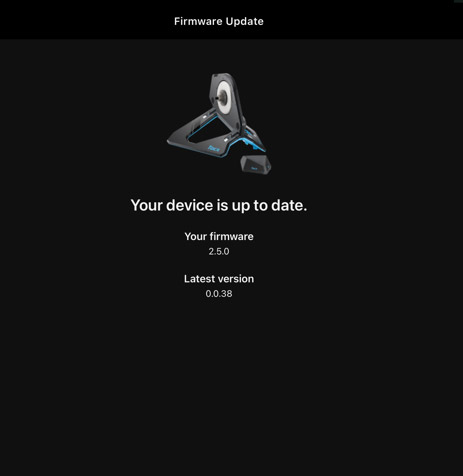
To enable virtual shifting on your NEO 2, 2T, or 3M, you’ll need to update your trainer’s firmware. This is done via the free Tacx Training app (available in the Apple Store and Play Store) on your mobile phone, and only takes a couple of minutes.

Zwift Ride Compatibility

Thanks to today’s firmware update, the Tacx NEO 2T is now compatible with the popular Zwift Ride smart frame ($799US). To be clear, that means Tacx NEO 2T owners can purchase the Zwift Ride frame today and immediately install and use it. (The frame ships with a Zwift Cog, which you will probably want to install on your NEO 2T. Technically, you could use an existing cassette, but that might require swapping out the Zwift Ride’s chain as well, since it’s a wide, heavy-duty, single-speed style chain.)

Note: The Zwift Ride does need the front foot to be a bit longer so the narrow chainstays don’t rub on the NEO 2T (as Shane Miller mentions in his video below), but the standalone Zwift Ride frame ships with longer, extra feet for just this purpose.

The NEO 2 and 3M are not compatible with Zwift Ride:

  • The NEO 2’s axle is not compatible with the Zwift Ride
  • The NEO 3M’s bulkier body doesn’t allow the Ride’s frame to mount properly

The Garmin/Tacx Virtual Shifting Experience

After reading and watching today’s posts from respected hardware reviewers like DC Rainmaker and Shane Miller (see video below), it’s clear that experienced users are impressed with how Zwift virtual shifting functions on the NEO 2T and 3M trainers they tested. There seems to be general agreement that the high power capabilities of these trainers, paired with their ability to adjust resistance very quickly, produces a very realistic shifting simulation.

Garmin’s addition of a slight “click” haptic in the trainer itself on each shift is just icing on the cake, adding to the realism of the experience. Well done, Garmin!

Virtual Shifter Options (Play/Click/Ride)

Play controllers
Click controller

To use Zwift’s virtual shifting, you don’t just need a compatible trainer – you also need compatible shifters. Furthermore, your trainer and shifters must be paired to Zwift via Bluetooth (not ANT+) for virtual shifting to work.

While Zwift (unfortunately) doesn’t sell the simple Click shifter as a standalone item, there are three virtual shifter options currently in stock at the Zwift shop:

RidePlayClick
Virtual Shifting✅✅✅
Steering + Braking✅✅❌
Powerup Trigger✅✅❌
Ride On Bomb button✅✅❌
Game Navigation buttons✅✅❌
Drop bar compatible✅✅✅
Flat bar compatible❌❌✅
TT bar compatible❌❌✅
Sequential Shifting✅✅✅
SRAM-Style Shifting✅✅✅
Shimano-Style Shifting✅❌❌
Cog Included✅❌✅
Power SourceUSB RechargeableUSB RechargeableCoin cell (CR2032)
Battery Life~20 hours~20 hours>100 hours
BLE Connections*121
Price$1300 (frame + trainer) or $800 (frame only)$50US$60US

As of today, Zwifters can use code ELITEZCOG2024 for a €20/$20 discount on the Cog & Click Upgrade pack, which is already on sale for $60.

To Cog, or Not To Cog?

You don’t need the Zwift Cog installed on your trainer for virtual shifting to work – if you’re using your own bike frame, then your current cassette will work just fine, and in fact will probably be quieter/smoother than the Zwift Cog.

That said, some riders may prefer to use the Cog so it’s easier to swap between different bikes on the trainer. Click here to purchase the Cog+Click upgrade pack (use code ELITEZCOG2024 for 20% off).

Related: All About Zwift Cog: Versions, Installation, and More

A tip for NEO 2 owners: be aware that, according to Garmin, NEO 2 users will need to remove the freehub body from the Cog before installing it on their NEO’s existing freehub. You’ll need a chain whip/lockring tool to do so. Here’s an affordable set of these two tools on Amazon.

Purchasing a Zwift-Ready Tacx NEO

Garmin is now selling both the NEO 2T and 3M in Zwift Ready versions with the version 2 Zwift Cog pre-installed and the Zwift Click shifter included.

Shop Tacx NEO 2T on Garmin.com >
Shop Tacx NEO 3M on Garmin.com >

Additional New Feature: 10Hz Race Mode

Today’s firmware update also enables race mode as a feature, so your power data is sent to Zwift at 10Hz instead of the NEO’s standard 4Hz (most trainer models send data at 1Hz). This feature can be toggled via the Tacx Training app.

Learn More

Here’s a great video covering today’s firmware upgrade from our friend Shane “GPLama” Miller:

And a thorough-as-always writeup from DC Rainmaker…

Questions or Comments

Have you tried virtual training on your NEO 2, 2T, or 3M? Share your experience below! Got questions about virtual shifting? Post those as well, and I’ll do my best to answer them…

NFC Release 15 Extends Tap-to-Pay Range From 0.5cm To 2cm

The NFC Forum has released NFC Release 15 (that’s what it’s calling it), extending the operating range of Near Field Communication connections from 0.5 centimeters to 2 centimeters — a fourfold increase that reduces the precision required for device alignment.

The global standards body, whose board includes representatives from Apple, Google, Huawei, Infineon, NXP, Sony, and ST Microelectronics, designed the enhancement to accelerate transaction speeds and improve reliability across NFC-enabled devices. The expanded range addresses technical challenges in smaller form-factor devices like wearables and smartphones while maintaining compatibility with existing ISO/IEC 14443 standards.

The standard also incorporates support for NFC Digital Product Passport specifications, allowing single NFC tags embedded in products to store and transmit sustainability data throughout their lifecycle.


Read more of this story at Slashdot.