Microsoft Bets On Hollow Core Optical Fiber Being The Future Of High-Speed Data

Microsoft Bets On Hollow Core Optical Fiber Being The Future Of High-Speed Data
A team of Microsoft-backed researchers has unveiled a new type of hollow core optical fiber that promises unprecedented speed and lower latency for the internet. This breakthrough was published this week in the Nature journal and if it pans out, could lead to a revolution in long-distance communications.

The research team, which has ties

Amazon Ends Shared Prime Free Shipping Outside Your Home

Speaking of Amazon Prime, Amazon is axing the program that lets Prime members share their free shipping perk with people outside their household. The Verge: In an update to its support page, Amazon says it will cut off Prime benefit sharing on October 1st, 2025, prompting invitees who don’t live with the account holder to sign up for their own subscription at a discounted $14.99 rate for an entire year (and then $14.99 per month after that).

Instead, Amazon is replacing this program with Amazon Family, which lets account holders share Prime benefits — but only with people they live with. Amazon says everyone in a “Family” must live at the same primary residential address, defined as “the address you consider to be your home and where you spend the majority of your time.”


Read more of this story at Slashdot.

OpenAI announces parental controls for ChatGPT after teen suicide lawsuit

On Tuesday, OpenAI announced plans to roll out parental controls for ChatGPT and route sensitive mental health conversations to its simulated reasoning models, following what the company has called “heartbreaking cases” of users experiencing crises while using the AI assistant. The moves come after multiple reported incidents where ChatGPT allegedly failed to intervene appropriately when users expressed suicidal thoughts or experienced mental health episodes.

“This work has already been underway, but we want to proactively preview our plans for the next 120 days, so you won’t need to wait for launches to see where we’re headed,” OpenAI wrote in a blog post published Tuesday. “The work will continue well beyond this period of time, but we’re making a focused effort to launch as many of these improvements as possible this year.”

The planned parental controls represent OpenAI’s most concrete response to concerns about teen safety on the platform so far. Within the next month, OpenAI says, parents will be able to link their accounts with their teens’ ChatGPT accounts (minimum age 13) through email invitations, control how the AI model responds with age-appropriate behavior rules that are on by default, manage which features to disable (including memory and chat history), and receive notifications when the system detects their teen experiencing acute distress.

Read full article

Comments

Chinese Cluster Now World’s Top Innovation Hotspot, UN Says

Shenzhen-Hong Kong-Guangzhou has overtaken Tokyo-Yokohama to become the world’s top cluster for innovation, the United Nations said Monday. From a report: The UN’s World Intellectual Property Organization (WIPO) said the Chinese cluster had leapfrogged its Japanese rival in its 2025 Global Innovation Index. The change at the top of the world’s 100 leading innovation clusters was down to WIPO broadening the criteria to include venture capital investments to formulate the annual rankings.

The UN agency dealing with patenting and innovation previously only used patent filing and scientific publishing data to identify local concentrations of world-leading innovation activity. “Venture capital investment activity helps capture how scientific and technological knowledge translates into start-up creation and, ultimately, new goods and services in the marketplace,” WIPO said. The agency said Shenzhen-Hong Kong-Guangzhou and Tokyo-Yokohama “make a massive contribution to global scientific publications and patenting outputs”, together accounting for nearly one in five patent applications filed globally.


Read more of this story at Slashdot.

Water Menus Gain Traction as Restaurants Seek Non-Alcoholic Revenue Streams

Premium bottled water is emerging as restaurants’ answer to declining alcohol consumption as establishments offer curated water menus featuring bottles priced up to $25.70. La Popote in Cheshire has introduced a seven-water selection ranging from $6.75 Peak District spring water to $25.70 Portuguese Vidago, served in wine glasses at room temperature.

Water sommelier Doran Binder, who created the menu and founded Crag spring water, reports 7 million monthly social media views for water content. The movement extends beyond Britain — over a dozen US restaurants maintain water lists, while new producers like Hampshire’s Chorq plan champagne-style bottles with corks. Michael Mascha’s FineWaters has certified more than 100 water sommeliers globally as demand grows for waters distinguished by mineral content ranging from 14 to 3,300 milligrams per liter of dissolved solids.


Read more of this story at Slashdot.

Google Says Gmail Security Alert Claims Are False

Google denied claims Monday that it had issued a security warning to Gmail users about a major vulnerability. The company stated that recent reports claiming a broad Gmail security alert were “entirely false.” Google said its email service blocks more than 99.9% of phishing and malware attempts from reaching users’ inboxes.


Read more of this story at Slashdot.

How to Set Up Android ‘Calling Cards’ for Your Friends and Family

The Google Phone app is getting a lot more like the iPhone’s. First, there was the new, iPhone-inspired horizontal swipe-to-answer gesture, but less controversially, there’s also now full-screen customizable calling cards for your contacts. These tie in with Android 16’s new Material 3 Expressive design language, which focuses on big buttons and bold colors. Here’s what you need to know about Android’s new equivalent to iOS’ Contact Posters feature.

How Android’s Calling Cards differ from iPhone’s Contact Posters

The Calling Cards feature in the Google Phone app doesn’t work exactly like Contact Posters on the iPhone.

On iPhone, the Contact Posters feature lets you create your own card, with your name and a photo or memoji, that gets automatically broadcasted to your contacts’ iPhones when you call them. They don’t need to do anything on their end, but that’s not how it works on Android.

On Android, you’ll have to create a Calling Card for each of your contacts individually, and your contacts won’t see the Calling Card you set up for yourself. In other words, you’re not controlling how you look to others, but how they look to you. You probably aren’t going to sit and do this for everyone, but I would highly suggest you take some time to add Calling Cards for your friends and family—they really do look nice.

How to create a Calling Card in the Google Phone app for Android

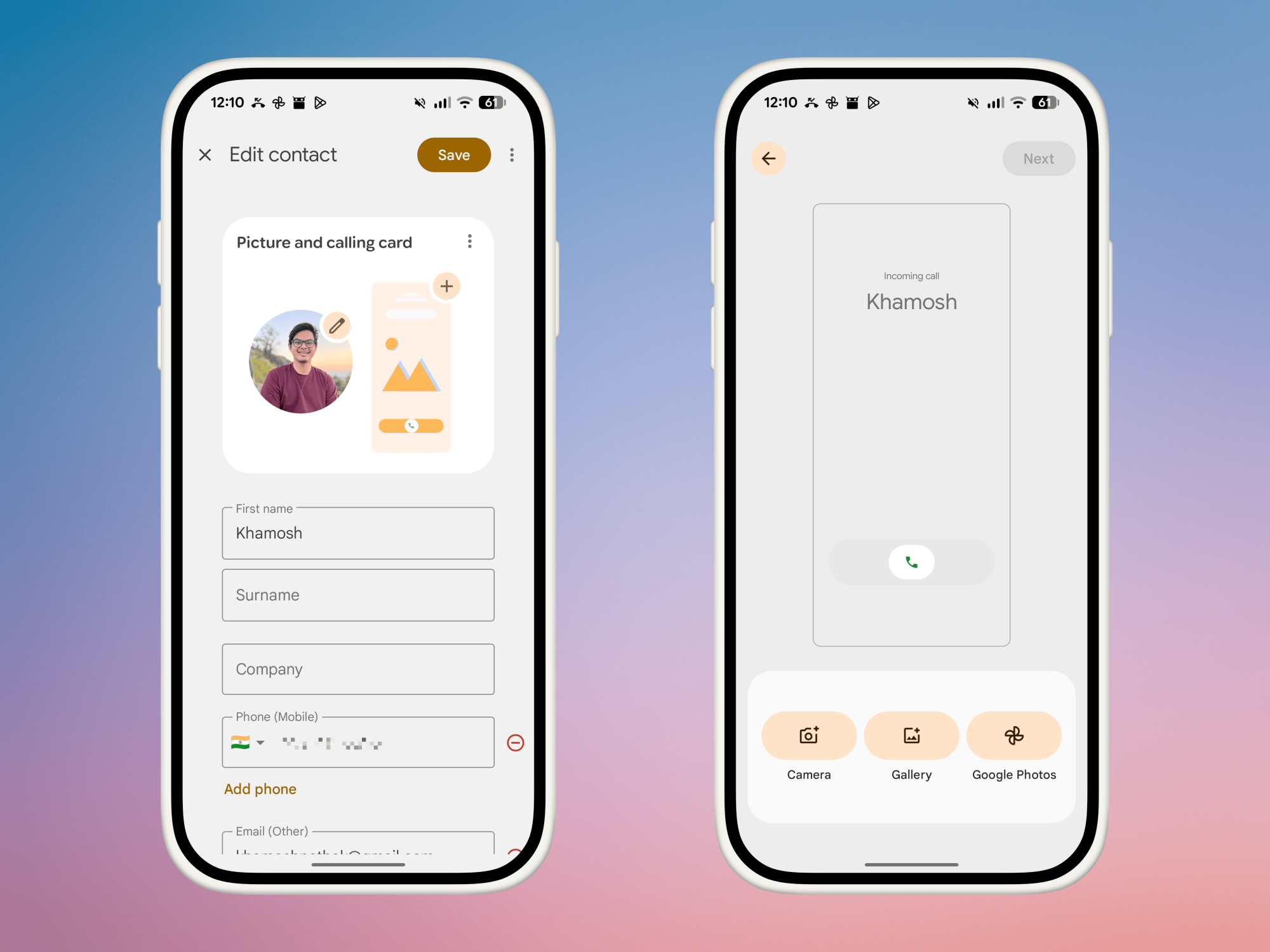
After updating to the new Google Phone app, open a contact page. Here, tap the Edit button from the top.

You’ll see a new Picture and Calling Card option. Tap the Rectangle Calling Card button.

Adding Calling Card to a Contact.

Credit: Khamosh Pathak

You’re now in the customization screen. Tap the Gallery or the Google Photos button to find a picture for your contact. Once you choose a photo, you can start the customization.

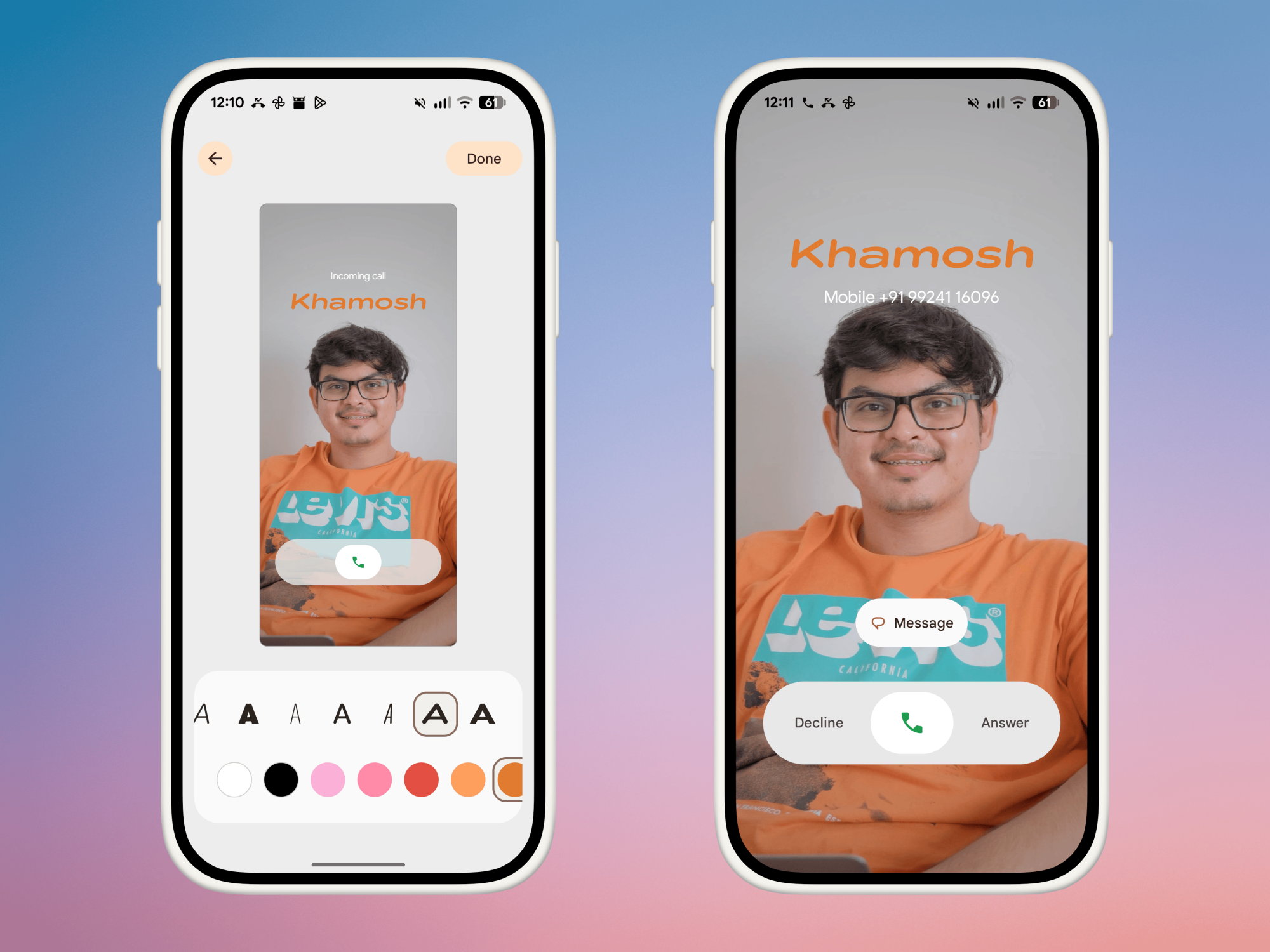
The image will be cropped to fit your screen automatically, but you can tap on the photo to pan or crop the image more if needed. You can also customize Font and the Color using the toolbar at the bottom. You have more than a dozen colors to choose from, although I would have appreciated a full color picker. When you’re happy with your Calling Card, tap the Done button.

Customizing Calling Card

Credit: Khamosh Pathak

Now, the Google Phone app will ask you if you also want to use your new Calling Card as a picture for that contact. This is usually a good idea. Tap Confirm and crop, then crop the Calling Card photo to just show the face of the contact. After you’re done, hit the Save button.

And that’s it. Your full-screen Calling Card is now saved and active. Repeat this process for as many contacts as you wish!

Ars Live: Consumer tech firms stuck scrambling ahead of looming chip tariffs

We’re roughly six months into Donald Trump’s trade war, and tech firms remain in a fog, unsure what tariffs or retaliations could be coming next.

To shed light on this struggle, we invite you to join us for an Ars Live talk at 3 pm ET on Tuesday, September 2, with Consumer Technology Association (CTA) Vice President of International Trade Edward Brzytwa. We’ll be discussing how tech firms are responding to tariffs so far and how looming chip tariffs could pose the biggest hurdle yet in sourcing alternative supply chains. And anyone joining will have an opportunity to ask their biggest questions about how tariffs could impact consumer tech.

Before Trump even took office, experts had warned that his global trade war—imposing tariffs on imports of various goods from various countries in a bid to strike more favorable trade deals for the US—risked spiking prices of popular tech products like laptops, game consoles, and smartphones.

Read full article

Comments

The first Game Pass additions for September include Hollow Knight: Silksong and I Am Your Beast

Microsoft has revealed the first batch of Game Pass additions for September 2025 and there’s one hornet-shaped title that looms large over the others. After a seven-year wait, Hollow Knight: Silksong arrives on September 4. We’ve known for a few years that the sequel to Team Cherry’s indie blockbuster would be on Game Pass on day one, and it’ll be available on the Ultimate and PC versions of the service.

Xbox announced the Metroidvania’s future debut on Game Pass all the way back at its June 2022 showcase. At the time, it claimed every game shown at the event would be out within the following 12 months. That didn’t exactly happen in Silksong‘s case.

Team Cherry confirmed pricing for Silksong this week as well. It’ll cost $20 on all platforms. The developer added that there will be a free Nintendo Switch 2 upgrade pack with “enhanced features” available for Kickstarter backers who receive a Switch key (it’s implied, but not confirmed, that anyone who gets the Switch 1 version will be able to upgrade for free later).

If you’re planning to dive into Silksong as soon as it goes live at 10AM ET on Thursday and you’re looking for something to play on Game Pass in the meantime, it’s maybe worth checking out I Am Your Beast. This is a fast-paced, covert revenge shooter from the folks at Strange Scaffold (Clickolding, TMNT: Tactical Takedown and El Paso, Elsewhere). It’s dropping on the Ultimate, PC and Standard versions of Game Pass today.

On September 3, Nine Sols will join the Game Pass Standard lineup after being on the Ultimate and PC versions of the service since last November. This is a Metroidvania from Devotion developer Red Candle Games, and it was one of our favorite games of 2024.

The other Game Pass additions for the first half of September are:

  • Real-time strategy game Cataclismo (PC) — September 4 on Game Pass Ultimate, PC Game Pass

  • 3D action adventure Paw Patrol World (Cloud, Console, and PC) — September 10 on Game Pass Ultimate, PC Game Pass and Game Pass Standard

  • Disaster recovery/construction sim RoadCraft (Cloud and Xbox Series X/S) — September 16 on Game Pass Ultimate and Game Pass Standard

Inevitably, a few games are cycling off of Game Pass too. All You Need is Help, Wargroove 2 and We Love Katamari Reroll+ Royal Reverie are all leaving the library on September 15.

This article originally appeared on Engadget at https://www.engadget.com/gaming/xbox/the-first-game-pass-additions-for-september-include-hollow-knight-silksong-and-i-am-your-beast-145148351.html?src=rss

Big TV Deals For Football Season Are Lit, Score A 98″ QLED For 35% Off

Big TV Deals For Football Season Are Lit, Score A 98
Are you prepared for a new NFL season? Kickoff for the first regular season game is this Thursday, September 4 at 8:20 p.m. EST, as the reigning Super Bowl champion Philadelphia Eagles play host to the visiting Dallas Cowboys, who may may not still be ‘dem boys’ after trading away Micah Parsons (sorry, Dallas fans). If your TV is not up to

LLVM Clang 21 Compiler Helping Squeeze More Performance On 5th Gen AMD EPYC “Turin”

With LLVM 21.1 having been released last week as the newest half-year feature update to this open-source compiler stack, I have begun benchmarking Clang 21 on a variety of systems for getting a feel for the performance over Clang 20. Eventually it will be extended as well to looking at the Clang 21 performance against GCC and vendor compilers. For some initial Clang 21 benchmarking, here is a look at how the Clang 21 C/C++ compiler is performing on 5th Gen AMD EPYC “Turin” Zen 5 processors compared to the prior release.

OpenAI is adding parental controls to ChatGPT

OpenAI has promised to release parental controls for ChatGPT within the next month, the company said Tuesday. Once the controls are available, they’ll allow parents to link their personal ChatGPT account with the accounts of their teenage children. From there, parents will be able to decide how ChatGPT responds to their kids, and disable select features, including memory and chat history. Additionally, ChatGPT will generate automated alerts when it detects a teen is in a “moment of acute distress.” According to OpenAI, “expert input will guide this feature to support trust between parents and teens.”

The announcement of parental controls comes after OpenAI was sued in the first known instance of a wrongful death lawsuit against an AI company. In a lawsuit filed last week, Matt and Maria Raine, the parents of a teen who committed suicide this year, allege ChatGPT was aware of four failed suicide attempts by their son before helping him plan his death. The Raines said ChatGPT provided their son Adam with information on specific suicide methods, and even gave him tips on how to hide neck injuries sustained from his previous failed attempts.      

On Tuesday, OpenAI said parental controls are part of a broader effort by the company to improve safety on ChatGPT. Separately, the company has promised to work with additional experts, including those who specialize in eating disorders, substance use and adolescent health, to fine tune its models. 

The company has also promised to deploy a new real-time router designed to funnel sensitive conversations through its reasoning models. “Trained with a method we call deliberative alignment, our testing shows⁠ that reasoning models more consistently follow and apply safety guidelines and are more resistant to adversarial prompts,” said OpenAI. Moving forward, in situations where ChatGPT detects a person may be in distress, the chatbot will direct those conversations through a reasoning model, regardless of the model the user selected before starting the conversation. 

More broadly, OpenAI says people can expect more safety features in the future. “This work has already been underway, but we want to proactively preview our plans for the next 120 days, so you won’t need to wait for launches to see where we’re headed,” OpenAI said. “The work will continue well beyond this period of time, but we’re making a focused effort to launch as many of these improvements as possible this year.”

This article originally appeared on Engadget at https://www.engadget.com/ai/openai-is-adding-parental-controls-to-chatgpt-144128085.html?src=rss

What Every Argument About Sideloading Gets Wrong

Developer Hugo Tunius, writing in a blog post: Sideloading has been a hot topic for the last decade. Most recently, Google has announced further restrictions on the practice in Android. Many hundreds of comment threads have discussed these changes over the years. One point in particular is always made: “I should be able to run whatever code I want on hardware I own.” I agree entirely with this point, but within the context of this discussion it’s moot.

When Google restricts your ability to install certain applications they aren’t constraining what you can do with the hardware you own, they are constraining what you can do using the software they provide with said hardware. It’s through this control of the operating system that Google is exerting control, not at the hardware layer. You often don’t have full access to the hardware either and building new operating systems to run on mobile hardware is impossible, or at least much harder than it should be. This is a separate, and I think more fruitful, point to make. Apple is a better case study than Google here. Apple’s success with iOS partially derives from the tight integration of hardware and software. An iPhone without iOS is a very different product to what we understand an iPhone to be. Forcing Apple to change core tenets of iOS by legislative means would undermine what made the iPhone successful.


Read more of this story at Slashdot.

September 2025 Stargazing Guide: Full Corn Moon, A Ghostly Pyramid And Much More

September 2025 Stargazing Guide: Full Corn Moon, A Ghostly Pyramid And Much More
We’ve barely ticked over into September and yet this month promises to dazzle both seasoned astronomers and casual skygazers allike. From a rare lunar eclipse to a planetary opposition and the annual shift of seasons, the month is packed with opportunities to be amazed by what the heavens have in store for us.

The month kicks off with a

Five Ways to Type Faster on Your Phone

There’s one mobile productivity hack that works no matter what you’re trying to do on your phone, or which app you’re in: being able to type faster. Whether you’re filling out a web form or messaging the group chat, getting your text inputted more quickly saves you seconds and minutes that can add up.

And there are more ways to do this than you might think—from hidden keyboard shortcuts to whole new approaches to typing out text. Try out one or more of these methods and you should be able to carve out more time to spend away from your phone screen (or to compose even more messages on your mobile).

Slide to type

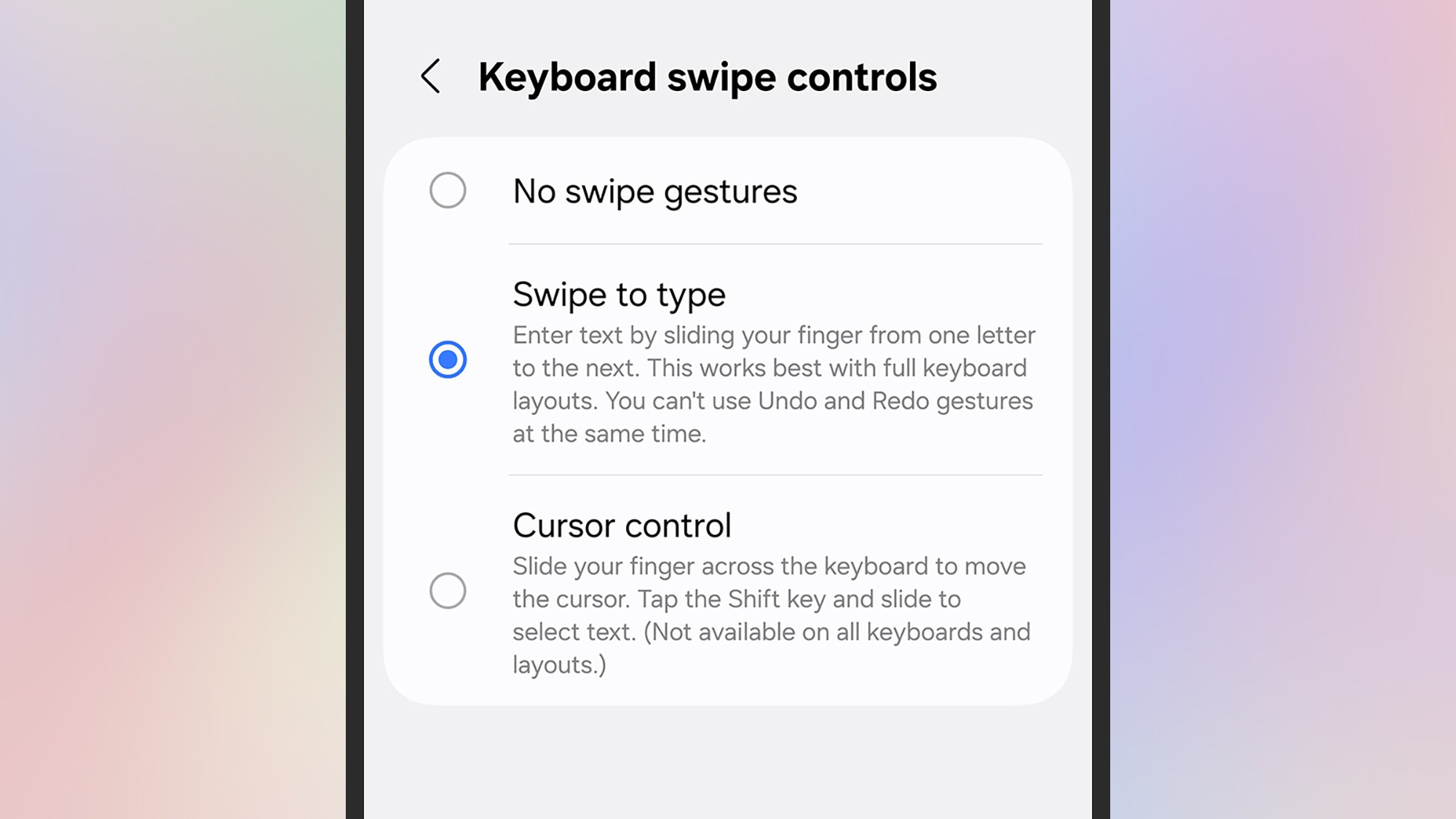
Swipe to type
Slide to type is an option on many keyboards.
Credit: Lifehacker

Rather than lifting up your finger and tapping down again for every single letter, you can just slide to type: Press on the first character of the word, then slide to the next one, and so on, until the word is finished. Once you get used to it, it can really speed up your typing. This is actually enabled by default on Pixels and iOS, but needs enabling on the Samsung Keyboard.

To manage the feature on Pixels, tap the gear icon on the keyboard then Glide typing. On iPhones, head to Settings then tap General > Keyboard > Slide to Type. On Samsung phones, you need to turn it on: Tap the gear icon on the keyboard, then choose Swipe, touch, and feedback > Keyboard swipe controls > Swipe to type.

Text shortcuts

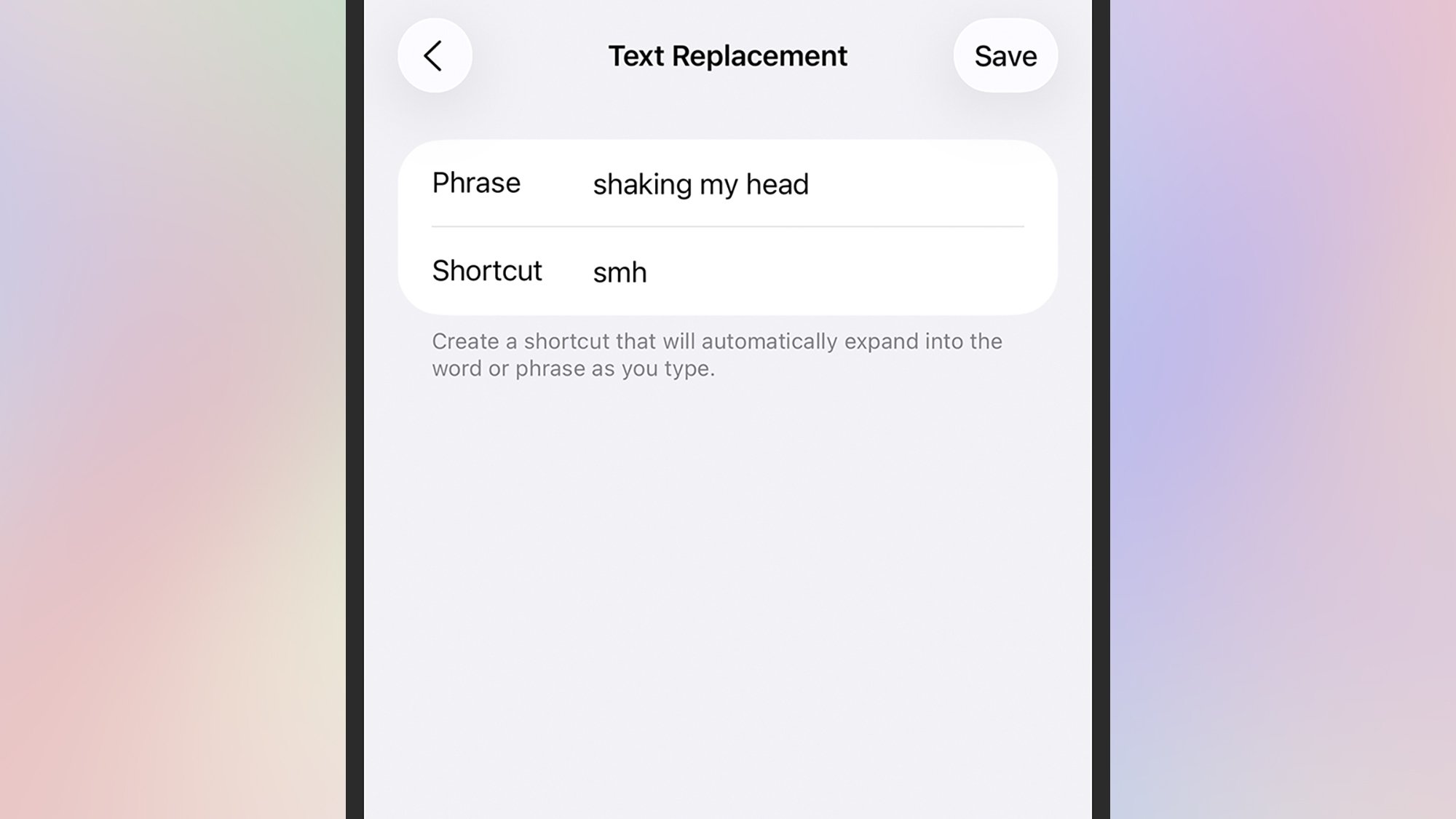
Text shortcuts
Use text shortcuts to speed up your typing.
Credit: Lifehacker

If you find yourself typing the same phrases over and over again in your messages, you can save them as shortcuts that get triggered by a custom code: So every time you type “omw,” you’ll see “on my way” appear as a suggestion, for example.

On Pixels, these shortcuts can be managed by tapping the gear icon on the keyboard, then Dictionary > Personal dictionary, then your current language: Tap the + (plus) icon in the top right corner to add a shortcut.

On Samsung phones, tap the gear icon on the keyboard, then Text shortcuts to add or remove shortcuts. If you’re on an iPhone, text shortcuts can be managed from General > Keyboard > Text Replacement in Settings.

Go one-handed

One-handed keyboard
Your phone keyboard can shrink for easier one-handed use.
Credit: Lifehacker

We’ve written before about how to make it easier to use your phone one-handed on Android and iOS, but it’s worth repeating here. If you only have one hand free, it can seriously slow down your typing speed—but it doesn’t have to.

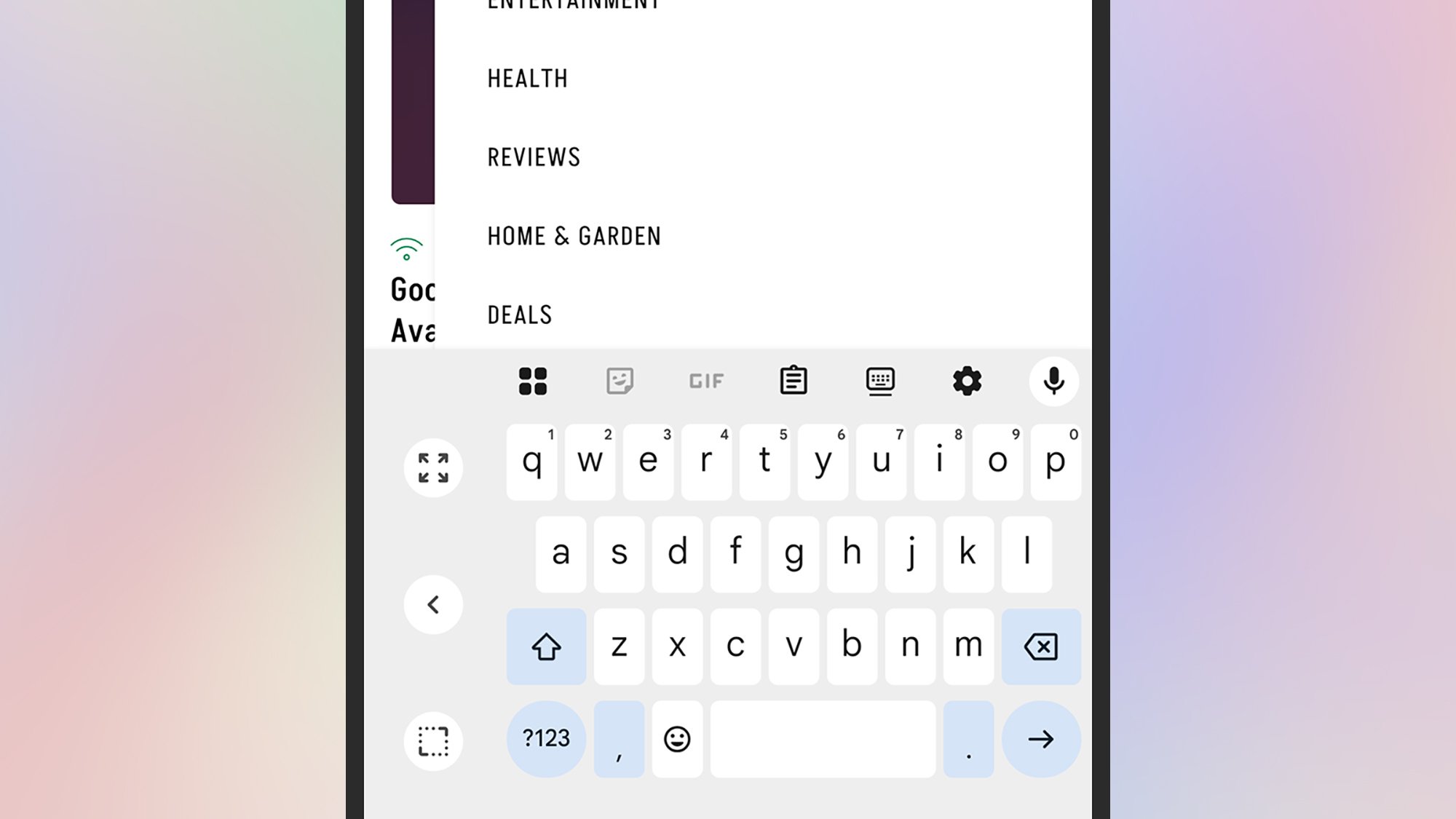
With the keyboard open on Android, tap the four squares to the top left (Pixels) or the three dots to the top right (Samsungs) to find the One-handed button, which pushes the keyboard to one side or the other (use the arrow to switch).

If you’re on an iPhone, open the keyboard, then press and hold the globe icon (bottom left). A series of icons pop up, enabling you to push the keyboard to the left or the right, or return it to its normal size.

Use your voice

Voice typing
Voice typing is another option on your phone.
Credit: Lifehacker

You probably don’t want to be dictating a personal message to your partner so that the whole subway car can hear, but if you’re busy on other jobs then voice input is a handy alternative. Depending on your typing speed, you might find it helps you get through your messages more quickly.

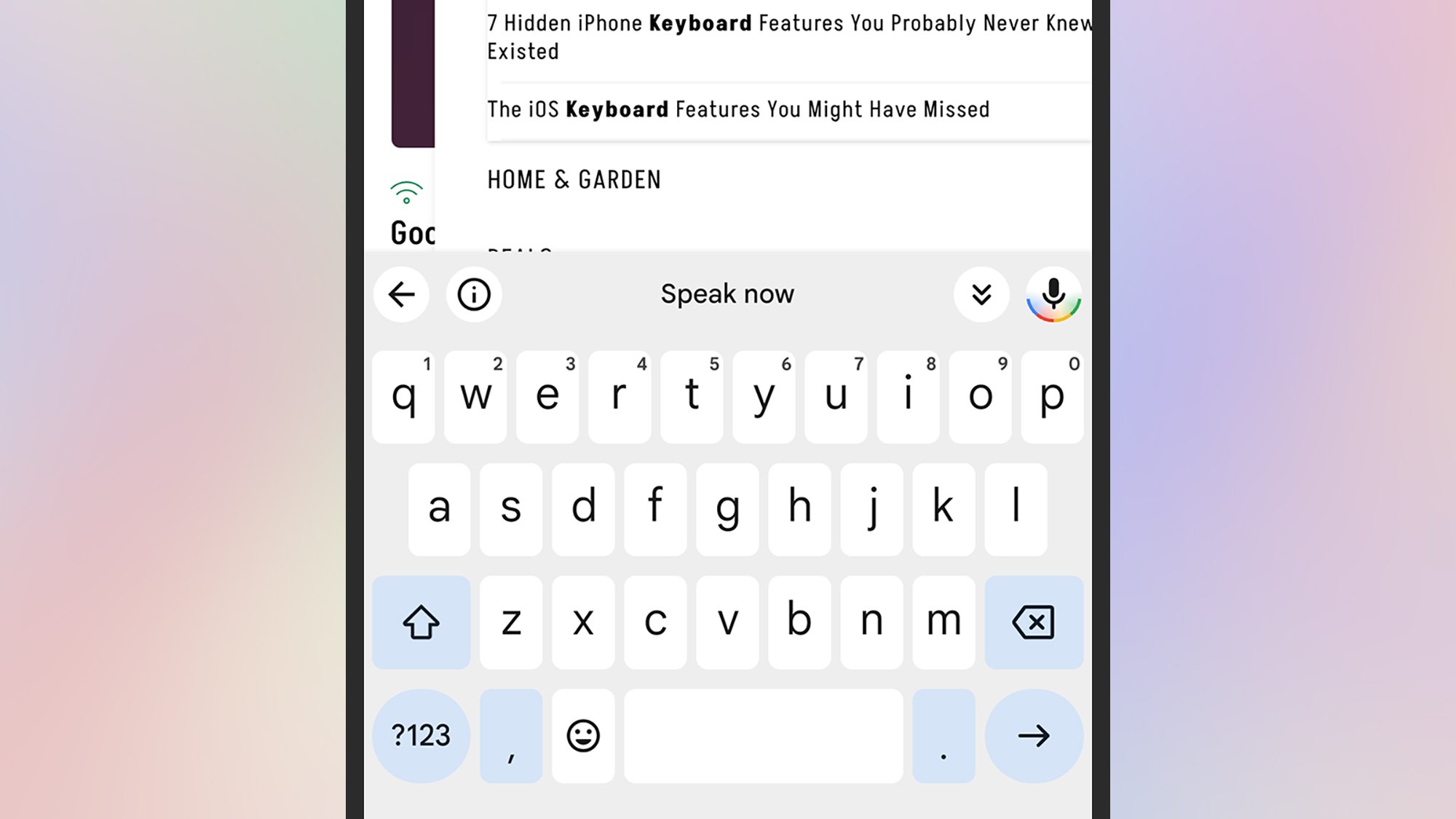
It couldn’t be much simpler to enable, either. Every default keyboard has a mic icon: Top right on Pixels, bottom left on Samsungs, and bottom right on iPhones. Tap the button, and then start talking—and you can speak out punctuation, too.

Try out different keyboards

Typewise keyboard
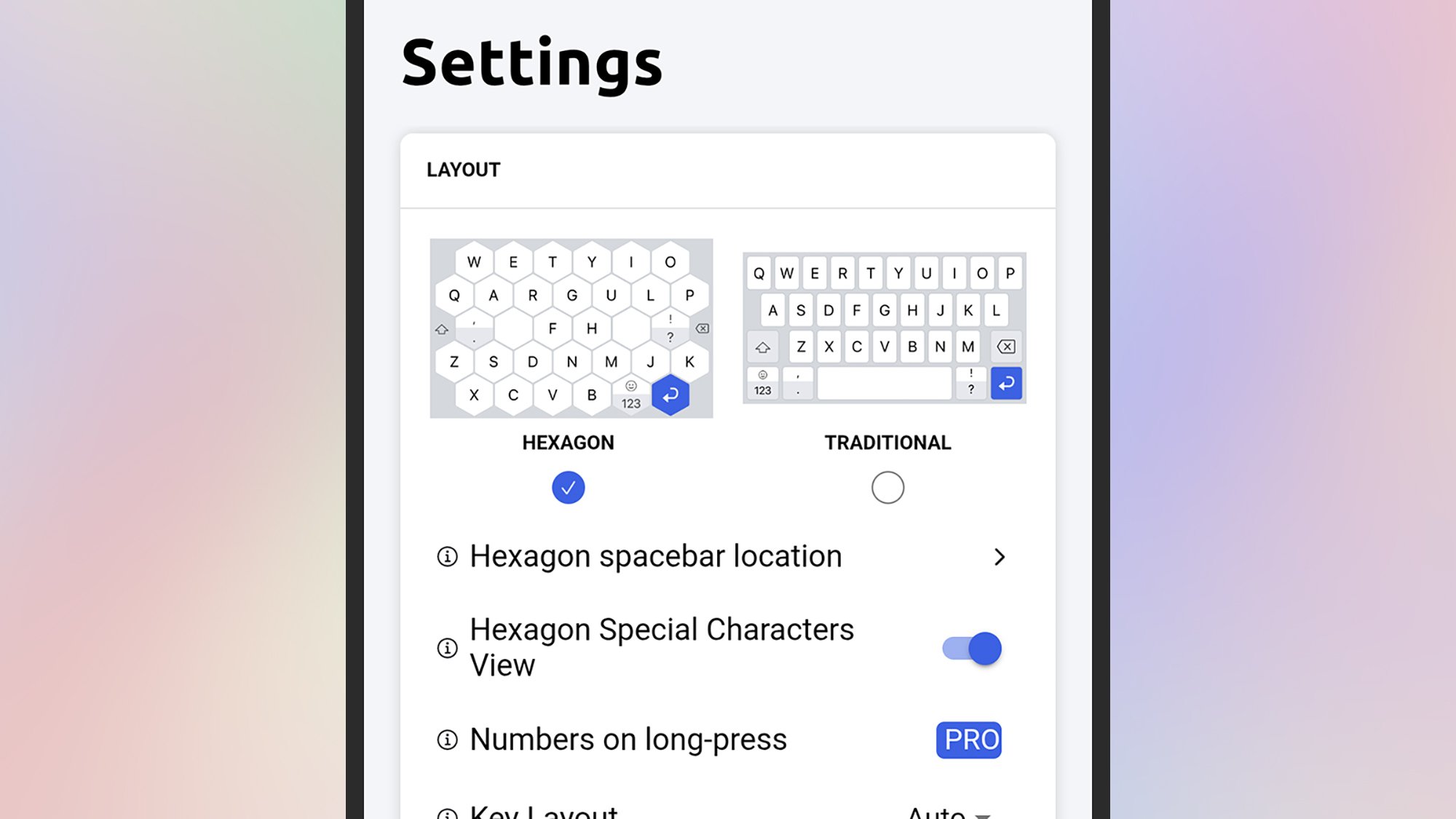
The Typewise keyboard gives you a choice of alternative layouts.
Credit: Lifehacker

Both Android and iOS let you install alternative keyboards and switch between them, and you might find they help you type more quickly: Look at Typewise for example, for Android or iOS, which brings with it larger buttons, a host of customizations, and the ability to swipe-to-type mentioned above.

Then there’s SwiftKey from Microsoft, also available for Android and iOS, which gives you a host of ways to customize the keyboard to suit your typing style—as well as promising the most accurate autocorrect and text prediction around, meaning you can more quickly get out the message you want to type.


Slate Auto’s sub-$30,000 EV pickup is due next year—here’s the factory

WARSAW, INDIANA—The Blank Slate pickup scratches a particular itch for some, fulfilling the desire for an EV powertrain without all the bells and whistles associated with a modern vehicle. Gone is the infotainment screen, the lane-keeping assistance, and, for those concerned about surveillance, a modem. Instead, it’s an unpainted modular pickup and can be configured post-production into nearly anything the owner wants. Oh, and it’s cheap.

This Old Factory

For decades, the RR Donnelley & Sons printing plant in Warsaw, Indiana, pumped out catalogs. Glossy shopping books from JCPenney, Sears, and—my personal favorite—Radio Shack left the plant and were shipped all over the country to eager shoppers looking for their next mail-order delight. Then the Internet broke all of that.

The last employees clocked out in 2023.

Read full article

Comments

[$] Removing Guix from Debian

As a rule, if a package is shipped with a Debian release, users can
count on it being available, and updated, for the entire
life of the release. If package foo is included in the stable
release—currently Debian 13
(“trixie”)—a user can
reasonably expect that it will continue to be available with security
backports as long as that release is supported, though it may not be
included in Debian 14 (“forky”). However, it is likely that the
Guix package manager will soon
be removed from the repositories for Debian 13 and
Debian 12 (“bookworm”, also called oldstable).

The hidden vulnerabilities of open source (FastCode)

The FastCode site has a
lengthy article
on how large language models make open-source projects
far more vulnerable to XZ-style attacks.

Open source maintainers, already overwhelmed by legitimate
contributions, have no realistic way to counter this threat. How do
you verify that a helpful contributor with months of solid commits
isn’t an LLM generated persona? How do you distinguish between
genuine community feedback and AI created pressure campaigns? The
same tools that make these attacks possible are largely
inaccessible to volunteer maintainers. They lack the resources,
skills, or time to deploy defensive processes and systems.

The detection problem becomes exponentially harder when LLMs can
generate code that passes all existing security reviews,
contribution histories that look perfectly normal, and social
interactions that feel authentically human. Traditional code
analysis tools will struggle against LLM generated backdoors
designed specifically to evade detection. Meanwhile, the human
intuition that spot social engineering attacks becomes useless when
the “humans” are actually sophisticated language models.

Marshall adds a subwoofer and compact soundbar to its Heston TV audio lineup

Marshall’s family of TV audio gear is growing. The company has announced the Heston Sub 200 subwoofer and Heston 60 compact soundbar, both of which are now available for pre-order. The $700 Heston 60 is a smaller take on the first soundbar Marshall introduced earlier this year, the Heston 120, offering Dolby Atmos and DTS-X for more intimate spaces. With the Heston Sub 200, a $600 subwoofer that pairs with both soundbars, Marshall touts “a sound that can be truly felt.” Both products come in Cream and Black, and sport Marshall’s classic guitar amp styling. They ship September 23.

The Heston 60 has 7 Class D amplifiers — two 25W and five 5W — with a total power output of 56W. It has two woofers and five full range drivers. The soundbar offers wireless and wired connectivity, with Bluetooth (5.3) and Wi-Fi, as well as an HDMI 2.1 port (eARC), a 3.5mm aux port, an RCA input and USB-C. It also supports AirPlay 2, Google Cast, Spotify Connect and Tidal Connect.

The Heston 200 subwoofer, the Heston 120 soundbar and the Heston 60 compact soundbar in black pictured in a vertical arrangement against a dark gray background
The Heston 200, Heston 120 and Heston 60
Marshall

The Heston Sub 200 packs two 5.25 inch subwoofers and two 120W Class D amplifiers, with a peak total power output of 236W. Marshall says it’ll deliver deep, room-shaking bass. The subwoofer has Bluetooth and wired input (RCA mono). 

The Heston 60 and Heston Sub 200 will be available from Marshall starting September 23, and will roll out to select other retailers on September 30.

This article originally appeared on Engadget at https://www.engadget.com/audio/speakers/marshall-tv-subwoofer-heston-200-compact-soundbar-heston-60-140044805.html?src=rss

The US Population Could Shrink in 2025, For the First Time Ever

An anonymous reader shares a report: The United States is on the precipice of a historic, if dubious, achievement. If current trends hold, 2025 could be the first year on record in which the US population actually shrinks.

The math is straightforward. Population growth has two sources: natural increase (births minus deaths) and net immigration (arrivals minus departures). Last year, births outnumbered deaths by 519,000 people. That means any decline in net immigration in excess of half a million could push the U.S. into population decline. A recent analysis of Census data by the Pew Research Center found that between January and June, the US foreign-born population fell for the first time in decades by more than one million. While some economists have questioned the report, a separate analysis by the American Enterprise Institute predicted that net migration in 2025 could be as low as negative 525,000. In either case, annual population growth this year could easily turn negative.


Read more of this story at Slashdot.