
Mesa 25.2.2 is out today as another on-time, bi-weekly Mesa point release managed by Eric Engestrom…
Category Archives: Unfiltered RSS
Appeals court reinstates fired Democratic FTC commissioner
Rebecca Kelly Slaughter can resume her work as a commissioner for the FTC, a federal appeals court has ruled. Slaughter, who was one of the two Democratic commissioners for the FTC that President Trump fired back in March, filed a lawsuit for her reinstatement. “Your continued service on the FTC is inconsistent with my administration’s priorities,” a letter to the commissioners said. In July, US District Judge Loren AliKhan ruled that her removal from the agency was “unlawful and without legal effect,” and Slaughter was able to go back to work. A few days later, however, an appeals court paused the order for her reinstatement.
Now, the appeals court judges voted 2-to-1 in favor of restoring AliKhan’s order. Obama appointees Patricia Millett and Cornelia Pillard voted to reinstate Slaughter, while Trump appointee Neomi Rao dissented. Millett and Pillard wrote in their decision that the government “has no likelihood of success on appeal given controlling and directly on point Supreme Court precedent.” They explained that a Supreme Court precedent known as Humphrey’s Executor prevents presidents from removing FTC commissioners at will and without cause. Based on federal law, commissioners can only be removed due to “inefficiency, neglect of duty, or malfeasance in office.”
Rao, however, has dissented. By “ordering the remaining FTC commissioners and the subordinates to treat Slaughter as though she is still in office, the district court expressly orders them to disregard the President’s directive,” she said in a statement. It “directly interferes with the President’s supervision of the Executive Branch and therefore goes beyond the power of the federal courts.” The FTC typically has five commissioners: Three from the same party as the president and two from the opposition. After Trump fired the FTC’s Democratic commissioners, only the three Republican commissioners remained.
Slaughter is now listed again on FTC’s website as a commissioner. According to The New York Times, she’s planning to report back to work today, September 3. “Amid the efforts by the Trump administration to illegally abolish independent agencies, including the Federal Reserve, I’m heartened the court has recognized that he is not above the law,” Slaughter said in an interview. Her fellow Democratic commissioner who was fired back in March, Alvaro Bedoya, resigned from the agency completely and took on a private-sector job.
This article originally appeared on Engadget at https://www.engadget.com/big-tech/appeals-court-reinstates-fired-democratic-ftc-commissioner-124549494.html?src=rss
Ooni’s Volt V2 oven uses ‘Pizza Intelligence’ to cook your pie more evenly
In the latest case of AI being shoehorned into everything, say hello to Ooni’s Volt 2 pizza oven. It uses an adaptive heating system called “Pizza Intelligence” that’s designed to cook your pizza more consistently to deliver the ideal slice, while also giving the company a hot new marketing angle.
The Volt 2 is an all-electric indoor oven that can cook pizzas up to 13 inches in size, the same as the Volt 12. Like that model it operates at up to 450 degrees Celcius (850 degrees) Fahrenheit, allowing you to cook a Neapolitan-style pizza in around 90 seconds. However, the design has changed with a more rounded profile, considerably larger window, touch controls and a dial. Ooni notes that it’s compact enough to fit on a kitchen counter.
Ooni
The Volt 2 uses real-time sensor data to dynamically balance heat between the top and base heating elements in order to minimize temperature fluctuations and cold spots for “consistently perfect pizza.” Ooni dubbed that system “Pizza Intelligence,” though others may call it a “thermostat.” It also automatically adjusts for different types of pizzas ranging from New York slices to Chicago-style deep-pan pies. Each preset is programmable so you can bookmark favorite settings for consistent results.
It offers cooking modes including Dough Proof, Oven and Grills, making it useful for prepping, baking, roasting and recipe experimentation. Ooni’s Volt 2 electric pizza goes on sale October 1 for $699 — if you’re interested, you can join the waitlist here.
This article originally appeared on Engadget at https://www.engadget.com/home/kitchen-tech/oonis-volt-v2-oven-uses-pizza-intelligence-to-cook-your-pie-more-evenly-123055762.html?src=rss
Four Ways These Houseplants Can Improve Your Quality of Life
There’s a reason about two-thirds of the households in America have at least one houseplant—many reasons, in fact. For one, they’re beautiful, bringing a blast of fresh, natural beauty into our homes. For another, they’re relatively inexpensive, especially when compared to other interior design elements. And some houseplants are easy to care for, which is ideal for busy lives.
Despite their popularity, however, most of us sleep on another potential benefit of houseplants: Practical, everyday uses. Houseplants don’t have to be merely decorative—the right ones combine that natural beauty with applications that can improve your life in myriad ways. If you’re looking to start an indoor garden or add to your existing collection, here are some of the most useful houseplants you can acquire.
Best houseplants for air quality
While claims that houseplants will scrub and purify your indoor air are overblown, there’s no doubt that houseplants do have a positive impact on your indoor air quality. All plants absorb carbon dioxide and excrete oxygen, after all, so just by having them you’ll be freshening up your home’s air. But specific plants also have more uses:
-
Improving humidity. If your house is feeling dry, giving you itchy eyes and skin, adding some spider plants to specific rooms can improve the situation. Studies have shown that spider plants can improve relative humidity in a room, making the space more comfortable. It should be noted that it’s all about leaf surface area, so you need a lot of them to make a real difference: 25 plants in 4-inch pots resulted in a 10% gain of relative humidity in the study, for example, though you could have fewer plants if they were larger.
-
Dust reduction. Many houseplants can improve the air quality in your home by capturing dust and other contaminants, trapping the stuff on their ridged leaves and stems. Peace lilies, English ivy, and rubber plants are great choices to have in the house for dust control. Note that these plants remove dust mechanically by capturing it, not by absorbing it in any way—you’ll need to dust them to actually remove the dust.
Plants with medicinal uses
Some houseplants are useful because they can be used to treat a range of mild discomforts and injuries. You might not be able to throw away all your store-bought stuff just because you have a few potted plants about, but if you include some of these plants in your collection, you can benefit from their proven healing qualities:
-
Aloe Vera has soothing properties, and the gel from a cut leaf can be used to treat minor burns (including sunburns) or other skin irritations. It’s also often used as a mild laxative.
-
Mint. Mint leaf teas have been used in folk medicine for centuries, and there’s some evidence that mint leaf teas can soothe the digestive tract. Having some fresh mint on hand in the form of an attractive houseplant means you can brew up a little relief any time you want.
-
Chamomile. Chamomile is often noted for its soothing qualities, reducing anxiety, aiding digestion, and improving sleep.
Edible plants to grow indoors
Your houseplants can be a source of ingredients in your cooking:
-
Herbs. The most obvious choices will be herbs like basil, sage, and parsley (among many, many other choices). These plants are attractive, easy to grow indoors, and can supply you with fresh seasoning for your meals.
-
Fruits. Several fruit trees actually thrive indoors. Figs, lemons, cherries, blueberries, and even bananas can be grown indoors, supplementing your grocery bills all year round.
-
Vegetables. Tomatoes, peppers, and kale are all beautiful houseplants that will also produce delicious veggies for your salads and other recipes.
Best plants for sleep aid
There are a lot of reasons to put houseplants in your bedroom, and better sleep is one of them. If you have trouble relaxing and falling asleep, just having plants in your bedroom can create a more serene, calm atmosphere that can promote better sleep. There’s also some evidence that scent can influence the quality and duration of sleep cycles—but it doesn’t have to be that complicated. Having plants that make the bedroom smell nice (like lavender, jasmine, or valerian) can contribute to a pleasant atmosphere that’s conducive to a good night’s sleep.
The best MagSafe power banks for your iPhone
One of the first guides I ever worked on for Engadget was about power banks. In the years since, I’ve tested more than 50 portable batteries to keep our top picks as up-to-date as possible. Now that the iPhone 17 is on the horizon — and rumored to be the thinnest ever — we wanted to devote some space to MagSafe battery packs in particular.
I gathered up a new crop of batteries to test and compared the results with our existing data to pick the best MagSafe-compatible battery out there. As we learn more about the new iPhone’s battery specs and get our hands on banks enabled with the new Qi2 25W charging standard, I’ll continue to update this guide. For now, our top pick is Anker’s Qi2-enabled MagGo 10K power bank. It has a big capacity, fast charging times and handy extra features like a stand and display. But there are also options here for minimalists and the budget-conscious, too.
The best MagSafe power banks for 2025
What to consider before buying a MagSafe power bank
Choose the right capacity. Most portable MagSafe chargers have either a 5,000 milliamp hour (mAh) or 10,000mAh capacity. Obviously, the larger capacity batteries are physically bigger, but thanks to an iPhone’s magnetic attachment points, you can still use the phone comfortably as it charges. If you’re worried about overall bulk, you may prefer the slimness of a 5,000mAh battery.
Just note that a 5K battery pack won’t deliver its entire capacity to your phone due to energy loss from voltage conversion and heat dissipation. Over the years, I’ve measured around a 60-percent delivery rate for wireless banks. For example, that means an iPhone 16 with its 3,561mAh battery will get about 85 to 90 percentage points from a 5K battery. A 10K bank will charge that same phone fully once, with enough for a 50- to 60-percent boost next time.
Understand MagSafe versus Qi2. All iPhones model 12 and later have MagSafe technology, which rely on embedded magnets to align the phone with a wireless charger and can support charging speeds of up to 15 watts. The MagSafe name is owned by Apple — third-party chargers can’t freely use the term and instead call their accessories “magnetic,” or apply a branded name like Anker’s MagGo or UGreen’s MagFlow. Be sure to check the product details before buying: anything that works with Apple’s technology will be listed as MagSafe-compatible.
Qi2 is a standard from the Wireless Power Consortium (of which Apple is a member) and has the same stipulations as MagSafe (15W charging and magnetic alignment). Any company can submit their tech for this certification. iPhones 13 and later are Qi2 compatible.
A new standard is coming this fall; it’s called Qi2 25W and bumps wireless charging speeds up to 25W. The WPC says a certified smartphone using a certified charger can wirelessly go from dead to half full in about 30 minutes. These devices will start hitting shelves in the fall of 2025 and it’s highly likely that the new iPhone 17 will support it. Plus, it’s likely that iPhone 16 models will retroactively gain the certification since those phones already support 25W speeds when using Apple’s official MagSafe Charger puck.
Remember travel restrictions. You may have seen news reports of flights being grounded because a power bank caught fire in the cabin. Currently, the TSA allows them in your carry-on luggage as long as they’re rated at 100 watt-hours or lower (about 27,000mAh for lithium ion batteries).
But some airlines have enacted further restrictions. Southwest, for example, requires you to keep power banks out of the bag and visible while charging. Even if your airline doesn’t make such demands, keeping a power brick out in the open while it’s in use is a good idea — it’ll keep it cooler and you’ll be more likely to notice if it starts to overheat. Most, if not all, MagSafe battery packs come in at under the 100-watt-hour limit, so traveling should be easy with one.
Consider the extra features. You may not need them, but the little extra perks of a MagSafe power bank can come in handy. Some have stands so you can watch your phone while it refills. Some have LED displays that tell you how much charge is left, which can be a little more precise than the lighted pips other banks use. Some also have straps to make the bank easier to carry around or fish out of your bag.
MagSafe power banks FAQs
What does MagSafe do?
MagSafe is Apple’s own technology that supports 15W wireless charging speeds and incorporates embedded magnets to align the phone with chargers and other accessories.
Which iPhones support MagSafe?
iPhones 12 and later support MagSafe technology, though only iPhones 13 and later can reach the 15W charging speed with third party Qi2 chargers. The iPhone 12 maxes out at 7.5W with non-Apple accessories.
Can you use MagSafe batteries with a case?
In most cases (heh), yes. The wireless charge can travel across a distance of a few millimeters. If the case is more than 5mm thick or contains metal components, the wireless charge can be blocked. Many iPhone cases are marketed as MagSafe-compatible, which means the case itself has complimentary magnets inside and should not interfere with charging accessories. We tested a MagSafe power bank on an iPhone 15 with and without a MagSafe case and got the same charging speeds and amounts in both tests.
How much power do MagSafe batteries provide?
That depends on the power bank. If it is Qi2-certified, it can provide up to 15 watts of wireless power. Non-Qi2 batteries typically deliver around 7.5 watts. The amount of charge delivered depends on the capacity. Most MagSafe portable chargers are rated at 5,000mAh or 10,000mAh. The former can get a standard iPhone 15 from five percent to around 90 percent. The latter can fill the phone completely with enough left over for another half charge.
This article originally appeared on Engadget at https://www.engadget.com/computing/accessories/best-magsafe-power-banks-120015338.html?src=rss
reMarkable’s Paper Pro Move is a pocketable version of its e-paper tablet
reMarkable knows you’d like to use its e-paper tablet on the go, but the size of its current products don’t make that easy. To address this, it’s launching a smaller, pocket-sized version of its flagship slate for folks who can’t luxuriate at a desk or armchair to do their thinking. The reMarkable Paper Pro Move is a slate with a 7.3-inch display that’s the same size as a reporter’s notepad. It’s a device that Chief Product Officer Mats Herding Solberg says is perfect for getting “real work done while standing up and holding it in one hand.” Now, I’m on record saying that I love reMarkable’s products, and its ethos, but the bit about being able to do good work while standing up? That’s a harder sell.
reMarkable makes devices for serious, intentional work shorn of the myriad distractions inherent in modern computing. You can read, annotate and edit documents on its e-paper display, as well as write with either a stylus or a compatible keyboard. Its first device launched in 2016 and its second in 2020 with the third, the Paper Pro, arriving last year. The Paper Pro heralded a number of changes, including a bigger display (11.8-inch, up from 10.3-inch), a backlight, faster internals and, for the first time, the ability to reproduce color.
Nico Cormier, the company’s CTO, said the previous three models were really designed “for people who have a desk, people in a controlled environment.” The focus here was to build a reMarkable slate that could easily fit in a pocket or purse for work on the go. After a lot of prototyping, product manager Jon Dalvang said the team used the reporter’s notepad as the template for how the hardware should feel.
At first blush, the Paper Pro Move just looks like a slimmed down version of the Paper Pro from last year. If the company said it just threw some of its bigger tablets into a boil wash and they came out looking like this, you’d be tempted to believe them (I’m joking). But while they look and feel very similar, reMarkable made it clear that a lot of work had to go into reengineering the hardware and software to reach this smaller size.
Daniel Cooper for Engadget
The reMarkable Paper Pro Move measures 7.6 inches tall and 4.3 inches wide, with a 7.3-inch version of the same Canvas Color display found in its larger sibling. Inside, you’ll find a 1.7GHz dual-core Cortex A55 processor (compared to the Paper Pro’s 1.8GHz, quad-core Cortex A53 one). It has the same 2GB of RAM and 64GB of storage as found on the bigger model, and while the battery has shrunk from 5,030mAh to 2,344mAh, the promise of two weeks of battery life remains the same. Similarly, you’ll find the same ridged edge banding (to evoke the feeling of a sheaf of paper) as on the Paper Pro. And the power button and USB-C ports are in the same place (bottom edge and top left corner, respectively), too.
Dalvang explained that the changes are far more subtle, and designed to improve the user experience. For instance, the back cover has the same “high-friction surface” as found on the company’s styluses to improve friction. reMarkable believes users should always use their device with a folio for protection. After all, no matter how hardy a device like this is, it might not do too well if it’s dropped onto a curb from chest height. Such are the perils of using any device on the go.
The smaller chassis and smaller display pushed the company to make a lot of changes to the software. The Paper Pro’s 11.8-inch screen is positively luxurious compared to what’s here and, in usual reMarkable fashion, the details have been sweated. For instance, you can now drag and drop the toolbar, letting you pick a position in both portrait and landscape modes. The company also focused on ensuring gesture navigation is more efficient since you’ll need to use it a lot more frequently here.
I’ve maintained that reMarkable’s products work fine with a stylus, but only really become truly useful when paired with a keyboard. After all, it’s at that point that you have a pure, distraction free writing machine that enables you to get focused work done. But with the Move, the only way to write and edit text is with the on-screen keyboard, and the company has already ruled out making a smaller version of the Type Folio. On one hand, it’s logical since a keyboard for a 7.3-inch tablet would be fairly small, and using the equivalent of a Nokia 9210 to get work done would be a pain. But I’d have preferred the ability to pair up any old Bluetooth keyboard if I needed to write something out and this was my device of choice. For the bigger models, I grudgingly accept the company omitting Bluetooth to help encourage sales of the type folio, but here, its absence is churlish.
Daniel Cooper for Engadget
Now, I often use old-school reporters notebooks, especially when I’m on the go at a big tech trade show. I like their small size, the big volume of paper at hand and the fact that they fit in the back pocket of my pants. The spiral binding makes it easy to flip pages and is a neat place to hold my pen, making it practical and effective, if not particularly good-looking. Since the Paper Pro has the same footprint as one, I could easily see this as a useful tool when I’m on the go.
The notebooks I use measure five by eight inches, giving me plenty of space to write. It’s here, however, that I started to see the issue with the Move, given its usable writing area is closer to 3.6 by 6.4 inches. That puts your writing area in the same territory as the not-quite-A6 you’d find if you used Field Notes or one of its many imitators. reMarkable knows this, and believes users will more likely hold the slate in landscape orientation. So you get a longer writing line, at the expense of having to scroll up more frequently — and you can move the toolbar around to ensure you’re as comfortable as you can be.
reMarkable believes landscape orientation is easier to write with, but it’s not as easy to hold with your non-dominant hand. It now has to carry the weight of both the slate and the pressure of your writing from the palm to the tips of your fingers.
It’s here, I think, that the whole pitch for the Paper Pro Move is slightly undermined by its goals. After all, you can use the full-size reMarkables when sitting down in pretty much any location you can imagine. I’ve read, written and annotated documents on train journeys and long haul flights on a fairly regular basis. But in trying to capture the feeling of writing while standing up or moving around, I’ve found that the experience is compromised. My handwriting is quick and efficient, but it’s barely legible to anyone else but me, and that’s a problem for OCR (Optical Character Recognition).
Take this snippet that I scribbled on the Paper Pro Move:
Daniel Cooper for Engadget
Naturally, reMarkable thinks its ability to convert written text to type will be more useful with the smaller slate. This is true, since its algorithms are quite effective at discerning what’s being written. But you will always be cursed with more than a few “Eat up Martha” moments.
Daniel Cooper for Engadget
“Naturally, ReMarble thinks its ability to count untten text type will be more betel with the small Slate. This is the, since its algorithms are Quite effete at discerning that’s being within. But, you will always be cased with me than a few “EAT Up MARTHA” Moment.”
As the above shows, your mileage is likely to vary depending on how many stickers you got from your teacher complimenting your handwriting.
But for people with more legible handwriting, the company is offering a new feature: Search. Behind the scenes, the system is indexing your scrawl, and so if you need to find a reference across all of your notebooks, you can type the word in search. So long as your text is clear enough to be indexed, you’ll be able to jump straight to where you need to go.
The arrival of the Move allows reMarkable to talk up its plans for reducing friction when using its devices. As much as you want a deliberate experience while using it, getting content to and from the Paper tablets can be arduous. Text documents need to be sent to the slate and when edited, may only be returned as an emailable PDF. It’s a fussy process, and one reMarkable knows needs to be improved.
Daniel Cooper for Engadget
Over the year, it’s been looking at building one-click methods to send files to platforms like Slack. But the company has also developed Quick Share, which will let you push a file online to share and collaborate with others. Press the button, and you’ll be given a QR code that will take you there in the browser and allow others to view at the same time.
In my limited time with the Paper Pro Move, I’ve found it to be a little more compelling to use than its bigger siblings. The smaller size means I’ve had it alongside my Bullet Journal for the whole of the week, helping me keep track of things. But I’ve discovered that I’d much rather sit down to use it rather than embracing its new-found portability. I suspect the biggest cause of this is my unique handwriting, and that better graphologists than I won’t have that issue.
The reMarkable Paper Pro Move is available to order today, priced at $449 with the standard Marker. As before, you’ll be able to upgrade to the Marker Plus, which has a built-in eraser tip on its other end, for an additional fee. The company has said users should be buying a folio to help protect their Move on the go, and there are six options to choose from, ranging from gray polymer weave to black leather. The former will set you back $69, while the latter is $139, although if bought at the same time as the slate, you’ll get a small discount. As usual, the Paper Pro and reMarkable 2 will remain available at their existing prices.
This article originally appeared on Engadget at https://www.engadget.com/mobile/tablets/remarkables-paper-pro-move-is-a-pocketable-version-of-its-e-paper-tablet-120011894.html?src=rss
Join Team Italy: More Rides, ZRL Teams, Pizza and Fun!
Team Italy is a longstanding Zwift club and racing team that helps riders of all abilities improve their fitness while having fun and competing in a supportive environment.
The Zwift Italy/Team Italy community was founded on January 4, 2017, with the goal of creating an all-Italian community on Zwift. Our numbers keep on growing thanks to inspiring leaders who motivate Zwifters from Italy and around the world to join our rides. Participation is also strong among women, thanks to our legendary “Pink Ladies!”
We proudly take part in the Zwift Racing League with both male and female teams. A big applause goes to our ZRL captains, who are reaching important goals and growing their leadership skills. We also have the Zwift Running Italy group for runners!

Our community is growing across all social channels, and Team Italy is active on Zwift Companion too. The Italian presence is strong and engaged — we want to play a significant role in the global Zwift community!
The club hosts ten group rides every week, including:
- Social rides for beginners
- Competitive training sessions
- A climbing & endurance event
- The famous Burn Calories Ride (perfect for pizza lovers)
We ride to train, but we also ride to enjoy more pizza and pasta — our special combo! Our ride leaders and our amazing red broom wagon make every event welcoming and fun.

Our weekly Rides include:
- Fat Burn Ride
- Super Early Ride
- Social SUB2 Ride
- Burn Calories Together Ride
- Endurance – Badge Hunting Ride
- Morning Early Ride
- Monday Afternoon Relax w/Rubberband Ride
- Smile! It’s Tuesday Ride
- Coffee Italian Ride
- Hunting Ride
See all Team Italy rides at zwift.com/events/tag/teamitaly >
Standing ovation for our Ride Leaders and Sweepers:
Elvira Wilhelm, Lily Franken, Cris Benato, Angela Di Prisco, Marco Xibilia, Simone Maffi, Niccolo’ Martinoli, Christopher Vigna, Andrea Anastasio, Oleg Smirnov, Nacho Rodriguez, Alberto Roncalli, Paolo Cairoli, Jason Taylor, Steffen Riemer, Mario Serratore, Massimo Asti, Eugenio Milano, Angelo Barra, Jim Brauer “Höf”, Jayde Cardoso, Enrico Oggiano, Fabrizio Germani, Thierry Bøudøuresque, Luca Acco, Milo Rad, Sergio Mercky, Felice De Rosa, Rob Julian, Enrico “Groot”, Fabio Benotti, Stefano Vesprini, Massimiliano Caccia, Silvio Coggiola, Marco Tandu, Diego Zanin, Daniele Pascali, Etienne Constant, Robert Jones, Richard Mattinson, Marcello Ferraro, Fabio Cola.
Join us in our events by signing up for Team Italy on Zwift Companion and following us on our social channels (links below).

Zwift Italy and Team Italy are waiting for you — for fun rides, great company, and sharing the Zwift spirit with everyone!
Learn more about Zwift Italy/Team Italy:
- Facebook Group: https://www.facebook.com/groups/zwiftitaly
- Discord Channel: https://discord.gg/c7PGKGv
- Live Streaming: https://www.twitch.tv/teamitalylive
- Other Contacts: https://linktr.ee/TeamItalyECT
Ride On! Ciao.
reMarkable’s Next Digital Notebook Fits in Your Pocket
Even a niche market has its major players, and among digital notebook makers, reMarkable has garnered a cult following. It made a major impression with the 2020 launch of the reMarkable 2, a writing tablet dedicated to distraction-free note-taking. The reMarkable Paper Pro added color and a front light in 2024, and that device is something of a platonic ideal of the e-ink notebook.
When I reviewed the Paper Pro last year, I praised the device for its sublime, tactile writing experience; its robust cloud-based editing features; and its premium build. I had only a few criticisms—chiefly, that it was a bit too large to be easily portable, and that it cost more than much of its competition.
Today, reMarkable has announced its next device, the reMarkable Paper Pro Move, which retains all of the benefits while addressing those “complaints” in a way that at least some users will appreciate (because producing products for a niche market is sometimes about finding the niche within the niche).
Full features, smaller size
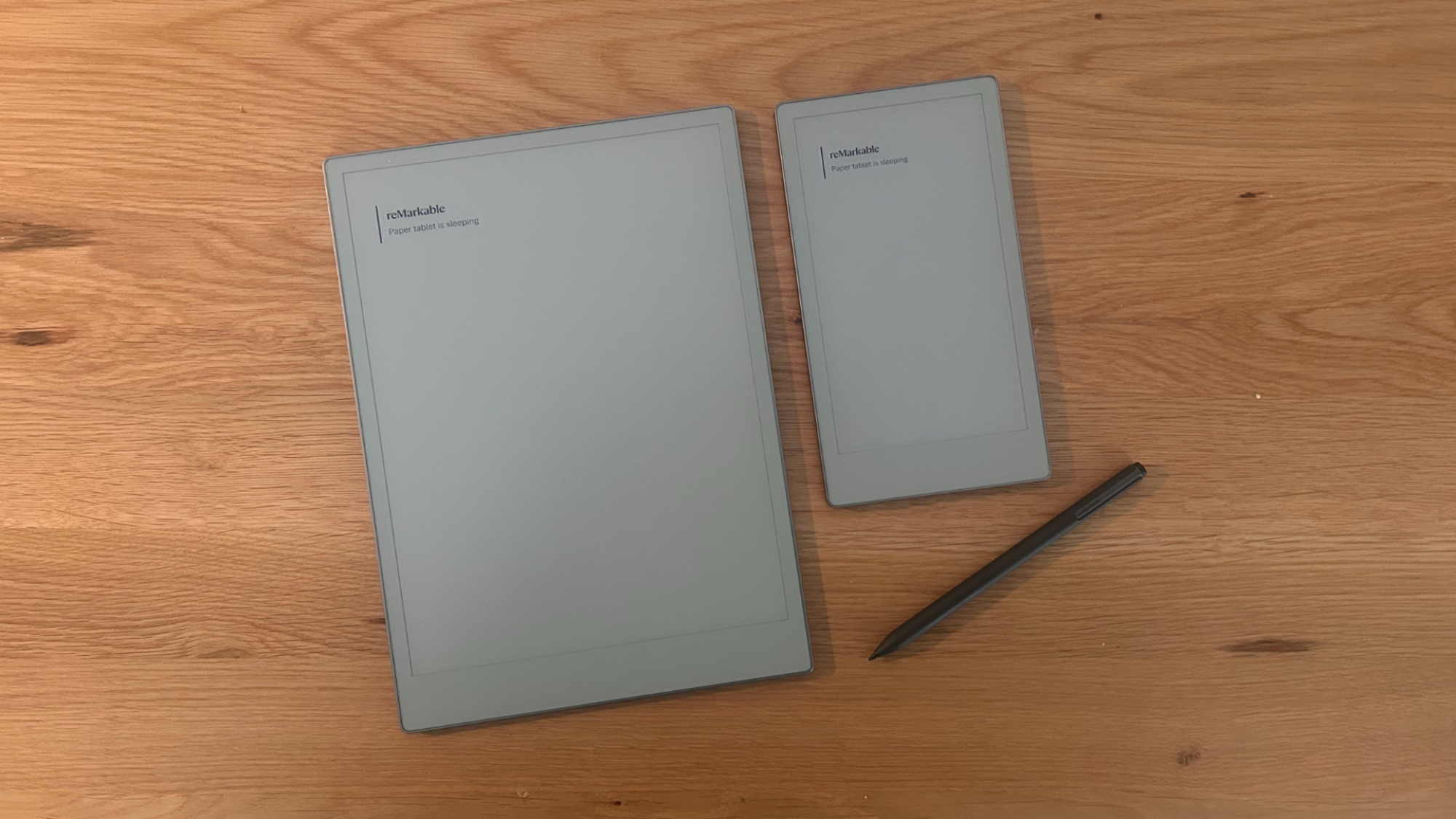
The Paper Pro Move (right) next to its larger sibling, the reMarkable Paper Pro.
Credit: Joel Cunningham
Credit: Joel Cunningham
About three weeks ago, reMarkable invited me to a press event in New York City where it showed off the Paper Pro Move, a reshaped and downsized version of the Paper Pro that is, in most meaningful ways, identical to that flagship device.
Whereas the Paper Pro is a large 11.8-inch slab, the Paper Pro Move has a 7.3-inch vertical screen that makes it look a bit like a beefed-up smartphone; both screens use the same Gallery 3 technology that can reproduce more than 10,000 colors. It weighs in at just over half a pound—235g to the Paper Pro’s 525g—but has the same 64GB of internal storage and 2GB of RAM. The chips are different, though a direct comparison is difficult on paper: The Paper Pro Move has a 1.7GHz dual-core Cortex-A55 processor, while the larger device has a 1.8GHz quad-core Cortex-A53, but performance feels comparable during real-world use.
Though it’s significantly less than half the size of the Paper Pro, the Paper Pro Move crams in a 2,334mAh battery that reMarkable says will last about two weeks with regular use and can be topped up with about three days worth of power after a 10-minute charge. (Of course, “regular use” will vary with the user, but generally, I found the Paper Pro has better than average battery life for devices of this type.) One small negative: The Paper Pro Move seems to have retained the same adjustable front light as its predecessor, which means I once again think it’s a bit disappointing—in certain conditions, it’s not nearly bright enough for my tired old eyes.
Despite the differences in specs, the Paper Pro Move is well-named in that it feels, er, remarkably comparable to its bigger brother, in a much more portable size.
Organize your thoughts on the move
According to reMarkable, the Paper Pro Move was engineered in response to feedback from customers who praised the company’s flagship devices but wanted something a little easier to carry around for ideating on-the-go. For me, the Paper Pro Move gets there. I started my career as a journalist for a small-town newspaper, a job that saw me out in the field conducting interviews and attending meetings, all the while jotting notes in a trusty 4-inch by 8-inch reporter’s notebook that I could stick in my back pocket and pull out whenever I needed to write something down; the size and shape made it easy to take notes while standing, holding the notebook in one hand and a pen in the other.
The Paper Pro Move comes in at around 4.25 inches by 7.75—close enough that using it to jot down notes on the fly takes me back to my cub reporter days—but with organizational software and cloud sync options I would have killed for back in the early 2000s.
Software that works at any size
Credit: Joel Cunningham
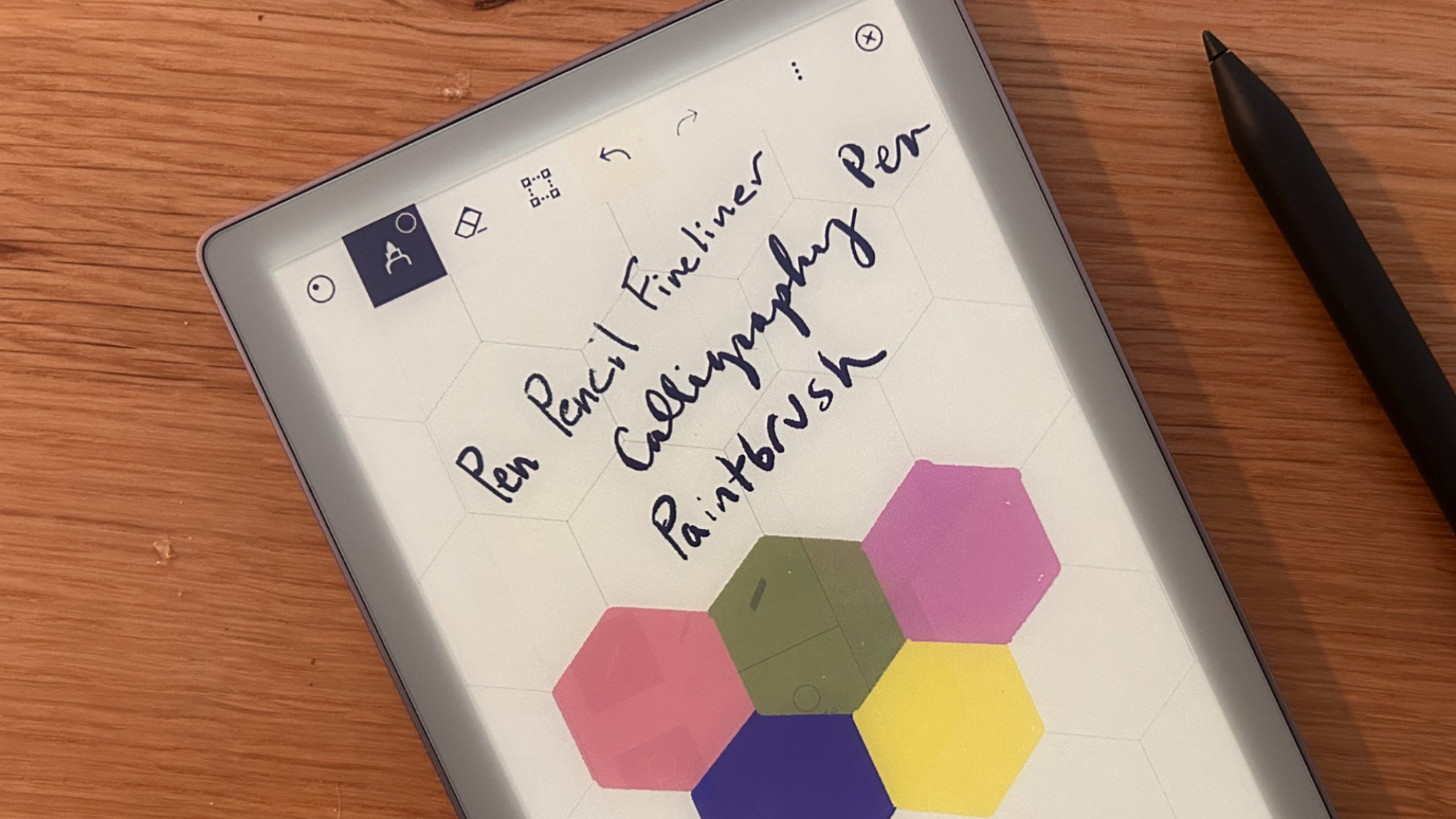
In all other ways, the Paper Pro Move is basically a resized Paper Pro. It offers the same excellent writing experience, which feels a lot like writing with a pencil on high-quality paper (when purchasing, you’ll be able to choose between a bundled Marker or Marker Plus with eraser), and the same software, including reMarkable’s familiar zoomable “infinite canvas” and $2.99/month cloud syncing features, but they have been tweaked to auto-reflow, so you can jump between editing documents on a Paper Pro and a Paper Pro Move without issue (if you are the sort of person with more than $1,100 to drop on two differently sized but otherwise largely comparable devices).
Not cheap, but cheaper
Starting at $679 with a basic stylus, the reMarkable Paper Pro is definitely pricey for a single-use device. The Paper Pro Move ameliorates that somewhat, even in the age of tariffs: You can choose a bundle with the Marker for $449 or the Marker Plus for $499.
That $230 is a significant price cut, but you’ve also got a lot less screen real estate to work with, so you’ll have to decide if the tradeoff is worth it—but based on my impressions after a few weeks of testing, that’s the only compromise you’ll need to worry about. In all other respects, the Paper Pro Move feels a lot like the Paper Pro. (I’ll follow up with a full review of the device later this week.)
The Paper Pro Move will be available for order today at reMarkable’s website and should be order-able at partner retailers (like Amazon) soon.
PowerDNS Authoritative Server 5.0 Released with BIND-Style Views
PowerDNS Authoritative Server 5.0 adds BIND-style views, better API features, Lua upgrades, webserver Unix socket support, and more.
The post PowerDNS Authoritative Server 5.0 Released with BIND-Style Views appeared first on Linux Today.
FFmpeg 8.0 Arrives With Whisper Filter, Vulkan Encoders
FFmpeg 8.0 video and audio converter adds Whisper filter, Vulkan AV1 encoder, ProRes RAW support, and expanded codec handling.
The post FFmpeg 8.0 Arrives With Whisper Filter, Vulkan Encoders appeared first on Linux Today.
Essential nmcli Command Examples To Manage Network Connections On Linux
Discover essential nmcli command examples to efficiently manage network connections on Linux. Enhance your networking skills with our comprehensive guide.
The post Essential nmcli Command Examples To Manage Network Connections On Linux appeared first on Linux Today.
FFmpeg 8.0 “Huffman” Released with AV1 Vulkan Encoder, VVC VA-API Decoding
Dubbed “Huffman” and coming more than ten months after FFmpeg 7.1, the FFmpeg 8.0 release is here to enable TLS peer certificate verification by default, add an AV1 Vulkan encoder, introduce VP9 Vulkan and ProRes RAW Vulkan hardware-acceleration, and implement APV encoding support through a libopenapv wrapper.
The post FFmpeg 8.0 “Huffman” Released with AV1 Vulkan Encoder, VVC VA-API Decoding appeared first on Linux Today.
Direct3D-to-Vulkan Library vkd3d 1.17 Released with Shader Enhancements
Discover the latest vkd3d 1.17 release, featuring enhanced shader capabilities for seamless Direct3D-to-Vulkan transitions. Upgrade your graphics experience today!
The post Direct3D-to-Vulkan Library vkd3d 1.17 Released with Shader Enhancements appeared first on Linux Today.
Arch Linux Confirms Ongoing Denial‑of‑Service Attack
Arch Linux acknowledges a persistent denial-of-service attack affecting its services. Stay informed on the latest updates and security measures being implemented.
The post Arch Linux Confirms Ongoing Denial‑of‑Service Attack appeared first on Linux Today.
Calibre 8.9 Released with Improved Annotations and Plugin Filtering
Discover the latest Calibre 8.9 release featuring enhanced annotations and improved plugin filtering. Upgrade your eBook management experience today!
The post Calibre 8.9 Released with Improved Annotations and Plugin Filtering appeared first on Linux Today.
Fedora’s Reproducible Package Build Mandate Deferred To F44
One of the planned changes for Fedora 43 was setting an expectation that RPM package builds are reproducible. Much of Fedora’s “reproducible builds” effort is already complete but this change has now been deferred to the Fedora 44 release next year…
Linux Scheduler Adapted For A Latency Win & Avoiding An RT Deadlock
A patch series for the Linux kernel scheduler code is queued up for expected introduction in Linux 6.18 to defer throttle when tasks exit to user-space. These changes to switch the scheduler to a task-based throttle model and task-based throttle time accounting can provide a latency win and also address a possible deadlock situation for real-time “RT” kernels…
WinBoat is a new Linux app to run Windows apps with
Sometimes, you really do just need to run a Windows app on Linux and perhaps WinBoat might make this easier with its promise of “seamless integration”.
Linux Sees Fresh Fixes For PCMCIA PC Card Support In 2025
It’s not too often hearing PCMCIA these days as that defunct PC card standard for laptops from the 90’s and early 00’s. Back in 2023 Linux began dropping old PCMCIA drivers from the kernel while coming as a surprise today are some clean-ups for the Personal Computer Memory Card International Association (PCMCIA) subsystem code persisting within the Linux kernel…
Improved Intel Vulkan Video Code Merged For Mesa 25.3
Merged overnight to Mesa 25.3 is an improvement for the Intel driver’s Vulkan Video encode/decode handling that has been in the works the past few months…