The Powerbeats Pro 2 Are Getting These New Fitness Features in iOS 26

Did you know you can customize Google to filter out garbage? Take these steps for better search results, including adding my work at Lifehacker as a preferred source.


In the wake of Apple’s “Awe Dropping” event this week, you might think the AirPods Pro 3 are the best fitness earbuds you can get for your iPhone. That might be true, but Apple sells another pair of “pro” earbuds that might make more sense for you, especially if you find traditional earbuds frequently fall out of your ears.

Apple released the Powerbeat Pro 2 earlier this year, offering the AirPods features in a package that might be better suited for fitness junkies. Like the AirPods Pro, the Powerbeats Pro 2 comes with noise cancellation and transparency mode, but unlike AirPods, these earbuds have “earhooks” to keep them in your ears. Plus, the Powerbeats Pro 2 were the first Apple earbuds to introduce a built-in heart rate monitor—though Lifehacker Senior Health Editor Beth Skwarecki found the sensor to be unreliable.

AirPods Pro 3 also have a heart rate monitor, and come with some additional new features, like Fitness app integration. But just because Powerbeats Pro 2 didn’t ship with some of these fitness features, that doesn’t mean you need the newest AirPods to get them. Beats shared some new iOS 26 features coming to Powerbeats Pro 2 with 9to5Mac, which should come as good news for anyone who already purchased a pair sometime this year.

Here’s what you can expect:

Apple Fitness app integration

Like the AirPods Pro 3, Powerbeats Pro 2 will now let you track workouts through the Fitness app. 9to5Mac says you can start one of 50 different workout types on your iPhone, and track your heart rate through your Powerbeats Pro 2.

Apple Fitness+ integration

If you subscribe to Apple Fitness+, you’ll be able to see track and view real-time data for your heart rate and calories burned, as well as the Burn Bar, which lets you compare how much effort you’re exerting to others who have done the same workout. This data will be pulled, of course, from your Powerbeats Pro 2.

Heart rate data

Powerbeats Pro 2 will have “multiple sources of heart rate data,” with the goal of improving accuracy. There’s also a broader algorithm update coming to both iOS and Android that will improve performance for faster heart rate readings, and users will get alerts to adjust the fit of their buds in order to improve heart rate tracking.

Beats doesn’t seem to elaborate on what the specific changes to the algorithm are, but perhaps this will help with the issues Beth experienced when reviewing the earbuds.

Single earbud heart rate tracking

In addition to these improvements, you’ll be able to track your heart rate with just one earbud. We’ll have to test this feature out to see if it’s any less reliable than using two buds at once.

Step counter

With iOS 26, Powerbeats Pro 2 will be able to track your steps without the need for an Apple Watch or iPhone. I never thought you could totally replace all other fitness tracking devices with a pair of earbuds, but that seems like Beats’ goal here.

Hands-free gestures

Once you update your iPhone, you’ll be able to use hands-free gestures to control Siri while wearing Powerbeats Pro 2, similar to the controls you get on certain AirPods. That includes nodding to say yes, or shaking your head to say no when Siri asks you about incoming calls and messages.

Mario, Metroid, Virtual Boy and more: all the biggest announcements from today’s Nintendo Direct

Whenever there’s a Nintendo Direct in September, you can be pretty sure that it’ll be a major edition of the showcase. Given that Friday’s one was scheduled to be about an hour long and that Nintendo has a whole new console to put games on, it was already likely that there was going to be a lot of news. 

Even then, it managed to be a jam-packed Direct. Let’s take a look at all the biggest announcements from the showcase, including what’s obviously the most important one: a Switch 2 version of Overcooked 2.

Mario’s 40th anniversary

September 13 is the 40th anniversary of Super Mario Bros. in Japan, which is a big reason why this Direct took place on a Friday (a highly unusual day for Nintendo to hold one of its showcases). Following news of Mario-related updates for the Nintendo Museum in Kyoto, the company revealed the title for the next Mario movie. It’s called The Super Mario Galaxy Movie, and it’s coming to cinemas in the US on April 3. We’ll have to wait a little longer for a trailer, though.

There was no announcement of an upcoming 3D Mario game today, unfortunately, but there was still plenty of other news. Mario Tennis Fever is coming to Switch 2 in February as the first new Mario Tennis game since 2018. Yoshi’s getting another adventure of his own with the Switch 2 platformer Yoshi and the Mysterious Book, which is set to arrive next spring. A Switch 2 version of Super Mario Bros. Wonder with fresh multiplayer modes will drop around that time too. 

Before all of that, though, Nintendo is bringing the wonderful Wii games Super Mario Galaxy and Super Mario Galaxy 2 to Switch on October 2. They’ll be available separately or as a bundle on the eShop and as a combined edition on a $70 physical cartridge. On Switch 2, you’ll be able to play these two classics in 4K. 

Two Mario Galaxy Amiibo figures are coming in April as well. Even though I’m not typically an Amiibo collector, I really want those because Luma is just adorable. In addition, Nintendo plans to release a physical collectible of the Talking Flower from Super Mario Bros. Wonder next spring.

Donkey Kong Bananza DLC out today

If you’ve already smashed everything to smithereens in Donkey Kong Bananza and have been yearning for more to do in one of the biggest Switch 2 exclusives to date, you’re in luck. Nintendo revealed a paid expansion for the platformer during the Direct. It’s called DK Island & Emerald Rush and it’s out today for $20.

You’ll be able to barrel around Donkey Kong’s home island and meet up with some familiar faces. After you’ve beaten the story in the main game, you’ll be able to try the Emerald Rush mode. This will see you undertaking timed runs in DK Island and the main game’s layers to collect emerald ore, smash fossils and collect Banandium Gems. 

Meanwhile, Nintendo has released a demo for the main game. So, if you have a Switch 2 and haven’t played Donkey Kong Bananza yet, you’ll be able to find out for yourself why the other cool kids are saying “ooh, banana!” all the time.

Pokémon Pokopia

Quite a few people were expecting/hoping for news of a new Animal Crossing during the Nintendo Direct. While that didn’t happen, Nintendo had arguably something even more exciting to announce — especially if you’re both an Animal Crossing and Pokémon fan.

Pokémon Pokopia is the first Pokémon life simulation game. You’ll play as a Ditto who has been transformed to look like a human and turn empty land into a cozy paradise for both yourself and Pokémon. Ditto can learn abilities from Pokémon, such as using Squirtle’s Water Gun to give life to flora. 

It looks utterly lovely. Pokémon Pokopia is coming to Switch 2 in 2026.

Fire Emblem: Fortune’s Weave

Nintendo used this Direct to seriously start filling out its Switch 2 slate for 2026. One of the games it’s publishing for the system next year is a new entry in the Fire Emblem series. It announced Fire Emblem: Fortune’s Weave during the showcase.

As ever, this will be a turn-based tactical RPG. The debut trailer touched on the story and characters in the upcoming game. 

Metroid Prime 4 and Hades 2 release dates

We had a feeling these were coming soon, but release dates for both Metroid Prime 4: Beyond and Hades 2 were both major announcements during the Direct. Samus has a rad, Tron-esque bike in Metroid Prime 4: Beyond, which will arrive on Switch and Switch 2 on December 4.

Hades 2, meanwhile, will arrive on Switch and Switch 2 on September 25. The full game will be available on Steam and Epic Games Store on the same day as it will exit early access on PC. There were be cross-save support across PC and Switch/Switch 2. The Switch 2 version will support 120fps gameplay when the console is docked. That Hades 2 and Hollow Knight: Silksong are dropping in the same month is pretty wild. Apologies to any designs you had on getting some sleep in September.

Hyrule Warriors: Age of Imprisonment release date

Nintendo announced Hyrule Warriors: Age of Imprisonment during a dedicated launch direct for Switch 2 back in April, and now there’s a release date for this hack and slash game. It’s coming to the console on November 6.

Age of Imprisonment, which was developed by Koei Tecmo’s AAA Games Studio, sees Princess Zelda traveling back in time and meeting Rauro and Sonia, the first king and queen of Hyrule. You’ll try to take down Ganondorf (yes, again) in what’s known as the Imprisoning War. Zonai devices will be at your disposal. According to the trailer, you’ll “uncover ancient truths that were only glimpsed in The Legend of Zelda: Tears of the Kingdom.”

There’s two-player co-op support via split-screen and GameShare. Zelda, Rauru and Sonia are among the playable characters, and you’ll be able to swap between them. You can also play as a Korok for a change instead of torturing the poor creatures, you monsters.

AAA third-party games coming to Switch 2

Nintendo confirmed during the Direct that Resident Evil Requiem is coming to Switch 2. It’ll arrive on February 27, the same day the next entry in Capcom’s classic survival horror series debuts on other platforms. Resident Evil 7: Biohazard and Resident Evil Village will also land on Switch on on February 27.

We learned back in April that the first installment of the Final Fantasy VII remake trilogy was bound for Switch 2 and now there’s a release date for that. Final Fantasy VII Remake Intergrade is coming to the system on January 22.

Switch 2 versions of indie classics

The Nintendo Switch was such an important platform for indie games, and several that became huge hits are getting Switch 2 versions. Overcooked 2 (the ultimate relationship test, in my opinion) will have support for 4K visuals, 60fps gameplay, GameShare and CameraPlay — the feature that allows you to see you and your teammate’s faces on screen as you play —in its Switch 2 version. That’s on the way this holiday season.

Stardew Valley will also support GameShare for co-op play on Switch 2. Mouse controls will be available, as well as four-player splitscreen and eight-player online action. Those who have the game on Switch already will get a free upgrade when the Switch 2 version arrives this fall.

Human Fall Flat is headed to Switch 2 in Spring 2026. That will also have support for mouse controls, GameShare and eight-person multiplayer.

It’s far too early to say whether Powerwash Simulator 2 will become an indie classic, but the original game was terrific and its sequel is getting a Switch 2 version as well. There’s no exact release date for Powerwash Simulator 2 as yet, but it’s still slated to arrive this fall.

Suika Game gets a sequel

Suika Game was a huge hit, and the sequel promises to soak up even more of my time. Suika Game Planet adds an extra dimension to the puzzle action. Instead of dropping fruit into a bucket and trying to combine two of the same items into a larger one, this time there’s a circular stage. That might be a fun wrinkle for anyone (me, hi) who gets frustrated about not being able to reach large fruit at the bottom of the container.

Suika Game Planet is coming to Switch and Switch 2 this winter and I might not be able to do anything else with my time after it drops. The Switch 2 version will support a GameShare mode that allows up to four players to work together.

Virtual Boy is back

Last but not least, Nintendo had an absolute shocker when it came to Switch Online + Expansion Pack. No, it’s not adding Super Mario Sunshine to the Gamecube app just yet. The company is bringing Virtual Boy games to the service, which is more bananas than anything you’ll find in Donkey Kong Bananza. 

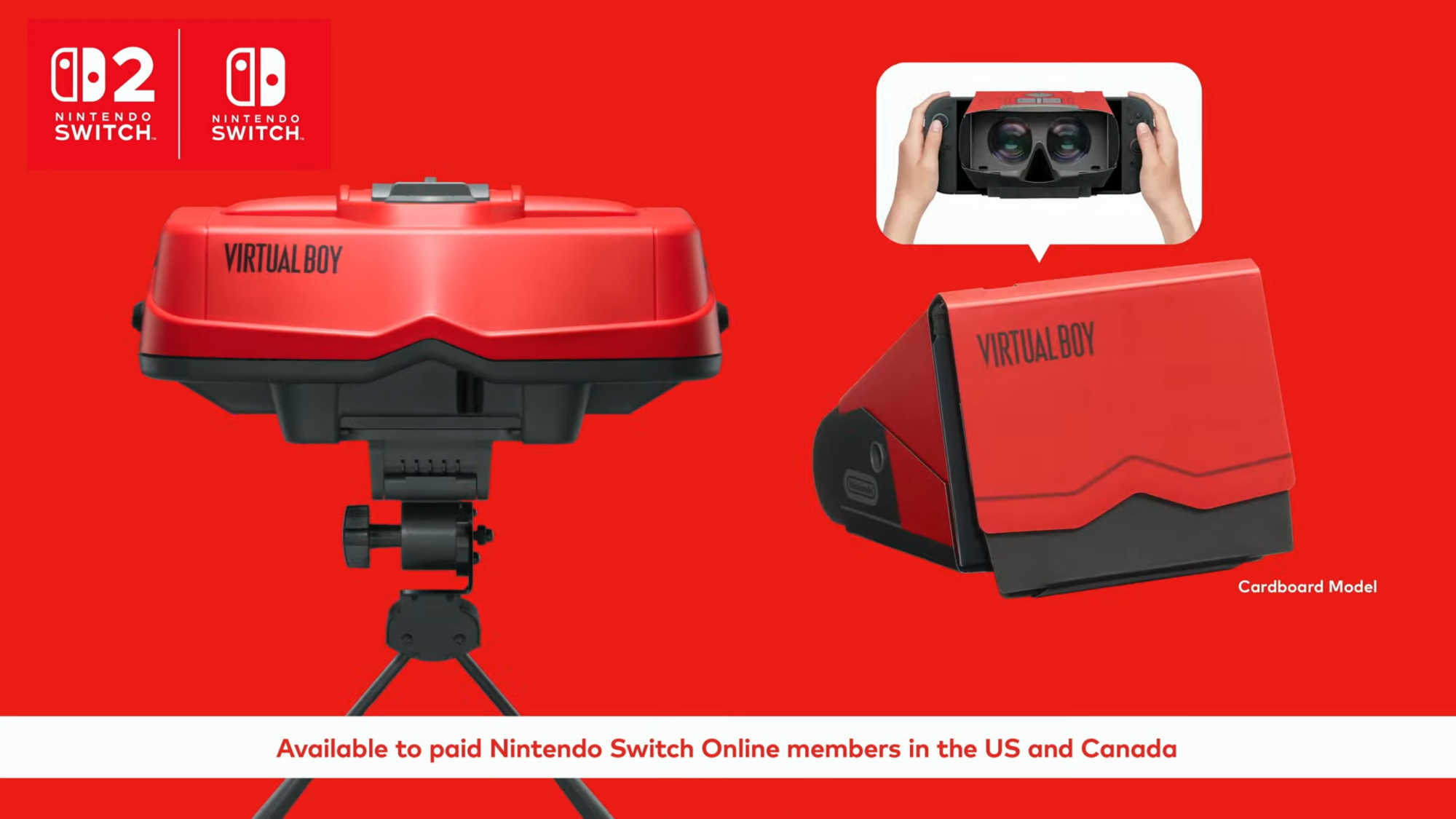
To play those games from a system that was notoriously undercooked (partly because Nintendo was placing much more focus on the massively more successful Nintendo 64 around that time), you’ll need an accessory. A $100 plastic tabletop one that looks just like the original Virtual Boy and a $25 cardboard version are on the way. They’re compatible with the Nintendo Switch, Switch 2 and, if it’s an authentic Virtual Boy experience, probably some eye strain.

This article originally appeared on Engadget at https://www.engadget.com/gaming/nintendo/mario-metroid-virtual-boy-and-more-all-the-biggest-announcements-from-todays-nintendo-direct-165722897.html?src=rss

Fire Emblem: Fortune’s Weave comes out for the Switch 2 in 2026

It’s official. The Switch 2 is getting the next entry in the long-running Fire Emblem series. Fire Emblem: Fortune’s Weave will be available sometime in 2026, though we have nothing more specific than that.

We do have a trailer and it looks gorgeous. It showed off the game’s tactical combat, which is a mainstay for the franchise, and teased the story. It involves some sort of gladiator-like contest called the Heroic Games. There are plenty of new combat units and many of them boast gladiatorial flair of some kind.

It also looks to take place in the same universe as the immensely popular Fire Emblem: Three Houses, which came out for the original Switch console. There are some visual similarities and one character seems to be a grown-up version of someone from Three Houses.

This makes a certain kind of sense, given that Three Houses is the most financially successful game in franchise history and considered by critics to be a stone-cold classic. The more recent Fire Emblem: Engage wasn’t nearly as popular, despite being a solid entry.

For the uninitiated, this series is all about tactical turn-based combat, factional rivalries and robust storylines involving numerous characters. It was a niche franchise here in the USA until the 3DS era and the release of Fire Emblem: Awakening and Fire Emblem: Fates.

This article originally appeared on Engadget at https://www.engadget.com/gaming/nintendo/fire-emblem-fortunes-weave-comes-out-for-the-switch-2-in-2026-162127483.html?src=rss

FTC investigating ad sale practices at Google and Amazon

The Federal Trade Commission is investigating whether Amazon and Google misled advertisers regarding the pricing and terms for their ads. As first reported by Bloomberg, the investigation is being conducted by the agency’s consumer protection unit, and centers around the auction-style sale of advertising space by the companies.

Google sells ads using automated auctions that run after a user enters a search query. These auctions take place in less than a second. Amazon uses real-time auctions to place ads within its listings, which users would recognize as “sponsored listings” or “sponsored ads” when searching for specific products.

The investigation questions whether Amazon disclosed so-called “reserve pricing” for some of its ads, which is a price floor that advertisers must meet before they can buy an ad. For Google’s part, the FTC is looking at certain practices by the search giant including its internal pricing process and whether it was surreptitiously increasing the cost of ads in ways that advertisers weren’t privy to.

The FTC isn’t the only federal agency keeping a close eye on big tech. Earlier this year, a federal judge ruled that Google held a monopoly in online ad tech after the Department of Justice (DOJ) sued to break up the giant’s ad business. Google also recently escaped mostly unscathed from a Department of Justice monopoly case involving its Chrome browser.

FTC Chair Andrew Ferguson has previously said that big tech is one of the agency’s top priorities. These investigations move forward against a backdrop of top tech CEOs continuing to try to curry favor with President Trump via lavish personal gifts and sweeping (if potentially unrealistic) promises of investment in the US economy.

This article originally appeared on Engadget at https://www.engadget.com/big-tech/ftc-investigating-ad-sale-practices-at-google-and-amazon-160236895.html?src=rss

AI-generated Medical Data Can Sidestep Usual Ethics Review, Universities Say

An anonymous reader shares a report: Medical researchers at some institutions in Canada, the United States and Italy are using data created by artificial intelligence (AI) from real patient information in their experiments without the need for permission from their institutional ethics boards, Nature has learnt.

To generate what is called ‘synthetic data’, researchers train generative AI models using real human medical information, then ask the models to create data sets with statistical properties that represent, but do not include, human data.

Typically, when research involves human data, an ethics board must review how studies affect participants’ rights, safety, dignity and well-being. However, institutions including the IRCCS Humanitas Research Hospital in Milan, Italy, the Children’s Hospital of Eastern Ontario (CHEO) in Ottawa and the Ottawa Hospital, both in Canada, and Washington University School of Medicine (WashU Medicine) in St. Louis, Missouri, have waived these requirements for research involving synthetic data.

The reasons the institutions use to justify this decision differ. However, the potential benefits of using synthetic data include protecting patient privacy, being more easily able to share data between sites and speeding up research, says Khaled El Emam, a medical AI researcher at the CHEO Research Institute and the University of Ottawa.


Read more of this story at Slashdot.

Education report calling for ethical AI use contains over 15 fake sources

On Friday, CBC News reported that a major education reform document prepared for the Canadian province of Newfoundland and Labrador contains at least 15 fabricated citations that academics suspect were generated by an AI language model—despite the same report calling for “ethical” AI use in schools.

“A Vision for the Future: Transforming and Modernizing Education,” released August 28, serves as a 10-year roadmap for modernizing the province’s public schools and post-secondary institutions. The 418-page document took 18 months to complete and was unveiled by co-chairs Anne Burke and Karen Goodnough, both professors at Memorial University’s Faculty of Education, alongside Education Minister Bernard Davis.

One of the fake citations references a 2008 National Film Board movie called “Schoolyard Games” that does not exist, according to a board spokesperson. The exact citation reportedly appears in a University of Victoria style guide, a document that teaches students how to format references using fictional examples. The style guide warns on its first page that “Many citations in this guide are fictitious,” meaning they are made-up examples used only to demonstrate proper formatting. Yet someone (or some AI chatbot) copied the fake example directly into the Education Accord report as if it were a real source.

Read full article

Comments

Depop’s Newest Feature Lets You Visualize a Full Outfit Assembled From Different Listings

Did you know you can customize Google to filter out garbage? Take these steps for better search results, including adding Lifehacker as a preferred source for tech news.


I love when technology works in a way that meets my particular needs—and that’s the case with this fun new tool I found on Depop, a resale platform I use almost exclusively as a buyer. One inconspicuous little button helps you create a visual representation of an outfit made up of clothing and accessories across various listings.

What is the new Depop tool?

A few days ago, a little scissors icon appeared on all the listings I was browsing, right above the like and bookmark icons I am used to using to save items I want to revisit and possibly purchase. I tapped on it with curiousity and was taken to a page called My Outfits, where I could remove the background from the photo of the listing and add it to a kind of vision board.

Here’s how it works: Let’s say you see a sweater you like while you’re browsing, but you aren’t sure what you’d wear it with. A little while later, you see some jeans you love and start to wonder how they’d look with that sweater. With this new feature, you can add both to your My Outfits tab, where the backgrounds of the listing photos will be removed and you can drag the pieces around on a blank screen, helping yourself visualize how they’d look together before you buy them. Your created outfits stay saved to your account and you can tap them any time to review or change them—plus they link back to the pieces they contain, so when you’re ready to buy, you can just go from there.

I love shopping resale because you can get items that are unique and not everyone is wearing (or you can get the things everyone is wearing for way less money). I can’t tell you how many times I’ve had an idea for an outfit cobbled together from various listings and tried to visualize it on my own, nor how many times I’ve struck out when the components of the outfit all arrive and I can actually try them on. It happened to me this week, actually: I ordered some pants and a top that I thought would go great together. They did not. Usually, I screenshot each item, then text them to a friend so they line up on top of each other in our iMessage thread. It’s rudimentary, but it gave me a vague sense of how things might look together.

With the new Depop feature, you can make vision boards of outfit ideas and there are no limits. Add shoes, a bag, a hair accessory, a top, a jacket, and pants—even (or especially) if all of those are from different sellers.

A few areas for improvement

A few weeks ago, I reviewed Google’s Doppl app, which is supposed to help you visualize how an article of clothing will look on your body using AI. That app really disappointed me and I wrote at the time that I’d like to see it expanded so I could dress my AI avatar in multiple pieces to get a sense of how they looked together. Right now, Doppl just lets you “try on” one thing and AI-generates the rest of the outfit. Sort of useless! Depop’s new feature wipes the floor with it that way; but it could stand to incorporate some way to borrow the Doppl feature that allows you to dress up a digital version of yourself. I’d like to see not just the outfit, but the outfit on me, with my hair and eye color, etc.

There are some flaws that will be harder to address. The most pressing one is that the photos the My Outfits tool uses are just pictures sellers take. As a seller myself, I’m not always taking high-quality images. Unlike a lot of other sellers, I never use mannequins or studio lighting. If I feel like it, I’ll don the article of clothing and take a mirror selfie, but that’s about as far as I’ll go—and a lot of people are like me. Plenty of sellers snap one or two pics of a dimly-lit pair of jeans or shoes and call it a day. We’re not professionals; we’re regular people trying to get some extra cash. When it comes to My Outfits, that means you may be importing less-than-quality images and trying, based on those, to figure out how an outfit looks. The quality of your My Outfit mockup actually depends on the quality of the photos, and you can’t control that at all.

The other issue is the same one you’ll always run into when online shopping: No matter how many measurements a listing includes, you won’t really know how it fits until you try it on. Arranging a top above a skirt in My Outfits can give you a sense of if the colors go well together (assuming the resellers took their photos in decent lighting), but it can’t tell you how high the skirt will rise on your torso or how low the hem of the shirt will sit. Will you have exposed skin? Will there be an overlap? My Outfits can’t tell you; your body measurements and the measurements of the garments will determine that.

Still, it’s innovative and fun; I’ve been making up outfits all week. I told my friends about it but even after updating their apps, they don’t have the feature yet, so it appears to still be rolling out.

Did you know your Garmin routes might be public? 7 ways you could be compromising your privacy

Everyone’s life has moved increasingly online, and for cyclists, that creates unique problems.

Sharing rides and photos can be motivating and fun, but it risks revealing far more than you intend – from the exact location of your garage to details thieves could use, not to mention often highly personal data. 

With so many connected apps, it’s not always clear who can see what.

Here are seven common ways you might be compromising your cycling privacy online, and what you can do to stay safe.

1. Think about your Strava settings

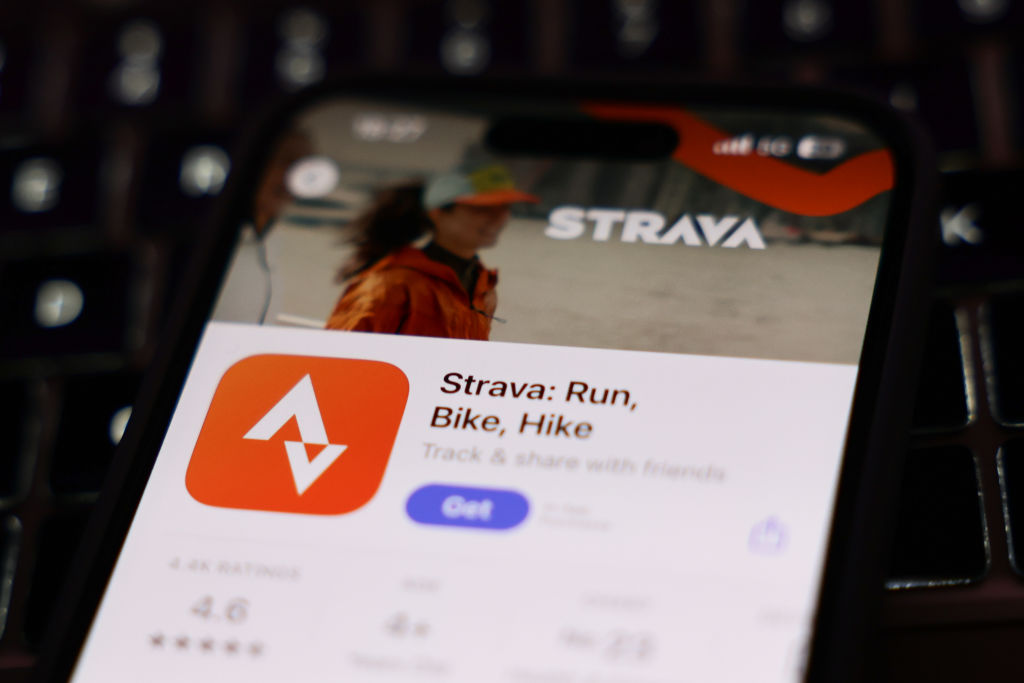
A laptop keyboard and Strava on App Store displayed on a phone screen are seen in this illustration photo taken in Krakow, Poland on January 15, 2025. (Photo by Jakub Porzycki/NurPhoto via Getty Images)
Strava’s all about sharing – just don’t share too much. Jakub Porzycki/NurPhoto via Getty Images

Strava calls itself “the social network for athletes”, and much of its appeal comes from sharing rides, cheering friends on, and posting photos or videos. But by default, that also means your activities reveal where you’ve been, when, and potentially even where you live.

The most important step is setting up privacy zones around your home, work or any other sensitive location.

Be strategic here – a small circle drawn just a couple of hundred metres from your house can still make it obvious which property is yours, especially if you live in a rural area. A zone set further away gives you more protection.

Even then, be cautious about what you post. An image taken outside your front door or garage can be just as revealing as a GPS trace.

From there, Strava’s layered privacy tools enable you to control who sees what: you can share with everyone, with followers only or lock rides down completely. 

Another setting to check is Flyby, which enables other riders to see when and where you crossed paths. 

It’s disabled by default, but if you switch it on, your rides must be publicly visible. Make sure you’re comfortable with that before enabling it.

Finally, consider the global heatmap, which aggregates millions of rides to show popular routes. 

Strava does apply your privacy settings here, but if your rides are public, others could zoom in close to your start and end points. You can opt out entirely if you’d prefer not to appear.

It’s not only your location you need to consider. If your ride starts with a run over to your mate’s house to meet up, it’s another frequently visited place that’s likely to contain bikes. 

Your Strava trace – or trace on any other app, for that matter – will most likely flag it up with a wiggly GPS trace and a speed drop to zero as you wait around for them to get ready.

Set privacy zones for friends’ houses and other locations you visit frequently, that snoopers may want to know about.  

2. Watch where your Garmin courses start

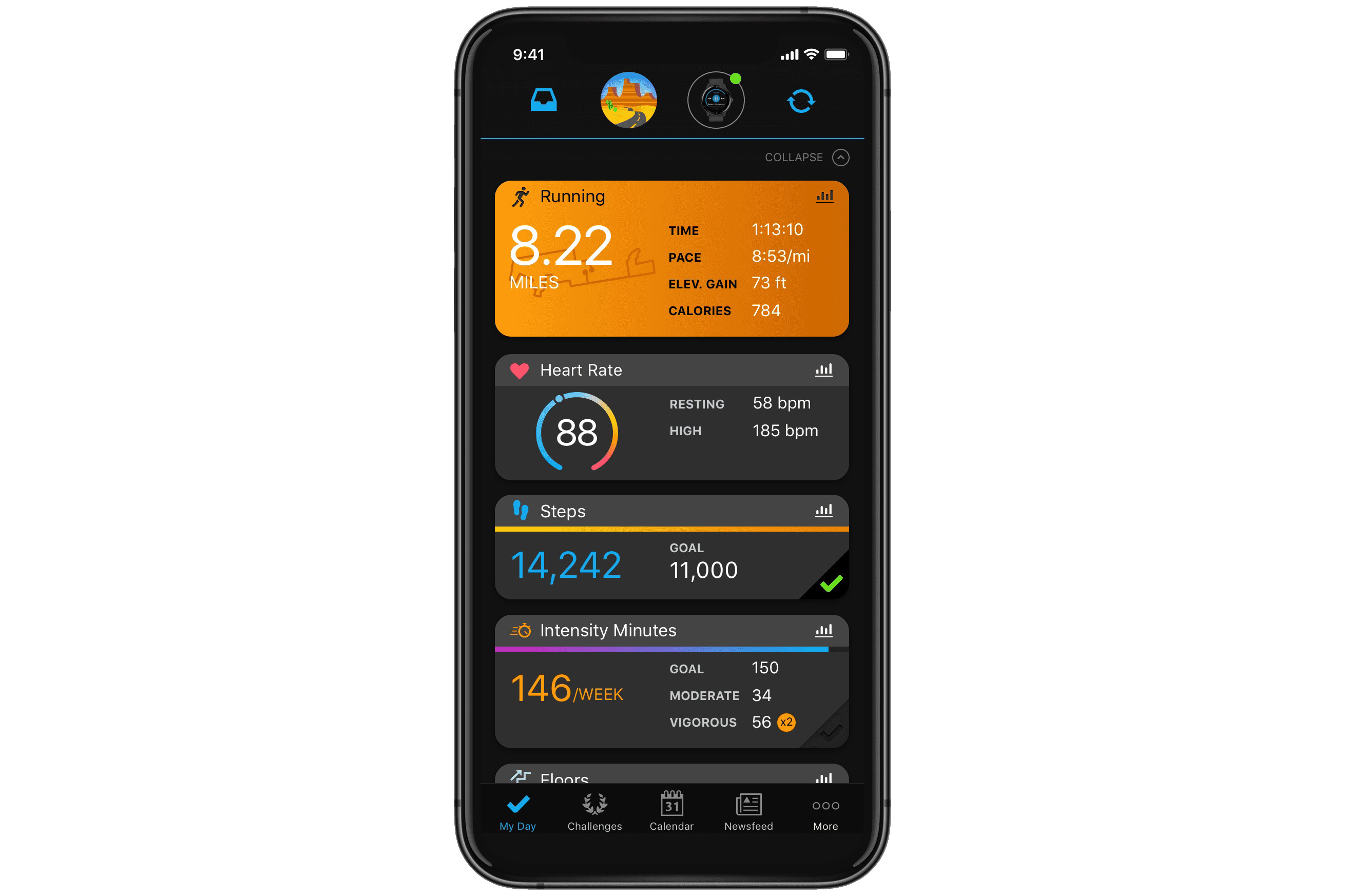
Garmin Connect App home screen.
Routes planned in OpenStreetMap in Garmin Connect are set to public by default. Garmin

Garmin Connect provides a great tool for ride planning. 

You can map out a route (or Course in Garmin speak) and Garmin will use its own popularity routing to send you via routes most used by cyclists. 

It’s similar to the route planning offered by Strava, but unlike Strava, it’s free to use.

You can choose your basemap to plot your route. The most detailed basemap is OpenStreetMap – but there’s a privacy catch if you use it.

While routes plotted in Garmin’s base map, Google Maps or Here Maps can be kept private, those plotted on OpenStreetMap are always public. 

This opens up the same issues of identifiable start and end locations as with rides on Strava. 

Either start your planned route a couple of kilometres down the road, when Garmin will direct you to the start, or delete your course once you’ve ridden it.

It won’t always be this way – speaking to BikeRadar, a Garmin spokesperson said it is “in the process of making courses created with OSM private by default”, adding “we expect that update to take place later this year”.

3. Don’t be too social

Social media can be a lot of fun, but it can be high-risk for cyclists. Jack Luke / Our Media

Social media sites are another source of info on where you are and where you ride. 

Instagram has recently introduced optional location sharing, which provides your location to contacts in near real-time.

Snapchat, too, has a location heatmap, which could show where you and your bikes are located.

If you want to be really safe, it’s probably not a good idea to boast online about that new Pinarello you’ve just bought, either. 

There’ve been cases of riders being followed and their bikes hijacked.

4. Make sure your photo sharing doesn’t share more than you thought

Be sure the metadata on your photos doesn’t reveal more than you want. Liam Cahill / Our Media

Another opportunity to reveal your location is provided by sharing photos. 

Be mindful of the background of your shots. Does it show your house, garage or other distinctive features that could reveal where you live? 

It’s relatively easy to use Google Street View and satellite images to establish where a particular shot was taken if you know the rough area. 

Some photo-sharing apps will retain the metadata for posted shots, too. This might include the GPS coordinates showing where they were taken. 

Check that your preferred photo-sharing app strips your metadata, or remove it yourself before posting a shot.

5. Check who you share your real-time location with

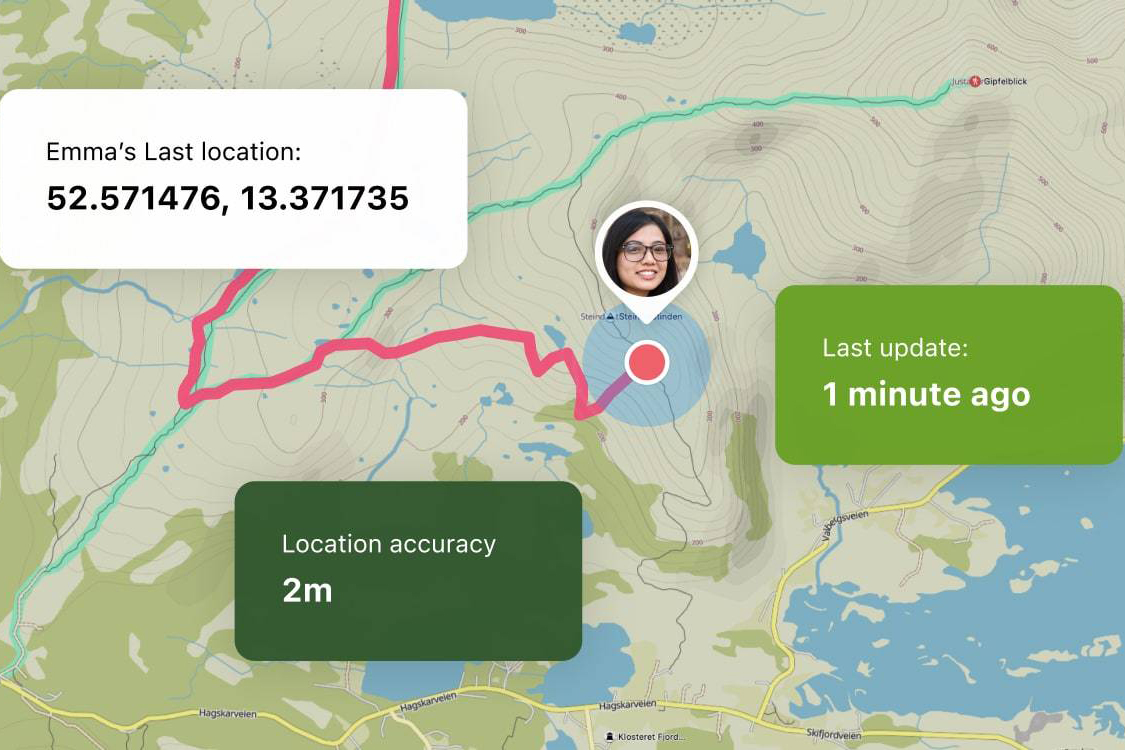
Komoot Live tracking screen example
Live tracking can be a great thing, but be careful. Komoot

Most GPS cycling computers offer real-time location sharing via their apps if you carry your phone with you. 

It’s another potentially leaky source of location info, although by default your ride is shared with named contacts only. 

But Garmin Connect, for example, enables you to share to other apps too, so you could potentially leak your location into apps where you haven’t set such tight privacy. 

6. Consider your indoor rides

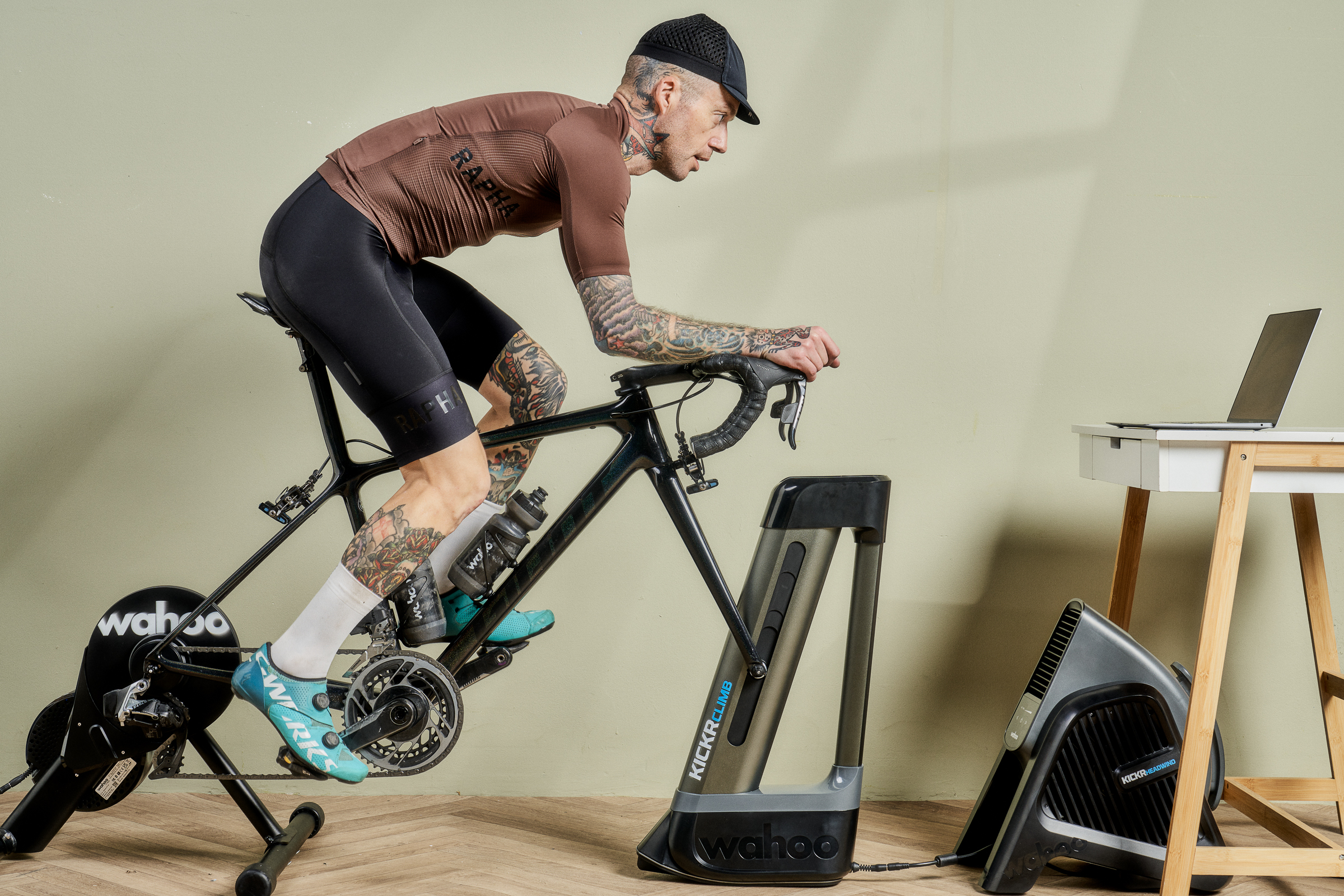
Wahoo Kickr Core set up
Indoor training might reveal unwanted details. Steve Sayers / Our Media

Indoor cycling apps enable you to ride your outdoor routes on your trainer. It’s yet another potential source of data leakage if you share your indoor workouts, particularly if you upload video footage to accompany your ride’s GPS file.

Again, consider who can see what in Rouvy, Bkool or your other preferred indoor training app. 

7. Check your shared apps

There’s a whole network of cycling apps that you can link together. 

Your ride might be logged in Garmin Connect, uploaded to Strava, pushed out to Komoot and fed through to training apps, brands’ sites and more. 

Before you know it, you could have a web of a dozen linked accounts, all seeing some or all of your data and potentially sharing it. 

Most apps will have robust privacy policies, but those policies can change, and lesser-known apps may take a more lax approach.

Proceed cautiously and check that any historical links are disabled if you stop using an app.

Intel’s New Core i5-110 Revives 5-Year-Old 14nm Comet Lake Architecture

Intel's New Core i5-110 Revives 5-Year-Old 14nm Comet Lake Architecture
Did you hear about the new Intel CPU? No, not the Arrow Lake refresh; that’s not out yet. It’s the Core i5-110, a model name so confused and absurd that it almost matches the absurdity of this product’s existence. That’s right: the brand-new Intel Core i5-110 is in fact an LGA 1200 Comet Lake processor from 2020 that has been re-branded and

[$] Creating a healthy kernel subsystem community

Creating welcoming communities within open-source projects is a recurring
topic at conferences; those projects rely on contributions from others, so
making them welcome is important. The kernel has, rather infamously
over the years, been an oft-cited example of an unwelcoming project, though
there have been (and are) multiple efforts to change that with varying
degrees of success. Hans de Goede talked about such efforts within his
corner of the kernel project in a talk (YouTube video) at
Open
Source Summit Europe
.

Over three decades later, Nintendo remembers the Virtual Boy exists

Even as Nintendo has endlessly mined its classic consoles for nostalgic re-releases in recent decades, the company has seemed to completely ignore the existence of the Virtual Boy—its abortive 1990s dip into the world of early virtual reality. That’s finally set to change next February with Nintendo’s first-ever official re-release of Virtual Boy games—at least for players who invest $100 in a required Virtual Boy-shaped Switch dock (or a cheaper cardboard holder) to make them work.

Virtual Boy – Nintendo Classics will be available for Nintendo Switch Online + Expansion Pack members on #NintendoSwitch and #NintendoSwitch2 starting Feb 17, 2026! #NintendoDirect pic.twitter.com/VnCO0DiX3S

— Nintendo of America (@NintendoAmerica) September 12, 2025

Subscribers to Nintendo Switch Online in the US and Canada will soon be able to purchase that $100 dock, which Nintendo says “recreates the form of the original Virtual Boy hardware,” or a slender $25 cardboard alternative. Then, starting on February 17, those players will be able to play downloaded Virtual Boy games (included with an Expansion Pack subscription) by inserting a Switch or Switch 2 into one of those retro replicas. The system will presumably display those games in a split-screen mode that can be viewed through special lenses to replicate the Virtual Boy’s original 384×224 resolution, four-shades-of-red stereoscopic display.

Nintendo’s announcement says you’ll “need this dedicated accessory” to play Virtual Boy titles through a Switch, suggesting that flat-screen play on a console without one of the custom docks won’t be possible. And while “purchase limits apply” to the plastic Virtual Boy replica (which seems likely to be a collectible available only in limited supplies), the cheaper cardboard model seems designed for wider availability.

Read full article

Comments

Google Has Finally Set Usage Limits for Gemini AI (Based on How Much You Pay)

Did you know you can customize Google to filter out garbage? Take these steps for better search results, including adding Lifehacker as a preferred source for tech news.


Before now, Google has been somewhat vague about just how many prompts, pictures, and videos you can get through with its Gemini AI, and the level of quality and AI model you can expect: The end results can vary depending on the Google AI plan you’re on, and the tool you’re using, with imprecise phrasing like “higher limits” and “highest limits” used in the official documentation.

Thankfully, Google has finally gotten around to giving us some clarity, as spotted by the team at 9to5Google. The new figures should give you a better idea of whether or not it’s worth upgrading the plan you’re currently on, and it means you won’t be caught by surprise quite so much when you reach your daily limits.

The limits of Gemini

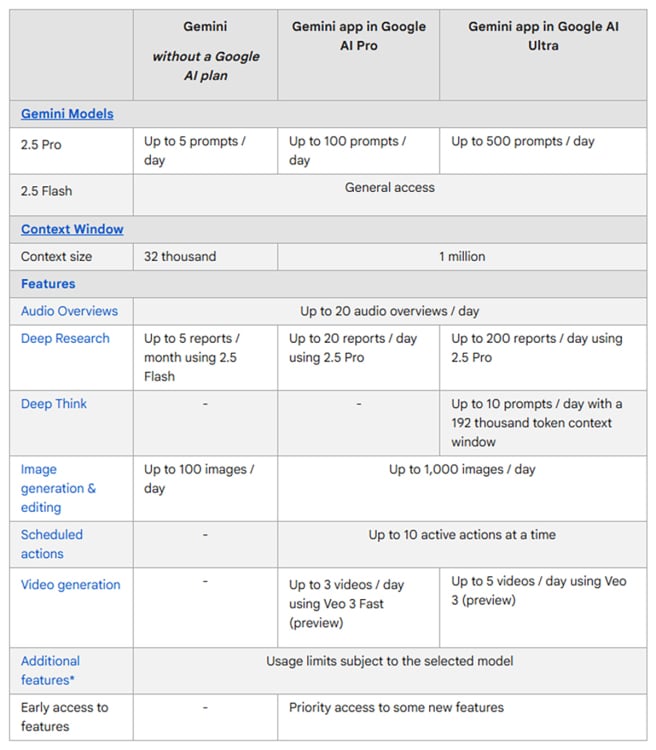
You can get the official lowdown on the limits of Google AI by heading to the Gemini support page. There are three plans to know about: The free tier (you don’t pay anything), the Google AI Pro tier ($20 a month), and the Google AI Ultra tier ($250 a month). The basics are as follows, though it doesn’t quite cover everything.

If you’re a free user, you get five prompts a day using the best 2.5 Pro model, after which the 2.5 Flash model kicks in. You also get a context window (reading capacity) of 32 thousand tokens, up to five Deep Research reports a month (using 2.5 Flash), up to 20 audio overviews a day, and up to 100 images a day. There are no Deep Think or AI video generation options.

If you’re on the Google AI Pro plan, you get pushed up to 100 prompts per day using 2.5 Pro. The context window grows to 1 million tokens, and you can run up to 20 Deep Research reports a day (using 2.5 Pro). The other limits are up to 20 audio overviews a day, up to 1,000 images a day, and up to three videos a day using the slightly inferior Veo 3 Fast. You can schedule up to 10 active actions, but there’s no access to Deep Think.

Finally, there’s the top Google AI Ultra tier. This gives you up to 500 prompts per day with 2.5 Pro, the same 1 million token context window as the AI Pro plan, and the same 20 audio overviews per day. You can run up to 200 Deep Research reports a day (with 2.5 Pro), and up to 10 Deep Think prompts per day. The 1,000 images-per-day limit is the same as the AI Pro plan, but you can also generate up to five videos per day with the slightly superior Veo 3 model.

Comparison chart

Credit: Google

What to consider

You might think all those figures are complicated enough, but they don’t quite cover everything. If you use other tools besides the Gemini app, other limits apply. The Flow movie-making web app, for example, works differently: It’s exclusively for Google AI Pro and Google AI Ultra subscribers, who get 1,000 monthly AI credits and 25,000 monthly AI credits respectively, to put towards their creations.

Another tool that’s affected is NotebookLM, because if you’re subscribed to one of the Google AI plans, you get higher usage limits and access to more features here as well. You can create more notebooks, add more sources, and work with longer documents if you upgrade from the free plan.

Then you’ve got the new features that are added over time, which are sometimes paywalled. The Canvas feature (a more expansive working area) was rolled out to everyone at the same time, for example, whereas the Gems feature (custom chatbots) was originally only for paying subscribers.

Eventually, most features trickle down to become available to everyone, but it’s something else to bear in mind if you’re wondering whether a Google AI Pro or Google AI Ultra plan is worth the investment. Google is obviously going to want to push users towards subscribing with a number of exclusives, but many will be able to get by on the free plan.

Nintendo Is Bringing Back Its Most Infamous Console As a Switch Accessory

We may earn a commission from links on this page.

Did you know you can customize Google to filter out garbage? Take these steps for better search results, including adding Lifehacker as a preferred source for tech news.


Nintendo is bringing virtual reality to the Switch 2 (and more VR to the Switch 1), but not in the way you probably expected. During the company’s hour long Nintendo Direct this morning, the Mario makers announced that 14 Virtual Boy games will be coming to the Nintendo Switch Online + Expansion Pack service, complete with stereoscopic 3D and a replica Virtual Boy accessory to make it all possible.

If you’re anything like one of my editors, you might be asking yourself “what’s a Virtual Boy?” Well, for all you gamers that weren’t around during the ’90s, it turns out the Oculus Rift wasn’t the first 3D headset to try courting gamers.

In 1995, five years after the release of the original Game Boy, Nintendo dipped its toes into VR, launching the Virtual Boy “portable” console. This 32-bit system had a decent amount of power and promise at the time—the original PlayStation was also 32-bit—but was held back from greatness by two major flaws. First, unlike VR headsets today, it didn’t strap around your head, and instead rested on a stand that needed you to lean into it, kind of like Han Solo getting dunked into the torture machine in The Empire Strikes Back. Second, it only displayed games in an eye-searing red-and-black graphics.

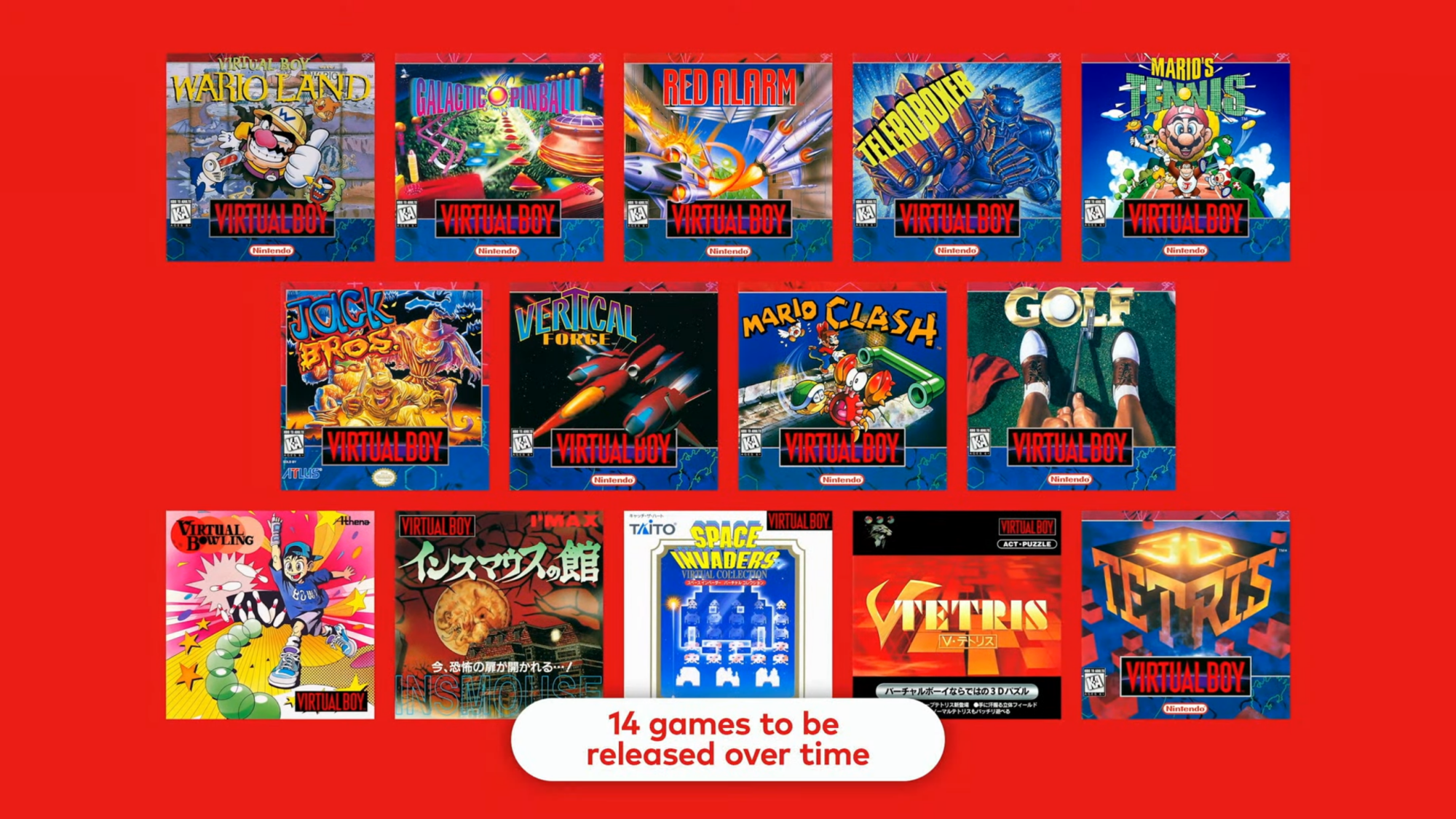
Though the reasons behind its eventual failure are bit more complicated than just that, suffice it to say, it didn’t sell well. Only 14 Virtual Boy games were ever released in the U.S., and Nintendo was quick to encourage us to forget about its flop—until now.

While unofficial emulators have tried to recreate the Virtual Boy experience for 3DS and Meta Quest, Nintendo is now throwing its own hat into the ring. Starting on Feb. 17, 2025, the company will begin releasing Virtual Boy games as part of its Nintendo Switch Online + Expansion Pack subscription service—with an adorable catch.

Virtual Boy as Switch accessory

Virtual Boy accessories Switch Online

Credit: Nintendo

Like many 3DS games, most of the Virtual Boy library technically doesn’t rely on 3D for gameplay too much, and some unofficial emulators have settled on displaying them in 2D without much issue to players. But Nintendo is, as it is wont to do, going all-in on the gimmick. In order to play Virtual Boy on Nintendo Switch Online, you’ll need an official Virtual Boy accessory that enables stereoscopic 3D for your system. It’s available for pre-order later today (the order links aren’t live as of this writing), and the actual release date remains unannounced

You’ve got two choices: First, you can get a full-blown replica of the Virtual Boy, stand and all. Personally, I’d be tempted to buy it even if it were just a hunk of nonfunctional plastic—it’s just that cute. But if you’re not with me there, or you want to save some money, you’ll also be able to buy a cardboard version, similar to the Nintendo Labo VR headset for Switch 1.

Regardless of which Virtual Boy accessory you get, you’ll slot your Switch or Switch 2 into it (Virtual Boy games will be available on both consoles), and the headset will divide the console’s screen into two halves to create a 3D image when you look at them through its lenses. It’s a similar approach to the Nintendo Labo, which allowed the Switch 1 to play Super Mario Odyssey, The Legend of Zelda: Breath of the Wild, and a few other choice games in VR. (You might be more familiar with using your phone to achieve this technique via Google Cardboard.)

Nintendo said that all 14 Virtual Boy games released in North America will be coming to Nintendo Switch Online this way, although the eight additional Virtual Boy games that were only released in Japan appear to be MIA for now.

Virtual Boy NSO Game Catalog

Credit: Nintendo

And that’s about all we know currently. Like Nintendo’s other retro replica devices, the Virtual Boy accessories needed to play these games with Nintendo Switch Online will only by available for purchase by paying Nintendo Switch Online subscribers. That’s a bit of a bummer if you just want one as a desk toy, but unlike the Gamecube controller also released for Switch 2, it’ll probably sting a bit less—that device can be used to play all sorts of games, but the Virtual Boy accessory will be limited to Virtual Boy games.

That is, unless Nintendo has plans to follow up on Labo and bring VR modes to existing Switch 2 titles like Donkey Kong Bananza. That’s just speculation at the moment, but hey, the Switch 2 is plenty more powerful than the Switch 1, and you could play Mario Odyssey in VR on that. A girl can dream.

Final Fantasy VII Remake Intergrade hits the Switch 2 on January 22

Final Fantasy VII Remake Intergrade comes out for the Switch 2 on January 22, 2026, which was revealed at today’s lengthy Nintendo Direct livestream. This is the first entry in the remake trilogy and primarily takes place in the opening city of Midgar. You’ll have to wait until Final Fantasy VII Rebirth to explore the overworld map, and there’s no Switch 2 release date for that one yet.

This release does include the Episode Intermission DLC, which involves the ninja Yuffie on a mission to steal powerful items from the evil Shinra corporation. That story takes place after the main campaign.

There’s a trailer and it looks gorgeous, so the Switch 2 should be able to handle this one. Final Fantasy VII Remake Intergrade originally came out back in 2021. The long-awaited title was more of a reimagining than a straight remake of the iconic JRPG. The game still managed to garner critical acclaim, despite drastic changes from the original.

It was followed by Final Fantasy VII Rebirth in 2024, with a third game on the way to close out the trilogy. There’s no name for this final entry and we don’t have a release date, as it’s still in active development.

This article originally appeared on Engadget at https://www.engadget.com/gaming/nintendo/final-fantasy-vii-remake-intergrade-hits-the-switch-2-on-january-22-152559995.html?src=rss

Google is Shutting Down Tables, Its Airtable Rival

Google Tables, a work-tracking tool and competitor to the popular spreadsheet-database hybrid Airtable, is shutting down. TechCrunch: In an email sent to Tables users this week, Google said the app will not be supported after December 16, 2025, and advised that users export or migrate their data to either Google Sheets or AppSheet instead, depending on their needs.

Launched in 2020, Tables focused on making project tracking more efficient with automation. It was one of the many projects to emerge from Google’s in-house app incubator, Area 120, which at the time was devoted to cranking out a number of experimental projects. Some of these projects later graduated to become a part of Google’s core offerings across Cloud, Search, Shopping, and more. Tables was one of those early successes: Google said in 2021 that the service was moving from a beta test to become an official Google Cloud product. At the time, the company said it saw Tables as a potential solution for a variety of use cases, including project management, IT operations, customer service tracking, CRM, recruiting, product development and more.


Read more of this story at Slashdot.

The iPhone 17 square selfie camera is a bigger deal than you think

A square camera sensor may sound like one of those things only nerds would appreciate, but as part of the new front-facing 18-megapixel “Center Stage” camera on the iPhone 17 lineup, it could have massive implications for Apple’s users. They’ll no longer need to turn their phones to take a landscape selfie, especially if they need to fit a large group of people, as that’s all handled automatically by Center Stage. It’s the sort of “Why didn’t I think of that?” feature that other phone makers will likely copy, simply because it’s immensely practical. Those square camera sensors could help make Apple a selfie pioneer, once again.

We’ve come a long way from when the iPhone 4 and HTC Evo 4G introduced the idea of modern front-facing cameras in 2010. Earlier cellphones in Japan and Europe had low quality selfie cameras, and you could argue that the Game Boy Camera also toyed with the idea when it arrived in 1998. But in 2010, we finally had powerful phones on relatively speedy mobile connections that could easily share photos and let users hop on video chats on a whim. (It still stings that it took Apple two more years to release the LTE-capable iPhone 5, which made FaceTime much more useful.)

iPhone Air selfie camera
Sam Rutherford for Engadget

During the iPhone 17 launch event, Apple revealed that its customers took 500 billion selfies last year, a massive figure that shows just how normalized the practice has become. Selfies were often mocked when they were deemed the purview of Instagram-obsessed teenage girls, but these days it’s not unusual to see everyone from seniors to a gaggle of sports bros gathering around a single phone like an object of worship. And, on a personal note, they’re really the only way to get decent photos of your entire family, especially when you’re juggling two rambunctious young kids.

We take photos to preserve memories, but selfies feel distinctive for their intimacy. You’re not just capturing where you were, but you’re also documenting yourself in the moment, along with the people around you. By making it easier to take selfies, it follows that you’ll start to take even more of them, ultimately tying yourself into Apple’s ecosystem even further. That leads to needing an iPhone with more storage and potentially more iCloud backup space down the line. You’re also not going to jump over to an Android phone if you have to turn your phone sideways for a landscape selfie, or if you lose access to all of the cherished memories in your Apple Photos library.

The square camera sensor keeps you loyal. 

It’ll also change the way iPhone users take front-facing videos. Center Stage automatically keeps you in the center of FaceTime calls, so you don’t have to worry so much about framing yourself up. And while I haven’t seen this particular feature in action, it should also help alleviate the headache of turning your phone during a FaceTime call to match the recipient’s device. (Or maybe I’m just tired of telling my parents to flip their phones when their FaceTime chats have huge black borders.)

This may be a stretch, but I could see the Center Stage front camera making it more common to record video with your front and rear cameras at the same time. While it’s new to iPhone as “Dual Capture,” we’ve seen variants of it from Samsung and Nokia (remember #bothie?) Android devices, but they’ve never really taken off. TikTok’s dual-camera live streaming mode has been more successful, and there are also vlogging apps like MixCam built around dual recording. With Dual Capture on iPhone 17, Center Stage’s ability to keep you in the middle of the action with the front camera should let you focus more on getting the best shot with the rear lenses.

While I’d love to see Apple cram more pixels into the 18MP Center Stage camera, moving to a square sensor will honestly be more impactful for all of the reasons above. It’s easy to throw in a higher resolution sensor, it’s tougher to fundamentally rethink how you can improve upon something as simple as taking a selfie.

This article originally appeared on Engadget at https://www.engadget.com/mobile/smartphones/the-iphone-17-square-selfie-camera-is-a-bigger-deal-than-you-think-151517041.html?src=rss

New pathway engineered into plants lets them suck up more CO₂

Lots of people are excited about the idea of using plants to help us draw down some of the excess carbon dioxide we’ve been pumping into the atmosphere. It would be nice to think that we could reforest our way out of the mess we’re creating, but recent studies have indicated there’s simply not enough productive land for this to work out.

One alternative might be to get plants to take up carbon dioxide more efficiently. Unfortunately, the enzyme that incorporates carbon dioxide into photosynthesis, called RUBISCO, is remarkably inefficient. So, a team of researchers in Taiwan decided to try something new—literally. They put together a set of enzymes that added a new-to-nature biochemical cycle to plants that let it incorporate carbon far more efficiently. The resulting plants grew larger and incorporated more carbon.

Cycles and recycles

In the abstract, incorporating carbon dioxide from the atmosphere into the biochemistry of the cell seems simple—you just link up a few of the carbon atoms and you’re off. But in reality, it’s fiendishly complicated. Carbon dioxide is an extremely stable molecule, so incorporating it requires a very energetically favorable reaction. In the Calvin cycle of photosynthesis, that reaction involves linking the carbon dioxide as part of a reaction that breaks apart a modified five-carbon sugar, creating two three-carbon molecules. Some of those molecules get fed into the cell’s metabolism, while others get built up into a five-carbon sugar again, restarting the cycle.

Read full article

Comments

Amazon Sets Sights On Challenging Meta Ray-Bans With Jayhawk Smart Glasses

Amazon Sets Sights On Challenging Meta Ray-Bans With Jayhawk Smart Glasses
The latest word on the street is that Amazon is secretly developing its own line of augmented reality (AR) glasses, with Meta’s market-leading Ray-Ban smart glasses as the main target. The project could move the company past its audio-only Echo Frames to a device with a full color display, a full suite of AI capabilities, and integrated Amazon

Small, affordable, efficient: A lot to like about the 2026 Nissan Leaf

SAN DIEGO—The original Nissan Leaf was a car with a mission. Long before Elon Musk set his sights on Tesla selling vast numbers of electric vehicles to the masses, then-Nissan CEO Carlos Ghosn wanted Nissan to shift half a million Leafs a year in the early 2010s. That didn’t quite come to pass, but by 2020, it had sold its 500,000th EV, which went from its factory in Sunderland, England, to a customer in Norway.

Pioneering though they were, both first- and second-generation Leafs were compromised. They were adapted from existing internal combustion engine platforms, with the electric powertrains shoehorned inside. The cars’ real handicaps were a lack of liquid cooling for the battery packs. Like an older Porsche 911, the Leaf was air-cooled, albeit with none of the collector value. That’s all changed for generation three.

The new Leaf is built on a dedicated EV platform shared with Nissan’s alliance partners Renault and Mitsubishi, and which we have previously seen used to good effect in the Nissan Ariya. The benefits of using a platform purpose-designed for electric propulsion are obvious from the space efficiency. The new car is 3 inches (75 mm) shorter from the outside, but offers nearly 9 inches (221 mm) more rear leg room (yes, really), making it a much more suitable place to put adults.

Read full article

Comments