The latest Apple Watches now boast a sleep score, which gives you a number on a scale of 1 to 100 for how well you slept. But that’s not all—you can even get this number without the Series 11 watch, as I discovered this morning while waiting for my new watch to be delivered. To get the new sleep score, just make sure you have iOS 26 and watch OS 26 installed.
Where to find the sleep score
You can view the sleep score on your iPhone or on your Apple Watch. On the watch (Series 6 or later), go to the Sleep app. The sleep score is the first thing it will show you. On the iPhone, the sleep score gets its own card in the Apple Health app. If you don’t see it, tap the search icon and then tap on Sleep.
Many devices can give you an Apple sleep score, not just the newest Apple Watch
The sleep score is a data analysis feature that doesn’t require specific Apple Watch hardware, and Apple has said that Apple Watches as old as Series 6 will get it. What’s more, I noticed that my Apple Health app gives me sleep scores for nights I wore other devices to bed, but not an Apple Watch.
According to my settings, my Apple Health app receives sleep data from the Coros, Garmin, Zepp (Amazfit), Oura, Ultrahuman, Whoop, and Withings devices I’ve used. I’ve rarely worn an Apple Watch to bed lately, but I’m always wearing something, usually including an Oura ring. I have sleep scores for all of those nights, not just the nights I wore an Apple Watch.
Your past sleep scores are calculated retroactively
The sleep score is new with iOS 26 and watch OS 26, but the data needed to calculate it was there anytime you wore a supported device to bed. Scrolling back, I can see sleep scores going back to April of 2020.
How sleep scores are calculated
Apple’s sleep score comes with a breakdown of where your 100 potential points come from. This includes:
50 points for how long you slept
30 points for how consistent your bedtime was with previous nights
20 points for minimizing interruptions
My own scores include a lot of “high” and “excellent” ratings, even though I don’t think my sleep has been great. But sleep scores are never totally scientific—even when they’re based on solid data, there’s no such thing as a medical cutoff for what counts as “high” or “excellent” sleep. The World Sleep Society tells us to “focus on trends and patterns, not individual ‘scores.’” If you see your sleep scores trending up (or down), that’s more important than what exactly your number is today.
If you’ve noticed odd stutters or audio crackles when using an ASUS laptop, you aren’t the only one. And just yesterday, Reddit user u/ZephKeks (Zephkek on GitHub) posted an explosive deep dive revealing exactly why that is. It turns out that these issues with ASUS laptops aren’t down to Windows 11’s idiosyncrasies, but rather genuinely faulty
Google is partnering with a UK nonprofit to fight non-consensual intimate imagery (NCII). (You may know it better as revenge porn.) Over the coming months, the company will begin using StopNCII’s hashes. These user-uploaded digital fingerprints can block individuals’ unwanted intimate content from appearing in search results.
StopNCII has a pretty neat system to combat revenge porn. Say you have some images you most definitely don’t want surfacing online. Select the picture on your device, and StopNCII will create a digital fingerprint of the file. That hash will be uploaded to the service. The photo itself never leaves your device. The organization then shares the hash (again, not the spicy pic) with participating platforms.
Then, if an asshole ex takes the liberty of uploading said photo to one of those companies’ services, it should be removed automatically. If the platform uses real-time hash matching, it can even block the upload immediately before it reaches anyone’s eyes. It’s a pretty solid defense against an ugly problem.
The system isn’t bulletproof. First, it only works for known images. So, if someone else has an intimate photo that you don’t have a copy of, you’ll have to fight that using other means. StopNCII doesn’t work for AI-generated images, audio recordings or saucy text chats.
The system also won’t help if the content is uploaded to a non-partner platform. In addition to Google, StopNCII partners with Meta, Reddit, Pornhub, OnlyFans, Snap, Microsoft Bing, X and more.
This is far from Google’s first move to combat NCII. A decade ago, it created a system for submitting revenge porn takedown requests. In 2024, it made it easier to remove deepfake NCII. On Wednesday, Google product manager Griffin Hunt explained that “given the scale of the open web, there’s more to be done to reduce the burden on those who are affected by it.”
If you’re 18 or older and have any photos of yourself that you want to flag proactively, you can start using StopNCII right now. Head to the org’s website to create a case. Note that the service only works for pictures that are nude, semi-nude or show a sexual act. And remember, the photo itself never leaves your device, so your privacy remains intact.
This article originally appeared on Engadget at https://www.engadget.com/big-tech/google-will-upgrade-its-revenge-porn-defenses-with-help-from-a-uk-nonprofit-181016291.html?src=rss
The Satori Threat Intelligence and Research Team at Human Security have discovered an ad and click fraud campaign dubbed SlopAds. The operation resulted in over 224 apps that have been downloaded 38 million times in 228 countries. It was a sophisticated effort that deployed several obfuscation techniques designed to evade security researchers
Light pollution now doubles every eight years globally as LED adoption accelerates artificial brightness worldwide. A recent study measured 10% annual growth in light pollution from 2011 to 2022. Northern Chile’s Atacama Desert remains one of the few Bortle Scale 1 locations — the darkest rating for astronomical observation — though La Serena’s population has nearly doubled in 25 years. The region hosts major observatories including the Vera C. Rubin Observatory at Cerro Pachon.
Satellite constellations pose additional challenges: numbers have increased from hundreds decades ago to 12,000 currently operating satellites. Astronomers predict 100,000 or more satellites within a decade. Chile faces pressure from proposed mining operations including the 7,400-acre INNA green-hydrogen facility near key astronomical sites despite national laws limiting artificial light from mining operations that generate over half the country’s exports.
Logitech hosted its annual G Play showcase today and unveiled a collection of new gaming peripherals. The lineup includes headsets, mice and a keyboard.
The G Pro X Superlight 2c is an even more compact redesign of the company’s Superlight 2 wireless mouse. This version weighs 51 grams and has up to 95 hours of battery life. It will be available on October 21 and will cost $160. Logitech’s other new gaming mouse is the G Pro X Superstrike, which boasts a haptics system in its main click buttons, allowing players to customize their actuation points. It also has battery life of up to 90 hours and weighs 65 grams. There’s no pricing information yet, and the release window is broadly set for the first quarter of 2026.
Logitech
The company also announced a pair of headsets. The Astro A20 X is a mid-range model with the handy feature of being able to connect to two consoles or PCs at once. It has 40 mm PRO-G Audio Drivers, and RGB settings. Battery life is up to 40 hours with the RGB equipped or up to 90 hours without. The A20 X comes with the same microphone as Logitech’s Astro A50 X model, which is one of our favorite gaming headsets. The A20 X will cost $180 and will be available on October 8. The other new headset is the G321 Lightspeed, a budget option at $60. This set has just 20 hours of battery life and emphasizes wearability in the design. It will be available starting sometime in October.
The rest of the G Play lineup includes the G515 Rapid TKL keyboard, which has a low profile and magnetic analog switches. That’s available today for $170. Logitech also added new RS50 and RS pedals for driving games. On the software side, the company has also added a game launcher to its G Hub portal. It supports Epic Game Store, GOG and WeGame libraries. The G Hub Games update will roll out during the holiday season.
This article originally appeared on Engadget at https://www.engadget.com/computing/accessories/logitech-adds-new-devices-to-its-gaming-accessories-lineup-180138486.html?src=rss
It’s somewhat ironic that Apple, the company that popularized the use of capacitive touchscreens with the iPhone and iPad, has been staunchly opposed to bringing our fingers anywhere near MacBook screens. Meanwhile, Microsoft and PC makers jumped at the opportunity to build touchscreen laptops years ago. The tablet-focused Windows 8was a failure, sure, but touchscreens led to excellent convertible notebooks and hybrid tablets like the Surface lineup. Now, according to a new rumor from longtime Apple analyst Ming-Chi Kuo, Apple might finally be ready to bring touchscreens to the MacBook Pro.
In a tweet posted this morning, Kuo wrote, “MacBook models will feature a touch panel for the first time, further blurring the line with the iPad. This shift appears to reflect Apple’s long-term observation of iPad user behavior, indicating that in certain scenarios, touch controls can enhance both productivity and the overall user experience.”
MacBook models will feature a touch panel for the first time, further blurring the line with the iPad. This shift appears to reflect Apple’s long-term observation of iPad user behavior, indicating that in certain scenarios, touch controls can enhance both productivity and the…
Specifically, Kuo says that touchscreen MacBook Pro models are “expected to enter mass production by late 2026,” and that they’ll use on-cell touch technology. Cheaper MacBooks (likely the Air) coming in late 2025 likely won’t have touchscreens, but that could change with a 2027 refresh.
It’s worth pointing out that Kuo’s predictions, which typically come from sources within Apple’s supply chain, aren’t always accurate. But given the timing of this particular note, and the ubiquity of touchscreen laptops these days, it’s the idea of a touchscreen MacBook isn’t too farfetched.
Apple is a stubborn company, no doubt — especially when it comes to adopting features from others. When referring to iPad competitors in 2010, Steve Jobs famously said, “If you see a stylus, they blew it.” While he was referring to using a stylus for general operation of a device, and not a highly specific use-case, it was still funny to see the Apple Pencil arrive five years later on the iPad Pro. There’s a certain nobility to sticking with your design convictions, but it would have been stupid for Apple to completely ignore the benefits of tablet stylii, something Microsoft was leaning into hard with its Surface devices.
So it goes with the touchscreen MacBook Pros. It’s hard to deny the convenience of lazily swiping the screen when scrolling through long articles, instead of tapping repeatedly on your keyboard or swiping a touchpad. Apple’s desire to keep touchscreens away from Macs is understandable. MacOS doesn’t have large touch-points like iPadOS, and it’s been honed for decades to work best with keyboards, mice and touchpads. But adding in basic touchscreen support doesn’t really require a complete macOS redesign, especially when the platform has already had support for multitouch gestures on trackpads since the first MacBook Air arrived in 2008.
It’s funny that the touchscreen MacBook Pro could also be arriving just as Apple is finally starting to make the iPad more Mac-like. iPadOS 26 adds the ability to resize app windows, easily organize them on your screen and it even brings over the menu bar from MacOS. It’s as if Apple is trying to appease all of its fans: The iPad owners who want more multitasking and productivity options, as well as the Mac owners who want a bit of iPad-like convenience.
Both of my kids were able to nimbly swipe around my phones and tablets at the age of two — that’s the power of a truly intuitive input mechanism. And to a certain degree, I also think it helped them get used to the idea of computing in general. If it’s easy enough for kids to grasp, why not make touchscreens a core feature of as many products as possible?
Simply put, Apple has run out of excuses. The time for touchscreen Macbooks is now.
This article originally appeared on Engadget at https://www.engadget.com/computing/laptops/a-macbook-pro-touchscreen-about-damn-time-180000315.html?src=rss
Google’s Discover content feed is getting some new features. It’ll soon include more than just articles from throughout the web. The company says the platform will be incorporating stuff like social media posts from platforms like Instagram and X along with YouTube Shorts.
“In our research, people told us they enjoyed seeing a mix of content in Discover, including videos and social posts, in addition to articles,” the company wrote in an announcement. These changes will start showing up in the “coming weeks.”
However, that’s not the only new tool arriving for Discover. Starting today, users can customize feeds in a number of ways. Folks can follow creators or publishers to see more content from them. Users can also tap the creator’s name to preview social posts and articles before making a final decision. This is all similar to a recently-introduced feature for Search that lets people set preferred news sources.
This article originally appeared on Engadget at https://www.engadget.com/apps/google-discover-is-going-to-start-showing-social-media-posts-and-youtube-shorts-175754283.html?src=rss
The Trump administration yesterday issued a lengthier denial of a whistleblower’s allegation that DOGE officials at the Social Security Administration (SSA) copied the agency’s database to an insecure cloud system. The allegation centers on the Numerical Identification System (NUMIDENT) database containing Americans’ personally identifiable information.
The cloud location described by the whistleblower report “is actually a secured server in the agency’s cloud infrastructure which historically has housed this data and is continuously monitored and overseen—SSA’s standard practice,” said a letter sent yesterday to Senate Finance Committee Chairman Mike Crapo (R-Idaho).
The letter was sent by SSA Commissioner Frank Bisignano, a Trump appointee who was previously CEO of the financial technology company Fiserv. It came in response to Crapo’s request for information.
Last week I ran the D.C. half-marathon alongside nearly 8,000 other runners. While I generally love running with my Garmin Forerunner 165 (which I’ve previously reviewed), when I strapped the watch on the morning of the race, I had some reservations. This watch has earned a reputation as a barebones beginner device—and I was worried if it would hold up when it really mattered. Would the GPS remain accurate throughout the 13.1 mile run? Would the pacing features actually help me hit my goal time?
After crossing the finish line, I’m happy to report that this entry-level watch met my expectations in almost every way.
In the leadup to race day, I tested Garmin’s training plans. It’s a simple process: Once you select a plan in Garmin Connect, your watch automatically receives each day’s workout, complete with target paces, intervals, and recovery periods.
The selling point for me is that Garmin’s training plans adapt to your performance over time, adjusting target paces based on recent runs and fitness assessments. For my marathon training, the plan included everything from easy runs and tempo workouts, to speed intervals and long runs (which may not be long enough—but more on that in a moment).
As I’ve previously noted, I particularly love the pacing guidance during tempo runs—the watch beeps and displays alerts when I drifted outside my target pace zone, helping me nail those challenging sustained efforts that are so crucial for race preparation.
That said, I’m not convinced Garmin’s training philosophy is entirely reliable, particularly over long run distances. I have a sneaking suspicion the device might not suggest long enough peak mileage for some runners, but I’ll dive deeper into that analysis after completing a full training cycle. In the meantime, I’m absolutely loving the pacing assistance and structured workouts.
Creating a custom race day workout
Ahead of race day, I took advantage of one of Garmin’s best features: creating a custom workout. To do so, I opened the Garmin Connect app and navigated to Training > Workouts > Create a Workout. From there, I built a step-by-step plan for my race. I created a warm-up mile (at an easy pace), followed by the main event (an 11-mile step with ambitious target pace alerts), and an extra ambitious final mile push. The key was setting up pace alerts that would notify me if I was running too fast or too slow relative to my half-marathon pace goal.
Once saved, the workout automatically synced to my Forerunner 165, and I could start it just like any other workout on race morning. Having this structure eliminated the guesswork and helped me stay disciplined during those early miles, when adrenaline and crowd energy make it so tempting to start out too fast.
Forerunner 165 GPS accuracy
Here’s where the Forerunner 165 really impressed me. I was genuinely concerned about GPS accuracy going into the race. Anyone who has ever attended a concert knows how dense crowds disrupt GPS on your phone or watch, and this half-marathon had around 8,000 runners plus who knows how many spectators cheering for us. More advanced Garmin watches offer dual-band GPS for improved accuracy, which the Forerunner 165 lacks. I worried that in a crowded race environment, amid tall buildings and thousands of other runners, the single-band GPS might struggle to maintain precision.
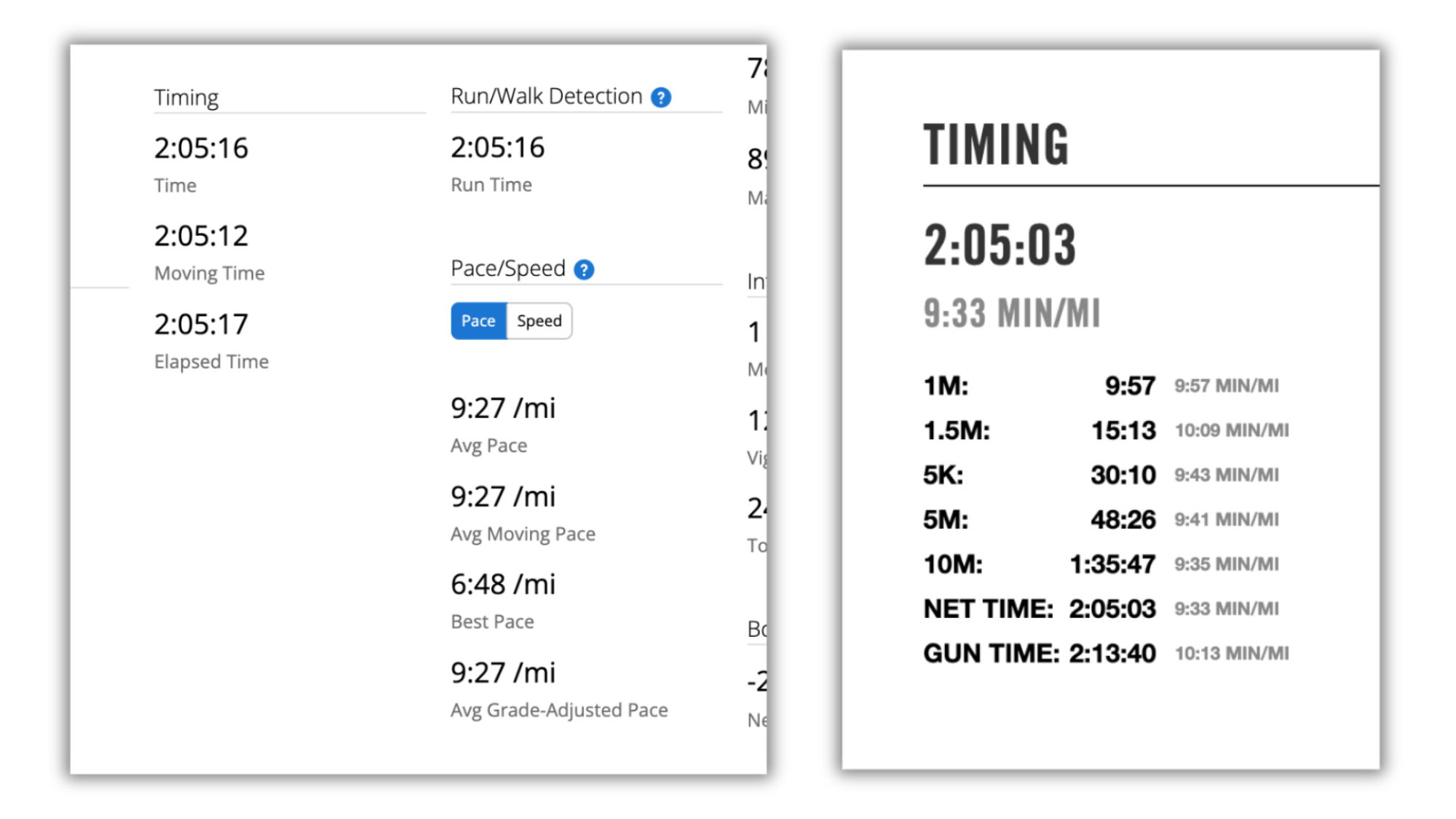
My fears were unfounded. Throughout the race, my Garmin’s distance measurements matched almost perfectly with the official mile markers set up by the race organizers. Mile after mile, when I reached each marker, my watch showed within 0.1 miles of the expected distance. This consistency gave me confidence in my pacing and eliminated the stress of wondering whether my watch was leading me astray.
You can see how close Garmin’s tracking is to my official race results in a side-by-side here.
Garmin’s summary on the left, my official race results on the right. Credit: Meredith Dietz
I should note that I’m an extremely relatable runner, in that I’m truly right in the 50th percentile of marathon runners: No faster, no slower. This means my experience is probably representative of what most recreational racers can expect from this watch.
How the Forerunner 165 performed on race day
During the race itself, the Forerunner 165 delivered exactly what I needed without overwhelming me with unnecessary data. The screen remained easily readable in various lighting conditions, from the pre-dawn start through full daylight. Battery life was never a concern—after two-plus hours of GPS tracking, I still had plenty of juice remaining.
The vibration alerts for pace deviations were perfectly calibrated: noticeable enough to get my attention without being jarring or distracting. The auto-lap feature marked each mile clearly, giving me regular checkpoints to assess my progress against my race plan.
Advice for racing with the Garmin Forerunner 165
Based on my race day experience, here are my top recommendations for getting the most out of your Forerunner 165 during a race:
Charge fully the night before. Even though battery life is excellent, there’s no reason to risk it. A full charge will easily handle any race distance.
Set up your data screens in advance. Customize what information appears on your main screen. I recommend keeping it simple: current pace, average pace, and elapsed time. Too much data can be overwhelming when you’re pooped.
Practice with your custom workout. Don’t let race day be the first time you use a custom workout. Test it during a long training run to make sure the pace alerts and structure work for your preferences.
Trust the GPS. My biggest surprise was how accurate the GPS remained throughout the race. Trust your watch’s distance and pace readings rather than trying to calculate based on course markers or feel.
Use the lap button strategically. While auto-lap is great, manually hitting the lap button at key points (like the halfway mark or when you start your finishing kick) can provide helpful psychological markers.
The Garmin Forerunner 165 might be positioned as an entry-level watch, but it did exactly what I needed it to do on race day, with accurate GPS, reliable pacing feedback, and an easy-to-read display. Sometimes, it seems, the most advanced features aren’t necessary—sometimes you just need a watch that works when it counts.
AI models often produce false outputs, or “hallucinations.” Now OpenAI has admitted they may result from fundamental mistakes it makes when training its models. The Register: The admission came in a paper [PDF] published in early September, titled “Why Language Models Hallucinate,” and penned by three OpenAI researchers and Santosh Vempala, a distinguished professor of computer science at Georgia Institute of Technology. It concludes that “the majority of mainstream evaluations reward hallucinatory behavior.”
The fundamental problem is that AI models are trained to reward guesswork, rather than the correct answer. Guessing might produce a superficially suitable answer. Telling users your AI can’t find an answer is less satisfying. As a test case, the team tried to get an OpenAI bot to report the birthday of one of the paper’s authors, OpenAI research scientist Adam Tauman Kalai. It produced three incorrect results because the trainers taught the engine to return an answer, rather than admit ignorance. “Over thousands of test questions, the guessing model ends up looking better on scoreboards than a careful model that admits uncertainty,” OpenAI admitted in a blog post accompanying the release.
If you’re in the market for an air fryer, first of all, welcome to the club. A world of perfectly- cooked fries awaits you. But which model to get? Well, you can save some cash right now if you pick Ninja’s Foodi DZ090C 5-in-1 air fryer, which is down to $120 from its regular price of $180 when purchased directly from the brand. That’s a sizable saving of $60.
A smaller version of the air fryer we featured as the best dual-zone option in our 2025 air fryer buyers guide, the two-basket DZ090C lets you cook up two totally different foods in separate baskets simultaneously. And while its six-quart capacity isn’t hugely spacious, you should have more than enough space for small or solo meals. And if you have a small kitchen, it’s probably a more sensible pick than the DZ401 we highlight in our guide.
If you’re thinking about what to have for dessert, you might also be interested in Ninja’s Creami, a 7-in-1 ice cream maker that also excels at smoothies, sorbets and milkshakes. We gave it a score of 90 in our review, praising its ease of use and versatility, which landed it a spot in our best tech of 2024 awards. At $200, it’s currently $30 off.
There are also a range of discounts to be found on SharkNinja’s entire product lineup at the moment. Shoppers can save 10 percent on $150+, 15 percent on $250+, or 20 percent on $350+ on Ninja products, and 10 percent on $200+, 15 percent on $250+, or 20 percent on $300+ when shopping directly from Shark.
This article originally appeared on Engadget at https://www.engadget.com/deals/one-of-the-best-ninja-air-fryers-for-small-kitchens-is-60-off-right-now-170505340.html?src=rss
Like the rest of its Big Tech cadre, Google has spent lavishly on developing generative AI models. Google’s AI can clean up your text messages and summarize the web, but the company is constantly looking to prove that its generative AI has true intelligence. The International Collegiate Programming Contest (ICPC) helps make the point. Google says Gemini 2.5 participated in the 2025 ICPC World Finals, turning in a gold medal performance. According to Google this marks “a significant step on our path toward artificial general intelligence.”
Every year, thousands of college-level coders participate in the ICPC event, facing a dozen deviously complex coding and algorithmic puzzles over five grueling hours. This is the largest and longest-running competition of its type. To compete in the ICPC, Google connected Gemini 2.5 Deep Think to a remote online environment approved by the ICPC. The human competitors were given a head start of 10 minutes before Gemini began “thinking.”
According to Google, it did not create a freshly trained model for the ICPC like it did for the similar International Mathematical Olympiad (IMO) earlier this year. The Gemini 2.5 AI that participated in the ICPC is the same general model that we see in other Gemini applications. However, it was “enhanced” to churn through thinking tokens for the five-hour duration of the competition in search of solutions.
Although this is ostensibly the entry-level MacBook Air, it is well-equipped to last you for many years. It comes with 16GB of RAM standard, twice what the previous generation’s basic model included. The 13.6-inch “Liquid Retina” display has a resolution of 2,560 by 1,664, a P3 wide color gamut, and a maximum brightness of 500 nits. You’ll also get an excellent backlit keyboard with Touch ID, Wi-Fi 6E support, and great speakers and microphones. Apple even decided to bring back MagSafe charging with this laptop.
The 12MP camera comes with the Center Stage, which follows your face as you move around the frame during video calls. The two USB-C ports are Thunderbolt 4 means you can extend to up to two 6K external monitors.
For a “basic” laptop, the 13-inch M4 MacBook Air offers incredible capabilities and features for the price, and is arguably a much better value than the Pro, according to Lifehacker Senior Tech Editor Jake Peterson. If you take into account the current discount, it really is the best all-around MacBook you can buy.
We’ve never raced this route in ZRL, and as a points race, it presents a strategic challenge. Do you go hard on the Mech Isle Climb and try to drop riders to improve your chance at points up the road? Or do you save your legs for the sprint segments? And what part will powerups play in your decisions?
There’s much to discuss, including the route’s key sections, powerup details, strategic options, and bike choice. Let’s go!
Looking at the Route
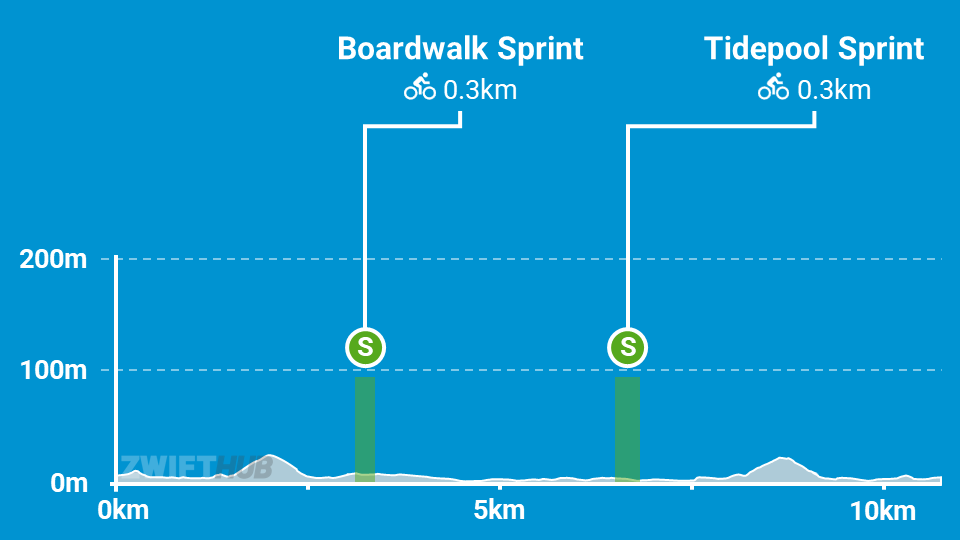
Makuri Islands’ Fine and Sandy route is 10.6km long with 77m of elevation gain and 2 flat intermediate sprint segments per lap. We’ve never raced this route in ZRL, and A/B categories will be completing 4 laps (42.5km) while C/D categories will be racing 3 (32.9km).
Here are the key sections of the route from a points race perspective:
Mech Isle Climb (700 meters, 2.9%): This is the key feature on the route. It’s the only climb of any length, plus it’s dirt, plus you’ll hit it twice per lap! The first ~250 meters of this segment are quite flat, and it’s the final ~450 meters, averaging 4%, where the big efforts must happen.
One tip: push over the top to get yourself up to speed on the dirt descent, because gaps will open up and you can lose contact easily.
Boardwalk Sprint (240 meters @ 0%) FAL+FTS: this short sprint is pan flat and arrow-straight, so there aren’t many tips to offer apart from standard sprinting tips. Riders will be chasing FAL here, and if you want to compete, you’ll need to use your aero powerup just before crossing the start line. I recommend sitting in the draft for at least the first half, then using the draft to slingshot through the pack and across the line before anyone else.
Tidepool Sprint (310 meters @ 0%) FAL+FTS: another pan flat sprint, but this one is a bit longer and curvier than the Boardwalk. The same tips apply as above, although I would wait perhaps 5 seconds before popping my aero powerup.
The Finish: thanks to the twisty final kilometers, the finish line isn’t visible until ~140 meters to go, so you’ll want to watch your distance countdown and mind your pack position. Riders will begin sprinting well before the finish line is available, but it’s the rider with the perfect sense of timing (and perhaps a saved aero powerup) who will win on the day.
Riders will receive one of two powerups at each arch, and there are two arches per lap, giving us a total of eight powerup possibilities (six for C/D categories). Here are details of the powerups, including the probability that you’ll receive each at an arch:
Aero Boost (75%): makes you more aerodynamic (reduces your CdA by 25%) for 15 seconds. Use at higher speeds (flats and descents), especially when no draft is available (although it is still useful when drafting.) If you’re chasing sprint points, this is the powerup for you.
Steamroller (25%): reduces Crr for 30 seconds so you roll as fast as a road tire on pavement regardless of wheels or road surface. This is most effective when used on dirt, which means it will be helpful on the Mech Isle dirt corkscrew climb where the key selections will happen in most races.
You’ll want an aero powerup when contesting the intermediates, as well as for your final sprint to the finish line. The steamroller powerup will prove very helpful on the Mech Isle corkscrew climb, but it’s basically useless anywhere else.
Bike Recommendations
Riders will consider a handful of factors when selecting a bike frame and wheels for this race:
All of the race’s available points are on flat intermediate sprints or the flat finish. No KOM points.
The short Mech Isle climb will be a key selection point, and if you get dropped from the front, you’ve lost your chance to earn big intermediate points.
Some may ask: Do I need to pick a wheelset that performs well on the Mech Isle Climb, or a more aero wheelset to optimize for the sprints and finish?
Fortunately, the physics make it easy. We tested multiple top wheelsets, and even the Tron bike, on the Mech Isle Climb:
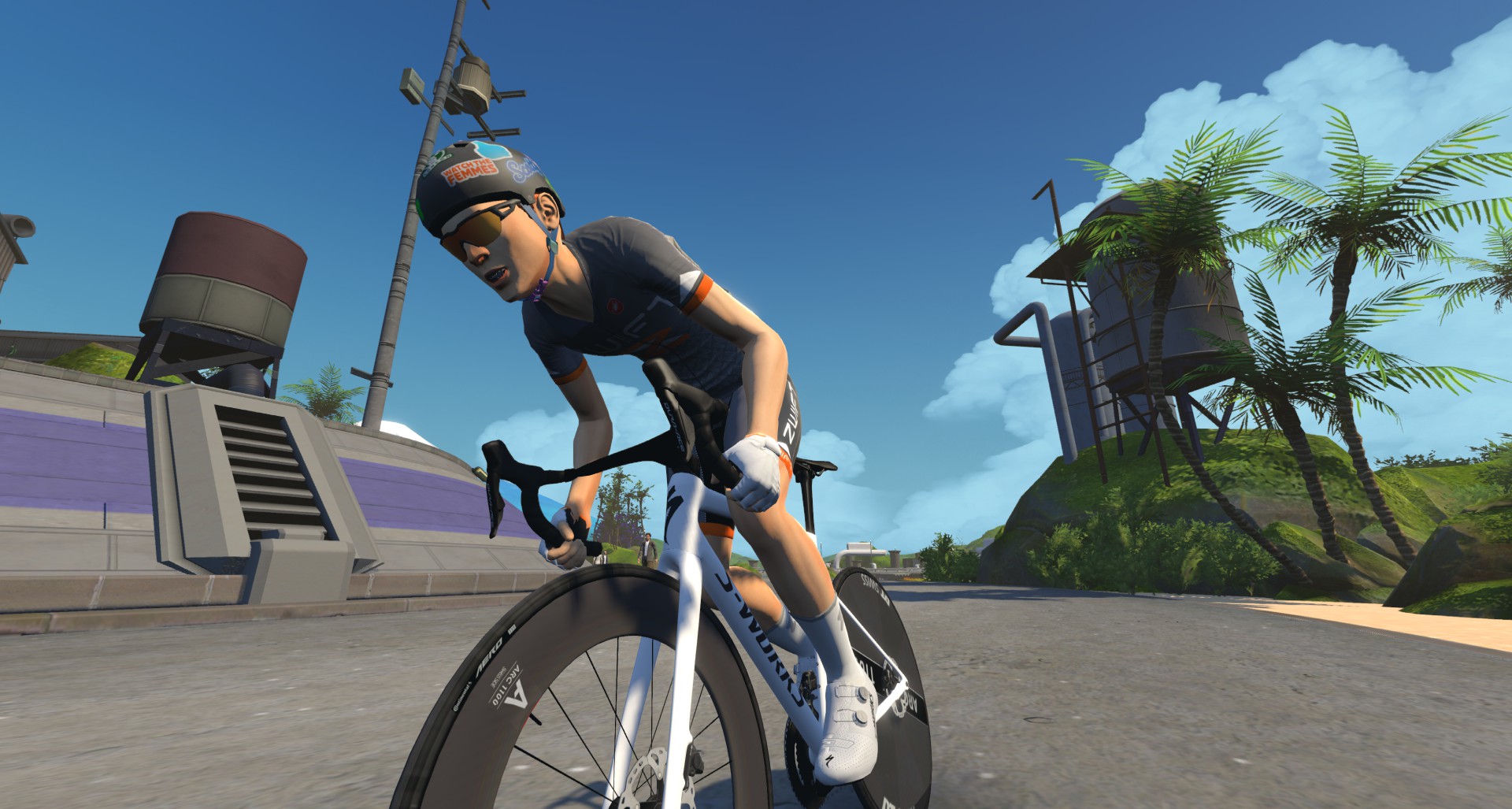
S-Works Tarmac SL8 with DT Swiss ARC 1100 DICUT 85/Disc
S-Works Tarmac SL8 with DT Swiss ARC 1100 DICUT 65
S-Works Tarmac SL8 with ENVE SES 4.5 PRO
S-Works Tarmac SL8 with ENVE SES 8.9
Zwift Concept Z1 (Tron)
At 5 W/kg, all these setups turned in the same time on the Strava segment: 1:25. Strava doesn’t do fractional seconds in times, but the consistency of those times tells us one thing: you can optimize your setup for the flat sprints without fear of losing time on the key climb!
So we’re recommending pairing the DT Swiss ARC 1100 DICUT 85/Disc wheels – the most aero wheels in game – with any of the following frames:
Lots of recon events are scheduled on upcoming ZRL routes, led by various teams. See upcoming ZRL recons for this race at zwift.com/events/tag/zrlrecon.
(Coming soon)
Strategic Options
Points Distributions, Fine and Sandy
4 Laps (A/B)
3 Laps (C/D)
These charts show the maximum points a team of 6 could earn in a race with 60 participants.
With FAL constituting the vast majority of each race’s total points, the message is clear: the winning team will be the one that puts the most riders near the front of the charging peloton at each sprint arch.
That means you’ll need to keep as many riders in the front group as possible, and those riders will need to contest the sprint segments as much as possible!
Here are some predictions of strategies we’ll see on Tuesday:
Sprint, Rest, Survive, Repeat: this will be the most common strategy. Rest between timed segments, sprint on the segments, and do the minimum required to stay in the front group over the Mech Isle climb. It’s the smartest approach, unless you have the legs to attack in a meaningful way. You’ll just need to decide which sprints you’re going all-in for, and which ones you’re conserving on.
Mech Isle Corkscrew Launch to Boardwalk Sprint: the Mech Isle climb ends about ~1.4km before the Boardwalk Sprint arch. Could rider(s) attack on the climb and stay away to grab FAL points on the Boardwalk Sprint? We think so… especially if 2-3 riders work together.
Big Attacks On the Mech Isle Corkscrew: this punchy dirt climb will stretch out the pack and drop some riders, especially on the first and last attempts of the race. Be ready for near-max ~45-second efforts each lap!
Bigger Final Mech Isle Corkscrew Attack: riders will save some juice for a final max effort up the key climb. Some who don’t trust their sprint may even try to go long, using the climb as a springboard… but these attempts are usually fatal.
Your Thoughts
Any insights or further thoughts on this race? Share below!
If global temperatures continue rising, virtually all the corals in the Atlantic Ocean will stop growing and could succumb to erosion by the end of the century, a new study finds. From a report: The analysis of over 400 existing coral reefs across the Atlantic Ocean estimates that more than 70 percent of the region’s reefs will begin dying by 2040 even under optimistic climate warming scenarios. And if the planet exceeds 2 degrees Celsius of warming above preindustrial temperatures by the end of the century, 99 percent of corals in the region would meet this fate. Today, the planet has warmed about 1.3 degrees Celsius over preindustrial temperatures.
The implications are grave. Corals act as the fundamental building blocks of reefs, providing habitat for thousands of species of fish and other marine life. They are also bulwarks that break up waves and help protect shorelines from rising sea levels. A quarter of all ocean life depends on coral reefs and over a billion people worldwide benefit from them, according to the National Oceanic and Atmospheric Administration.
complyctl is a powerful command-line utility implementing the principles of “ComplianceAsCode” (CaC) with high scalability and adaptability for security compliance. In today’s rapidly evolving digital landscape, maintaining a robust security posture isn’t just a best practice – it is a necessity. For Fedora users, system administrators, and developers, ensuring that your systems meet various security […]
Deeply troubled parents spoke to senators Tuesday, sounding alarms about chatbot harms after kids became addicted to companion bots that encouraged self-harm, suicide, and violence.
While the hearing was focused on documenting the most urgent child-safety concerns with chatbots, parents’ testimony serves as perhaps the most thorough guidance yet on warning signs for other families, as many popular companion bots targeted in lawsuits, including ChatGPT, remain accessible to kids.
Mom details warning signs of chatbot manipulations
At the Senate Judiciary Committee’s Subcommittee on Crime and Counterterrorism hearing, one mom, identified as “Jane Doe,” shared her son’s story for the first time publicly after suing Character.AI.
Sony Pictures has dropped a trailer for its upcoming horror comedy, Anaconda, a meta-reboot of the 1997 campy cult classic—and frankly, it looks like a lot of fun. Starring Paul Rudd and Jack Black, the film will arrive in theaters on Christmas Day.
(Spoilers for the 1997 film below.)
The original Anaconda was your basic B-movie creature feature, only with an all-star cast and better production values. The plot revolved around a documentary film crew (Jennifer Lopez, Ice Cube, Eric Stoltz, Jonathan Hyde, and Owen Wilson) who travel to the Amazon in search of a long-lost Indigenous tribe. They take on a stranded Paraguayan snake hunter named Serone (Jon Voight, affecting a hilariously bad foreign accent), who strong-arms them into helping him hunt down a 25-foot green anaconda. He wants to capture the animal alive, thinking he can sell it for over $1 million.