Strava is prepping for a US initial public offering (IPO), with the fitness platform said to have invited banks including Goldman Sachs, JPMorgan and Morgan Stanley to pitch for roles, according to reports.
Reuters reported that the listing could happen as soon as early 2026, depending on market conditions, and that Strava has yet to finalise how much it plans to raise or the valuation it will target.
The potential IPO follows the San Francisco-based company closing a fundraising round valuing it at $2.2 billion back in May 2025.
The valuation followed a series of acquisitions made by Strava. In April, it acquired Runna, a UK-based run training app. Then, in May, it bought The Breakaway, a cycling training app.
The rumours follow two leadership appointments. In August, Strava announced Matt Anderson as its new chief financial officer and Louisa Wee as chief marketing officer.
Anderson joined Strava from Nextdoor, a social network for neighbourhood communities, where he served as chief financial officer and guided the company through its public listing.
Strava says the platform saw more than 50 per cent growth in new users last year, with Gen Z turning to the platform. The fitness training app now has more than 150 million users in over 185 countries.
Strava has not responded to a request for comment.
With a raft of mounts, more tyre clearance and geometry inspired by mountain bikes, the new Marin Headlands V2 looks set to be one of 2026’s most exciting and affordable new gravel bikes.
The original Headlands combined a lightweight carbon construction with heavily MTB-influenced geometry.
The Headlands’ combination of impressive handling and great value made it a very popular option for trail-seeking gravel riders, and the inclusion of rack and mudguard fittings made it popular with bikepackers, too.
The new Headlands V2 will certainly keep both parties happy; the raft of updates and design changes seem set to enhance the experience, making the V2 look like one of this year’s most capable and versatile gravel designs.
The Marin Headlands is intended as a trail-capable gravel bike that can handle epic bikepacking adventures, too. Marin
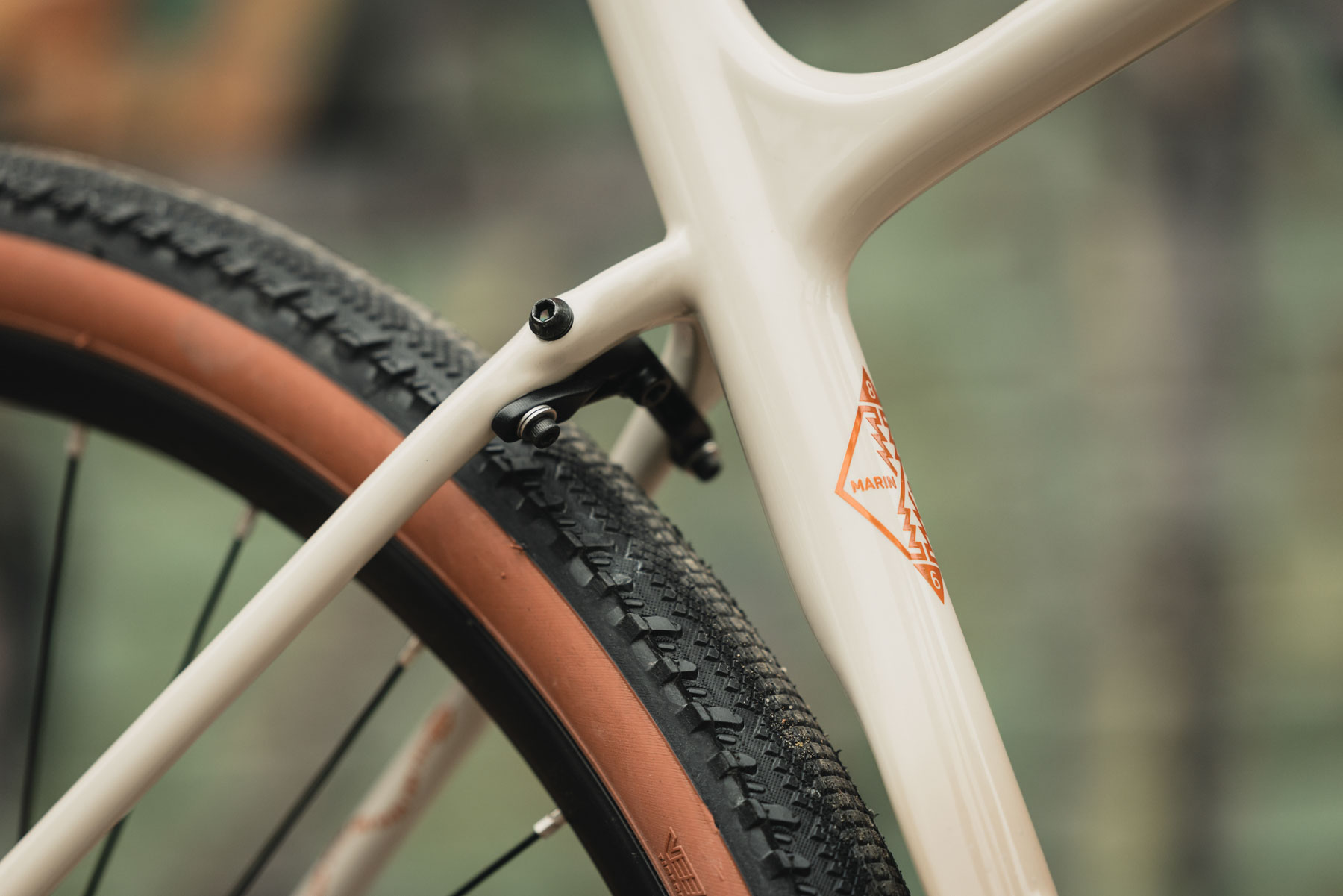
The new frame keeps the same 1x drivetrain-specific design. It means that, while increasing the tyre clearance to 50mm, Marin has been able to retain short 420mm chainstays.
The new Headlands frame features short chainstays and a cut-out seat tube. Marin
The front end retains the slackened 70.5-degree head angle, which is combined with a long front centre, deeply sloping top tube and steep (73.5-degree) seat angle.
The Headlands is designed to be run with a very short stem (60mm on the first four sizes, 70mm on the two largest). From these numbers, it’s apparent the Headlands still wears its mountain bike inspiration boldly.
The mudguard bridge is removable. Marin
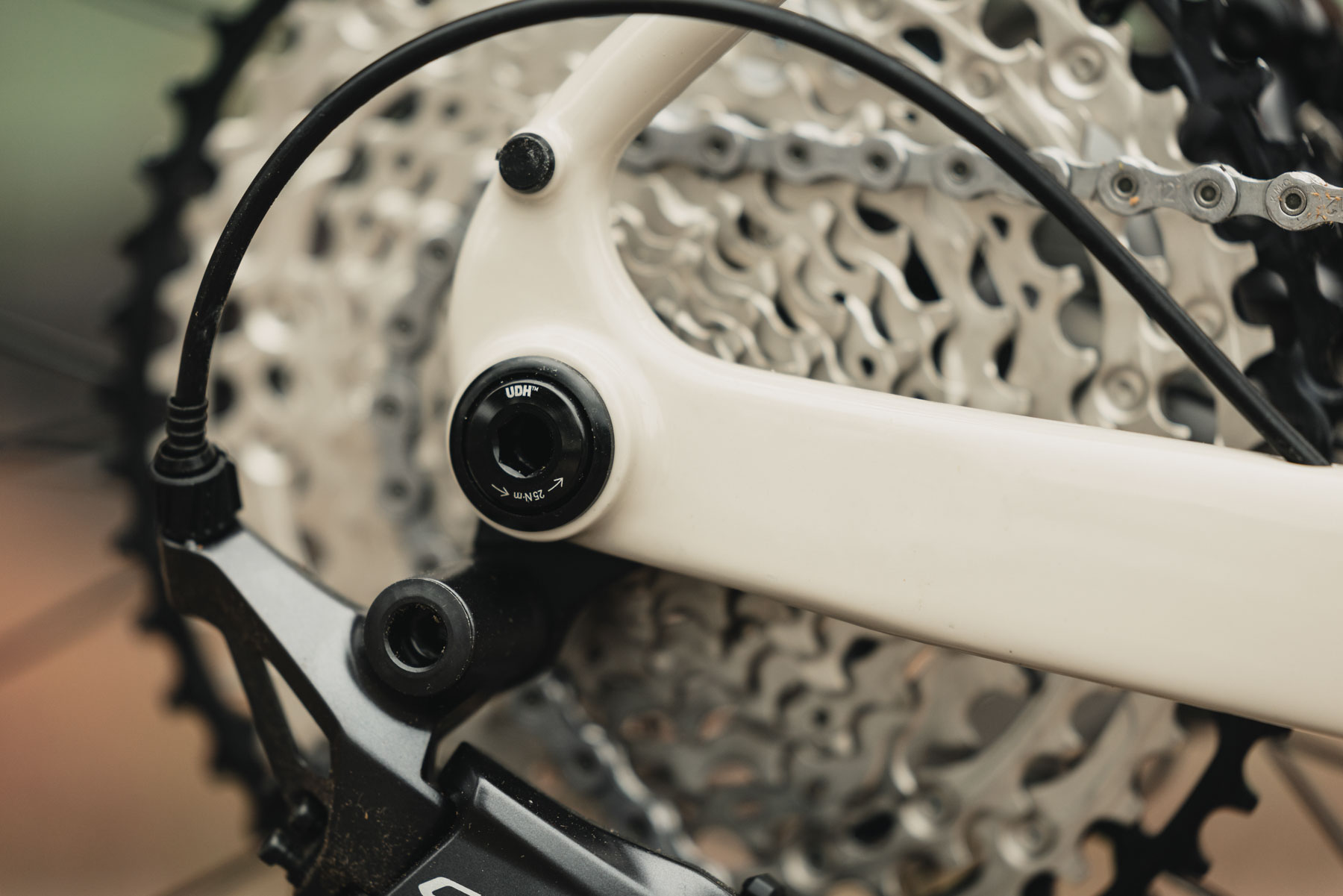
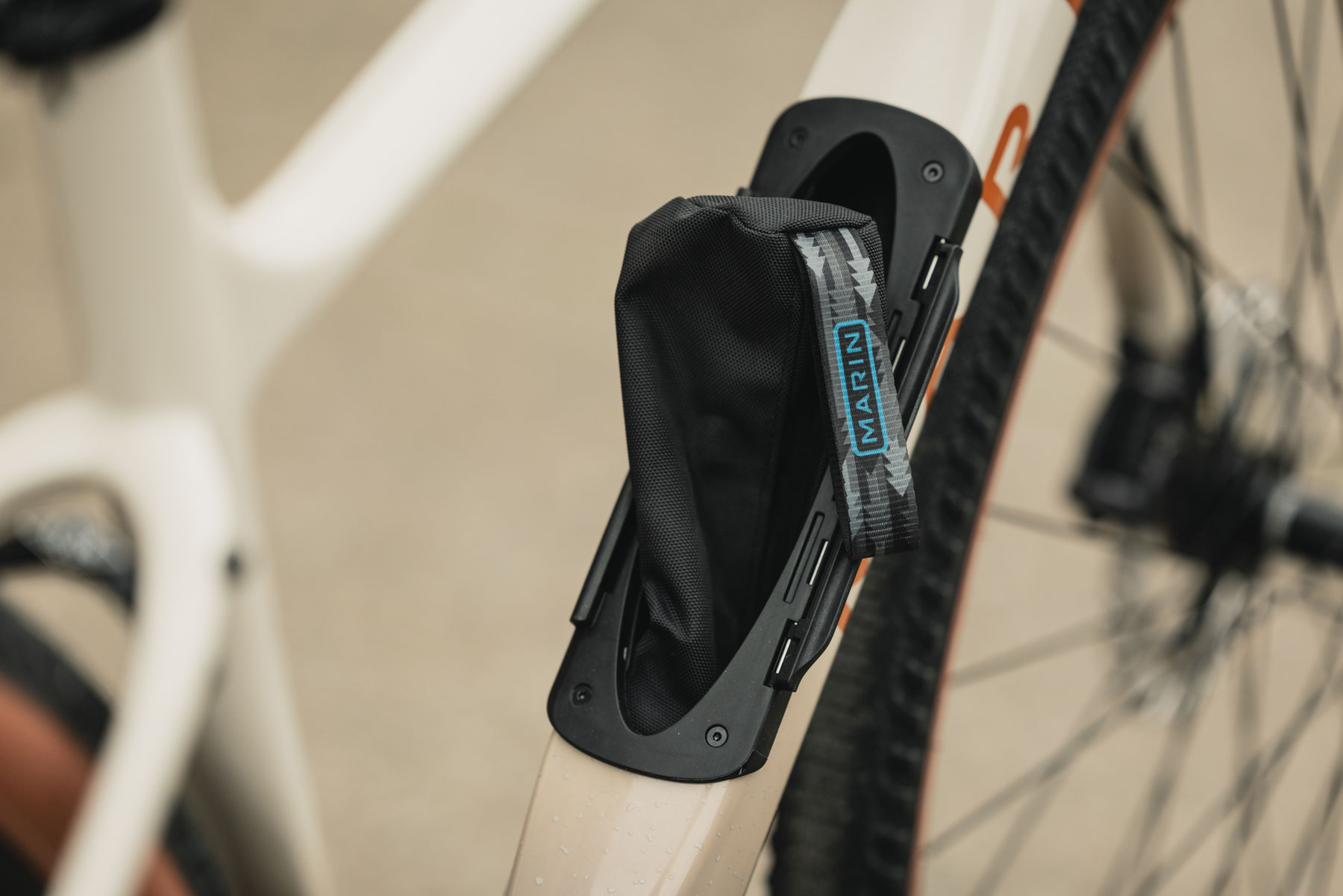
The rear dropout is now UDH-compatible, bringing the frame bang up to date. There are further practical additions, such as the ‘Bear Box’ down tube storage, as seen on the Alpine Trail XR mountain bike, and internal cable routing that enters at the fork crown and down tube rather than being fully internally routed.
The rear dropout is UDH-compatible. Marin
A full raft of mounts on the frame complete the details, with triple fork mounts, top tube mounts and bottle bosses, along with traditional rack mounts and mounts for full mudguards (fenders).
The ‘Bear Box’ storage design is borrowed from Marin’s mountain bikes. Marin
Marin Headlands V2 range details
There are three models in the V2 range. Marin
The Headlands V2 range consists of three models, starting with the Headlands 1, which combines the unidirectional carbon frame with a Shimano GRX610 1×12 drivetrain and GRX610 hydraulic brakes.
The Headlands 1 is priced at £2,499 / CAD$3,499 / €2,849.
Next is the Headlands 2 with Shimano’s GRX RX820 1×12 drivetrain, an integrated dropper lever, GRX RX820 hydraulic brakes and a long-travel dropper post.
The Headlands 2 is priced at £2,899 / CAD$3,999 / €3,295.
The Headlands 3 is the top-of-the-range model, with carbon wheels, SRAM Rival XPLR AXS and a dropper post. Marin
The range is topped by the Headlands 3, which comes with SRAM’s latest Rival XPLR AXS 1×13 drivetrain, SRAM Rival XPLR hydraulic brakes, Novatec G24 carbon gravel wheels and a long-travel dropper post.
The Headlands 3 is priced at £3,799 / CAD$5,399 / €4,499.
If you’d rather build your own, the Headlands V2 is available as a frameset-only option for £1,699 / CAD$2,499 / €1,999.
Why browse the web yourself when an AI sidekick can spoon-feed it to you?Now that it knows it won’t be forced to sell its browser, Google is cramming AI into every vacant corner of Chrome it can find, whether you like it or not. …
China’s economy increasingly relies on 200 million “flexible workers” who lack formal employment contracts, pensions and urban residency permits despite comprising 25% of the national workforce and 40% of urban workers. The demographic includes 40 million day-wage factory workers and 84 million platform economy workers performing deliveries and ride-share driving. Factory gig workers average 26 years old, are 80% male, and 75-80% single and childless. These workers face systemic exclusions from urban benefits including healthcare, schooling and property ownership due to lacking urban hukou residency permits.
China’s Supreme Court ruled in August that workers can claim compensation from employers denying benefits, though enforcement mechanisms remain unclear. Economic data shows retail sales growth at yearly lows, continuing property price declines, and rising urban unemployment. Analysts project GDP growth potentially falling to 3% in the third quarter. Manufacturing hubs report increasing numbers of young workers sleeping in parks and under overpasses between temporary jobs.
If you’re wondering what effect Intel’s blockbuster deal with Nvidia will have on its existing product roadmaps, Intel has one message for you: it won’t. PCWorld: “We’re not discussing specific roadmaps at this time, but the collaboration is complementary to Intel’s roadmap and Intel will continue to have GPU product offerings,” an Intel spokesman told my colleague, Brad Chacos, earlier today. I heard similar messaging from other Intel representatives.
Nvidia’s $5 billion investment in Intel, as well as Nvidia’s plans to supply RTX graphics chiplets to Intel for use in Intel’s CPUs, have two major potential effects: first, it could rewrite Intel’s mobile roadmap for laptop chips, because of the additional capabilities provided by those RTX chiplets. Second, the move threatens Intel’s ongoing development of its Arc graphics cores, including standalone discrete GPUs as well as integrated chips. We’re still not convinced that Arc’s future will be left unscathed, in part because Intel’s claim that it will “continue” to have GPU product offerings sounds a bit wishy-washy. But Intel sounds much more definitive on the former point, in that the mobile roadmap that you’re familiar with will remain in place.
As announced last month, PCI Express 8.0 is aiming for 256 GT/s speeds for allowing 1 TB/s bandwidth in an x16 configuration. In working towards the goals of PCIe 8.0, the PCI-SIG announced today that the v0.3 specification has been released to members…
This is a video documenting the rehabilitation of Princess Edna, a Pokemon 10-day old mole that was accidentally dug up by a man during garden renovations and reached out to Critter Care Wildlife Society in Langley, British Columbia to care for the animal. Look at those front feet! And I thought I had big feet — those are some BOATS. I wonder if other moles call it Bigfoot. I doubt it though because their feet are probably just as big. They’d probably make fun of it if it had small feet. Me? I get made fun of for having smelly feet. My girlfriend won’t even let me in the bed if I don’t scrub them in the shower. She keeps trying to get me to start wearing socks but *wiggling toes* I’m not about that life. “Your feet are disgusting, you need a pedicure.” Hahaha, I tried once but the lady referred me to a horse vet.
I’ve been testing smart glasses for almost a decade. And in that time, one of the questions I’ve been asked the most is “oh, but can you see anything in them?” For years, I had to explain that no, glasses like that don’t really exist yet.
That’s no longer the case. And while I’ve seen a bunch of glasses over the last year that have some kind of display, the Meta Ray-Ban Display glasses feel the closest to fulfilling what so many people envision when they hear the words “smart glasses.”
To be clear, they don’t offer the kind of immersive AR that’s possible with Meta’s Orion prototype. In fact Meta considers “display AI glasses” to be a totally separate category from AR. The display is only on one lens — the right — and its 20-degree field of view is much smaller than the 70 degrees on Orion. That may sound like a big compromise, but it doesn’t feel like one.
Karissa Bell for Engadget
The single display feels much more practical for a pair of glasses you’ll want to wear every day. It’s meant to be something you can glance at when you need it, not an always-on overlay. The smaller size also means that the display is much sharper, at 42 pixels per degree. This was especially noticeable when I walked outside with the glasses on; images on the display looked even sharper than in indoor light, thanks to automatic brightness features.
I also appreciated that you can’t see any light from the display when you’re looking at someone wearing the glasses. In fact the display is only barely noticeable at all when you at them up close.
Having a smaller display also means that the glasses are cheaper, at $799, and that they don’t look like the chunky AR glasses we’ve seen so many times. At 69 grams, they are a bit heavier and thicker than the second-gen Meta Ray-Bans, but not much. As someone who has tried on way too many pairs of thick black smart glasses, I’m glad Meta is offering these in a color besides black. All Wayfarer-style frames look wide on my face but the lighter “sand” color feels a lot more flattering.
The Meta Ray-Ban Display (left) and second-gen Ray-Ban Meta glasses (right.) The display glasses are a little thicker.
Karissa Bell for Engadget
The Meta Neural Band wristband that comes with the display glasses functions pretty much the same as the band I used on the Orion prototype. It uses sensors to detect the subtle muscle movements on your hand and wrist and can translate that into actions within the glasses’ interface.
It’s hard to describe, but the gestures for navigating the glasses interfaces work surprisingly well. I can see how it could take a little time to get used to the various gestures for navigating between apps, bringing up Meta AI, adjusting the volume and other actions, but they are all fairly intuitive. For example, you use your thumb to swipe along the the top of your index finger, sort of like a D-pad, to move up and down and side to side. And you can raise and lower the speaker volume by holding your thumb and index finger together and rotating your wrist right or left like it’s a volume knob.
It’s no secret that Meta’s ultimate goal for its smart glasses is to replace, or almost replace, your phone. That’s not possible yet, but having an actual display means you can look at your phone a whole lot less.
Karissa Bell for Engadget
The display can surface incoming texts, navigation with map previews (for walking directions), and info from your calendar. I was also able to take a video call from the glasses — unlike Mark Zuckerberg’s attempted live demo during his keynote — and it was way better than I expected. I could not only clearly see the person I was talking to and their surroundings, I could turn on my glasses’ camera and see a smaller version of the video from my side.
I also got a chance to try the Conversational Focus feature, which allows you to get live captions of the person you’re speaking with even in a loud environment that may be hard to hear. There was something very surreal about getting real-time subtitles to a conversation with a person standing directly in front of me. As someone who tries really hard to not look at screens when I’m speaking to people, it almost felt a little wrong. But I can also see how this would be incredibly helpful to people who have trouble hearing or processing conversations. It would also be great for translations, something Meta AI already does very well.
I also appreciated that the wristband allows you to invoke Meta AI with a gesture so you don’t always have to say “Hey Meta.” It’s a small change, but I’ve always felt weird about talking to Meta AI in public. The display also addresses another one of my longtime gripes with the Ray-Ban Meta and Oakley glasses: framing a photo is really difficult. But with a display, you can see a preview of your shot, as well as the photo after the fact, so you no longer have to just snap a bunch and hope for the best.
I’ve only had about 30 minutes with the glasses, so I don’t really know how having a display could fit into my daily routine. But even after a short time with them, they really do feel like the beginning of the kind of smart glasses a lot of people have been waiting for.
This article originally appeared on Engadget at https://www.engadget.com/wearables/meta-ray-ban-display-hands-on-discreet-and-intuitive-002334346.html?src=rss
Federal prosecutors charged a UK teenager with conspiracy to commit computer fraud and other crimes in connection with the network intrusions of 47 US companies that generated more than $115 million in ransomware payments over a three-year span.
A criminal complaint unsealed on Thursday (PDF) said that Thalha Jubair, 19, of London, was part of Scattered Spider, the name of an English-language-speaking group that has breached the networks of scores of companies worldwide. After obtaining data, the group demanded that the victims pay hefty ransoms or see their confidential data published or sold.
Bitcoin paid by victims recovered
The unsealing of the document, filed in US District Court of the District of New Jersey, came the same day Jubair and another alleged Scattered Spider member—Owen Flowers, 18, from Walsall, West Midlands—were charged by UK prosecutors in connection with last year’s cyberattack on Transport for London. The agency, which oversees London’s public transit system, faced a monthslong recovery effort as a result of the breach.
The panel of vaccine advisors hand-selected by anti-vaccine activist Robert F. Kennedy Jr. voted on Thursday to change the federal vaccine recommendations for children, removing safe, well-established vaccine doses from current schedules and realizing Kennedy’s anti-vaccine agenda to erode federal vaccine policy and sow distrust.
Specifically, the panel—the Advisory Committee on Immunization Practices (ACIP)—voted to remove the Centers for Disease Control and Prevention’s previous recommendation for use of a measles, mumps, rubella, varicella (chickenpox) MMRV combination vaccine for children under 4 years old.
The context
In June, Kennedy fired all 17 highly qualified, highly vetted members of ACIP and quickly replaced them with seven questionable members, who largely did not have subject matter expertise. Moreover, many of them have clearly expressed anti-vaccine rhetoric and skepticism about pandemic responses and COVID-19 vaccines. At least two new members have been paid witnesses in trials against vaccine makers, a clear conflict of interest. Last week, Kennedy added five additional members, who raise the same anti-vaccine concerns as the first group.
Tails 7.0 is out today as a major update to this portable Linux OS based on the Debian GNU/Linux operating system that protects users against surveillance and censorship.
This is a video of paraglider Ulvi Ercan experiencing a “60 percent asymmetrical collapse” while gliding and losing his GoPro in the process, which captures its fall from 1,100 meters safely to the ground below. Of course it landed in soft grass and not on a boulder, which I’m sure helped. Thankfully, Ulvi was able to recover from the paraglider collapse and track down the camera afterwards.
I didn’t realize it fell off. I was able to find the rough location by analyzing flight log and spot the location collapse I had. After that, just used Quik app and wished for the best. Just turning it on and off to listen the beep sound. Rest was easy.
Damn, that was some smart thinking, because I definitely would not have recovered that camera. I can’t even recover my phone, and I know it’s in the house and can hear it every time somebody calls. “Awww, you have friends.” Hahahaha, no, I have relentless scammers.
Does alcohol enhance one’s foreign language fluency? Do West African lizards have a preferred pizza topping? And can painting cows with zebra stripes help repel biting flies? These and other unusual research questions were honored tonight in a virtual ceremony to announce the 2025 recipients of the annual Ig Nobel Prizes. Yes, it’s that time of year again, when the serious and the silly converge—for science.
Established in 1991, the Ig Nobels are a good-natured parody of the Nobel Prizes; they honor “achievements that first make people laugh and then make them think.” The unapologetically campy awards ceremony features miniature operas, scientific demos, and the 24/7 lectures whereby experts must explain their work twice: once in 24 seconds and the second in just seven words.
Acceptance speeches are limited to 60 seconds. And as the motto implies, the research being honored might seem ridiculous at first glance, but that doesn’t mean it’s devoid of scientific merit. In the weeks following the ceremony, the winners will also give free public talks, which will be posted on the Improbable Research website.
Google has added Gemini features to Chrome for all desktop users in the US browsing in English following a limited release to paying subscribers in May. The update introduces a Gemini button in the browser that launches a chatbot capable of answering questions about page content and synthesizing information from multiple tabs. Users can remove the Gemini sparkle icon from Chrome’s interface.
Google will add its AI Mode search feature to Chrome’s address bar before September ends. The feature will suggest prompts based on webpage content but won’t replace standard search functionality. Chrome on Android already includes Gemini features. The company plans to add agentic capabilities in coming months that would allow Gemini to perform tasks like adding items to online shopping carts by controlling the browser cursor.
It turns out the “lifestyle logging” feature introduced with Garmin’s Venu 4 watch announcement isn’t limited to that watch—it seems to be available to all Garmin users, which means the app has made a huge stride in catching up with competitors like Whoop.
What is lifestyle logging?
This feature lets you track different habits, behaviors, or factors that might impact your health metrics. For example, you can log when you have caffeine or alcohol at night, and see how this affects your sleep. (Garmin tends to refer to these as “behaviors,” even though some of them are more like environmental factors or states of being—illness, for example—but I’ll allow it.)
Whoop, the screenless tracker with the expensive (but arguably worth it) subscription, has long had this kind of feature, and it will give you detailed breakdowns of how your habits have affected your recovery. The Apple Watch app Bevel provides similar functionality as well, while the Oura ring has “tags” in its app, although they are more for labeling than analysis.
Garmin’s version uses your logged behaviors to generate reports that show how the factors you logged affect:
These seem to be the only outcomes, so you won’t see whether these behaviors affect, say, your running performance. And as with any feature of this type, the app can’t actually tell you if your behaviors are causing the positive or negative results you get.
For example, Whoop told me that I sleep worse on nights I take melatonin, but that’s just a correlation: The melatonin probably isn’t making my sleep worse; it’s more likely that the connection is because I take melatonin on nights when I’m already up late or expect to have trouble sleeping.
Which Garmin devices can use lifestyle logging?
Logging your behaviors doesn’t require any specific device; I was able to activate it on an account that had no wearable devices paired at all. However, Garmin notes that to get meaningful reports, you’ll need a device that is capable of measuring HRV (which also contributes to your sleep score and overnight stress). Most of the popular Garmin wearables have HRV capabilities, including Venu, Vivoactive, and Forerunner watches, and the new Index sleep monitor.
How to use Garmin’s lifestyle logging
The feature is kind of hidden, so I wouldn’t blame you for not knowing that it’s there. Make sure your Garmin Connect app is up to date, and then tap the three-dot menu in the bottom right corner. Go to training and planning, then health stats, and then lifestyle logging.
The first time you do this, you’ll get a few information screens explaining the feature and asking you to acknowledge that it’s not medical advice.
You’ll then select the items you want to log. Garmin recommends choosing “only a few” items to log at a time, so you can learn more about those specific things rather than trying to wade through mountains of data. The app’s info screen wisely points out that if you log many different factors, “you may get conflicting data and have a difficult time determining what’s really impacting your health stats.”
A non-exhaustive list of what you can log
The lifestyle category includes alcohol, caffeine (morning or late), exercise (light, moderate, or vigorous), late meals, and intermittent fasting.
The self-care category includes cold showers, journaling, and sunlight.
The treatments category includes acupuncture and massage.
The sleep-related category includes CPAP machine use, eye masks, reading in bed, and having a pet in your bedroom.
The life status category includes allergy symptoms, caregiving, illness, and vacation.
You can also create custom items to log. You can give them a quantity if you like, or just set them up as a yes/no answer. You can also indicate if the item is daytime or bedtime related. Finally, after choosing the behaviors you’d like to log, the app will ask if you’d like related morning and/or evening reminders.
To see results from any of your behaviors, you’ll need to accumulate five yeses and five nos for each. (As with Whoop’s version of this feature, it’s not useful to track a behavior that you always do or never do—there’s just not enough data to work from.)
You can view your results from the Training and Planning menu, as above, and you can also add a card to the “at a glance” section of your Garmin Connect app home screen. The card will show whether you’ve logged your behaviors for the day, and tapping on it will show what you’ve logged today and in the past. The Venu 4 watch also has a widget for lifestyle logging on the watch itself.