Snap Specs Hands-On: Minimum Viable Consumer True AR Glasses

I briefly went hands-on with Snap’s Specs at the “launch” event in Los Angeles. Here’s what I thought.

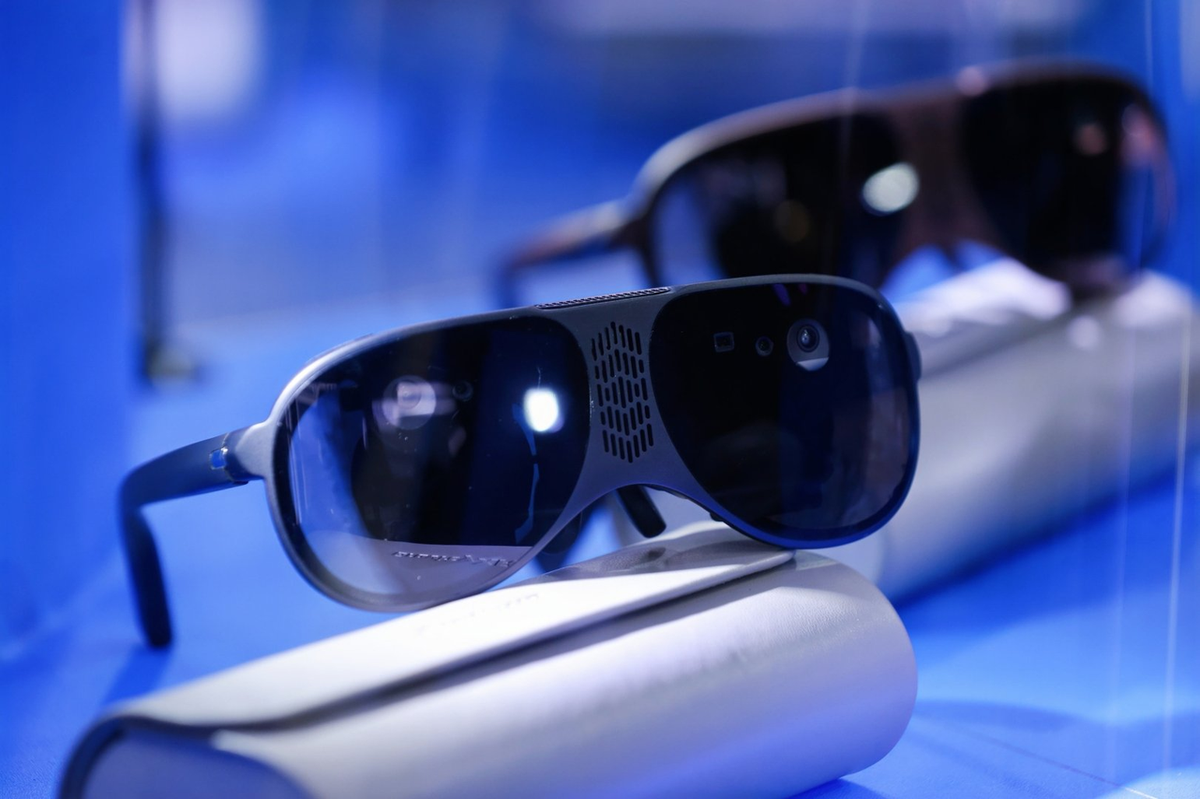
If you’re unfamiliar: Snap Specs are standalone true AR glasses, meaning they have physically transparent see-through optics and can position virtual objects and interfaces in real space, while having no tether or external computing hardware. Revealed back in June, when the company opened preorders, the $2195 Specs are set to be the first fully standalone true AR glasses outside China, and the most advanced on the planet that you can actually buy, beating companies like Meta and Apple to market.

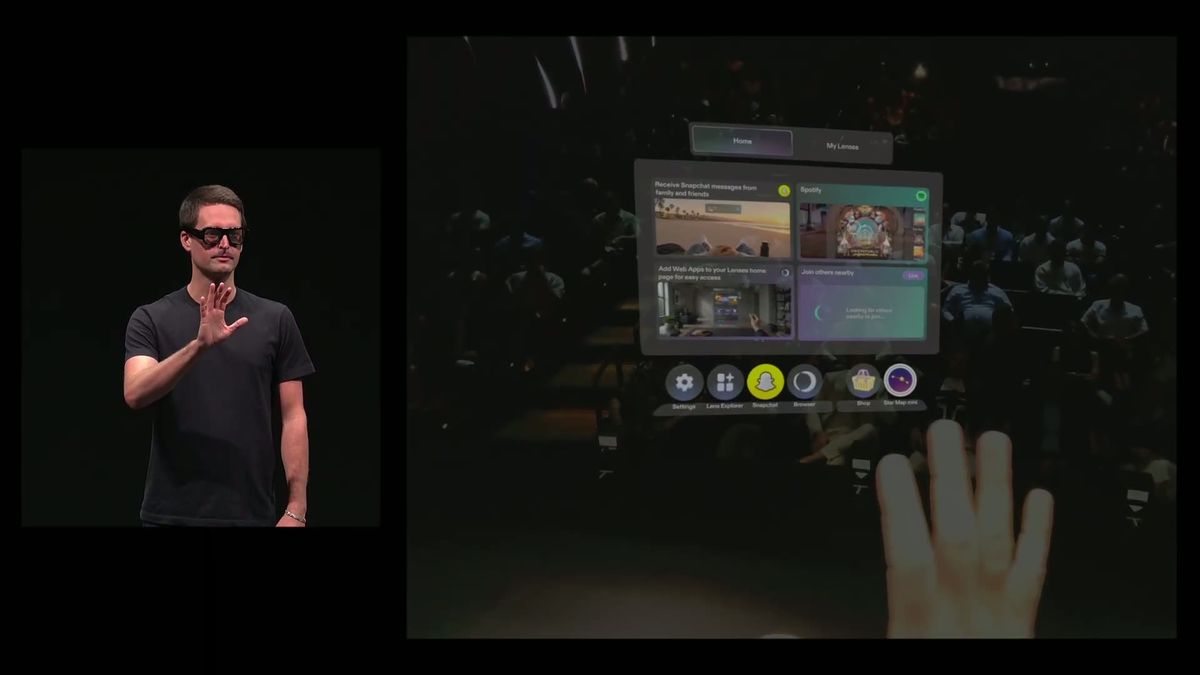
For disclosure, Snap paid for my flights and accommodation for its “launch” event, which I put in scare quotes because it didn’t actually launch the glasses. It did announce that Specs will have a built-in cross-platform agentic AI assistant, and an optional cellular case for on-the-go connectivity. CEO Evan Spiegel also demoed the glasses live on stage, a welcome respite compared to the usual prerecorded tech launches.

But while Spiegel’s demo was inarguably impressive, the problem with Specs is that, through the lenses, it simply doesn’t actually look like the casted and recorded views.

Watch Snap’s CEO Demo Specs True AR Glasses Live On Stage
Snap’s CEO demoed the soon-to-launch Specs standalone true AR glasses live on stage, including an official Harry Potter experience from HBO.
UploadVRDavid Heaney

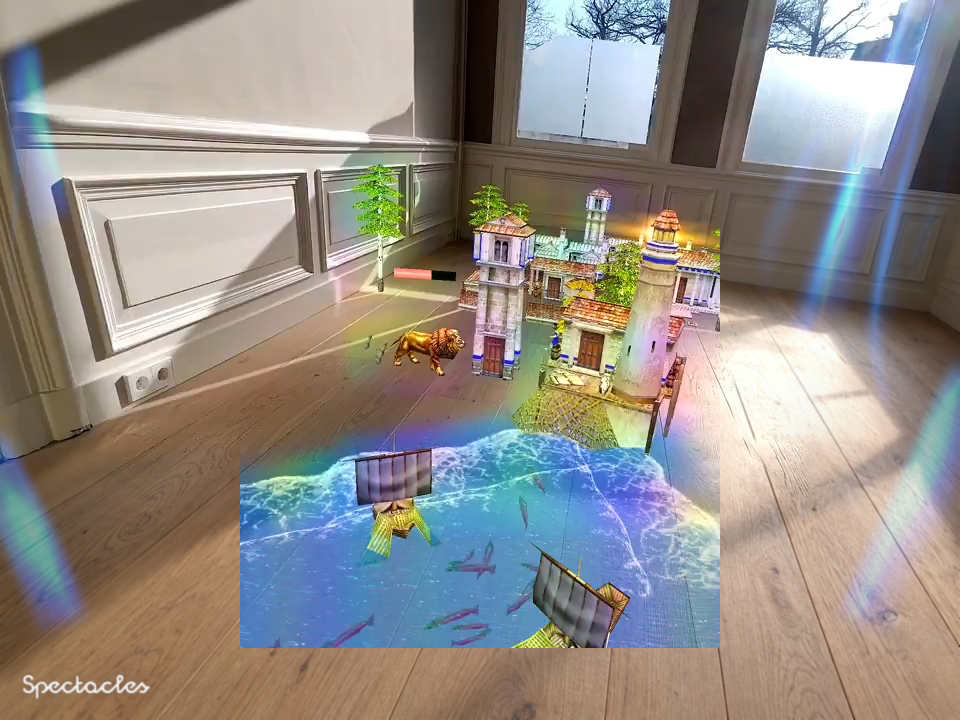
As soon as you put on Specs, you’ll notice a number of optical artifacts. There is a rainbow pattern over the display area, which has poor color uniformity in general, as well as blue streaks from reflections of real-world light. This is not the crisp image you’ll be used to in a VR headset, nor is it even anywhere near as clear and uniform as the Meta Ray-Ban Display HUD.

The bigger problem though, as with every optically transparent AR device to ever ship, is the field of view. At 51 degrees diagonal, it’s roughly the same as HoloLens 2. What’s strange (and misleading) is that Specs renders and records a larger field of view than what it can actually display, so what you see in Snap’s promotional videos, and any recorded Specs content shared on social media, is very different to what you see in the device.

(For comparison, passthrough VR-style headsets like Quest 3 and Apple Vision Pro have a diagonal field of view of over 110°)

In practice, what you see as you look around is a rectangular slice of the virtual content that should be surrounding you. As I’ve written about many times before, this breaks object permanence, and leaves you constantly searching for where each virtual object went.
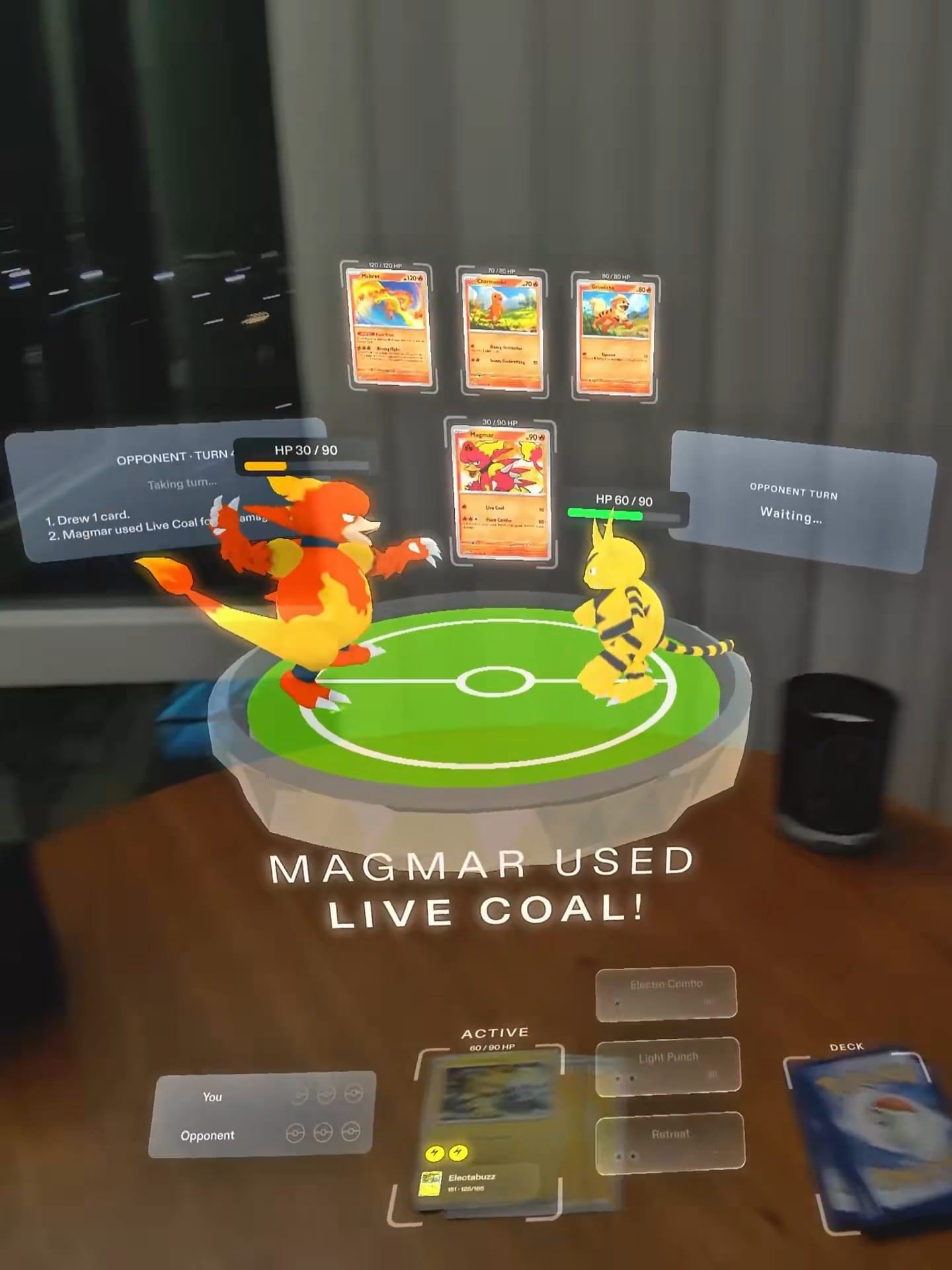
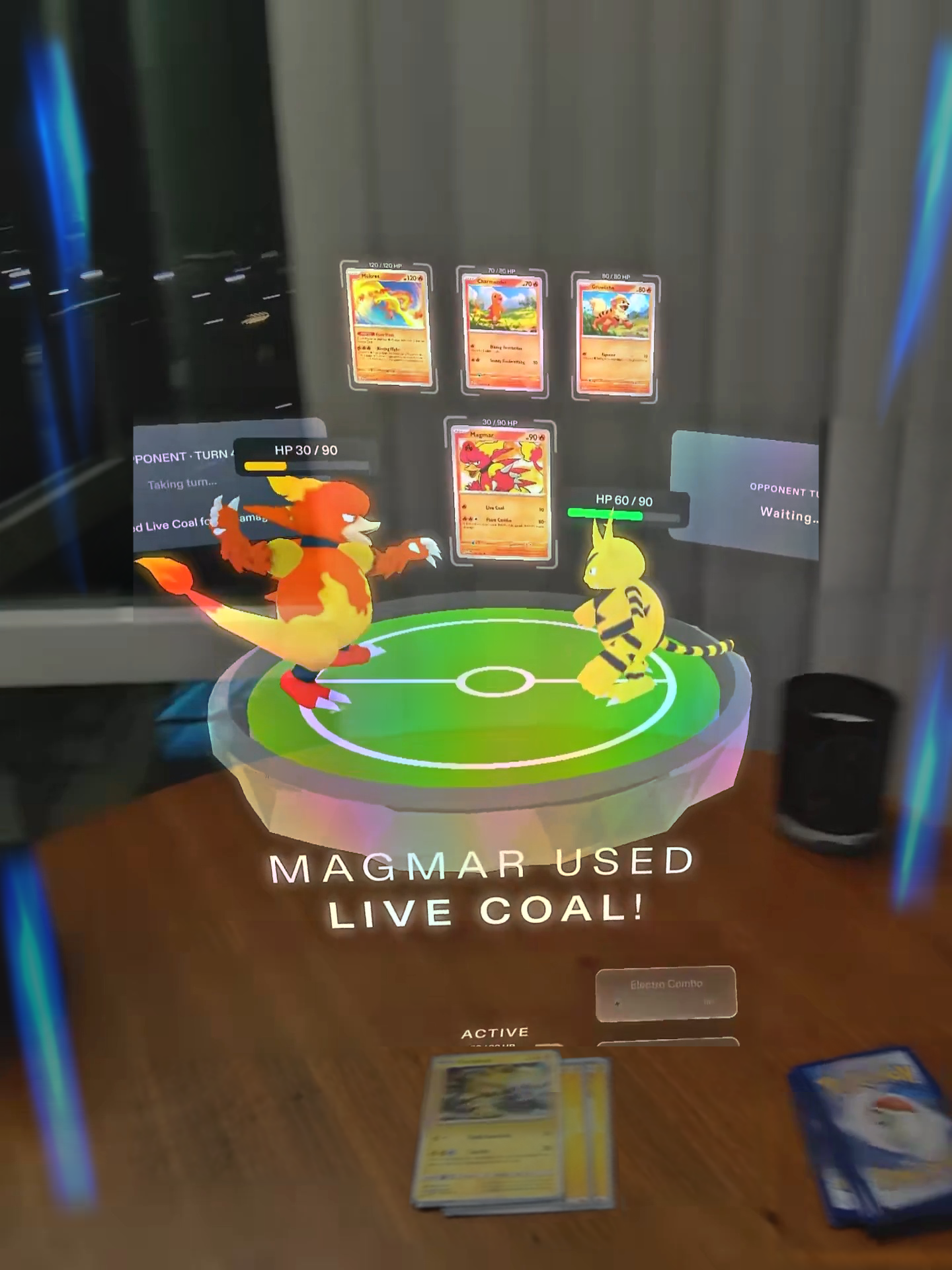
Specs recording vs UploadVR mockup of what Specs really looks like.
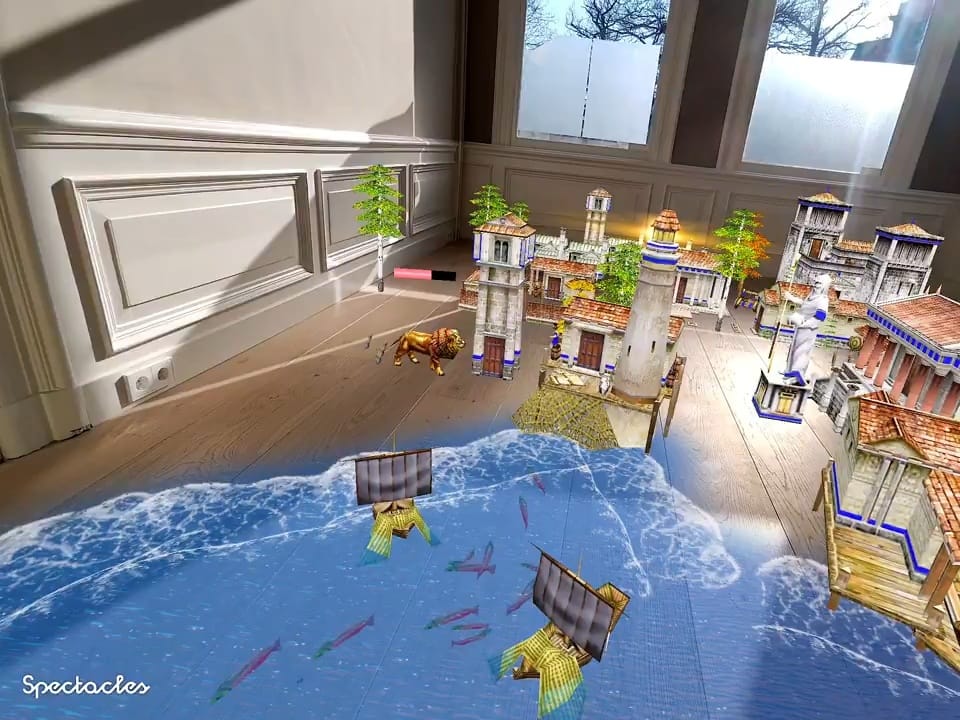
Spectacles recording vs UploadVR mockup of what Specs really looks like.
This is not a dealbreaker for all use cases. And it’s not Snap’s fault – it’s essentially impossible today to build a glasses-size transparent AR device with a field of view much larger than this. Meta’s Orion prototype famously used an exotic expensive material with no existing non-military supply chain to achieve 70 degrees, for example. But it’s something I sorely wish that companies building transparent AR devices had been more honest about for the past decade of this industry. Because the inevitable result is that people are disappointed when they put the thing on their face and see only a slice of the content.

Some experiences cleverly design around the field of view, and for others it doesn’t matter at all. This is where Specs shines. But many experiences seem to ignore it, to the detriment of usability, as if building for a future device that doesn’t yet exist.

And while it’s impressive that Specs is able to be a fully standalone device in glasses form factor, no pucks or tethers required, this feat does not come without tradeoffs. While I do describe Specs as glasses form factor, at 134 grams it sits right at the very boundary of earning that description. It is comfortable, thanks to its outwards-flexing arms (an ergonomic feature of all good recent smart glasses), but the bulk looks somewhat comical to regular bystanders. Even Spiegel admitted as much by acknowledging the memes around the form factor.

Specs also seems to render at a far lower frame rate compared to other VR devices. While Snap wouldn’t say the exact rate, rendering in many experiences felt to be nowhere near the 72FPS minimum of other XR systems. Fitting a higher-performance spatial computer into a glasses arm is simply beyond the technology of 2026.

The lack of eye tracking on Specs is also a major miss, as it quickly became tiring to raise my hand to point-and-pinch. Apple Vision Pro has established eye tracking as absolutely essential for any serious XR device interaction other than active gaming. I am convinced that Specs will be one of the last major devices in this space without eye tracking.
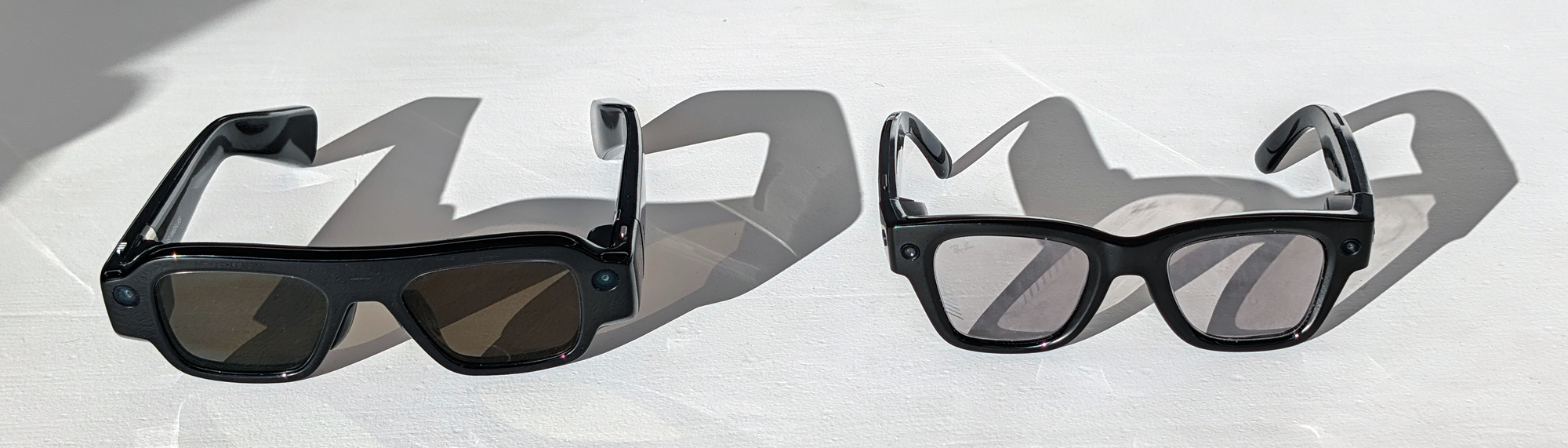
Snap Specs vs Meta Ray-Ban Display size (photo by UploadVR)

My description of Specs so far has been rather negative, but what I’ve really been trying to do is just establish a realistic picture of what to expect, beyond the hype and expectations that have built up around true AR glasses and Snap’s marketing. But that’s not to say that Specs isn’t a viable first-generation product for early adopters.

What’s most impressive about Specs is its computer vision tech. Even in low light when the sun went down, with dozens of people walking nearby, Specs’ positional tracking and hand tracking remained rock solid. It even features real-time continuous scene meshing with occlusion, so real-world geometry will block virtual content. To do this at such a low power envelope, in the arm of glasses, is groundbreaking. Not even Quest 3 does this!
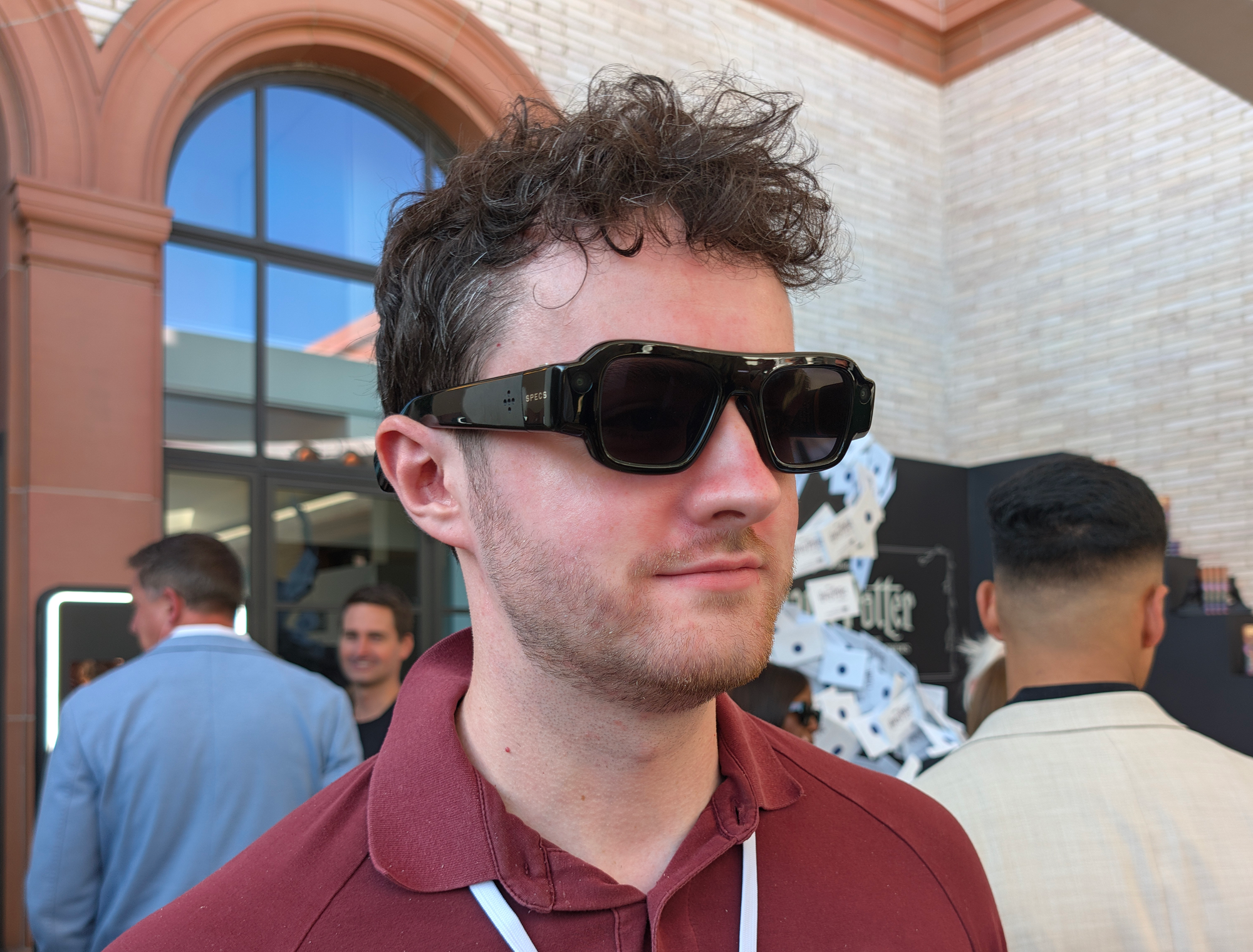
Specs outdoors (photo by UploadVR)

I was also struck by how much better having 6DoF augmented reality makes key use cases I already use on Meta Ray-Ban Display feel, such as translation and navigation. It’s significantly more comfortable to have translated captions anchored to the person speaking to you rather than awkwardly on a fixed display in the lower-right of your view, and to have a huge map at chest height in front of you rather than a tiny one to the right.

Specs’ core software is also well-made, with relatively fast loading times for both interfaces and apps. While it’s not high refresh rate, it never feels sluggish. This is thanks to Snap’s years of work on a highly optimized software stack that runs from the OS to the “Lenses” (apps) built in the highly managed Lens Studio development software on PC. This is a mature well-crafted software stack, not some lazy Android fork.

0:00

/0:17

The Snap OS real-world navigation Lens.

Snap OS real-time translation Lens.

Snap is also pushing Specs as a computer for virtual monitors and browser interfaces. While I can definitely see a device like Specs being a highly portable way to privately watch YouTube on a bus, train, or plane without holding up your phone, the display artifacts and limited field of view make me highly skeptical of its use for serious productivity. The coming wave of ultralight passthrough VR headsets will likely be strongly preferable for this, and even prism optic devices like Xreal Aura will offer a wider field of view and clearer image.

Snap Specs is exactly what I expected from first-generation standalone true AR glasses in 2026. It’s as if a company tried to make an iPhone in the late 90s. The idea is there, and for what tech it has to work with, Snap’s implementation of the idea is actually excellent. But the fundamental display tech is the problem. Even with well-designed software, an iPhone in 1999 just wouldn’t be the iPhone of 2007. If you’re a tech enthusiast who understands that, and can temper your expectations, Specs is like nothing else out there, and delivers an experience absolutely no other device can match. But if you’re a general consumer hoping for a highly refined consumer true AR experience, you’ll need to wait for the 2030s like everyone else.

Apple Has a Fix for Your New Apple Watch’s Restart Bug

We may earn a commission from links on this page.

Apple’s latest Apple Watches, the Series 12 and the Ultra 4, should be the “best” smartwatches the company has to offer. While they’re minor upgrades over the Series 11 and Ultra 3, there are some key improvements, including the new S11 chip and a heart rate monitor that checks your pulse every five seconds. If you picked up one of these watches, you might have put these new upgrades to the test—that is, if your watch didn’t restart on you.

As reported by MacRumors, Apple’s latest smartwatches appear prone to unexpected restarts. That’s according to numerous posts on the site’s forums, with users saying their watches abruptly show a blank screen with the Apple logo. There doesn’t appear to be any particular action that triggers it: Users say their watches rebooted when recording a workout, using Siri AI, editing watch faces, or using the Maps app. Many users on this Reddit thread share similar experiences with their new watches. Some users dug deeper, pulling their Apple Watches’ diagnostics at the time of rebooting. Rather than a specific function, the culprit appears to be a timeout with the Neural Engine, the hardware that processes Apple’s AI features.

Users tried multiple workarounds themselves: One Redditor simply turned the watch off and on themself, and the issue never returned; others tried resetting the watch as new, but experienced rebooting again. MacRumors highlighted one case where a user received a replacement from Apple, and it, too, rebooted unexpectedly. It does appear to be an issue with the Series 12 and Ultra 4, and, luckily, Apple figured it out.

watchOS 27.0.1 fixes unexpected reboots with Apple Watch Series 12 and Ultra 4

On Wednesday, Apple unexpectedly released watchOS 27.0.1. The update has a brief changelog, with only one new addition: “This update provides bug fixes for your Apple Watch, including fixing an issue where Apple Watch may restart unexpectedly.” Apple didn’t clarify exactly what it changed to fix the issue, but at least the reboots should be over.

This update is only for Apple Watch Series 12 and Ultra 4 users, so don’t expect to see it unless you have one of Apple’s newest wearables. If you do, make sure to install it as soon as possible to avoid dealing with these unexpected restarts. To install watchOS 27.0.1, head to the Apple Watch app, then tap My Watch and go to General > Software Update.

Whatever Happened to the 150,000 Tons of Radioactive Waste Stored Under the Atlantic Ocean?

More than 200,000 barrels of low-level radioactive waste were stored on the floor of the Atlantic Ocean between 1949 and 1982, reports ScienceAlert.

Whatever happened to those barrels?

Scientists have descended to the wreckage in a crewed submersible to investigate — and found many of the barrels corroded and degraded, their contents spilling across the seafloor. Surprisingly, this isn’t necessarily a subversion of the original plan… The International Atomic Energy Agency recommends that low-level waste be disposed of in robust containment in isolation for at least a few hundred years — but back in the mid-20th century, the recommendations were a little different. The contemporaneous guidelines recommended that containers needed to reach the seafloor intact and remain sealed only long enough for the short-lived radionuclides to decay. After that, the remaining waste was expected to slowly escape and disperse through the surrounding ocean. Not everything in the barrels would conveniently decay away, however. They contained a radioactive hodgepodge, including cesium-137, plutonium isotopes, and tritium, some of which can persist for thousands of years…

[A] few years ago, nuclear engineer Patrick Chardon and marine geologist Javier Escartín of the French National Center for Scientific Research started to wonder what had become of the dumped waste. That question eventually became NODSSUM — Nuclear Ocean Dump Site Survey Monitoring — an interdisciplinary project bringing together nuclear physics, geology, oceanography, biology, and marine chemistry to find the barrels and investigate what, if anything, they were doing to the surrounding environment…. [T]he barrels also appeared to function as tiny oases on the otherwise sparsely populated sandy seafloor. Anemones had attached themselves to the barrels. Sponges, sea cucumbers, fish, and crustaceans lived around them, with crabs apparently particularly fond of the artificial shelters…

Instruments aboard the ship detected significant signals of cobalt-60 and niobium-94, which the researchers could specifically link to the dumped waste… [Samples are now being analyzed] There is precedent, however, to suggest that even striking levels of radioactivity around a source don’t necessarily spread very far. A recent study of the sunken Soviet submarine Komsomolets found radionuclide levels hundreds of thousands of times above background immediately around the leaking reactor — but those levels dropped sharply within just a few meters as the material dispersed through the seawater. The NODSSUM team similarly found that, despite the significant radioactive signals around the barrels, activity levels weren’t high enough to pose major radiation-protection problems for the scientists handling the samples. [Their three-person submersible] Nautile and the instruments it carried showed no signs of contamination.
The real achievement was mapping the exact location of the barrels. “None of this means the waste is harmless,” the article concludes — but it also doesn’t mean we’re about to be overrun by radioactive crabs.”


Read more of this story at Slashdot.

URXR One Kickstarter Raises $1.3M For Ultralight Tethered Passthrough Headset

Unseen Reality’s Kickstarter raised almost $1.3 million for URXR One, a 93-gram ultralight VR-style passthrough headset that acts as a virtual monitor.

The Kickstarter campaign launched last month, and concluded over the weekend after reaching $1,288,712. By “VR-style” I mean that it uses pancake lenses placed between your eyes and the displays, and you see the physical world via the passthrough cameras on the front.

URXR One achieves its 93-gram weight mainly by not having much compute onboard and lacking a battery. It features the GravityXR G-X100 coprocessor chipset announced back in December, and is essentially an implementation of GravityXR’s reference design. The chip handles positional head tracking, optical hand tracking, and camera passthrough using very little power and generating very little heat, leaving the rendering to an external device.

It features dual 2448×2064 micro-OLED displays magnified by pancake lenses to a field of view of 80° horizontal × 56° vertical (around 90° diagonal) at up to 90Hz refresh rate.

GravityXR: Chinese Startup Builds Chip To Enable Ultralight Headsets
A Chinese startup with former Apple and Meta engineers built a coprocessor that enables ultralight headsets, and its reference design is the lightest ever shown.
UploadVRDavid Heaney

You plug it into a laptop, phone, or other device that supports USB-C DisplayPort out (including handhelds like Steam Deck, ROG Ally, Legion Go) and it displays the input as a 6DoF virtual monitor floating in front of you positionally. The device accepts a 2560×1440 signal at 90Hz.

Essentially, URXR One as a product is the same proposition as Xreal and Viture glasses, a virtual monitor for your existing devices, but with a VR-style display system with passthrough instead of transparent prism optics, offering a much wider field of view. Even Xreal’s upcoming Aura device reaches only 70° diagonal, and other Xreal and Viture devices have a diagonal field of view of less than 70°, compared to the roughly 90° of URXR One.

On Windows and Mac, URXR’s software enables multiple virtual monitors alongside hand tracking controls for positioning them in space.

XRXR One does not feature eye tracking or face tracking.

0:00

/2:14

URXR One Kickstarter trailer.

Unseen Reality claims URXR One will start shipping to backers in October, and to new buyers in November, priced at $999. To display a connected smartphone, you’ll need the $69 Power Hub accessory, set to ship in December.

Some time after launch, Unseen Reality plans to add support for PC VR, letting it act as a SteamVR headset, but that functionality won’t be ready for when the device ships.

Of course, URXR One’s campaign is somewhat overshadowed by the repeated leaks of Meta’s next headset, codenamed Phoenix, which appears to have a similar form factor and may even be shown at Connect tomorrow. How exactly Meta’s headset will compare on price, and when it might launch, remains to be seen. But what seems clear is that URXR One won’t be alone in having this ultralight form factor.

‘Android XR Bridge’ Tool Brings Quest Exclusives To PC VR

Meta Quest exclusives like Batman: Arkham Shadow, Deadpool VR, and Asgard’s Wrath 2 are playable on PC VR thanks to Android XR Bridge, an experimental project from developer Feli Reintgen.

Android XR Bridge (AXRB) is an experimental software runtime for Windows which allows you to run Android-based VR applications made for Meta Quest on your PC. It’s notable in that it allows you to play Quest exclusives in 4K (per eye) and high frames per second using the full power of your gaming PC.

While early versions of the program yielded pretty terrible results, recent updates have enabled 4K per eye rendering at 120 FPS, as demonstrated in a recent social media post from AXRB’s developer, which shows Pinball FX VR running at said specs.

Here is me playing a bit of @zen_studios Pinball FX VR (the Quest one, not classic!) through my Android XR Bridge on Windows. The game is rendering at 4K per eye now – something that would have never been possible on Quest.

Latency while playing only comes from my network, I… https://t.co/bbhwRWxJAA pic.twitter.com/dpQmZ8cbgd

— Feli Reintgen (@jxstfeli) September 16, 2026

Android XR Bridge is designed to work with legal copies of Quest games. It operates like a traditional emulator to remove hardware restrictions, after which the game runs on OpenXR. You must own legal game files to play them.

AXRB’s Early Access launch, which was originally planned for Monday, September 21, has been delayed. AXRB’s developer announced today via the app’s Discord that the delay stems from issues with the installer failing, the emulator failing to launch games, and a lack of overall game support leading to “a lot of the untested games fail[ing] most of the time.”

Nevertheless, AXRB represents an interesting possibility: that PC VR users may soon be able to access Meta’s Quest library of exclusives and run them on a PC with very little (or no) modification to the original Android-based builds.