NotebookLM is Google’s more sophisticated, research-focused AI tool, built on the same underlying models as Gemini but with an interface that’s less chatty and friendly. Like Gemini, it regularly gets upgrades and new features, and the latest update adds “cinematic” video summaries.
One of the tasks NotebookLM is perfect for is collecting a bunch of information together in a notebook—PDFs, web links, YouTube videos—and then having it explained and summarized (it’s a great study tool in that respect). You may remember that a couple of years ago it added the ability to generate realistic-sounding podcasts called Audio Overviews from your notebooks.
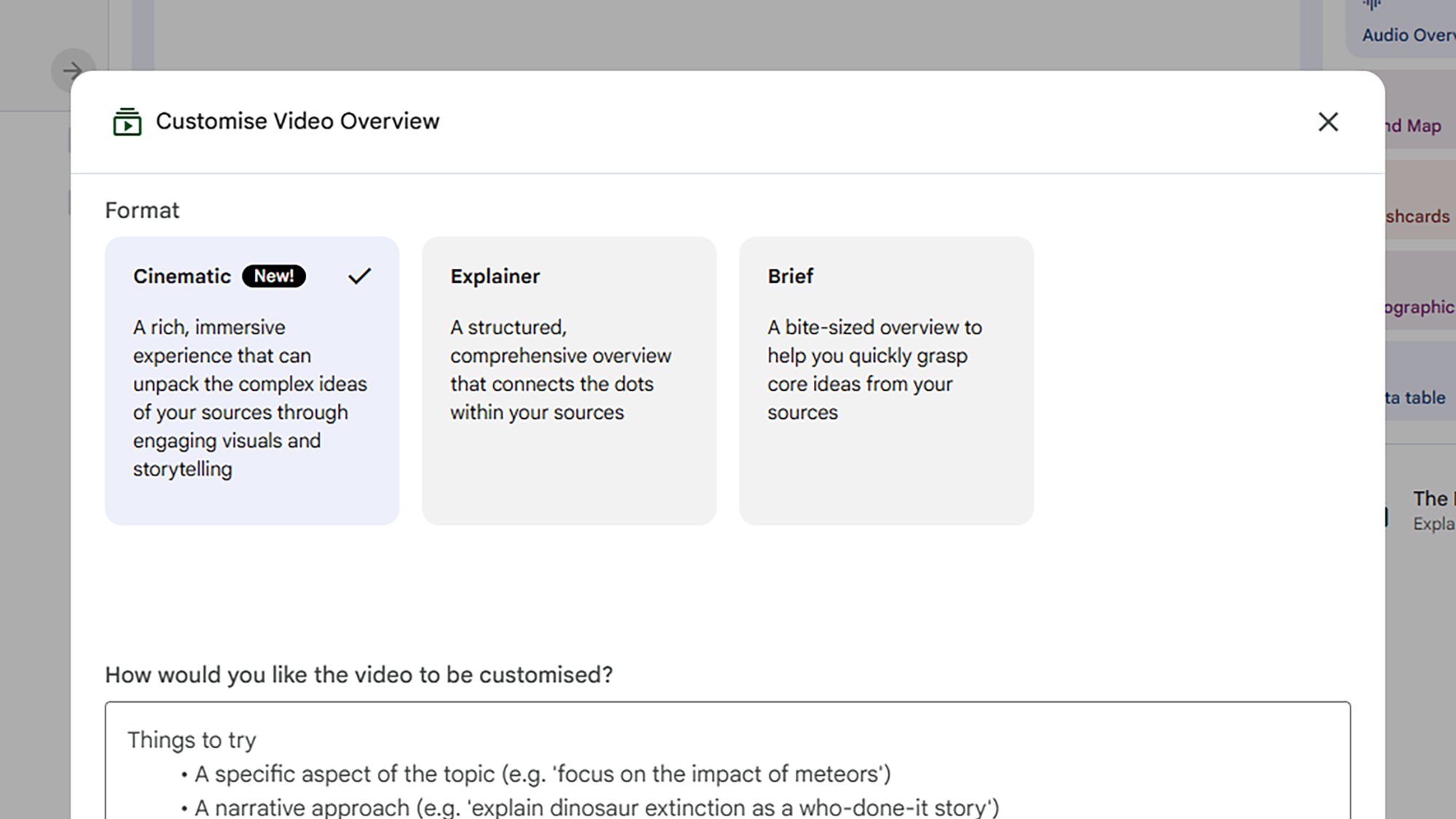
The new Cinematic option in Video Overviews. Credit: Lifehacker
Last year we got Video Overviews, but these were more like slideshows than mini movies—they basically put the contents of a notebook into something that might have been made in PowerPoint. With this new cinematic upgrade, however, you’ll get video summaries that are much more animated and three-dimensional.
There are some rather hefty caveats: You need to be on the top-tier, $250-per-month Google AI Ultra plan to access this new Video Overviews category; additionally, they’re only available to users aged 18 and above, and only in English. The feature may trickle down to everyone eventually, but for now you need to be a relatively well-off AI enthusiast to be able to access this.
It’s a lot of money to spend on AI each month, but there’s plenty more to Google AI Ultra, including a subscription to YouTube Premium and 30TB of Google Drive space to store all those AI-generated images and videos you’ll be making. In Gemini and NotebookLM, you get higher usage rates on just about everything.
To put the new cinematic overviews to the test, I created a new notebook in NotebookLM based on a single source: A paper published by Apple researchers on the “illusion of thinking” exhibited by Large Reasoning Models (LRMs), such as those that NotebookLM taps into. It’s a dense, 39-page study, exactly the sort of lengthy document you might need summarizing by AI.
The cinematic difference
While there are mobile apps available for NotebookLM, the interface is easier to manage on the web. If you’re new to the tool, you can click Create new notebook to get started, then point NotebookLM towards your sources—whether it’s plain text you want to paste in, or an Apple AI study you want to upload. The app can even search the web for other relevant sources.
Once you’ve actually got some information together, the Video Overview option is in the Studio panel on the right. You can pick between a Brief overview or a more detailed Explainer style, and choose a template for your overview too. There’s also space to give some pointers as to how the video should be structured. If you’re a paid-up Google AI Ultra member, you also get a Cinematic option.
First I requested an Explainer-style Video Overview for the Apple AI paper. It took around 15 minutes to generate, and came in at a little over six minutes long. As you can see above, it does a decent job of explaining the contents of the paper, and giving some of the reasons why LRMs get stuck on complex tasks.
It’s a very static slideshow, but it’s well laid out, and the illustrations generally make sense, with one or two aberrations: That first Claude Sonnet graph has two extra lines that shouldn’t be there. It gives you a decent understanding of the paper, but I wouldn’t want to 100 percent rely on it (AI “can be inaccurate” is the disclaimer that Google puts all across Gemini and NotebookLM).
The Cinematic–style Video Overview took more than 50 minutes to generate and is more than seven minutes long, and you can see it below. On the plus side, it goes into more detail, and I felt I knew more about the topic after watching it. All the charts were copied over from the paper correctly, and some of the animations were genuinely useful.
However, NotebookLM clearly struggled with certain animations: When it was trying to show someone drawing on a page for example, or placing blocks on top of one another in a Tower of Hanoi puzzle. These are notable problems evident in other AI-generated videos, because these models don’t really understand the real world or physics—the vast amounts of video footage they’ve been trained on give them a good idea about where to place pixels, but not really how objects should interact with each other.
I did prefer the Cinematic Video Overview overall, though clearly the results are going to vary depending on the sources that you feed NotebookLM—outside of research papers it might get a bit more creative and interesting. The visual errors are kind of distracting, though, and ultimately the standard Video Overviews that everyone has access to work well enough without any enhancements.
It took a few attempts, but NVIDIA’s latest driver release for GeForce GPU owners is polished and properly optimized for Resident Evil Requiem. The caveat is that you have to install a new hotfix, which is technically beta software, though it purportedly stomps out several bugs that were introduced with the latest Game Ready release.
An anonymous reader quotes a report from TechCrunch: At the Morgan Stanley Technology, Media and Telecom conference in downtown San Francisco Wednesday, Nvidia CEO Jensen Huang said his company’s recent investments in OpenAI and Anthropic are likely to be its last in both, saying that once they go public as anticipated later this year, the opportunity to invest closes. It could be that simple. While firms sometimes pile into companies until practically the eve of their public debut in search of more upside, Nvidia is minting money selling the chips that power both companies — it’s not like it needs to goose its returns by pouring even more money into either one.
Nvidia, for its part, isn’t offering much more on the matter. Asked for comment earlier today following Huang’s remarks, a spokesman pointed TechCrunch to a transcript from the company’s fourth-quarter earnings call, where Huang said all of Nvidia’s investments are “focused very squarely, strategically on expanding and deepening our ecosystem reach,” a goal its earlier stakes in both companies have arguably met. Still, a few other dynamics might also explain the pullback, including the circular nature of these arrangements themselves. […] Meanwhile, Nvidia’s relationship with Anthropic has looked fraught in its own right. Just two months after Nvidia announced a $10 billion investment in November, Anthropic CEO Dario Amodei took the stage at Davos and, without naming Nvidia directly, compared the act of U.S. chip companies selling high-performance AI processors to approved Chinese customers to “selling nuclear weapons to North Korea.” Ouch. […]
Where that leaves Nvidia is holding stakes in two companies that, at this particular moment, are pulling in very different directions, and potentially dragging customers and partners along for the ride. Whether Huang saw any of this coming, given Nvidia’s web of partnerships, is impossible to know. But his stated reason on Wednesday for likely pulling the plug on future investments — that the IPO window closes the door on this kind of deal — is hard to square with how late-stage private investing actually works. What’s looking more probable is that this is an exit from a situation that has gotten really complicated, really fast.
The most-streamed TV shows in February prove that the monoculture is officially dead. Instead of one-show-fits-all, we have a lineup of series diverse enough to give you genre-whiplash. The high-stress espionage of The Night Manager, the super-hero meta-commentary of Wonder Man, the light fantasy of A Knight of The Seven Kingdoms, and the gritty realism of The Pitt have little in common beyond all being excellent television shows. Here’s the full list of the top 10 most-streamed shows of February 2026 across all major streaming services, as compiled by JustWatch.
The Pitt
ThePitt continues to dominate the streaming charts. HBO’s gritty, hyper-realistic medical drama has earned acclaim from critics and audiences for its relentless pace, as it follows a single 15-hour shift at the Pittsburgh Trauma Medical Center. Starring Noah Wyle as Dr. Michael Robinavitch, The Pitt ditches the “disease of the week” format of many medical shows in favor of a study of the toll the modern medical system places on everyone involved. Season one earned five Emmy awards, and judging from the first few episodes, season two might win more. Stream The Pitt on Max.
A Knight of the Seven Kingdoms takes fans back to Westeros, 100 years before the events of Game of Thrones. Based on George R.R. Martin’s Tales of Dunk and Egg novellas, the series is less about world-spanning politics and more about smaller, character driven moments in the lives of humble, towering knight Ser Duncan the Tall (Peter Claffey) and his diminutive, mysterious squire Egg (Dexter Sol Ansell). It’s shorter, lighter, and funnier than its forebears (but not too light—this is still Westeros, after all). Stream AKnight of the Seven Kingdoms on Max.
If you’re into high-stake international espionage, you have to check out The Night Manager. It’s based on John le Carre’s best-selling novel and stars Tom Hiddleston as Jonathan Pine, an MI-6 agent whose mission is to infiltrate the inner circle of dangerous arms trader Richard “Dickie” Onslow Roper, played by Hugh Laurie. It’s been 10 long years since the show first premiered, but both seasons of this BBC-made series are available in full as of Feb. 1, so binge it up, man.Stream The Night Manager on Prime Video.
Post-apocalyptic action-comedy Fallout is like nothing that’s been on TV before. Staying true to the gritty, gruesome, and irreverent spirit of the video games upon which it is based, it follows naive former vault dweller Lucy MacLean (Ella Purnell) as she leaves her protected bunker to track down her father in the irradiated Wasteland. The show’s standout characters include Lucy’s duplicitous pop (Kyle MacLachlan), conflicted mech-warrior Maximus (Aaron Moten), and The Ghoul (Walton Goggins), the noseless, undead remains of a pre-apocalypse Hollywood cowboy. Season one earned a staggering 17 Emmy nominations in 2024, and the just-finished season two earned even greater critical acclaim for its expansion into the iconic ruins of New Vegas. Stream Fallout on Prime Video.
January saw the premiere of the third season of Apple TV+’s Shrinking, a comedy/drama created by Jason Segel, Bill Lawrence, and Brett Goldstein, the team behind Ted Lasso and Scrubs. This comedy/drama series follows Jimmy Laird (Segel), a grief-stricken therapist who breaks all professional and ethical boundaries by telling his patients exactly what he thinks, while Harrison Ford, Laird’s mentor, does damage control. Shrinking has been nominated for nine Primetime Emmies, including Outstanding Comedy Series and Outstanding Lead Actor in a Comedy Series, but has yet to take a statue home. Unfair! Stream Shrinking on Apple TV+.
In the Marvel universe, people with superpowers are legally prohibited from appearing in Hollywood movies, but struggling actor Simon Williams really needs a job, and he doesn’t understand how his powers work anyway, so he takes a job on a superhero movie called Wonder Man. What could possibly go wrong? A lot, it turns out. Yahya Abdul-Mateen II stars as the reluctantly super-heroic main character, and Sir Ben Kingsley plays Simon’s mentor, Trevor Slattery. Stream Wonder Man on Disney+.
There’s something comforting about this old-school legal procedural. Based on the best-selling novels by Michael Connelly, the series follows Mickey Haller (Manuel Garcia-Rulfo), an idealistic LA attorney who runs a law practice out of the back seat of his Lincoln Town Car. Slick, fast-paced, and anchored by a charismatic lead actor, The Lincoln Lawyer makes even the most dense legal jargon feel like a thrill ride. Stream The Lincoln Lawyer on Netflix.
Despite having been off the air for more than six years, beloved series Schitt’s Creek is on the top 10 charts, proving that quality pays. Created by the father-son team Eugene and Dan Levy, Schitt’s Creek is a riches-to-rags comedy that follows the Rose family, who lost a massive fortune and must live together in a rundown motel in a town the family once bought as a joke. Stream Schitt’s Creek on Hulu andMax.
The “Paradise” of the show’s title is a high-end, experimental community inside an underground Colorado bunker. The surface may be an irradiated hellscape, but in Paradise, everything seems perfect, until an outsider enters. Sterling K. Brown plays a Xavier Collins, a secret service agent investigating the murder of the U.S. President in Paradise. Stream Paradise on Hulu.
Derry Girls creator Lisa McGee is behind this biting comedic thriller about a trio of lifelong friends who reunite after a tragic death. A somber wake in a Northern Ireland hometown soon spirals into a high-stakes thriller as these three unlikely heroes uncover a global mystery that might prove deadly. How to Get to Heaven From Belfast is an ode to Irish culture, female friendship, and Hitchcock-style suspense. Stream How to Get to Heaven From Belfast on Netflix.
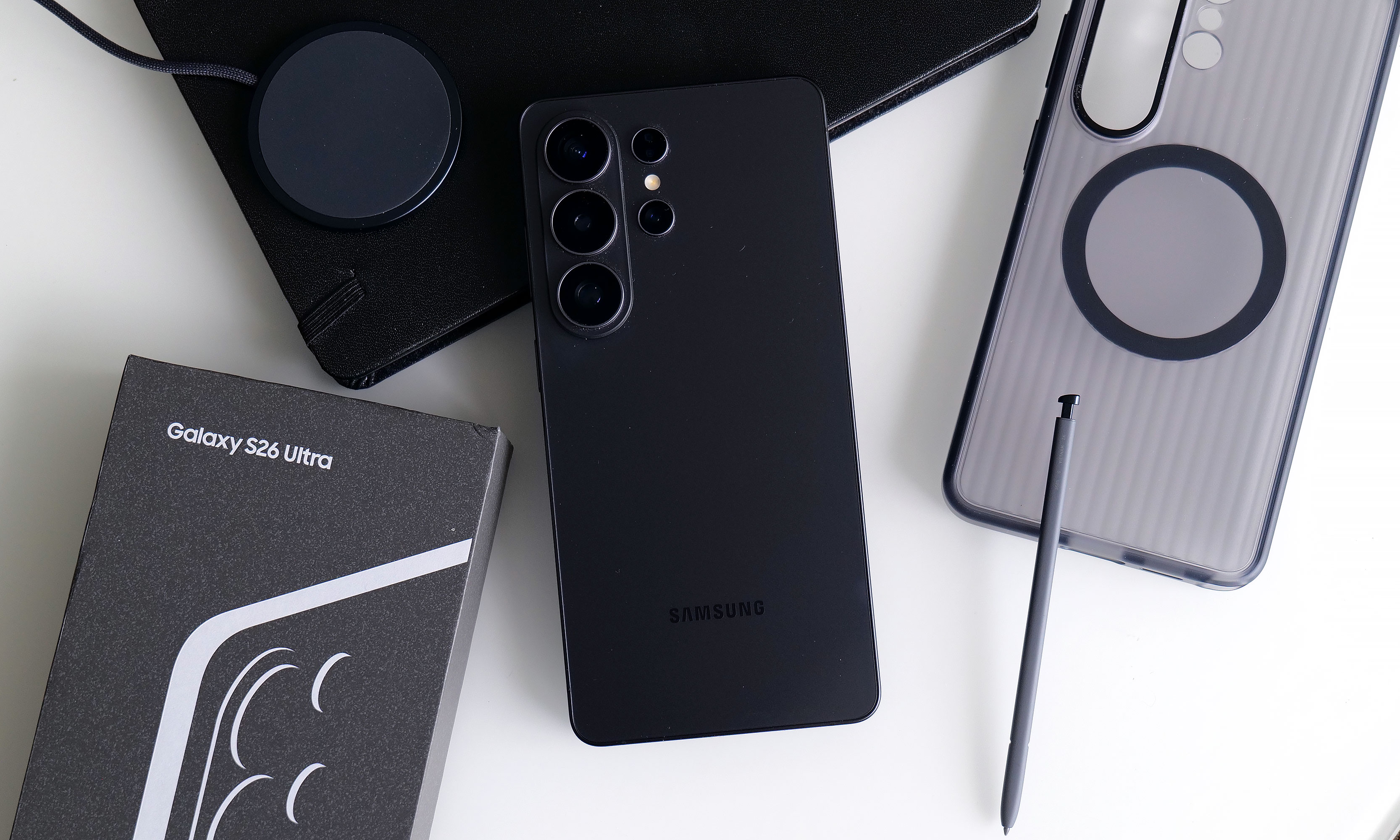
You’d be forgiven for thinking that the Samsung Galaxy S26 Ultra looks a lot like the last four models. That’s because it does, right down to its general design and rear camera layout. But on Samsung’s latest flagship phone, some stealthy upgrades are hidden beneath its classic blocky silhouette that might go unnoticed by the casual observer. Those help make this year’s release feel like a better deal than its most recent predecessor. It remains rather expensive, starting at the same $1,300 as before, but considering the price of RAM these days, that almost feels like a blessing. So while it won’t hit you over the head with monumental changes year over year, it’s subtly one of the best Ultras we’ve gotten in the past half-decade.
Design: Back to aluminum
After dabbling with titanium frames on the last two Ultras, Samsung returned to aluminum for 2026. The company says this makes it easier to color-match the phone’s chassis to the Corning Gorilla Armor 2 panels on the front and back, though it’s incredibly difficult to see the impact on my black review unit. Elsewhere, the company shaved a few grams off its total weight and a few millimeters off its thickness (7.9mm and 214 grams), but even when directly comparing the new model to last year’s S25 Ultra (8.2mm and 218 grams), that difference is basically imperceptible. I almost think the S26 Ultra’s extra sleekness was just so that people would stop saying the Z Fold 7 is lighter than Samsung’s most premium traditional candybar-style handset.
As always, there’s a built-in storage slot for Samsung’s S-Pen, which is essentially a carbon copy of what we got last year without any functional changes. However, because the phone’s corners are more rounded than ever, one small peculiarity is that now there’s a right and wrong way to insert it. No matter what you do, the stylus will stay put, but if you don’t align the curve on the end of the S-Pen with the shape of the phone’s corner, it just doesn’t look right.
Display: Now with more privacy
The Galaxy S26 Ultra’s display has the same specs as the previous model, except now it comes with a built-in Privacy Display.
Sam Rutherford for Engadget
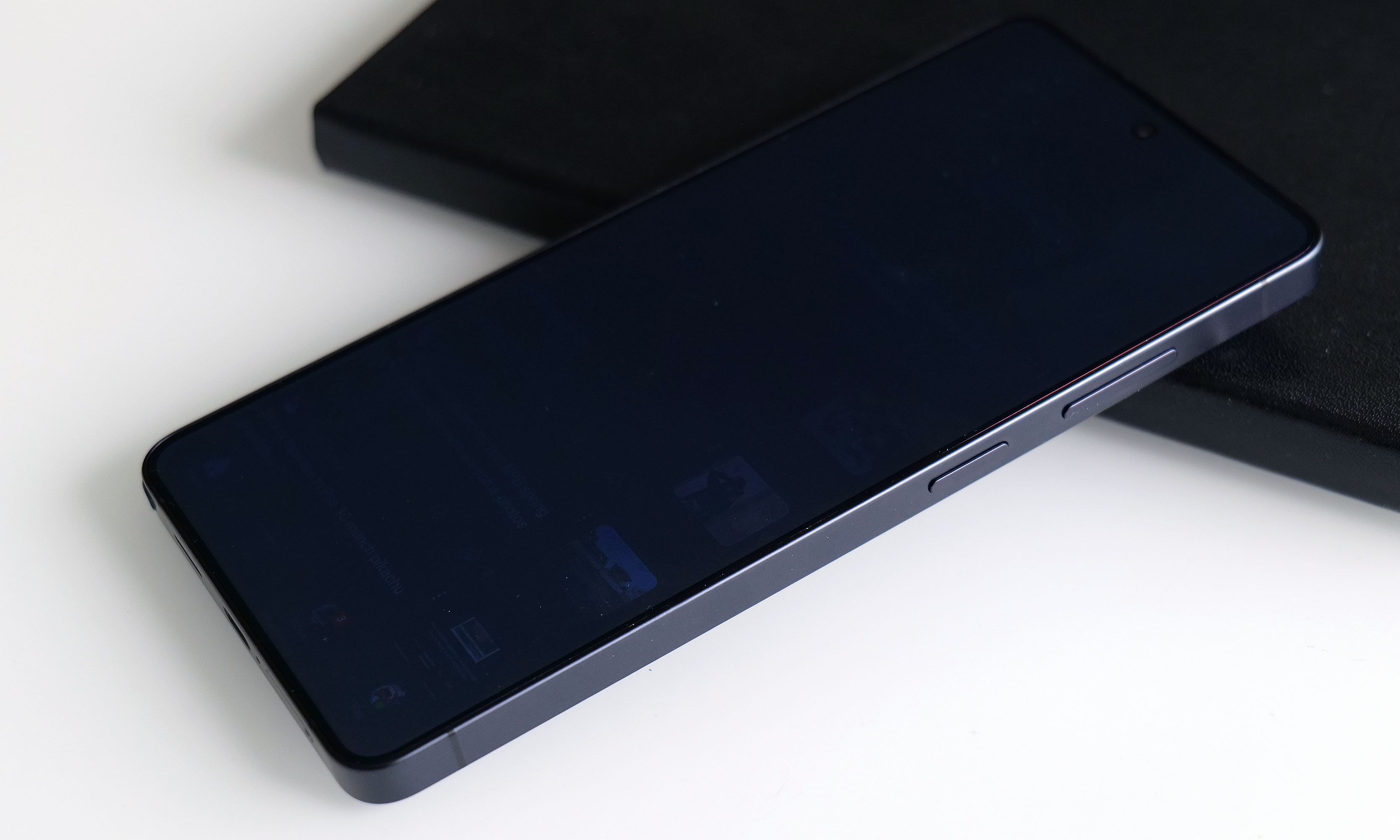
The S26 Ultra’s 6.9-inch screen is easily its most undercover upgrade because it sports essentially the same specs as last year. You still get 2,600 nits of peak brightness with a variable 120Hz refresh rate and a max resolution of 3,120 x 1,440. The secret is that with the touch of a button, you can activate Samsung’s Privacy Display, which effectively stops others from spying on your screen when viewed from acute angles (both from the side and up and down).
When you turn the Privacy Display on and look at the phone less than head-on, everything sort of fades to black. Depending on the angle, you may still see an outline of UI elements and some bright spots depending on your content, but the wider you go, the fainter things get. The way it works is that the phone has two sets of subpixels, narrow and wide, the latter of which get turned off when the feature is active. And if you’re really concerned about people snooping on you, there’s an extra level called Maximum Privacy Protection that makes almost everything completely go gray, though there are trade-offs for this.
Even on maximum protection, you can still make out some faint details. But good luck to anyone trying to glean any usable info while the Galaxy S26 Ultra’s Privacy Display is on.
Sam Rutherford for Engadget
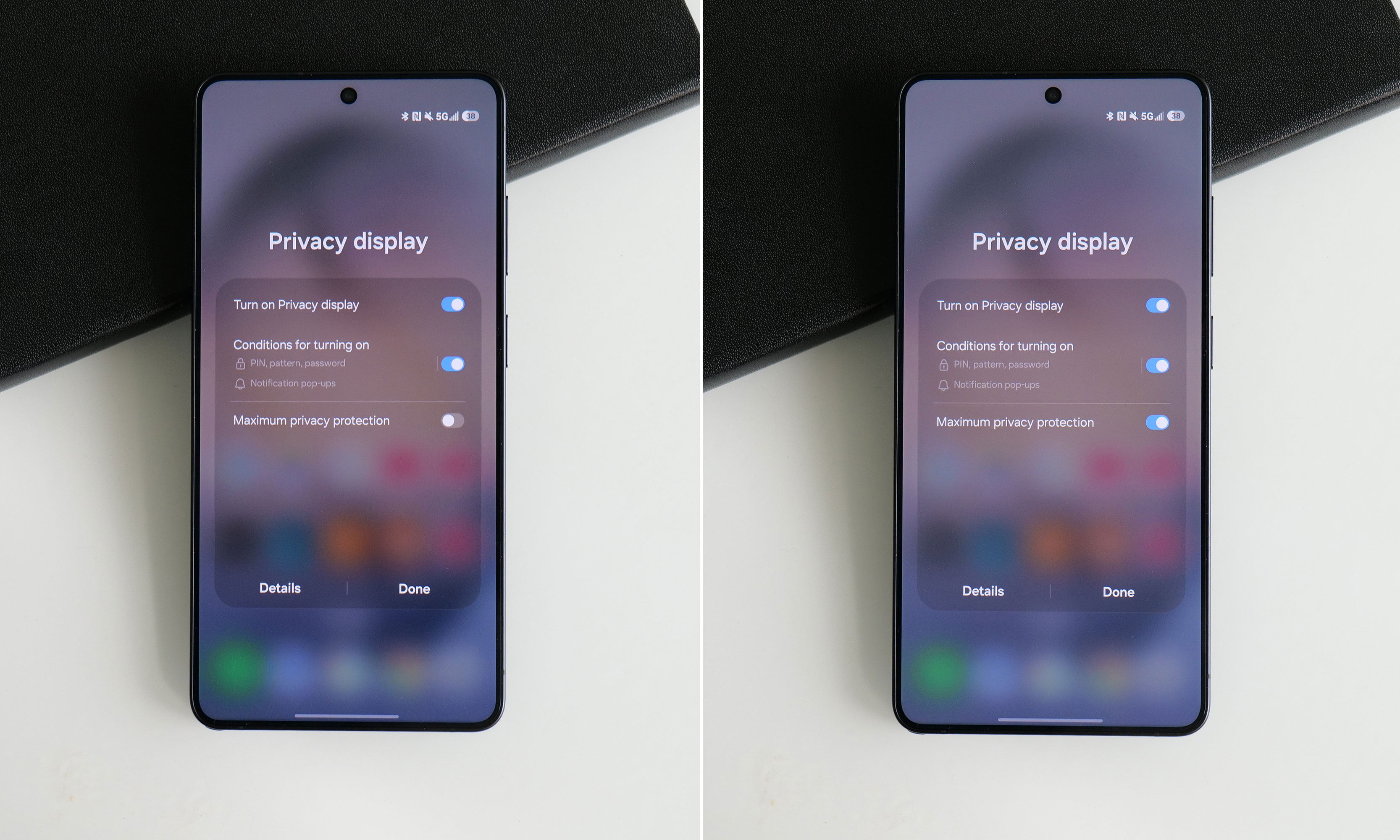
When using the standard Privacy Display mode, there’s very little impact on image quality and brightness, so it’s not that big of a deal to leave it on all the time. If you look closely, you may notice what appears to be a small drop in resolution, though this requires some serious pixel peeping and good eyesight. But with maximum protection on, there’s a noticeable drop in contrast and luminance that, for me, isn’t worth the increased privacy.
The effect is more pronounced in person, but in this side-by-side comparison, you can still see how Maximum Protection mode has an impact on the S26 Ultra’s contrast and color saturation.
Sam Rutherford for Engadget
Thankfully, there’s a third option, which is to have the phone selectively activate Privacy Display under certain conditions. You can have it automatically turn on when you get notifications or open selected apps (like for banking or authenticators), which is what I prefer. The phone can also enable the feature when you need to enter a PIN, pattern or password. The caveat is that this only applies to system-level prompts like your lock screen. Theoretically, there’s no reason the S26 Ultra can’t do this anytime you’re presented with a password or PIN prompt, but every app needs to be optimized properly, so that isn’t a thing just yet. Regardless, it’s a powerful tool that can prevent people from gleaning sensitive info while you’re and about and I really hope it becomes standard inclusion on all premium phones going forward.
Performance and software: More speed and AI
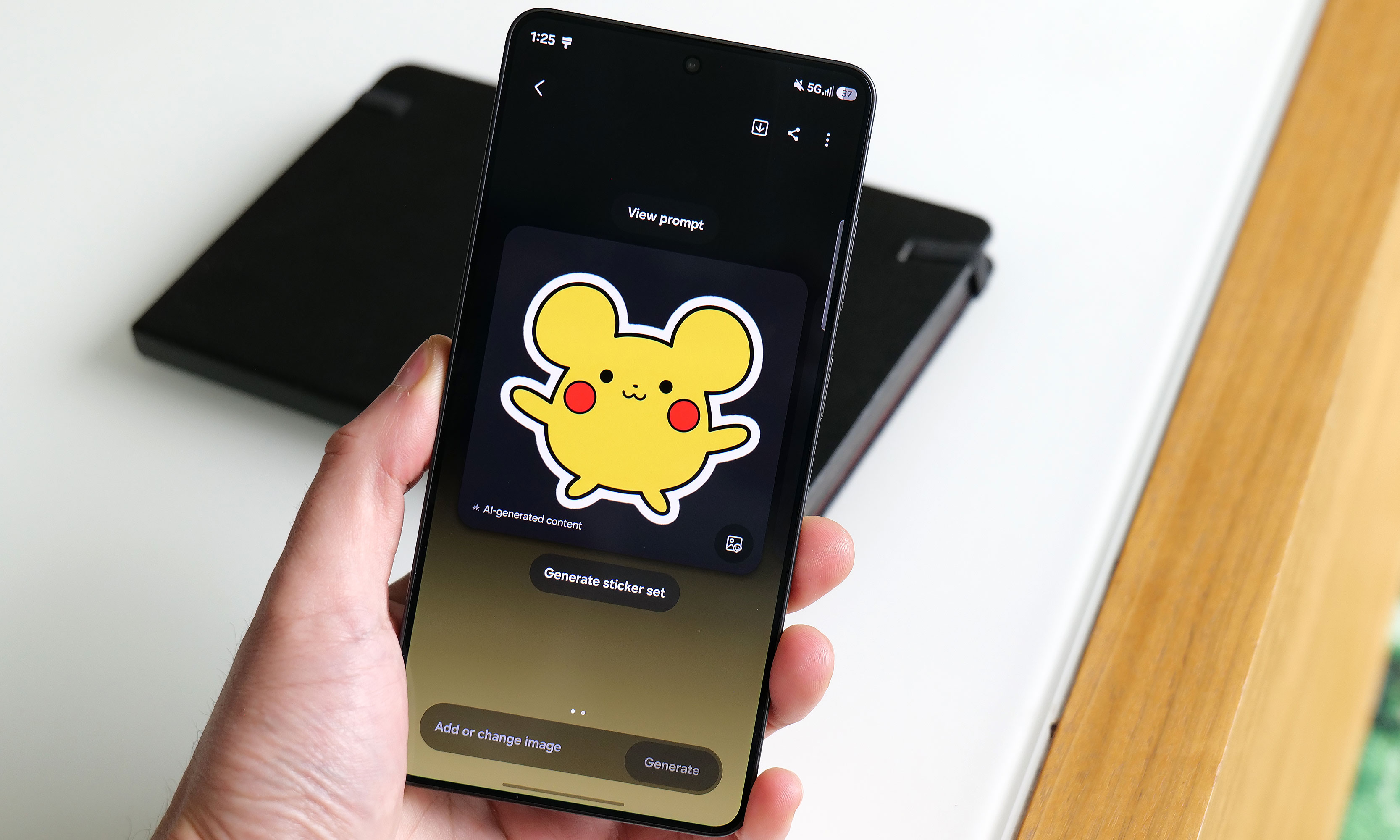
Apparently this is what Samsung’s AI thinks a Pikachu sticker should look should look like.
Sam Rutherford for Engadget
The main engine powering the S26 Ultra is Qualcomm’s Snapdragon 8 Elite Gen 5 chip for Galaxy along with 12GB or 16GB of RAM and up to 1TB of storage. Its biggest strength lies in its improved NPU, which is 39 percent more powerful than the previous generation, paving the way for improved AI-based features. That said, the rest of the processor provides some nice but not especially impressive gains in processing speed. Its CPU boasted 19 percent better performance while its GPU is around 24 percent beefier. In Geekbench 6, this translated to a multi-core score of 11,240 for its CPU (up from 9,828 on the S25 Ultra) and a GPU score of 25,403 (up from 19,863). Granted, it’s not like its predecessor ever struggled with performance, but it’s still worth noting that this is essentially as fast as an Android phone can get right now.
Of course, as we progress deeper into the AI era, Samsung has come up with a boatload of new and improved AI-powered tools as well. The most useful of these is Photo Assist, which serves as a one-stop shop for all your editing and content creation needs. In addition to fixing things like reflections or deleting objects in an image, you can use natural language text prompts to generate completely new elements like hats for your pets or pretty much anything else you can think of. And if that’s not enough, there’s also Samsung’s Creative Studio, which is a playground for making all sorts of fun digital art like wallpapers, stickers and greeting cards.
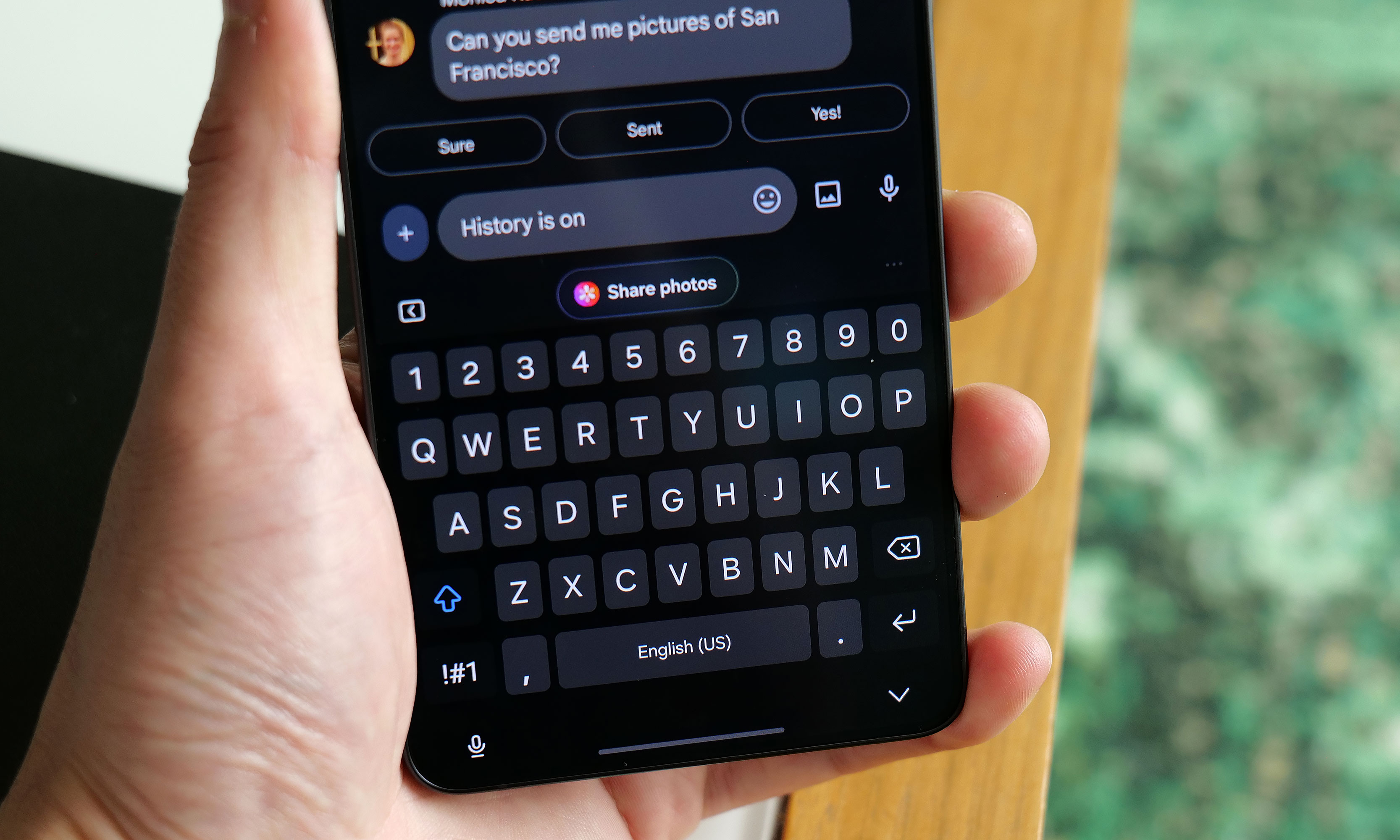
The S26 Ultra’s Now Nudge feature uses AI to find and suggest relevant photos when you use the Samsung Keyboard.
Sam Rutherford for Engadget
Elsewhere, there’s also an improved document scanner and a call screener that’s better at blocking spam and robocalls. All told, they’re welcome upgrades and they work rather well. Samsung even borrowed an idea from Google’s Magic Cue with its Now Nudge feature, which can surface relevant photos based on context anytime you’re using the Samsung keyboard. Unfortunately, what’s arguably the S26 Ultra’s coolest new feature, Automated App Actions, isn’t available for another week. But the bigger issue is that almost all of these features are things we’ve seen before on rival devices like the Pixel 10 Pro. While they’re nice to have, it’s gotten to the point where these tools are more like table stakes for high-end phones nowadays instead of being reasons you might want to upgrade.
Cameras: The same sensors with some larger apertures
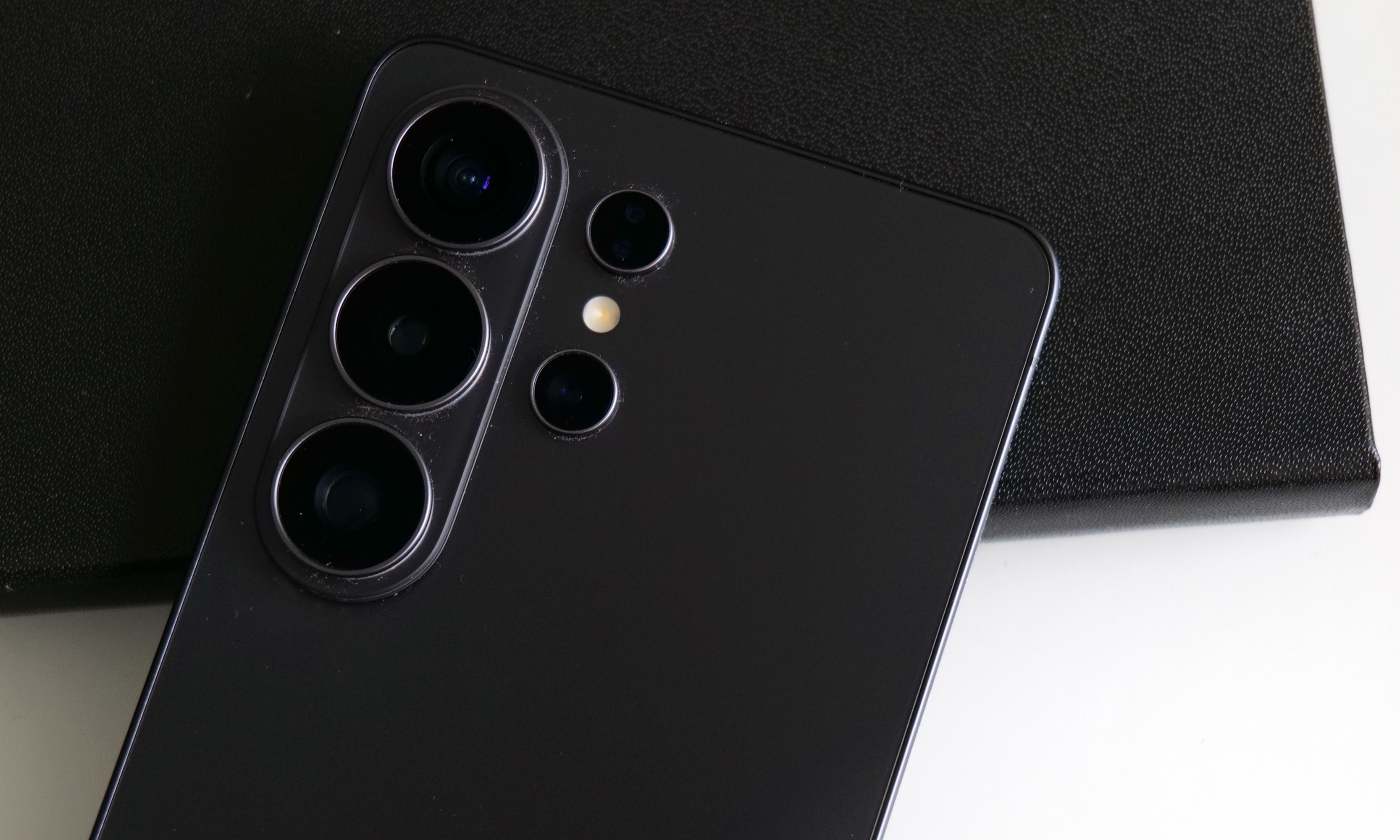
While the S26 Ultra has the same sensors as before, Samsung gave it wider apertures for its main and 5x telephoto cameras.
Sam Rutherford for Engadget
While the sensors on the S26 Ultra haven’t changed since the previous model, Samsung didn’t completely forget about photo upgrades. Alongside its 10-megapixel 3x telephoto, 50MP ultra-wide and 12MP selfie cam, its 200MP main cam and 50MP 5x telephoto camera have larger apertures at f/1.4 and f/2.9, respectively (up from f/1.7 and f/3.4). So on top of already being able to take excellent photos during the day, the UItra’s primary shooter is noticeably better at night.
In a shot of some Transformers in a dimmed room, the S26 Ultra basically matched what I shot with a Pixel 10 Pro — aside from some minor differences in white balance. Details were sharp and Samsung’s photo was less noisy, which is due in part to a change in the phone’s image processing. But the most impressive example of the Ultra’s improved picture quality was when I took a very challenging backlit shot of a Grogu doll, in which the S26 did a better job of exposing Baby Yoda’s face compared to the P10 Pro. So even without new sensors, Samsung has managed to make an already great main camera just a bit better.
Battery life
The Galaxy S26 Ultra features a 5,000mAh battery, just like what we got on the previous model. That means it’s largely relying on power efficiency gains from its new chip for improved longevity, which it delivers, but it’s not a major leap. On our local video rundown test, the S26 Ultra lasted 30 hours and three minutes, which is only about half an hour longer than before. That said, considering the only phones that have fared better were the OnePlus 15 and 15R, it’s hard to be upset about its overall runtime.
As for charging, the Ultra has gotten a big leap in speed (assuming you have compatible power adapters) compared to its less expensive siblings. When using a cable, it now supports up to 60 watts versus 45 watts for the S26+ or just 25 watts for the base S26. And it’s a similar story when charging wirelessly, with the Ultra now capable of hitting 25 watts when plopped on a pad compared to 20 watts for the S26+ and 15 watts for the S26.
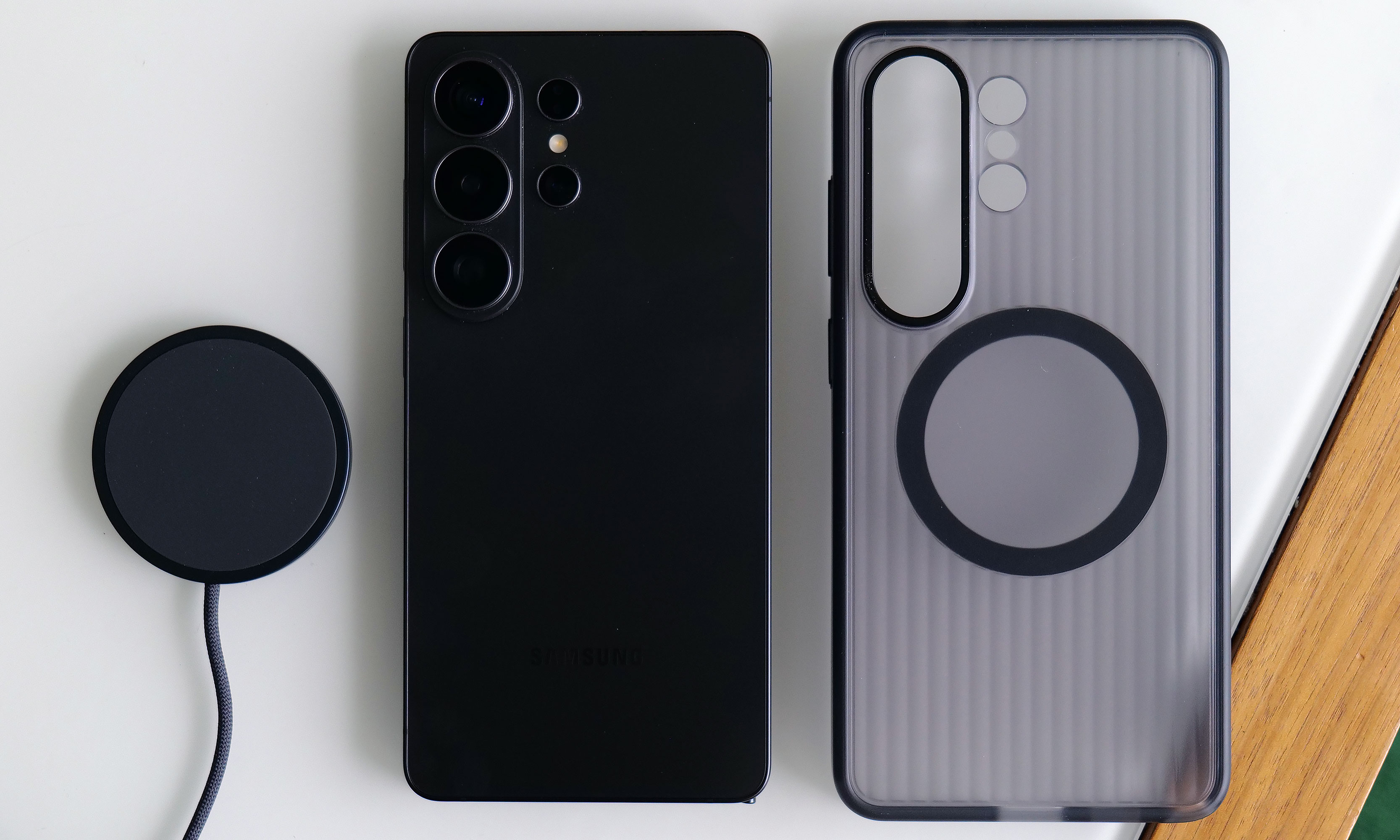
The S26 Ultra has significantly faster wired and wireless charging than its less expensive siblings. Though sadly, it still doesn’t have a built-in ring for magnetic accessories.
Sam Rutherford for Engadget
The major annoyance is that Samsung still hasn’t given any members of the S26 family a built-in magnetic ring for Qi2 charging or other magnetic accessories. The company claims this was done to help keep the phone as thin as possible, but honestly, I thought we had gotten over the desire for needless sleekness long ago. Sure, you can add that functionality back in by choosing the right case, but that’s not a very premium experience and I sincerely hope this is the last time Samsung makes this omission on its flagship phone line.
Wrap-up
There’s a strange feeling I often get when testing phones. After I got everything updated and set up the way I like, I noticed it even more with the S26 Ultra. The issue is that despite using a brand new device with shiny hardware, better performance and a more refined design, I’m still largely doing the same things and using the same apps as I was before (like Google Maps, Gmail and whatever my go-to mobile games are at the moment). This means my daily flow is basically unchanged from device to device.
This better be the last time Samsung skips putting a magnetic ring inside the Galaxy S line.
Sam Rutherford for Engadget
However, if you’re paying attention, you’ll notice things like higher framerates while gaming, sharper and more well-exposed photos at night and helpful suggestions like when the phone surfaces relevant photos in the middle of a text conversation. This goes double for the S26 Ultra, whose biggest upgrade — the Privacy Display — is something meant to stop other people from snooping at what you’re doing. When it’s on, you probably won’t even be able to tell, which is kind of the point.
There’s no doubt that the S26 Ultra is an improvement over last year’s phone. It’s faster, it takes better low-light photos and thanks to all of its new AI features, the handset feels smarter too. But it takes a discerning eye to spot and feel all these differences, particularly if you’re upgrading from a device that’s only a year or two old. So while the S26 Ultra remains the top pick as a phone that can do pretty much everything really well, in the grand scheme of things, it’s more of a stealthy, undercover update than an eye-catching new crown jewel.
This article originally appeared on Engadget at https://www.engadget.com/mobile/smartphones/samsung-galaxy-s26-ultra-review-the-stealth-upgrade-140000629.html?src=rss
We may earn a commission from links on this page. Deal pricing and availability subject to change after time of publication.
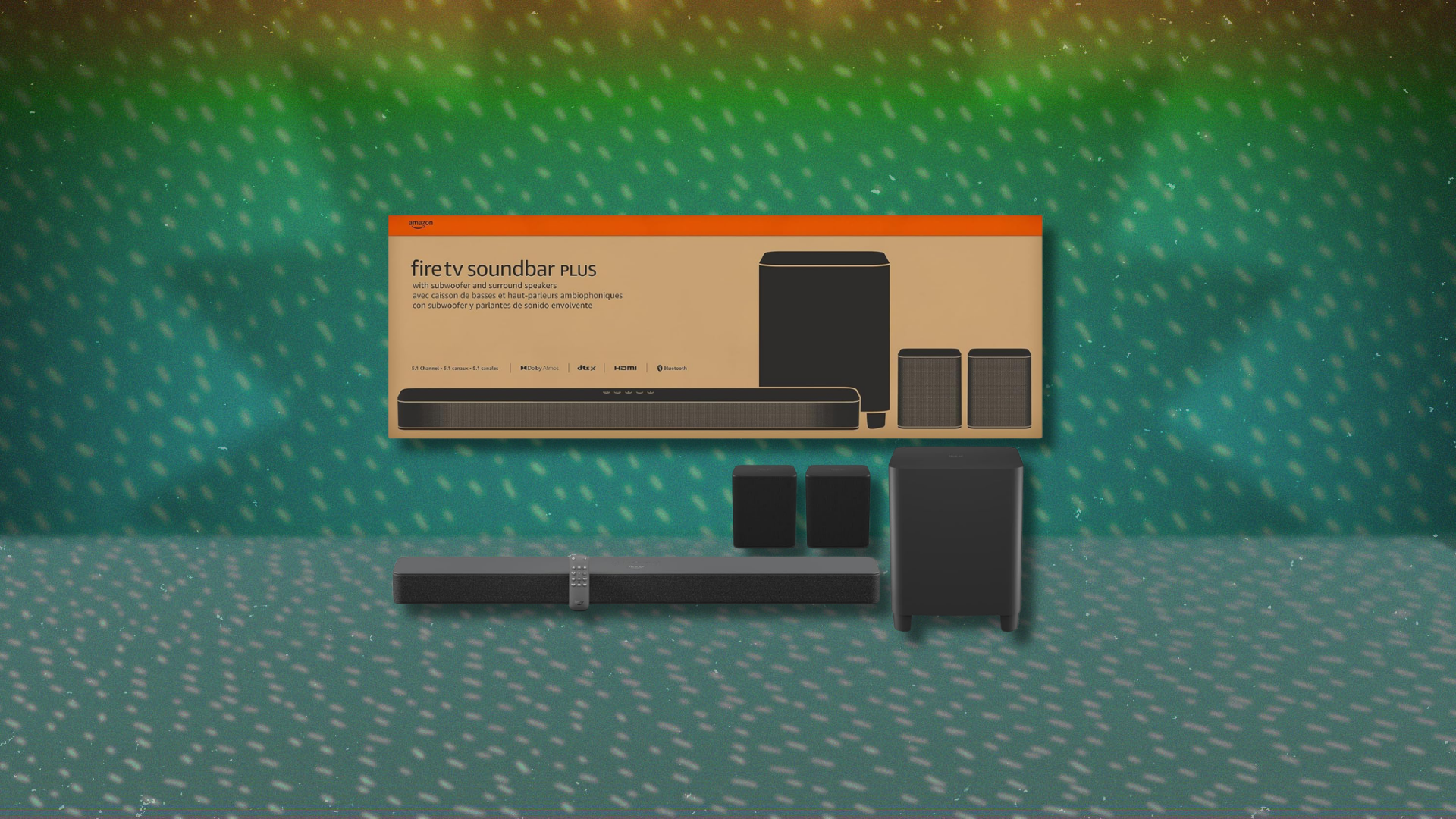
A basic TV can only do so much with its built-in speakers. Thin cabinets leave little room for proper drivers, so dialogue sounds flat, and action scenes lose their impact. A soundbar is the usual fix, and this Amazon Fire TV Soundbar Plus with subwoofer and surround speaker bundle tries to solve that problem without creeping into the price range of premium home-theater gear. Right now, the open-box bundle is $219.95 on Woot, while the same configuration is listed for $414.99 on Amazon, making the discount significant. The deal also includes free standard shipping for Prime members, while others pay $6. That said, shipping is not available to Alaska, Hawaii, APO addresses, or PO Boxes, which is typical for many Woot listings.
This package is the larger configuration of Amazon’s Fire TV Soundbar Plus line, adding a wireless subwoofer and rear satellite speakers to create a 5.1-channel setup. The soundbar sits under the TV and handles the front channels, while the wireless subwoofer takes over the low end, and the two satellites provide surround effects behind the viewer. The system supports Dolby Atmos, DTS:X, and lossless Dolby TrueHD, which means it can handle most modern streaming audio formats. On the downside, there are no dedicated upward-firing drivers for Atmos, so height effects rely on virtualization instead of physical speakers bouncing sound off the ceiling. Still, it creates a wider, fuller sound than a typical budget bar would.
The trade-offs are mostly about simplicity: The build uses lightweight plastics, and the system does not come with a companion app or advanced tuning tools. There is also no room-correction feature, so the sound will depend on how your room is arranged. Latency stays manageable for movies and streaming shows because most TVs include audio-video sync adjustments, but some setups may show a slight delay when gaming. Integration is much smoother if you already use a Fire TV device, since HDMI control and settings work more cleanly together. For someone looking for a plug-and-play surround setup that covers the basics, this bundle delivers a lot of channels for the price.
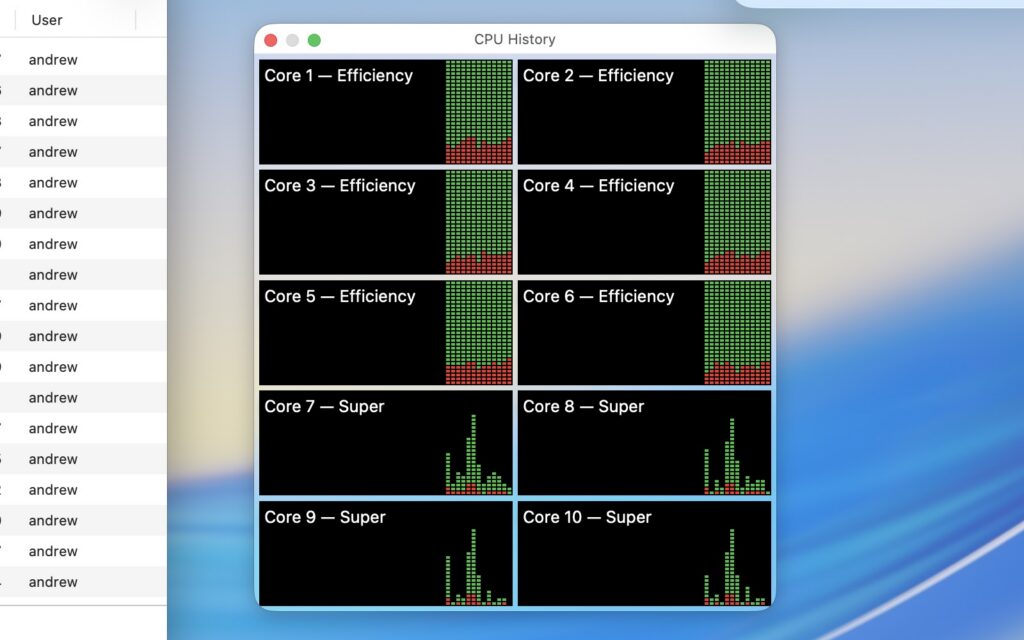
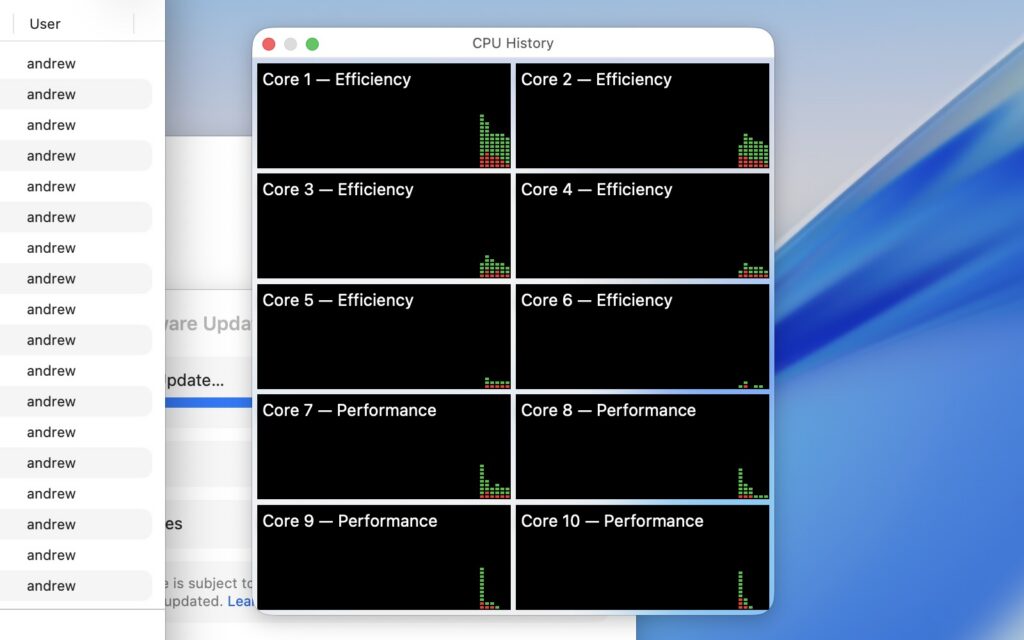
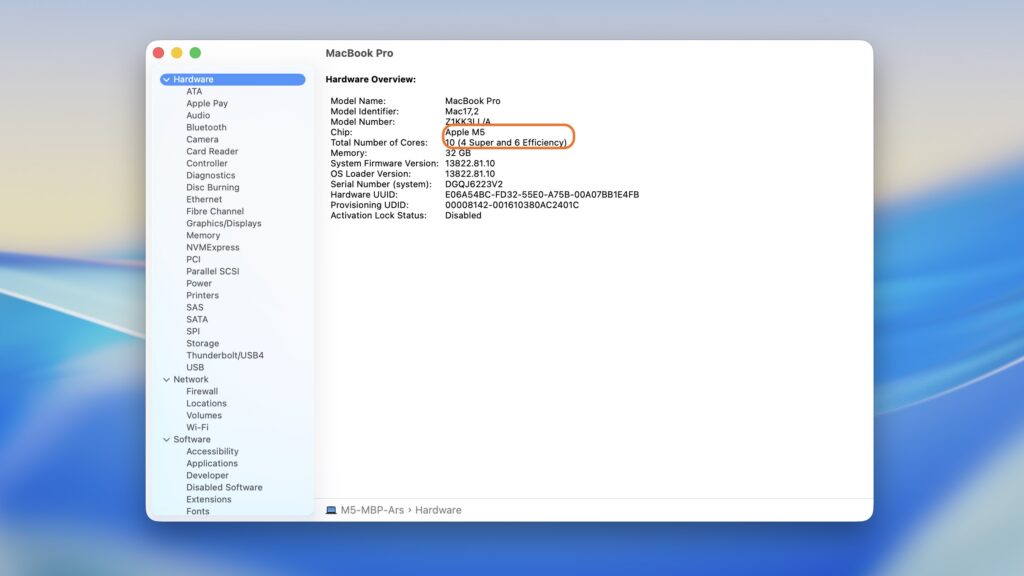
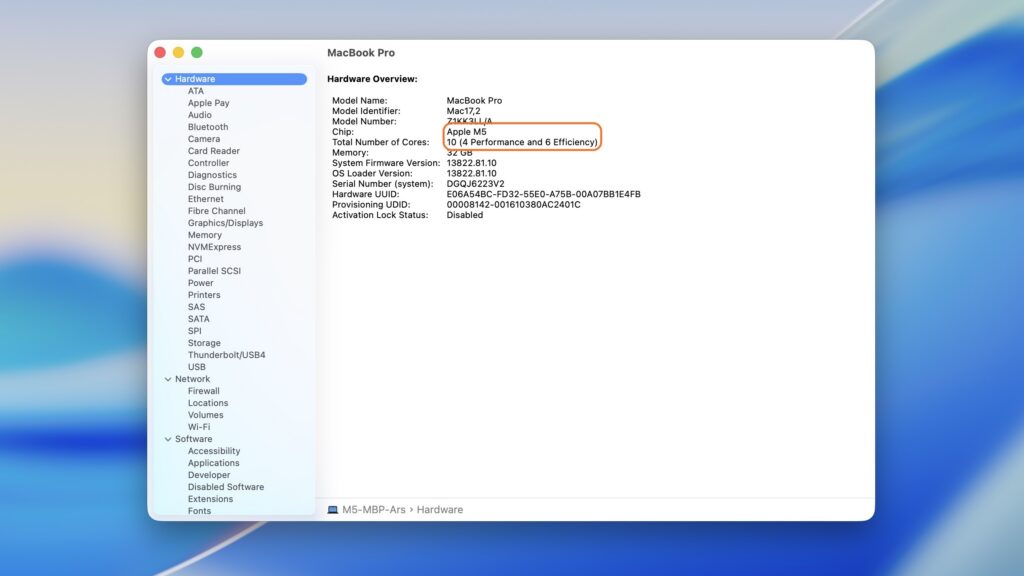
As part of Apple’s flurry of Mac announcements earlier this week, the company announced the new M5 Pro and M5 Max processors. And those chips are shaking up the way that Apple designs and talks about its processor cores: What would have been called “performance” CPU cores are now “super” cores. “Efficiency” cores are still called efficiency cores. And there’s a new, third type of CPU core in between that is labeled a “performance” core.
Apple said earlier this week that the “super” name change would retroactively apply to the regular-old Apple M5’s performance cores, too. And the macOS Tahoe 26.3.1 update released yesterday formally made the name change official, changing the labeling in both the System Information app and the Activity Monitor.
The Activity Monitor in macOS 26.3.1 updates your “performance” cores to “super” cores.
Credit:
Andrew Cunningham
Activity Monitor on the M5 MacBook Pro in macOS 26.3, before the name change was announced.
Credit:
Andrew Cunningham
The System Information app also now refers to M5’s high-performance cores as “super.”
Credit:
Andrew Cunningham
System Information in macOS 26.3, when the big cores were still called “performance” cores.
Credit:
Andrew Cunningham
This “upgrade” should only apply to the M5 MacBook Pro, the sole M5-family Mac released before the name change was announced. It should go without saying that this is just a name change; you shouldn’t actually expect different behavior or performance from your Mac after installing the update. The new MacBook Airs and Pros with M5, M5 Pro, and M5 Max chips will likely already be using the new names out of the box.
One of the big surprises to come out of Sony’s recent State of Play showcase was the announcement of a sequel to 2021’s Kena Bridge of Spirits, the impressive debut from indie studio Ember Lab. If you missed the first game and want to catch up before its successor launches on PC and PS5 later this year, it’s coming to Switch 2 this spring.
The Switch 2 is very much in its port era, owing to publishers seizing the opportunity to take advantage of the new system’s popularity and improved graphical grunt. And while it’s hard to get too excited about a five-year-old game making its way to the latest Nintendo console, Kena’s gorgeous Pixar-lite aesthetic, cute critters and decidedly Zelda-y medley of combat, exploration and puzzle-solving make it a great fit for Switch 2.
If you missed it the first time around, Kena: Bridge of Spirits is a third-person action-adventure game that follows the eponymous Kena, a young spirit guide who helps wayward souls on their journey through to the afterlife. It has PS2 energy in the best possible way, and a deceptively deep combat system that will eventually catch you out if you don’t pay attention to enemy patterns.
While nothing about the game is particularly groundbreaking, Kena is a visual feast, which is unsurprising when you learn about Ember Lab’s roots in film animation. I’m quite looking forward to seeing how it looks running on the Switch 2’s big, bright handheld display.
The Switch 2 version comes with the Anniversary DLC, which features Charmstones, Spirit Guide Trials, new outfits, and various accessibility features. You also get a New Game+ mode with even trickier encounters. It arrives this spring, with Kena: Scars of Kosmora due to launch later in 2026 on PS5 and PC.
This article originally appeared on Engadget at https://www.engadget.com/gaming/kena-bridge-of-spirits-is-coming-to-nintendo-switch-2-this-spring-132839640.html?src=rss
The Intel IVPU accelerator driver will be introducing limits on Intel NPU resource usage by non-root user-space programs beginning with the Linux 7.1 kernel…
Runners often swear by the 80/20 rule for organizing their training—but there’s no relation to the Pareto principle of the same name. Let’s talk about where the 80/20 idea comes from, how to implement it, and when it is and isn’t a good idea to train this way.
What is the 80/20 rule for running?
Briefly, it’s the idea that 80% of your running should be low intensity, and only 20% at medium or high intensity. Recreational runners (like you and me) often run closer to a 50/50 split. The 80/20 rule suggests that we should take some of those faster runs and slow them the heck down to reach a better training balance.
The 80/20 rule was popularized in a 2014 book, 80/20 Running, by Matt Fitzgerald. Fitzgerald, in turn, based his recommendations off research by Stephen Seiler, who found that elite athletes in a variety of endurance sports, including running, cycling, and cross-country skiing, did about 80% of their training sessions at intensities much lower than they would ever use in racing. In other words: To train your body to go fast, you have to log a lot of miles going slow. This is similar to the idea of “polarized training,” which means that you stick to the extremes—either working very easy, or very hard, rather than spending much time in the in-between.
Note that 80/20 here only refers to how you split up your training: 80% easy versus 20% hard. This is not the Pareto principle, which states that 80% of your results come from 20% of your…whatever. (80% of sales coming from 20% of customers, 80% of your needs met by 20% of the stuff you own, etc.) In running, there is only really one result—your race time—so the question is just how to split up your training time. 80% easy and 20% hard is the balance that, Fitzgerald and Seidler would argue, will get you the best race times.
What counts as low-intensity running?
If you’ve been paying attention to the “zone 2” trend, you’re probably thinking you should be in zone 2 (arguably 60-70% of your max heart rate) for 80% of your training. And you know what? That will get you close enough. Go with it.
But the definitions more often used in the scientific research aren’t based on heart rate alone. Some of them use metrics we can’t easily measure on our own—go ahead, try to keep your blood lactate below 2 millimoles per liter.
What’s more useful—and still borne out by research—is to use VT1, the “first ventilatory threshold.” That’s a fancy word for what old heads will know as the “talk test.” If you can carry on a conversation without taking extra breaths mid-sentence, you’re below VT1. That’s what 80% of your training should feel like.
I know that’s not enough information for the more data-minded among you, so I’ll note that Fitzgerald reported in his book that this level is often found around 77% to 79% of elites’ max heart rate. The exact number might vary from person to person, and heart rate numbers are never totally objective, since they can be affected by heat and stress among other things. But as a gut check, 77% of my own known, tested max puts me around 153, which matches shockingly well to what I consider my easy pace—I try to stay in the low 150s for my easy runs.
Taking this information together, it turns out we can go a bit higher than “zone 2” and still be at the right intensity for the 80% part of our 80/20 running—as long as it truly feels easy. If you’d like, you could customize your zones on your running watch so that you have a zone that tops out at 77% or so. (It might even make more sense for that to be zone 3 rather than zone 2.) Or if you want to round this number to get an easy-to-remember rule of thumb, you can keep 80% of your running below 80% of your (true) max heart rate and you’ll be right on track.
How to train with the 80/20 rule
Before we can divvy up our training, we need to decide how we’re measuring our training. Are we aiming for easy runs to be 80% of our training sessions? 80% of our miles? 80% of our total training time?
Fitzgerald, in his book, counted up minutes in easy, moderate, and hard intensity levels. But if you’re doing an interval run, he counted the intervals and the recovery between them as part of your harder intensity work. (A cooldown after those intervals would count as low intensity, though.)
So you can do the same. It would also get you in the right ballpark to think in terms of miles or sessions. If you do one hard run for every four easy runs, you’re still doing 80/20 (as long as those runs are roughly similar in mileage).
How important is it to stick to the 80/20 rule?
Even though it’s called a “rule,” this isn’t a thing you have to follow. It’s just one way of training that matches what a lot of elite athletes do. There has also been research showing that recreational runners can benefit—but that doesn’t mean it’s the only way to train.
Seidler, the researcher, even told Fitzgerald, the author, that if he could only train twice a week, he’d do a mix of harder and easier work in both sessions. Research on competitive recreational runners found that a 77/23 split and a 46/54 split both resulted in small improvements to 10K time, and the difference between groups was not statistically significant. That said, these folks had 10K times (that’s a 6.2-mile race) under 40 minutes to start, so they were pretty fast to start with, compared to a lot of beginner runners.
Meanwhile, there’s plenty of other research showing that casual runners can improve with almost any type of training, and that increasing your total mileage (measured in miles per week) is helpful for improving your fitness and your race times.
The bottom line
If you’re a runner with lots of room for improvement—which covers many of us beginner, intermediate, and casual runners—you don’t necessarily have to slow down 80% of your runs to a crawl. You can use any conversational pace that works for you, even if your watch says that’s zone 3. And since increasing mileage is usually part of improving as a runner, it may make more sense to think about adding easy miles, rather than turning your hard miles into easy ones.
In a previous article on Zwift Insider, the structure of the Women’s Ladder League was explained in detail — how the rankings work, how teams are formed, and how scoring is calculated. If you’re looking for a technical breakdown of the mechanics, that article remains the best place to start.
What it cannot fully capture, however, is what the league feels like once you’re inside it — how it evolves over a season, where its current strengths lie, and where it could grow if more clubs chose to step in.
The Women’s Ladder League was never meant to be a seasonal filler or a substitute for another competition. It stands on its own, with its own rhythm, its own competitive logic, and its own identity within women’s esports racing.
Where the League Stands Today
The league now includes 21 teams, six of them newly registered, with additional teams ready to come on board! That is enough to create meaningful competition. It is also few enough that certain patterns begin to repeat.
Because only a small number of teams currently field multiple Platinum or higher-ranked riders, the sharp end of the racing often brings together familiar matchups. The battles are still epic, but similar combinations tend to surface again and again.
With just a few additional teams (particularly those bringing depth in the higher ranking brackets), the entire dynamic would shift. Different team rosters, different tactical decisions, different outcomes.
Why the Format Feels Different
The Ladder uses ranking-based seeding rather than legacy pace categories. That may sound technical, but in practice, it changes how races unfold. The field tends to stratify in layers. Moves don’t always explode the group in predictable ways. Tactics surface earlier.
Riders who might otherwise see themselves as mid-pack often discover they are tactically essential. A steady engine can neutralize attacks. A rider who reads wheels well can protect a sprinter. A consistent climber can soften the field before a decisive move. And even dropped riders can still contribute meaningfully to the outcome of the race. Sometimes it’s the sprint for ninth place that decides the race!
Timezone and Growth Potential
Currently, most racing takes place in the EMEA evening time slot. That concentration works well for European teams, but it leaves a noticeable absence in the AMER timezone. More North and South American participation would not simply expand scheduling — it would alter the competitive picture entirely.
21 teams provide a solid base. But even modest growth would change the texture of the league. Three or four additional squads in higher-ranking brackets would immediately diversify the front of the race. At the same time, teams across all ranking levels remain equally important. Broader representation increases unpredictability throughout the field.
For Clubs Considering Joining
Clubs need at least five committed riders to register. Closer to ten makes participation stable and less stressful. Beyond that, it is less about perfect rosters and more about willingness to build something.
Mock Ladder races can be organised through FCC as club events in collaboration with established teams to introduce the format. Experienced captains are available to mentor new ones. A comprehensive guide outlines scoring, registration, and race logistics. No club has to step in without guidance.
Women’s team racing does not expand automatically. It grows when clubs choose to invest in it, in roster lists, coordination, and showing up on the start line.
The structure is already there. The experience is already meaningful. For clubs wondering whether they “have enough riders” or whether they would “fit in” … the only way to know is to try!
The Ladder is open. And it becomes stronger every time a new team joins.
Getting Started
Want to try out the Women’s Ladder League for the first time? If you’re already part of a larger team on Zwift, reach out to team leaders to see if there is a squad you can join. You can also captain your own team! Read and understand the rule book first, then register as a captain here.
Contact Sonja Weber (s.w.r4cf.) or Berdien (birdisnoop) the FCC Discord server (https://discord.gg/rU8TUtGbfD) if you have questions.
For an electric car to survive in this incentive-free, tariff-laden, emissions-loving world, it has to be very, very good. It also helps if it’s priced right, and looking great doesn’t hurt either.
Unfortunately for BMW’s latest EV, the i3 sedan, we still can’t say much about those last two questions. BMW hasn’t announced pricing yet, and thanks to some eye-crossing camouflage, it’s impossible to know exactly what it looks like, either. But, after a day behind the wheel of a prototype machine sliding it through the Swedish wilds, I can at least confidently confirm that it’s shaping up to be a very good indeed.
Deja Vu
If you’re thinking to yourself, “Wait, didn’t BMW already have an i3?” You are absolutely right. Back in 2013, BMW released its first mass-market electric car, a little five-door hatchback called the i3. I drove a few versions of it over the years. It was wonderful and novel and earned itself some ardent fans, but it never quite reshaped the motoring world the way that its creators surely hoped.
A decade later, BMW’s got a new i3 that has the potential to be a far bigger success on the global scale, and it also resets that designation to slot in with the company’s already well-established naming scheme. BMW’s 3 Series is its iconic sedan, and “i” is the designation for its electric vehicles. The i3, then, should be an electric sedan, and so it is going forward.
BMW’s i3 prototype on a course in Sweden
BMW
This new i3 is built on the Neue Klasse platform, BMW’s “new class” architecture that also underpins the iX3 SUV. In developing Neue Klasse, BMW started almost from scratch, developing a whole new suite of technologies in pursuit of a better-driving, faster-charging and more-affordable next generation of EVs.
There’s a battery pack that’s wholly new compared to the company’s prior efforts, a cell-to-pack architecture that promises more capacity in a smaller, lighter enclosure. There’s a whole new stack of electronics systems offering more power and capability than before. And, there’s a completely new styling design language that not everyone will love.
The iX3 SUV was the first recipient of all that newness, and the i3 sedan will be the second. Again, we can’t pass judgment on its styling just yet, but you can probably get a bit of an idea of what to expect by looking at 2023’s Vision Neue Klasse concept.
Heart of Joy
That new electronics suite running throughout the Neue Klasse is a huge part of the appeal here. Typically, when buying a new car, you don’t worry too much about who did the ABS or the traction control. Those are simply table stakes in modern motoring.
However, BMW decided to shake up these pedestrian safety features in the i3 by re-thinking everything from the brake actuators to the electric motor controllers and doing it all in-house. Now, fewer, more powerful chips from Qualcomm and others run all of the car’s disparate systems like those together in a system that BMW evocatively calls “Heart of Joy.” That makes for a far smoother and more seamless driving experience when the ABS can, for example, talk directly to the stability control.
BMW’s i3 prototype on a course in Sweden
BMW
That’s the theory, anyway, and in Sweden this week I got a chance to test that out. I got behind the wheel of what will be the first i3. Called the i3 50 xDrive, it’s a dual-motor, all-wheel-drive sedan that produces 463 horsepower and 476 pound-feet of torque.
All-wheel drive helps with acceleration, but it’s the braking where the Neue Klasse’s technology really shines. Thanks to having more finesse over the control of its two electric motors, the Neue Klasse can rely far more on recuperative braking and far less on using the physical brakes. This makes for ultra-smooth, calm stopping, even when driving on glare ice.
Accelerating, though, is far more entertaining. Even on extremely low-grip, unpredictable surfaces like a frozen lake, I could just mash my foot to the accelerator and clumsily turn the wheel in the direction I wanted to go. Despite my lack of finesse, the system intelligently applied the brakes on the inside wheel to help get the car to rotate, and automatically cut the power to the electric motors front and rear based on how much grip was available.
BMW’s i3 prototype on a course in Sweden
BMW
Even with my foot flat on the accelerator, I was able to navigate tight turns on glare surfaces without having to deploy any fancy ice driving techniques. However, as someone who enjoys deploying such techniques, I was also invited to turn off the car’s stability systems and have a little fun.
Like this, the BMW turned into an absolute riot. Let loose, the i3 was a very willing drift partner, letting me slide through the corners with wild abandon. It still used just enough of its smarts and control systems to keep me from spinning out when I got a little too eager on the throttle, but it never ruined the fun.
Panoramic Vision
This prototype drive was also a chance to sample the i3’s Panoramic Vision display in a new environment. As debuted formally at CES back in 2025, Panoramic Vision replaces the standard gauge cluster behind the steering wheel with a massive, windshield-spanning display. It’s a little like an ultra-wide heads-up display in that it reflects up from a lengthy display embedded in the dashboard.
In pictures, this seems like it will be horribly distracting, since you have six customizable sections of information flashing at you in your line of sight. In practice, though, it’s actually quite nice. You can customize those panels to show whatever information you like, from whatever track you’re playing to the current vehicle speed to even a disembodied head representing the car’s integrated voice assistant. Or, if that’s all too much, you can simply disable most of the panels and keep it simple, relying only on the left-most pane to display your speed and other vehicle information.
I didn’t get to see all of the i3’s interior. Since it’s still a prototype, BMW kept much of it covered in black fabric. Still, the Panoramic Vision display and the weird central touchscreen that’s inclined to the left work together to create a great user experience. I will, though, miss the rotary iDrive knob, which is sadly no more.
Wrap-up
We have a little while yet to wait until BMW gives us all the details on the new i3 — its debut is set for March 18 — but from what I experienced in Sweden, it’s shaping up extremely well. If BMW gets the pricing right, and if what’s hiding under that vinyl camouflage isn’t too offensive, this thing has all the makings of a hit.
This article originally appeared on Engadget at https://www.engadget.com/transportation/evs/bmws-i3-prototype-conquers-the-ice-with-power-and-technology-130000610.html?src=rss
schwit1 shares a report from Slow Boring: A new report (PDF) from the Center for Global Development documents that most of [the decentralized solar/battery systems used in poor countries in sub-Saharan Africa] use lead-acid batteries, like Americans use in cars. Lead-acid batteries work for a while and then need to be recycled. If they’re recycled safely, that’s fine. But in poor countries, most lead-acid batteries are not recycled safely and they become a huge source of toxic lead poisoning. C.G.D. believes that decentralized solar systems are currently generating somewhere between 250,000 and 1.5 million tons of unsafe lead-acid battery waste per year, a number that could grow much higher.
Americans have mostly heard about lead issues in recent years due to the tragic situation in Flint, Michigan. But on the whole, lead exposure via faulty water pipes is a relatively minor issue. Across American history, the biggest culprits for lead exposure have been lead paint and leaded gasoline. Both were phased out decades ago, but old paint chips and lingering lead in soil have remained problems for years, albeit at diminishing rates.
The global situation is quite different and much worse, to the point that in low- and middle-income countries, half of children have blood lead levels above the threshold that would trigger emergency action in the United States. It sounds fantastical to cite numbers this high. But there is credible (albeit somewhat uncertain) research indicating that five million people per year die as a result of lead-induced cardiovascular impairments. And roughly 20 percent of the gap in academic achievement between poor and rich countries is due to lead’s impact on kids’ cognitive development. The report goes on to note that lead-acid batteries dominate solar storage in poorer countries because they’re far cheaper than lithium-ion alternatives. When these lead batteries reach end-of-life, they are often recycled unsafely, creating significant lead pollution.
It’s difficult to determine the scale of the problem due to limited data and minimal attention from policymakers, but researchers say it could become massive as solar adoption accelerates. Since safer battery technologies and proper recycling methods already exist, the issue largely stems from cost and lack of regulation. In other words, the problem is solvable if addressed early.
Anthropic is reportedly trying to reach a new deal with the US Defense Department, which could prevent the government from labeling it a supply chain risk. According to Financial Times and Bloomberg, Anthropic CEO Dario Amodei has resumed talks with the agency over the use of its AI models. In particular, the publications say that Amodel is having discussions with Emil Michael, the Under Secretary of Defense for Research and Engineering.
The two of them were trying to work out the contract over the use of Anthropic’s models before negotiations broke down and the government soured on the company. The Times reports that they couldn’t agree on language that the AI company wanted to see to ensure that its technology will not be used for mass surveillance.
In a memo sent to Anthropic staff, Amodei reportedly said that the department offered to accept the company’s terms if it deleted a specific phrase about “analysis of bulk acquired data.” He continued that it “was the single line in the contract that exactly matched” the scenario it was “most worried about.” Anthropic, which first signed a $200 million deal with the department in 2025, refused to comply with the Pentagon’s demands. The agency then threatened to cancel its existing contract and to label it a “supply chain risk,” a designation typically reserved for Chinese companies. President Trump ordered government agencies to stop using Anthropic’s technology afterward. However, there’s a “six-month phase-out period” that reportedly allowed the government to use Anthropic’s AI tools to stage an air attack on Iran.
Amodei also said in the memo that the messaging OpenAI has been trying to convey is “just straight up lies,” the Times reports. He hinted, as well, that one of the reasons his company is now on the outs with the government is because he hasn’t “given dictator-style praise to Trump” like OpenAI’s Sam Altman has.
If you’ll recall, OpenAI announced that it reached an agreement shortly after it came out that Anthropic was having issues with the agency. Its CEO, Sam Altman, said on Twitter that he told the government Anthropic shouldn’t be designated as a supply chain risk. He said during an AMA on the social media website that he didn’t know the details of Anthropic’s contract, but if it had been the same with the one OpenAI had signed, he thought Anthropic should have agreed to it. Anthropic’s Claude chatbot rose to the top of Apple’s Top Free Apps leaderboard after OpenAI announced its Defense Department contract, beating out ChatGPT.
Altman later posted on X that OpenAI will amend its deal with language that explicitly prohibits the use of its AI system on mass surveillance against Americans. When it comes to the military’s use of its technology, though, CNBC says that Altman told staffers that the company doesn’t “get to make operational decisions.” In an all-hands meeting, Altman reportedly said: “So maybe you think the Iran strike was good and the Venezuela invasion was bad. You don’t get to weigh in on that.”
This article originally appeared on Engadget at https://www.engadget.com/ai/anthropic-is-reportedly-back-in-talks-with-the-defense-department-125045017.html?src=rss
Nothing has announced its latest premium midrange device, the Phone 4a Pro. The company says it’s the thinnest full-metal phone on the market, measuring in at 7.95mm. It also looks notably different from the prior A-series phones – and pretty much any of the company’s phones to date.
It features an aluminum unibody while retaining Nothing’s retro-clear hardware design touches, with a clear, redesigned camera unit. Yes, the aggressively protruding circular camera unit of the Phone 3a Pro is gone, replaced with an oblong housing that houses the triple-camera array and a tweaked Glyph Matrix, similar to what debuted on last year’s Nothing Phone 3. It also feels incredibly premium – more so than even the company’s flagship phones.
Despite that, Nothing seems to be strikeinga balance between affordability and wow factor with the Phone 4a Pro. It has a slightly higher price tag ($499) than the 4a and alongside a major hardware redesign, a lot of the improvements here make this phone feel “pro” compared to its smaller sibling. This new premium vibe comes at a cost of design excitement, though.
It also looks a little like another certain smartphone or two. Don’t call it a camera plateau.
Image by Mat Smith for Engadget
The Phone 4a Pro has its own take on the Glyph Matrix, composed of 137 mini-LEDs. That’s fewer LEDs than the Nothing Phone 3, but they are 100 percent brighter at around 3000 nits. It supports pretty much all the Glyph toys we enjoyed on last year’s Nothing flagship, although the 4a Pro lacks a dedicated Glyph Button, which is a shame. This means in order to hop between toys and modes, you’ll have to dig into Glyph settings inside the settings menu – not the existing Glyph menu – in order to flit between them. Honestly, may make me less likely to play around with the Glyph, but I’ll have to see after further testing. It’s a little odd when there’s a circular metal detail on the lower left corner that looks like it could have been a Glyph button. Ah well.
The gigantic camera unit seen on the Phone 3a Pro is no more.
Image by Mat Smith for Engadget
The Phone 4a Pro has a slightly bigger screen than both its predecessor and the 4a, but the real news isn’t just the extra fraction of an inch. The 6.83-inch display can now reach 144Hz refresh rates, while it can also top out at 5,000 nits of brightness with HDR content. That makes it up to 66 percent brighter than its predecessor, and it was noticeably easier to read in Nothing’s harsh spotlights and daylight.
Nothing has further refined the cameras, and the 4a Pro uses the same telephoto sensor as the flagship Phone 3. That’s paired with a new 50-megapixel Sony LYT-700C camera sensor that’s 24 percent bigger than the 50MP sensor inside the 3a Pro. It’s also faster at auto-focus than its predecessor, and seems to more easily lock onto subjects without having to tap on what you want in focus.
There’s also a new triple 12-bit Image Signal Processor (ISP), which enables up to 140x ultra zoom, like we’ve seen on Galaxy phones for the last few years. Don’t expect to be blown away by those zoom extremes: it seems to work well on the easy-to-guess structures of buildings and patterns, but a 70x zoom range and higher aren’t settings I’m going to lean into much.
I haven’t had time yet to fully scrutinize the 4a Pro’s camera, but there’s a lot of feature parity with pricier phones. It can capture super-slow 120fps video at full HD, while Action Mode is built directly into the camera app to shoot up to 30 Ultra XDR images in a row. Codeveloped with Google, Ultra XDR images are high-dynamic-range images that capture 13 RAW frames at different exposures and combine them into a single image. In practice, this should offer another way to pull usable shots from challenging low-light or harsh-light environments.
Power users may also like new presets, alongside Nothing’s own collection of camera filters. There are seven new editing options, letting you tweak (and save) contrast levels or even apply a vignette effect. I’m a fan of the built-in presets, but it’s nice to have access to the same camera settings to make and save my own B&W filter.
Nothing says you can expect 30 percent improved graphics performance and 27 percent faster CPU speeds, with “flagship” LPDDR5X memory, which makes it 100 percent faster than last year’s 3a Pro. Improvements to the chipset and memory speed weren’t immediately noticeable during my time seeing the device.
Nothing continues to refine its own OS skin, but it’s still a refreshing, different take on the Android interface you’re used to. And if you’re not a fan, you can turn it back to a more stock look. Based on user feedback, there are new size options for the home screen widgets and a new custom lock screen. It may be due to the more powerful processor, but both the 4a Pro and the base 4a seem to have smoother animation flourishes when opening and switching between apps or swiping across content.
New AI software includes a formal launch of Essential Search, able to scour the entire device for information, images, documents, apps and more. The 4a series include the first Nothing devices to include cloud access for the still useful Essential Space app, housing your voice notes, screengrabs, text notes, and more. This means, hopefully, I can transition everything across from my Nothing Phone 3. (Or even between the Phone 4a and 4a Pro.)
Image by Mat Smith for Engadget
It’s a different look for Nothing, and the 4a Pro’s price (and timing) will pit it against both the Pixel 10a (priced the same) and base flagship devices from Samsung. The Phone 4a series pre-orders are open now at nothing.tech and other retailers, with sales of the Phone 4a Pro starting March 27. Expect our full review in the coming weeks.
This article originally appeared on Engadget at https://www.engadget.com/mobile/smartphones/nothing-phone-4a-pro-hands-on-price-launch-date-123053485.html?src=rss
In the monthly newsletter for February 2026, Linux Mint creator Clement Lefebvre talks about the new screensaver for the Cinnamon desktop environment that will be implemented in future Linux Mint releases.
While music streaming apps like Bandcamp, Spotify and Deezer have taken steps to inform users about AI-generated content, we haven’t heard much out of Apple Music in that regard. However, Apple Music has now introduced “Transparency Tags” designed to show listeners if any elements were generated in whole or part by AI. The catch is that Apple is leaving it up to labels and distributors to create those tags, according to an Apple newsletter to industry partners seen by Music Business Worldwide..
“Proper tagging of content is the first step in giving the music industry the data and tools needed to develop thoughtful policies around AI, and we believe labels and distributors must take an active role in reporting when the content they deliver is created using AI,” Apple wrote, calling it a concrete first step toward transparency around artificial intelligence.
Streaming platforms already use metadata tags for things like song and album titles, genre and the name of the artist. The new tags will now identify any artwork, tracks, compositions and music videos created in whole or in part by AI.
However, Apple’s new system requires labels and distributors to opt in and manually flag their use of AI, a system that’s similar to what Spotify is doing. On top of that, Apple has no apparent enforcement mechanism for AI content.
By contrast, other music platforms including Deezer and Bandcamp are using in-house AI-detection tools to flag content whether the distributor opts in or not. Deezer disclosed in January 2026 that it receives over 60,000 fully AI-generated tracks every day, double the number it saw in September 2025. Synthetic content, also called “AI slop,” has accounted for 13.4 million tracks on its platform, Deezer added.
This article originally appeared on Engadget at https://www.engadget.com/entertainment/music/apple-music-can-now-flag-ai-content-but-only-if-distributors-elect-to-label-it-121521873.html?src=rss
The AMD Host System Management Port (HSMP) Linux driver that provides access to various system management features on modern EPYC server processors is preparing for the upcoming EPYC Zen 6 “Venice” processors…